

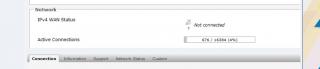
My router can detect LTE, but seems not connected to the internet.
Please help me...


Tp LInk TL-MR3420 Owner CLub V2.5, need a pro here
|
|
 Jun 10 2013, 08:19 PM Jun 10 2013, 08:19 PM
|
 
Junior Member
249 posts Joined: Aug 2009 
|
Guys, I really need helps.
My router can detect LTE, but seems not connected to the internet. Please help me... |
|
|
|
|
|
Jun 10 2013, 08:39 PM
|

Senior Member
8,025 posts Joined: Feb 2005 From: Planet Boleland 
|
This dun shows that you are logged into its Network but sooner it might, just need to be patience
This post has been edited by digilife: Jun 10 2013, 08:52 PM |
|
|
Jun 10 2013, 09:15 PM
|
|
Junior Member
249 posts Joined: Aug 2009
|
QUOTE(digilife @ Jun 10 2013, 08:39 PM) This dun shows that you are logged into its Network but sooner it might, just need to be patience I have wait more than 30 minutes, it keep showing not connected
  There is one time, I on the router, then went to mamak having dinner, then when i am back after about 1 hour it is still the same showing not connected |
|
|
Jun 10 2013, 09:33 PM
|
|
Newbie
0 posts Joined: Jun 2013
|
|
|
|
Jun 11 2013, 12:33 AM
|

Junior Member
39 posts Joined: Jan 2010
|
also happening to me... dunno izzit rooter defect or e398 defect... plugged in rooter lte detected but not connected... direct plug e398 to lappy open mdma lte detected but no provider (maxis)... the only way i did to make them usable is change channel in e398 via mdma then change back to my preference then only maxis showed... after that plug into rooter connected like normal...
btw, izzit normal when change port (increase decrease button) it took a while for it to detect and connect? mine took about 1-2 minutes to detect and connect after click the button... |
|
|
Jun 11 2013, 09:36 PM
|

Junior Member
406 posts Joined: Sep 2010 From: Papar, Sabah
|
Wahroonga Farm
do u know if usb-modeswitch-data package have been removed or is it accidentally removed? been trying to build my OpenWrt since a week ago from trunk. it seems that the package went missing.. |
|
|
|
|
|
Jun 11 2013, 09:55 PM
|

Junior Member
46 posts Joined: Apr 2012
|
Anyone facing 3G line keep disconnected , however already input the auto ping in schedule but seem like doesn't not work.
Using E372+ mr3420 v2 , openwrt |
|
|
Jun 11 2013, 10:06 PM
|

All Stars
11,836 posts Joined: Mar 2011 From: Kota Kinabalu, Sabah
|
yeah mine too, random disconnect, even shuts down my modem
|
|
|
Jun 11 2013, 11:20 PM
|
 
Elite
6,931 posts Joined: Apr 2011 From: Bolehland for sure ^_^
|
This is my friend setup, using TL-MR3420 V2 + ZTE MF820D LTE modem

normally LTE can hold almost 1 weeks+ without any Disconnected at all if u are using stock firmware, remember to set your wireless channel to auto and set the channel width to 40MHz,.. it will push your DL/UL speed to the max through your wireless,.. it does make a little different compare to 20MHz  This post has been edited by chuahcs79: Jun 11 2013, 11:35 PM |
|
|
Jun 11 2013, 11:26 PM
|
|
Elite
6,931 posts Joined: Apr 2011 From: Bolehland for sure ^_^
|
the setup TL-MR3420 V2 + ZTE MF820D
 green LED on ZTE MF820D mean is on LTE |
|
|
Jun 11 2013, 11:28 PM
|
|
Elite
6,931 posts Joined: Apr 2011 From: Bolehland for sure ^_^
|
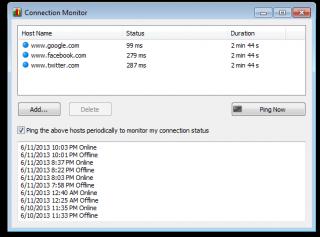
if u worry original stock firmware cannot ping,
u can install this Networx it can help you to ping automatically when u on your computer 
|
|
|
Jun 12 2013, 12:50 AM
|
|
Senior Member
8,025 posts Joined: Feb 2005 From: Planet Boleland
|
QUOTE(chuahcs79 @ Jun 11 2013, 11:26 PM) the setup TL-MR3420 V2 + ZTE MF820D Nice one Chuah, but why dun try on ROOter ?green LED on ZTE MF820D mean is on LTE Location where ? Muntri St again ? |
|
|
Jun 12 2013, 12:55 AM
|
|
Elite
6,931 posts Joined: Apr 2011 From: Bolehland for sure ^_^
|
QUOTE(digilife @ Jun 12 2013, 12:50 AM) Nice one Chuah, but why dun try on ROOter ? i dont want to comments anything on Rooter because i dont want user misunderstanding on my statement,..Location where ? Muntri St again ? as i already say,..there's some perks using original stock firmware,... and stability to hold on same IP for 1 week + is main one of them This post has been edited by chuahcs79: Jun 12 2013, 12:56 AM |
|
|
|
|
|
Jun 12 2013, 01:00 AM
|
|
Senior Member
8,025 posts Joined: Feb 2005 From: Planet Boleland
|
QUOTE(chuahcs79 @ Jun 12 2013, 12:55 AM) i dont want to comments anything on Rooter because i dont want user misunderstanding on my statement,.. it will happen only when the RSSI there is < -60dbm as i already say,..there's some perks using original stock firmware,... and stability to hold on same IP for 1 week + is main one of them  where is the location, can PM me  thanks |
|
|
Jun 12 2013, 01:05 AM
|
|
Elite
6,931 posts Joined: Apr 2011 From: Bolehland for sure ^_^
|
QUOTE(digilife @ Jun 12 2013, 01:00 AM) it will happen only when the RSSI there is < -60dbm nope, on that location rssi is around 75~85dBm though,.. where is the location, can PM me thanks my friend already test openwrt and rooter both,.. with stock firmware, he can have stable connection without disconnect minimum once per day,.... above post is all purely for sharing,. no offence to any firmware/rooter firmware party... as this is still a TL-MR3420 router thread This post has been edited by chuahcs79: Jun 12 2013, 01:31 AM |
|
|
Jun 12 2013, 03:29 AM
|

Junior Member
275 posts Joined: Sep 2011
|
hi..im new in this thread..
can sumone tell me the best setting for e398+mr3420 other than Qos and flashing with openwrt.. Coz im currently using stock fw.121206 |
|
|
Jun 12 2013, 05:34 AM
|
|
Elite
6,931 posts Joined: Apr 2011 From: Bolehland for sure ^_^
|
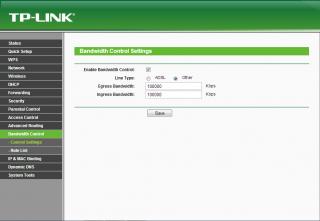
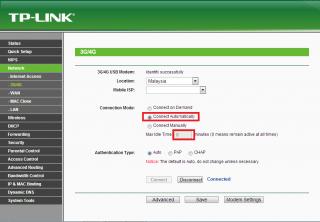
QUOTE(air_pull91 @ Jun 12 2013, 03:29 AM) hi..im new in this thread.. if you are using LTE with your E398,.can sumone tell me the best setting for e398+mr3420 other than Qos and flashing with openwrt.. Coz im currently using stock fw.121206 then u can plug your E398 into your computer and use MDMA to band config it to either 1800 or 2600MHz LTE band to lock to 4G or if u are using 3G DC-HSPA+ with your E398, use MDMA to band config it to 2100MHz 3G band only, then plug your E398 into your TL-MR3420 V2,.. ( MDMA (Windows) http://www.nerve.org.za/mdma/ ) and a few setting i use for my mr3420 V2 same firmware like yours 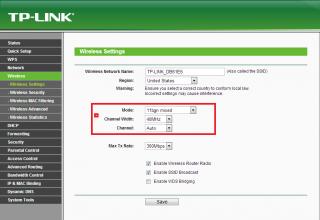
This post has been edited by chuahcs79: Jun 12 2013, 05:40 AM |
|
|
Jun 12 2013, 02:42 PM
|

Junior Member
97 posts Joined: Feb 2013
|
Huntsman 2013-06-03 appears to have two known issues:
Luci locks up "problem loading page", but internet connection is fine ... cause unknown but appears to be a recent event Keep alive function has stopped working Not sure if these problems existed in the immediate earlier version? The WIKI change log provides further information: http://whirlpool.net.au/wiki/router_openwrt#wiki_rooter_pg4 I'll update again when these problems are addressed. Cheers John k |
|
|
Jun 12 2013, 02:46 PM
|
|
Junior Member
97 posts Joined: Feb 2013
|
QUOTE(chuahcs79 @ Jun 12 2013, 02:26 AM) the setup TL-MR3420 V2 + ZTE MF820D Hi chuahcs,green LED on ZTE MF820D mean is on LTE What sort of LTE speeds are you seeing with that set up? We are currently working on what may be a ROOter instability problem. Thanks for the feed-back. Cheers John k This post has been edited by Wahroonga Farm: Jun 12 2013, 02:46 PM |
|
|
Jun 12 2013, 02:48 PM
|
|
Elite
6,931 posts Joined: Apr 2011 From: Bolehland for sure ^_^
|
QUOTE(Wahroonga Farm @ Jun 12 2013, 02:46 PM) Hi chuahcs, just plug in computer to use dashboard to config it to 4G only first then after that plug it into V2 stock firmware router What sort of LTE speeds are you seeing with that set up? We are currently working on what may be a ROOter instability problem. Thanks for the feed-back. Cheers John k that zte mf820D able to surpass the 25Mbps limits,. it normally hit 27~32Mbps for download and 13~17Mbps for Uploads,.. thanks to the stock firmware wireless 40MHz with the Auto selection as well,.. it will push the speed up to the max boundary where by when openwrt rooter wireless 40MHz channel width,. cannot manually anyhow select wireless channel, u will end up with zero internet traffic when u select wrong channel for the 40MHz channel width,..the Auto channel for it always stuck @ Channel 1,.. it is not Auto at all,. This post has been edited by chuahcs79: Jun 12 2013, 02:57 PM |
|
Topic ClosedOptions
|
| Change to: |  0.0180sec 0.0180sec
 0.59 0.59
 6 queries 6 queries
 GZIP Disabled GZIP Disabled
Time is now: 9th December 2025 - 03:24 PM |
 Quote
Quote