Welcome Guest ( Log In | Register )

Bump Topic Topic Closed RSS Feed
127 Pages « < 49 50 51 52 53 > » Bottom

Outline · [ Standard ] · Linear+

 Tp LInk TL-MR3420 Owner CLub V2.5, need a pro here

views
     
blacktubi
post May 18 2013, 06:45 PM

-
Group Icon
Elite
8,413 posts

Joined: Jul 2008

QUOTE(xphr3ak @ May 18 2013, 06:38 PM)
digilife What did you put for the auth protocol then?
Just now, I've tested the internet speed at Forest Heights.
Danm slow bro.
The RSSI was around -95dBm and have tried at Taman Rashidah Utama.. I got ~5mbps with constant speed.

Do you think, by getting omni and panel antenna will  get for the better speed?

*Where do you live arr bro?
I want to buy a house around there lah..
Got arrr? brows.gif

Thanks.
*
-9XdBm is awful sweat.gif

Try your new modem then decide should you get antenna.

For sure if signal is the limiting factor antenna definitely solve the issue.
digilife
post May 18 2013, 07:12 PM

The MNP guy, its me yeah.
*******
Senior Member
8,025 posts

Joined: Feb 2005
From: Planet Boleland


QUOTE(xphr3ak @ May 18 2013, 06:38 PM)
digilife What did you put for the auth protocol then?
Just now, I've tested the internet speed at Forest Heights.
Danm slow bro.
The RSSI was around -95dBm and have tried at Taman Rashidah Utama.. I got ~5mbps with constant speed.

Do you think, by getting omni and panel antenna will  get for the better speed?

*Where do you live arr bro?
I want to buy a house around there lah..
Got arrr? brows.gif

Thanks.
*
I used Maxis in Pulai Villa, Pulai Impian. can get 18Mbps in the dead of the night.

If you want good speed in Sban, Lavendar Heights is the place and it should be the first location there to get LTE because currently pipu there is enjoying FTTH.


xphr3ak
post May 18 2013, 08:09 PM

Regular
******
Senior Member
1,797 posts

Joined: Jan 2003
QUOTE(digilife @ May 18 2013, 07:12 PM)
I used Maxis in Pulai Villa, Pulai Impian.  can get 18Mbps in the dead of the night.

If you want good speed in Sban, Lavendar Heights is the place and it should be the first location there to get LTE because currently pipu there is enjoying FTTH.
*
I'm staying at Taman Panchor Jaya.


user posted image

Thanks.

This post has been edited by xphr3ak: May 18 2013, 08:40 PM
digilife
post May 18 2013, 08:33 PM

The MNP guy, its me yeah.
*******
Senior Member
8,025 posts

Joined: Feb 2005
From: Planet Boleland


bro , pls remove your Ip Address

Bandar Seremban now

user posted image

Paroi, if get a Panel Antenna face it towards Senawang can get good speed on a E398 icon_idea.gif

This post has been edited by digilife: May 18 2013, 08:34 PM
bjohnxbjohn
post May 18 2013, 11:03 PM

Getting Started
**
Junior Member
294 posts

Joined: Sep 2010
Hi all bros, i am facing some problem on my router.

Lately, I realise that there was no internet connection although the router status showed everthing is ok include IP address, subnet mask, default gateway and signal.

I plugged my modem to laptop, it works fine.

So, I reset and setup my router again. Then it is working fine.

This scenario had been occurred more than 3 times in a month.

I flashed latest firmware (3.13.1 Build 121123 Rel.57630n) after it happened on first time. However, this did not solved the problem.

Do you think this is router's problem? Anyone faced this before?

Thanks in advance.
blacktubi
post May 18 2013, 11:05 PM

-
Group Icon
Elite
8,413 posts

Joined: Jul 2008

QUOTE(bjohnxbjohn @ May 18 2013, 11:03 PM)
Hi all bros, i am facing some problem on my router.

Lately, I realise that there was no internet connection although the router status showed everthing is ok include IP address, subnet mask, default gateway and signal.

I plugged my modem to laptop, it works fine.

So, I reset and setup my router again. Then it is working fine.

This scenario had been occurred more than 3 times in a month.

I flashed latest firmware (3.13.1 Build 121123 Rel.57630n) after it happened on first time. However, this did not solved the problem.

Do you think this is router's problem? Anyone faced this before?

Thanks in advance.
*
Is that happening if you use other device to try to connect when using the router?
bjohnxbjohn
post May 18 2013, 11:12 PM

Getting Started
**
Junior Member
294 posts

Joined: Sep 2010
QUOTE(blacktubi @ May 19 2013, 12:05 AM)
Is that happening if you use other device to try to connect when using the router?
*
Sorry, can you elaborate more on this?

Do you mean i connect wifi and LAN cable at the same time?

Besides, the problem still persist although i restart my router 2-3 times.

My router did not on all the times. I on it about 3-4 hours per day.
CyrusWong
post May 19 2013, 05:55 PM

Regular
******
Senior Member
1,643 posts

Joined: Apr 2013
-deleted-

This post has been edited by CyrusWong: May 19 2013, 06:42 PM
digilife
post May 19 2013, 07:11 PM

The MNP guy, its me yeah.
*******
Senior Member
8,025 posts

Joined: Feb 2005
From: Planet Boleland


My Barrier Breaker flashed 1043ND is not getting any response via 192.168.1.1 ?

what could be the reason/s ?

what can i do to overcome/revive it ?

Thanks guys

notworthy.gif


noobandroid
post May 19 2013, 10:25 PM

Audiophile
********
All Stars
11,836 posts

Joined: Mar 2011
From: Kota Kinabalu, Sabah


QUOTE(digilife @ May 19 2013, 07:11 PM)
My Barrier Breaker flashed 1043ND is not getting any response via 192.168.1.1 ?

what could be the reason/s ?

what can i do to overcome/revive  it ?

Thanks guys

notworthy.gif
*
failsafe mode then use putty to access it
digilife
post May 20 2013, 01:15 AM

The MNP guy, its me yeah.
*******
Senior Member
8,025 posts

Joined: Feb 2005
From: Planet Boleland


QUOTE(noobandroid @ May 19 2013, 10:25 PM)
failsafe mode then use putty to access it
*
any instructions ?

thanks

notworthy.gif
noobandroid
post May 20 2013, 05:48 AM

Audiophile
********
All Stars
11,836 posts

Joined: Mar 2011
From: Kota Kinabalu, Sabah


QUOTE(digilife @ May 20 2013, 01:15 AM)
any instructions ?

thanks

notworthy.gif
*
http://klseet.com/index.php/tl-wr1043nd-ve...vert-to-factory
digilife
post May 20 2013, 08:15 AM

The MNP guy, its me yeah.
*******
Senior Member
8,025 posts

Joined: Feb 2005
From: Planet Boleland


QUOTE(noobandroid @ May 20 2013, 05:48 AM)
Thanks bro,

notworthy.gif

I am resting the 1043ND for a few days and see if it revert back to is former self , if it did not, i gonna try the Putty/Telnet way.

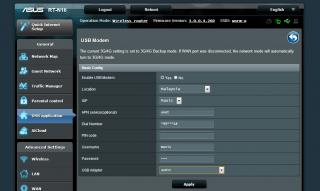
Meanwhile on my RT-N16 (factory FW) now


Attached Image

hurricane21
post May 20 2013, 04:37 PM

Senior Probation
******
Senior Member
1,389 posts

Joined: Feb 2006
From: Southern Region


Just flashed to 0512b but wifi seems not working doh.gif
then I tried to downgrade to 0430 and its same too ohmy.gif
but on tp link fw the wifi work just great blink.gif
ibnuasad
post May 20 2013, 05:20 PM

A screw is not a screw until you screw it!
****
Senior Member
558 posts

Joined: Jun 2006
From: Lowyat.Net


2 days ago my 2nd MR3420 (v1.3) kaput. PC connected to Lan Port 4 but somehow got 'ghost' at Lan Port 2. Both ports blinking. If no cable connected at all the port, Lan Port 2 still blinking blink.gif Can connect to the internet but sometimes can't access the router page. When I was still able to access the router page, quickly did a system reset and then flashed to stock firmware. After flashing stock, can access TP-Link router page but only once...after refresh, gone...can't access anymore. Tested one more time last night to double confirm router really kaput and today went for 1-1 Warranty Exchange.

Currently using the other MR3420 (also previously 1-1 warranty exchange) sweat.gif

Service Center Address: 4-20, 4th floor, Plaza Low Yat, off Jalan Bukit Bintang, 55100 Kuala Lumpur.

Went to service center; explained the LAN Port problem, showed receipt and straight away got a replacement MR3420 (v1.0). No questions asked, everything done within 5 minutes nod.gif FYI, Service Centre lunch hour is 2-3pm...
digilife
post May 20 2013, 05:23 PM

The MNP guy, its me yeah.
*******
Senior Member
8,025 posts

Joined: Feb 2005
From: Planet Boleland


Why so many TP links having problem now ?

btw, my MR3420 on HM 12b still fine ( touch wood )

flex.gif flex.gif
xphr3ak
post May 20 2013, 05:37 PM

Regular
******
Senior Member
1,797 posts

Joined: Jan 2003
QUOTE(digilife @ May 20 2013, 05:23 PM)
Why so many TP links having problem now ?

btw, my MR3420 on HM 12b still fine ( touch wood )

flex.gif  flex.gif
*
Mind to share the .bin file?
Thanks.

digilife
post May 20 2013, 05:41 PM

The MNP guy, its me yeah.
*******
Senior Member
8,025 posts

Joined: Feb 2005
From: Planet Boleland


QUOTE(xphr3ak @ May 20 2013, 05:37 PM)
Mind to share the .bin file?
Thanks.
*
flip back the pages, its there

icon_idea.gif
camel90
post May 20 2013, 05:59 PM

Go-Kart racer, Amature Race Driver
******
Senior Member
1,314 posts

Joined: Dec 2005
From: Tumpat,Shah Alam,Bangi,Dengkil.


Hi guys, i'm interested with this device, here are some questions i would like to ask :

1. Is it compatible with Huawei E1762 (originally from Maxis but re-flashed to ori non telco to use umobile)
2. How is the wifi strength ? for a normal small 2 storey terrace house enough to cover if the router is located outside (ie : hall)
3. I read at the first post there are many tweaks and wrt which i don't understand at all. So, if i buy this device as stock at Cycom or wherever, i can simply setup as per manual provided to use with the modem above right ? I don't have to do all those tweaks if i just want to use it as normal? (I'M VERY SORRY, noob sad.gif )

Thanks notworthy.gif
renishi
post May 20 2013, 06:13 PM

Enthusiast
*****
Senior Member
893 posts

Joined: Jun 2006
bought a v2 tl-mr3420 but it seems... less white or should i say yellowish instead of being as white as seen in the picture. SIgh

127 Pages « < 49 50 51 52 53 > » Top
Topic ClosedOptions
 

Change to:
| Lo-Fi Version
0.0176sec    0.47    6 queries    GZIP Disabled
Time is now: 9th December 2025 - 02:36 PM