Outline ·
[ Standard ] ·
Linear+
Home Networking ASUS Malaysia Networking User & Technical Support, Managed by ASUS Malaysia Representative
|
cyclone2
|
 Mar 19 2014, 02:43 PM Mar 19 2014, 02:43 PM
|

|
Hi All,
I'm having RT-N16 router with Unifi. I have the router link to my Synology NAS and also to a Dlink Gigabit switch.
Recently I noticed the speed showing on the dlink switch and NAS only 100Mbps. I had updated the router to latest version, ie. 3.0.0.4.374_4422.
Anyone had the same issue like mine after upgrade? Should I send for warranty claim?
|
|
|
|
|
|
cyclone2
|
Apr 21 2014, 12:05 PM
|
|
|
Hi ASUSMy,
May I know where is the service centre of ASUS at JOHOR BAHRU?
|
|
|
|
|
|
cyclone2
|
Oct 17 2014, 12:04 AM
|
|
|
Hi ASUSmy,
Recently I had upgraded my RT-N16 to firmware ver 3.0.0.4.376_2678 and download master ver 3.1.0.93.
However, in the system log, I'm seeeing the following error.
Oct 12 22:43:20 transmission-daemon[12294]: UDP Failed to set receive buffer: requested 4194304, got 237568 (tr-udp.c:78)
Oct 12 22:43:20 transmission-daemon[12294]: UDP Failed to set send buffer: requested 1048576, got 237568 (tr-udp.c:89)
Oct 12 22:43:42 transmission-daemon[13041]: UDP Failed to set receive buffer: requested 4194304, got 237568 (tr-udp.c:78)
Oct 12 22:43:42 transmission-daemon[13041]: UDP Failed to set send buffer: requested 1048576, got 237568 (tr-udp.c:89)
Oct 12 22:43:58 transmission-daemon[13426]: UDP Failed to set receive buffer: requested 4194304, got 237568 (tr-udp.c:78)
Oct 12 22:43:58 transmission-daemon[13426]: UDP Failed to set send buffer: requested 1048576, got 237568 (tr-udp.c:89)
Oct 12 22:44:15 transmission-daemon[13615]: UDP Failed to set receive buffer: requested 4194304, got 237568 (tr-udp.c:78)
Oct 12 22:44:15 transmission-daemon[13615]: UDP Failed to set send buffer: requested 1048576, got 237568 (tr-udp.c:89)
Oct 12 22:44:29 transmission-daemon[14117]: UDP Failed to set receive buffer: requested 4194304, got 237568 (tr-udp.c:78)
Oct 12 22:44:29 transmission-daemon[14117]: UDP Failed to set send buffer: requested 1048576, got 237568 (tr-udp.c:89)
Oct 12 22:44:42 transmission-daemon[14423]: UDP Failed to set receive buffer: requested 4194304, got 237568 (tr-udp.c:78)
Oct 12 22:44:42 transmission-daemon[14423]: UDP Failed to set send buffer: requested 1048576, got 237568 (tr-udp.c:89)
Oct 12 22:44:58 transmission-daemon[14676]: UDP Failed to set receive buffer: requested 4194304, got 237568 (tr-udp.c:78)
Oct 12 22:44:58 transmission-daemon[14676]: UDP Failed to set send buffer: requested 1048576, got 237568 (tr-udp.c:89)
Oct 12 22:45:14 transmission-daemon[15114]: UDP Failed to set receive buffer: requested 4194304, got 237568 (tr-udp.c:78)
Oct 12 22:45:14 transmission-daemon[15114]: UDP Failed to set send buffer: requested 1048576, got 237568 (tr-udp.c:89)
Oct 12 22:46:42 transmission-daemon[15541]: UDP Failed to set receive buffer: requested 4194304, got 237568 (tr-udp.c:78)
Oct 12 22:46:42 transmission-daemon[15541]: UDP Failed to set send buffer: requested 1048576, got 237568 (tr-udp.c:89)
Oct 12 22:47:54 transmission-daemon[15622]: UDP Failed to set receive buffer: requested 4194304, got 237568 (tr-udp.c:78)
Oct 12 22:47:54 transmission-daemon[15622]: UDP Failed to set send buffer: requested 1048576, got 237568 (tr-udp.c:89)
Oct 12 22:48:14 transmission-daemon[15650]: UDP Failed to set receive buffer: requested 4194304, got 237568 (tr-udp.c:78)
Oct 12 22:48:14 transmission-daemon[15650]: UDP Failed to set send buffer: requested 1048576, got 237568 (tr-udp.c:89)
Oct 12 22:48:42 transmission-daemon[15683]: UDP Failed to set receive buffer: requested 4194304, got 237568 (tr-udp.c:78)
Oct 12 22:48:42 transmission-daemon[15683]: UDP Failed to set send buffer: requested 1048576, got 237568 (tr-udp.c:89)
is it a bug in the firmware or download master? Now all my download is not working in download master.
Please advice.
|
|
|
|
|
|
cyclone2
|
Oct 21 2014, 04:28 PM
|
|
|
QUOTE(ASUSmy @ Oct 21 2014, 04:08 PM) Hi cyclone2, May I ask, are you able to log in to the download master interface? If yes, is the torrent are uploading or downloading? Can you try disable and enable back the download master at the USB Application section? If still cannot, try disable the download master and go change the name of the folder in Samba. You can do it by enabling the AiDisk and go to advance mode to rename the folder. Can you provide me the 3 folders from the Download2 and e-mail to me? I will pm you my e-mail address. 1. config 2. Seeds 3. .logs (Hidden folder) Thank you In fact I did reformat my external HDD and reinstall the Download Master application, thought it will resolved the issue. When 1st adding the torrent file, i can see the job was running fine, however after sometime I relogin download master again, then all the job is gone, can't see any torrent file running. I will send you the file asap as I'm outstation now. Thanks. |
|
|
|
|
|
cyclone2
|
May 11 2016, 10:06 AM
|
|
|
Hi ASUSMY,
I'm planning to replace my RT-N16 with either RT-88U, RT-87U or RT-AC3200. I'm doing from research on the technology for both router. Understand that RT-88U and RT-87U are MU MIMO while RT-AC3200 is Xstream. Correct me if i'm wrong. May I know what is the difference between these 3 model?
My house is double storey house and my Unifi is at upstair familly hall and connected to a dlink gigabit switch. Due to the current lan cable issue, i'm not able to get gigabit speed but only 100Mbps. I'm planning to add on a wireless media bridge in the future in order to have "near" gigabit speed between upstair and downstair connection.
Which model would be more appropriate for my future upgrade?
|
|
|
|
|
|
cyclone2
|
May 12 2016, 03:07 PM
|
|
|
QUOTE(pl95077 @ May 11 2016, 11:30 PM) If you planed to get a media bridge you may consider to buy RT-AC3200. ASUS is having promotion buy RT-AC3200 free EA-AC87, good buy! Bro, thanks for recommendation. I did saw that in Lazada and Gemfive but not sure how true is the deal.... haha.... Originally was planning to get AC88U or AC87U or AC3200 from SG, then later maybe add on media bridge. As my sis was working at Funan and there is closure sales over there. The router price is cheaper than here around 400-600.... Still waiting my sis to check the price for me. |
|
|
|
|
|
cyclone2
|
May 21 2016, 01:43 AM
|
|
|
Hi,
Does anyone know that when set the RT-N16 to AP or Repeater mode whether the IPv6 is enable automatically?
I'm able to run the IPv6 testing when connect to main router. However when switch to RT-N16, the IPv6 test will fail.
|
|
|
|
|
|
cyclone2
|
May 23 2016, 12:13 PM
|
|
|
QUOTE(ASUSmy @ May 23 2016, 11:21 AM) Hi cyclone2, Can you try updating the RT-N16 firmware to the latest? The latest firmware is Beta Version 9.0.0.4.380.2985. https://www.asus.com/Networking/RTN16/HelpDesk_Download/Thank you Hi ASUSmy, I'm currently on the latest Beta firmware previously. The IPv6 in AP mode seem is working now, I noticed that the status reflect in my laptop (Win 10) seem is slow. When 1st connect to RT-N16, the IPv6 is showing no connectivity, but then after while, can see the status show "Internet". My currently set up is RT-N16->Dlink Gigabit switch->Netgear Nighthawk X6->BTU. I'm not sure whether the problem is on the Netgear router or the dlink or the beta firmware on RT-N16. Will monitor it again when the final version firmware is release. |
|
|
|
|
|
cyclone2
|
Jun 16 2016, 03:21 PM
|
|
|
Hi ASUSmy,
Previously I had registered a ddns under asuscomm.com in my old RT-N16 router.
Now i just got the ac5300, planned to use back the same hostname i registered previously. How can I do that? As when i type in the old hostname, it mentioned the name is registered.
|
|
|
|
|
|
cyclone2
|
Jun 17 2016, 06:52 PM
|
|
|
QUOTE(ASUSmy @ Jun 17 2016, 02:53 PM) Hi cyclone2, Is the RT-N16 is still usable, plug back the RT-N16 and change the DDNS to other name. The name you want to use will be release and you can use it on the new router. Thank you Hi ASUSmy, The RT-N16 stilll usable, but I had flashed it to Tomato firmware. As I'm testing the wiressless ethernet bridge. Maybe will just register new host name then. Thanks. |
|
|
|
|
|
cyclone2
|
Jul 29 2016, 12:03 PM
|
|
|
Hi AsusMY, I'm currently using RT-AC5300 and setup the PPTP VPN. I'm using Windows 10 to connect back to my home network, it seem that the VPN will get disconnected after 1 or 2 minutes. The firmware version is 3.0.0.4.380_3341. The VPN connection setting is very simple and straightforward. is there anything I miss out? Below is the log file. This post has been edited by cyclone2: Jul 29 2016, 12:05 PM Attached thumbnail(s)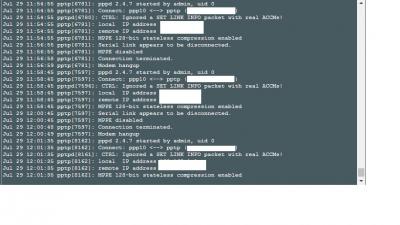
|
|
|
|
|
|
cyclone2
|
May 20 2018, 04:23 PM
|
|
|
Hi ASUSMY,
I had upgraded my AC-5300 to latest firmware version 3.0.0.4.384_20648. It seem the DDNS not able to connect to ASUS DDNS service.
Below is some log in the router.
May 20 16:13:27 nat: apply nat rules (/tmp/nat_rules_ppp0_vlan500)
May 20 16:13:28 miniupnpd[3831]: version 1.9 started
May 20 16:13:28 miniupnpd[3831]: HTTP listening on port 41611
May 20 16:13:28 miniupnpd[3831]: Listening for NAT-PMP/PCP traffic on port 5351
May 20 16:13:29 ddns update: Asus update entry:: return: HTTP/1.1 401 |Authorization failed^M Date: Sun, 20 May 2018 08:13:27 GMT^M Server: Apache^M X-Powered-By: PHP/5.6.30^M Content-Length: 0^M Content-Type: text/html; charset=UTF-8^M ^M
May 20 16:13:29 ddns update: retval= 2, ddns_return_code (,401)
May 20 16:13:29 ddns update: asusddns_update: 2
It seem required the user ID and password login. Is there a bug in the new firmware?
|
|
|
|
|
|
cyclone2
|
May 21 2018, 05:12 PM
|
|
|
QUOTE(ASUSmy @ May 21 2018, 09:30 AM) Hi cyclone2, May I ask, do you still remember what version of firmware are you using before updating to the latest firmware? Can you go to the DDNS page, click Apply and see what message that it pop out? Thank you Hi, If not mistaken, the previous version is 20379. |
|
|
|
|
|
cyclone2
|
May 25 2018, 07:07 AM
|
|
|
QUOTE(ASUSmy @ May 21 2018, 09:30 AM) Hi cyclone2, May I ask, do you still remember what version of firmware are you using before updating to the latest firmware? Can you go to the DDNS page, click Apply and see what message that it pop out? Thank you Hi ASUSMY, When I click on apply, it just sign out from the page. Then after relogin again, it prompt Unauthorized registration request. Please advise. Thanks. |
|
|
|
|
|
cyclone2
|
May 28 2018, 10:23 AM
|
|
|
QUOTE(ASUSmy @ May 25 2018, 09:04 AM) Hi cyclone2, Can you try do a factory reset on the router and redo the setting again? Thank you After factory reset, now DDNS registration working fine. All these while when I upgrade to latest firmware never factory reset and so far no issue at all, only this time round. Anyway problem solved. Thanks. |
|
|
|
|
|
cyclone2
|
Jul 14 2018, 10:19 AM
|
|
|
Hi, is anyone using Asus ea-ac87 media bridge?
How's the performance with rt-ac5300?
|
|
|
|
|
|
cyclone2
|
Jul 17 2018, 11:52 AM
|
|
|
QUOTE(blacktubi @ Jul 14 2018, 04:05 PM) Not a huge fan of this model due to the Quantenna chipset. Surprised that it is still available for sale. Go for RT-AC66U B1 instead. Anyway, I had changed to AC68U instead of AC66U B1. |
|
|
|
|
|
cyclone2
|
Jan 1 2019, 01:53 PM
|
|
|
Hi ASUSMY,
I just now upgrade my ac-5300 to latest firmward 3.0.0.4.384_45149. Then I noticed the Download Master is missing from the USB Application.
Does the Download Master been removed?
|
|
|
|
|
|
cyclone2
|
Apr 3 2019, 10:42 PM
|
|
|
ASUSMY,
I had a AC5300 run as AIMesh router and AC86U AIMesh Node. After I changed the connection from wireless to wired in AIMesh router, I noticed that 2nd 5GHz is still used as dedicated backhaul, but I already switch to wired mode, how to enable back the 2nd 5GHz for normal wifi connection?
Also yesterday my AC5300 was spoilt and I get a new replacement unit today, but my DDNS was registered on the old router, how to recover my ddns registration?
This post has been edited by cyclone2: Apr 3 2019, 10:46 PM
|
|
|
|
|
|
cyclone2
|
Apr 4 2019, 12:47 PM
|
|
|
QUOTE(ASUSmy @ Apr 4 2019, 11:14 AM) Hi cyclone2, Make sure all the firmware is the latest and factory reset if needed. Can you provide the serial number, DDNS name and MAC address of the old router? I will help request HQ to release the DDNS. Thank you Hi, The spoilt unit already collect back by service center. But the old box still with me, will try to check the old box then PM you later. Thanks for your help. |
|
|
|
|



 Quote
Quote

 0.0404sec
 0.66
0.66
 7 queries
 GZIP Disabled