Outline ·
[ Standard ] ·
Linear+
Home Networking ASUS Malaysia Networking User & Technical Support, Managed by ASUS Malaysia Representative
|
blu3chip
|
 Mar 27 2014, 07:19 AM Mar 27 2014, 07:19 AM
|

|
Hi, recently purchased and hooked up a RT-AC56U router. Signal strength is way stronger than the lovely DLINK provided by UNIFI. However, been facing connection drops with my portable devices eg. iPhone, iPad
The PC on the other hand, operates just fine. Would need to constantly reconnect the Wi-fi (every 2 minutes!) for the portables, have tried running Google searches and testing 'fixes' such as changing the Channel etc. but still facing the same problem. Any advise please? Thanks.
|
|
|
|
|
|
blu3chip
|
Mar 27 2014, 03:14 PM
|
|
|
QUOTE(ASUSmy @ Mar 27 2014, 09:33 AM) Hi blu3chip, May I ask, have you try update your firmware to the latest already? And which WiFi band that you connected to and facing this problem? 2.4GHz or 5GHz. And is your PC is Mac also or it is running in window OS? http://www.asus.com/my/Networking/RTAC56U/#supportVersion 3.0.0.4.374.4561 Thank you Hi, Thanks for your prompt reply. Will try updating my firmware later tonight. As for the Wi-fi band, am facing problems with 2.4ghz via handheld devices as mentioned. My iMac on the other hand, has zero issues whatsoever. Same connection, different outcome. Can confirm that it only affects handhelds through testing (iPhone, iPad, Galaxy S4 etc.) |
|
|
|
|
|
blu3chip
|
Mar 28 2014, 07:13 AM
|
|
|
QUOTE(arslow @ Mar 27 2014, 04:42 PM) Try disabling NAT acceleration if its turned on. Solved a TON of issues on my end. We don't need that with the "pathetic" unifi speed we have compared to what others have (200mbps++) Couldn't locate this via my router settings. Firmware has been upgraded but problem still persists, made the following changes for the network. Need more advise please, Thanks!  Attached thumbnail(s) Attached thumbnail(s)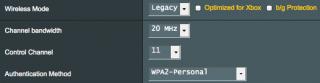
|
|
|
|
|
|
blu3chip
|
Mar 29 2014, 10:54 AM
|
|
|
QUOTE(ASUSmy @ Mar 28 2014, 09:37 AM) Hi blu3chip, You can try set it as shown on the picture below. Thank you Thanks. Tried but problem still persists! Any other solutions?  |
|
|
|
|
|
blu3chip
|
Mar 29 2014, 12:09 PM
|
|
|
QUOTE(andrekua2 @ Mar 29 2014, 11:59 AM) If you have problem with iPad, iPhone, then I suggest you lower it to 20MHz instead of 20/40MHz. You can also try to reserve the IP when the device connected for the first time. Thanks for your advice. Was previously on 20MHz and that did not solve the problem. I have just switched it back to 20, lets see how it goes..  |
|
|
|
|
|
blu3chip
|
Mar 29 2014, 12:21 PM
|
|
|
QUOTE(andrekua2 @ Mar 29 2014, 12:13 PM) What is your setting for Network Key Rotation Interval? 3600 |
|
|
|
|
|
blu3chip
|
Mar 30 2014, 10:36 AM
|
|
|
QUOTE(andrekua2 @ Mar 29 2014, 12:22 PM) Still did not cut it - Dropping issues have not been fixed yet. Any other options? |
|
|
|
|



 Quote
Quote

 0.0423sec
 0.52
0.52
 7 queries
 GZIP Disabled