AsusMy
how many years is the warranty for DSL-N55U and PCE-N15
Home Networking ASUS Malaysia Networking User & Technical Support, Managed by ASUS Malaysia Representative
Home Networking ASUS Malaysia Networking User & Technical Support, Managed by ASUS Malaysia Representative
|
|
 Aug 30 2013, 11:12 AM Aug 30 2013, 11:12 AM
Return to original view | Post
#1
|
 
Senior Member
1,147 posts Joined: Jan 2003 From: HeRe 
|
AsusMy
how many years is the warranty for DSL-N55U and PCE-N15 |
|
|
|
|
|
Sep 2 2013, 04:25 PM
Return to original view | Post
#2
|
|
Senior Member
1,147 posts Joined: Jan 2003 From: HeRe
|
QUOTE(ASUSmy @ Sep 2 2013, 02:50 PM) Hi ahchun, one more question before i decideBoth are came with 3 years local warranty. Thank you  i am currently using dlink router and using their ddns http://www.dlinkddns.com/ do asus have thier own ddns and is it free for asus customer to use? This post has been edited by ahchun: Sep 2 2013, 04:29 PM |
|
|
Sep 18 2013, 09:49 AM
Return to original view | Post
#3
|
|
Senior Member
1,147 posts Joined: Jan 2003 From: HeRe
|
will the be price revise for all current model due to RT-AC68U is going to be in market soon?
|
|
|
Oct 23 2014, 07:59 AM
Return to original view | Post
#4
|
|
Senior Member
1,147 posts Joined: Jan 2003 From: HeRe
|
hi AsusMy
is it previously this model DSL-N12U b1 and updated newer version is DSL-N12U_c1? or its different model all together if shop still selling n12u b1, can we flash it to updated C1 firmware? kindly advice |
|
|
Oct 23 2014, 08:38 PM
Return to original view | Post
#5
|
|
Senior Member
1,147 posts Joined: Jan 2003 From: HeRe
|
QUOTE(ASUSmy @ Oct 23 2014, 03:22 PM) Hi ahchun, thanks DSL-N12U B1 and DSL-N12U C1 are different in term of hardware version, you will need to use back their own firmware. And you won't be able to to flash the firmware from C1 to B1 and vice versa. Thank you  |
|
|
Oct 25 2014, 02:20 PM
Return to original view | Post
#6
|
|
Senior Member
1,147 posts Joined: Jan 2003 From: HeRe
|
hi ASUSmy
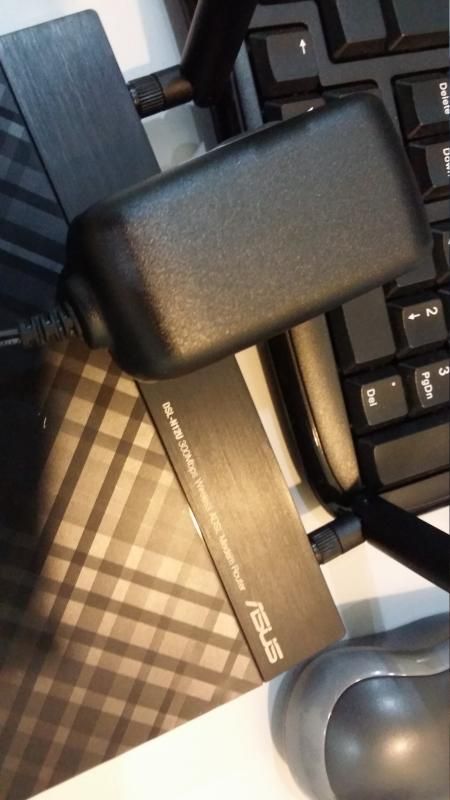
i just got myself new DSL wifi router n12u_c1 i notice the adapter do not have any asus branding n labeling on it, is it normal ? it is label as Netbits instead my previous asus router which used at other place have asus labeling with better quality attach are picture of the adapter from n12u router 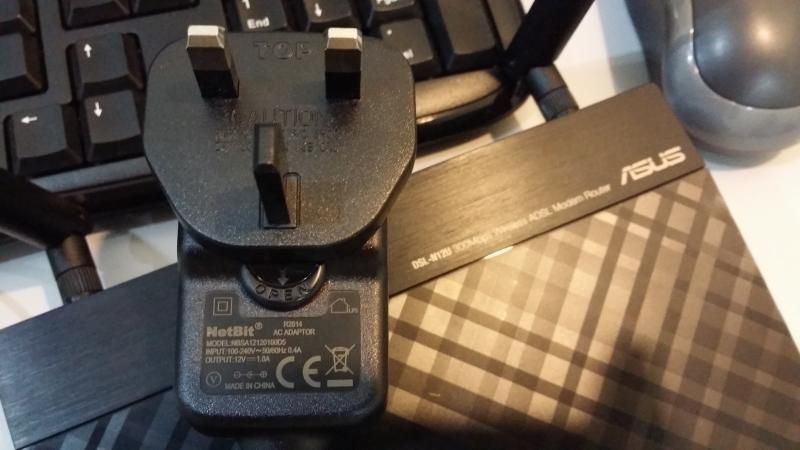 » Click to show Spoiler - click again to hide... « |
|
|
|
|
|
Oct 28 2014, 02:57 PM
Return to original view | Post
#7
|
|
Senior Member
1,147 posts Joined: Jan 2003 From: HeRe
|
QUOTE(ASUSmy @ Oct 28 2014, 11:19 AM) Hi ahchun, Thanks for the reply Checked with HQ, it is the original adapter. Those that came with ASUS logo mostly is dual band router. Thank you |
|
|
Mar 10 2015, 04:08 PM
Return to original view | Post
#8
|
|
Senior Member
1,147 posts Joined: Jan 2003 From: HeRe
|
ASUSmy
recently my download master download speed drop so much and become unstable. my internet is working find and speedtest is showing good result my router DSLN12U_C1 any advice? This post has been edited by ahchun: Mar 10 2015, 04:09 PM |
|
|
Mar 13 2015, 09:13 PM
Return to original view | Post
#9
|
|
Senior Member
1,147 posts Joined: Jan 2003 From: HeRe
|
QUOTE(ASUSmy @ Mar 13 2015, 11:23 AM) Hi ahchun, based on the speed test, the server i choose San Francisco and i am getting 5MbpsMind to share what is the speed you get now? and speedtest always will show good result if the server are within peninsular. You can try select the server from other country for the torrent you added. Thank you but my download speed from DM vary from ZERO to 20+KBps. and its a highly seeded files yet the DL is so slow my DM version is ver. 3.1.0.95. i have tried uninstall DM and reinstall again and still the same kindly advise what is wrong with DM This post has been edited by ahchun: Mar 13 2015, 09:14 PM Attached thumbnail(s) 
|
|
|
Mar 16 2015, 10:55 AM
Return to original view | Post
#10
|
|
Senior Member
1,147 posts Joined: Jan 2003 From: HeRe
|
QUOTE(ASUSmy @ Mar 16 2015, 10:48 AM) Hi ahchun, I do not have torrent install in window as i solely depend on torrent in this router May I know what is the speed you will get if you download it in windows? And what is your internet package? Thank you my internet package is 8mb streamyx normal download are fast and you tube streaming on HD with no lag |
|
|
Mar 19 2015, 10:17 PM
Return to original view | Post
#11
|
|
Senior Member
1,147 posts Joined: Jan 2003 From: HeRe
|
QUOTE(ASUSmy @ Mar 19 2015, 10:09 AM) Hi ahchun, when you are saying due to processing power in router limited the download speed. how do you explain when i can get high DL speed up to near 900KBps with the same router previously. and suddenly it just change to this slow speed.I have tested the DM with the version 3.1.0.95. The speed I get is 800KBps~1200KBps for 20MB line. It seen ok as router may not have the actually download speed compare to the windows client. This is due to the processing speed of router are slower than PC. May I ask, have you tried other torrent? The one show on the image below is game torrent which is mostly seeded. Thank you i try with another torrent which have 3K+ seeder and the speed are still bad This post has been edited by ahchun: Mar 19 2015, 10:18 PM Attached thumbnail(s) 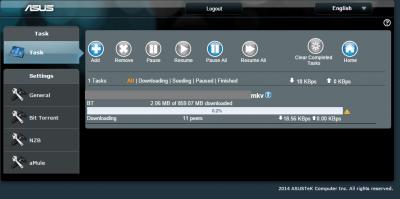
|
|
|
Mar 20 2015, 02:28 PM
Return to original view | Post
#12
|
|
Senior Member
1,147 posts Joined: Jan 2003 From: HeRe
|
QUOTE(ASUSmy @ Mar 20 2015, 02:08 PM) Hi ahchun, thanks for your reply Do you mind share the torrent? So that I can test it with my UNIFI line. And if can please try install a download clients and try download it from your PC so that we can whether is the ISP line got problem or the modem router problem. You can try changing the port at the Download Master(picture below). And make sure that you QoS if off. Thank you i will share with you the torrent once i got home and i do not/never turn on QOS. i do not have a pc to try with download client on this part. what is the port recommended ? you didn't attach any picture on your reply. Thanks |
|
|
Mar 22 2015, 03:30 PM
Return to original view | Post
#13
|
|
Senior Member
1,147 posts Joined: Jan 2003 From: HeRe
|
QUOTE(ASUSmy @ Mar 20 2015, 03:07 PM) Hi ahchun, ASUSmyYou can try this 11136/ 45682/ 11132/ 15987/ 18368/ 10116/ 15387/ 18318/ 11092/ 54467/ 47975/ 35244/ 49666/ 53906(I found this on youtube) or anything above 10000. And below is the picture. Thank you thanks for your help pass week. the culprit is the open port. the given port in router are blocked now and above all the ports u provided only 1 is working fine n the speed back to normal now maybe asus will need to amend the firmware for default port to be working properly |
|
|
|
|
|
Jun 11 2015, 07:43 PM
Return to original view | Post
#14
|
|
Senior Member
1,147 posts Joined: Jan 2003 From: HeRe
|
Hi ASUSmy
Can this router support YES Go dongle? Please advise.. Networking | DSL-N55U_C1 attached is the snap shot. firmware is updated If yes, please let me know how This post has been edited by ahchun: Jun 11 2015, 09:42 PM Attached thumbnail(s) 
|
|
|
Jun 15 2015, 09:55 AM
Return to original view | Post
#15
|
|
Senior Member
1,147 posts Joined: Jan 2003 From: HeRe
|
QUOTE(ASUSmy @ Jun 15 2015, 09:25 AM) Hi ahchun, but this DSL-n55u_c1 also can act as annex B router right? Our DSL router unable to support the USB YES GO modem. Thank you if it can be use as annex B router, this should be same with you other router that can support YES no ?  |
|
|
Oct 2 2016, 09:20 AM
Return to original view | Post
#16
|
|
Senior Member
1,147 posts Joined: Jan 2003 From: HeRe
|
ASUSmy
I am currently using DSL-N55U-c1. How do I check which website user that using my WiFi browsing currently? |
|
|
Oct 4 2016, 05:33 PM
Return to original view | Post
#17
|
|
Senior Member
1,147 posts Joined: Jan 2003 From: HeRe
|
QUOTE(ASUSmy @ Oct 4 2016, 10:51 AM) Hi ahchun, Yes I would like to try it out.At the Network Map, you can see what device is currently connected to the router. The current firmware don't have the Web History feature where you can see the websites currently surf by the connected clients. If you wish to try on the beta firmware for the Web History feature, do let me know and I will provide it to you. Thank you |
|
|
Oct 4 2016, 08:04 PM
Return to original view | Post
#18
|
|
Senior Member
1,147 posts Joined: Jan 2003 From: HeRe
|
QUOTE(ASUSmy @ Oct 4 2016, 05:45 PM) Hi ahchun, Thanks will try it outYou may download the beta firmware from the link below. You will need to do a factory reset after the update. Remember to save your settings. https://www.asuswebstorage.com/navigate/s/8...42C222A1636D9CY Thank you |
|
|
May 31 2017, 09:14 AM
Return to original view | Post
#19
|
|
Senior Member
1,147 posts Joined: Jan 2003 From: HeRe
|
hi ASUSmy
is there any 4G/LTE usb modem that compatible with Asus router? i see from the compatible list or the drop down menu from my router, those list are all old modem model/3G and can DSL N55u_c1 suppose LTE/4G usb modem/which model. thanks |
| Change to: |  0.0437sec 0.0437sec
 0.55 0.55
 7 queries 7 queries
 GZIP Disabled GZIP Disabled
Time is now: 9th December 2025 - 05:56 PM |
 Quote
Quote