

QUOTE(digilife @ Nov 16 2013, 09:24 PM)
Any updates ?
Thanks

Hi digilife,Thanks
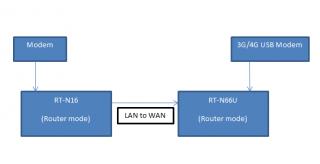
If the image below is what you asked on your question, yes it will be able to work for both the Fail over or Load balance.
Thank you
Attached thumbnail(s)
Home Networking ASUS Malaysia Networking User & Technical Support, Managed by ASUS Malaysia Representative
 |
 Nov 19 2013, 08:59 AM Nov 19 2013, 08:59 AM
|
 
Senior Member
2,319 posts Joined: Mar 2010 
|
QUOTE(digilife @ Nov 16 2013, 09:24 PM) Any updates ? Hi digilife,Thanks If the image below is what you asked on your question, yes it will be able to work for both the Fail over or Load balance. Thank you Attached thumbnail(s)
|
|
|
|
|
|
Nov 20 2013, 11:02 AM
|

Junior Member
68 posts Joined: Jan 2003 From: (KL) 
|
is RT-AC68U support unifi connection?
|
|
|
Nov 20 2013, 11:03 AM
|
|
Senior Member
2,319 posts Joined: Mar 2010
|
QUOTE(cricketboy @ Nov 20 2013, 11:02 AM) is RT-AC68U support unifi connection? Hi cricketboy,Yes, it able to support. Thank you |
|
|
Nov 20 2013, 05:12 PM
|

Senior Member
1,138 posts Joined: May 2010
|
QUOTE(ASUSmy @ Nov 18 2013, 12:43 PM) Hi Khalid21, just replace that set today.. now 2.4ghz working.. I will be assuming the reset you do is factory reset. If so, try set the Channel bandwidth 20/40MHz. Set a value for the Control channel. And may I know is there by any chances that there is something around the router that interfere with the signal? Do send the device for warranty claim if you still facing the same problem. Thank you but the speed stuck at 72mbps (2 laptop and 1 PC (used usb wifi adapter)) location of router 3ft from laptop/pc any setting need to be done to get maximum performant thanks |
|
|
Nov 21 2013, 02:18 PM
|
 
Staff
12,089 posts Joined: Dec 2004 From: Malaysia
|
ASUSmy I was browsing for Asus routers in Harvey Norman just now, looking to get the budget-friendly RT-N12 C1/D1 but they only had RT-N12U which was selling for RM179. What's extra in the RT-N12U?
|
|
|
Nov 21 2013, 06:46 PM
|
|
Senior Member
2,319 posts Joined: Mar 2010
|
QUOTE(Khalid21 @ Nov 20 2013, 05:12 PM) just replace that set today.. now 2.4ghz working.. Hi Khalid21,but the speed stuck at 72mbps (2 laptop and 1 PC (used usb wifi adapter)) location of router 3ft from laptop/pc any setting need to be done to get maximum performant thanks In the router under the Wireless, you can try change the Channel bandwidth to 40MHz. Thank You |
|
|
|
|
|
Nov 22 2013, 08:10 AM
|
|
Senior Member
1,138 posts Joined: May 2010
|
QUOTE(ASUSmy @ Nov 21 2013, 06:46 PM) Hi Khalid21, Hi ASUSmyIn the router under the Wireless, you can try change the Channel bandwidth to 40MHz. Thank You setting done..but my 5ghz connecting 450mbps 2.4 only 130 to 145 mbps it is normal.. supposed 2.4ghz 300mbps and 5ghz 300mbps thanks [attachmentid=3734400] 
This post has been edited by Khalid21: Nov 22 2013, 08:49 AM Attached thumbnail(s) 
|
|
|
Nov 22 2013, 11:30 AM
|
|
Junior Member
178 posts Joined: Nov 2007
|
QUOTE(Khalid21 @ Nov 22 2013, 09:10 AM) Hi ASUSmy setting done..but my 5ghz connecting 450mbps 2.4 only 130 to 145 mbps it is normal.. supposed 2.4ghz 300mbps and 5ghz 300mbps thanks [attachmentid=3734400]
bro how u did that on apple os wifi info? |
|
|
Nov 22 2013, 11:47 AM
|
 
Elite
3,156 posts Joined: Sep 2005
|
What is the top range model and best wireless router for below usage:
1. Unifi 2. 2.4Ghz wifi (No need 5Ghz wifi) 3. highest speed |
|
|
Nov 22 2013, 12:15 PM
|
|
Senior Member
2,319 posts Joined: Mar 2010
|
QUOTE(OKLY @ Nov 21 2013, 02:18 PM) ASUSmy I was browsing for Asus routers in Harvey Norman just now, looking to get the budget-friendly RT-N12 C1/D1 but they only had RT-N12U which was selling for RM179. What's extra in the RT-N12U? Hi OKLY,I don't think we have RT-N12U, It is DSL-N12U that you saw at Harvey Norman? The "U" mean there is an USB port at the device. Thank you |
|
|
Nov 22 2013, 12:16 PM
|

Senior Member
1,044 posts Joined: Dec 2008 From: 127.0.0.1
|
Any news on the PCE-AC68? >.>
|
|
|
Nov 22 2013, 12:18 PM
|
|
Senior Member
2,319 posts Joined: Mar 2010
|
QUOTE(Khalid21 @ Nov 22 2013, 08:10 AM) Hi ASUSmy Hi Khalid21,setting done..but my 5ghz connecting 450mbps 2.4 only 130 to 145 mbps it is normal.. supposed 2.4ghz 300mbps and 5ghz 300mbps thanks [attachmentid=3734400]
Did you change both the wireless band? Thank you |
|
|
Nov 22 2013, 12:19 PM
|
|
Senior Member
2,319 posts Joined: Mar 2010
|
QUOTE(chinkw1 @ Nov 22 2013, 11:47 AM) What is the top range model and best wireless router for below usage: Hi chinkw1,1. Unifi 2. 2.4Ghz wifi (No need 5Ghz wifi) 3. highest speed You can have a look at RT-N16. Thank you |
|
|
|
|
|
Nov 22 2013, 12:20 PM
|
|
Staff
12,089 posts Joined: Dec 2004 From: Malaysia
|
QUOTE(ASUSmy @ Nov 22 2013, 12:15 PM) Hi OKLY, Nope, very sure it's RT-N12U. I was looking for RT-N12 and when I saw the model RT-N12, I looked at the price and was shocked at the price tag RM179. Double check only to find out it's RT-N12U. Unless they didn't source this model from local distributors. I don't think we have RT-N12U, It is DSL-N12U that you saw at Harvey Norman? The "U" mean there is an USB port at the device. Thank you  |
|
|
Nov 22 2013, 03:01 PM
|
|
Elite
3,156 posts Joined: Sep 2005
|
QUOTE(ASUSmy @ Nov 22 2013, 12:19 PM) Hi chinkw1, RT-N16 have a good review, looks like it is very reliable.You can have a look at RT-N16. Thank you After get this new unit, 1st thing to do is to flash to latest firmware in order to connect to UNIFI? |
|
|
Nov 22 2013, 03:02 PM
|
|
Senior Member
2,319 posts Joined: Mar 2010
|
QUOTE(ZeratoS @ Nov 22 2013, 12:16 PM) Any news on the PCE-AC68? >.> Hi ZeratoS,Ya, the PCE-AC68 has arrived at our supplier site. May I know where you plan to send the PCE-AC66 for warranty? Thank you |
|
|
Nov 22 2013, 03:12 PM
|
|
Senior Member
3,544 posts Joined: Sep 2008
|
Have using the ac68u for about a week now, very happy so far.
Still on firmware 158,will upgrade to 371 over the weekend. Hope it goes well lol. ASUSmy, any idea about what kind of speeds we should be getting for wireless transfer over the LAN network from a note 3(AC) and a wired gigabit NAS? So far my only issue with the is that I'm getting a max speed of 5mBps only transferring to and from the NAS and my phone. That's with 5ghz though. With 2.4ghz it's limited to 3mBps. There's like a zillion settings on the config page, so unsure what to change now.  |
|
|
Nov 22 2013, 03:32 PM
|
|
Senior Member
1,044 posts Joined: Dec 2008 From: 127.0.0.1
|
QUOTE(ASUSmy @ Nov 22 2013, 03:02 PM) Hi ZeratoS, I got it from Viewnet Ya, the PCE-AC68 has arrived at our supplier site. May I know where you plan to send the PCE-AC66 for warranty? Thank you Not sure where the receipt is though.This post has been edited by ZeratoS: Nov 22 2013, 03:34 PM |
|
|
Nov 22 2013, 05:12 PM
|
|
Senior Member
1,138 posts Joined: May 2010
|
QUOTE(KrankZ @ Nov 22 2013, 11:30 AM) bro how u did that on apple os wifi info? hold option key and click wifi logo |
|
|
Nov 22 2013, 05:17 PM
|
|
Senior Member
1,138 posts Joined: May 2010
|
QUOTE(chinkw1 @ Nov 22 2013, 03:01 PM) RT-N16 have a good review, looks like it is very reliable. this model going to discontinue After get this new unit, 1st thing to do is to flash to latest firmware in order to connect to UNIFI? service center said easy kena lightning strike |
| Change to: |  0.0223sec 0.0223sec
 0.52 0.52
 6 queries 6 queries
 GZIP Disabled GZIP Disabled
Time is now: 7th December 2025 - 10:17 PM |
 Quote
Quote