

QUOTE(Ghoisdo @ Oct 13 2015, 01:25 PM)
Are you sure? Haha

If not, what is the point of spending more? Hahahaah!!Home Networking ASUS Malaysia Networking User & Technical Support, Managed by ASUS Malaysia Representative
|
|
 Oct 13 2015, 01:42 PM Oct 13 2015, 01:42 PM
Return to original view | IPv6 | Post
#61
|
 
Senior Member
4,333 posts Joined: Jan 2003  
|
QUOTE(Ghoisdo @ Oct 13 2015, 01:25 PM) Are you sure? Haha If not, what is the point of spending more? Hahahaah!! |
|
|
|
|
|
Oct 17 2015, 01:23 AM
Return to original view | IPv6 | Post
#62
|
|
Senior Member
4,333 posts Joined: Jan 2003
|
QUOTE(herojack41 @ Oct 16 2015, 11:00 PM) just did the ipv6 setting Here is my working IPv6 settings for my RT-N12D1.in ipv6 testing it still got problem [attachmentid=5135591] [attachmentid=5135592] I noticed your assigned LAN IPv6 Address is not correct.  |
|
|
Oct 17 2015, 06:17 AM
Return to original view | IPv6 | Post
#63
|
|
Senior Member
4,333 posts Joined: Jan 2003
|
QUOTE(herojack41 @ Oct 17 2015, 02:08 AM) the LAN ipv6 can change? That is what I mean.it auto generate for me...even i reboot still same result Your LAN IPv6 address is automatically assigned every time you reboot the router. The IPv6 initialization process should take a minutes, but at the end, it should assign a valid LAN IPv6 address. It looks like your router did not do so. Here is the relevant part of my system log. Sep 29 16:12:38 rdnssd[371]: Get IPv6 address from RA & get DNS from DHCPv6 Sep 29 16:12:38 rc_service: rc 404:notify_rc start_dhcp6c Sep 29 16:12:39 rc_service: dhcp6c-state 408:notify_rc start_radvd Sep 29 16:12:39 rc_service: dhcp6c-state 408:notify_rc start_httpd Sep 29 16:12:39 rc_service: waitting "start_radvd" via dhcp6c-state ... Sep 29 16:12:39 radvd[362]: Exiting, sigterm or sigint received. Sep 29 16:12:40 RT-N12D1: start httpd |
|
|
Nov 15 2015, 10:17 AM
Return to original view | IPv6 | Post
#64
|
|
Senior Member
4,333 posts Joined: Jan 2003
|
Did you limit the QoS upload and download bandwidth to 20mbps in your router settings?
If yes, set it to upload 10mbps and download to 50mbps. |
|
|
Nov 15 2015, 02:04 PM
Return to original view | IPv6 | Post
#65
|
|
Senior Member
4,333 posts Joined: Jan 2003
|
QUOTE(pascalhos @ Nov 15 2015, 11:42 AM) Wow, that was embarrassing. Yes, that was exactly what the problem was. Completely forgot I enabled that previously. I am glad my suggestion works for you. Thanks for the quick reply.  |
|
|
Jul 28 2016, 10:50 AM
Return to original view | Post
#66
|
|
Senior Member
4,333 posts Joined: Jan 2003
|
Hahaha! I knew it.
 |
|
|
|
|
|
Aug 17 2016, 04:56 AM
Return to original view | IPv6 | Post
#67
|
|
Senior Member
4,333 posts Joined: Jan 2003
|
QUOTE(voncrane @ Aug 17 2016, 02:00 AM) Unfortunately, there are no "service centers" where Asus routers are concerned. It's a popular complaint against Asus Malaysia and till date, they are yet to implement such. For now, you'd have to return it to the seller to claim warranty. There are plenty of ASUS service centers in Malaysia.http://www.asus.com/my/support/Service-Center/Malaysia How come only routers cannot be sent directly to a service center? What is so special about routers? |
|
|
Oct 16 2016, 06:40 AM
Return to original view | IPv6 | Post
#68
|
|
Senior Member
4,333 posts Joined: Jan 2003
|
QUOTE(baliwesti @ Oct 14 2016, 12:41 PM) My RT-N66U just died. Any suggestions on which can replace it? Not really looking at fast wireless since most the devices I have are not AC capable yet. Most important feature I am missing from my RT-N66U is the setting of bandwidth limiter based on IP, which routers (cheapest one) have this feature? Even my lowly RT-N12D1 has bandwidth limiter after flashing it with the latest firmware.But I have upgraded to the Huawei WS880 (RT-AC68U equivalent), which also has bandwidth limiter after flashing it with the latest Xwrt-Vortex firmware. |
|
|
Oct 20 2016, 11:24 AM
Return to original view | IPv6 | Post
#69
|
|
Senior Member
4,333 posts Joined: Jan 2003
|
QUOTE(sHawTY @ Oct 20 2016, 09:26 AM) I'll answer on behalf of ASUSmy I think a lot of forummers, including me, can answer that correctly. There are none  |
|
|
Feb 12 2017, 02:09 PM
Return to original view | IPv6 | Post
#70
|
|
Senior Member
4,333 posts Joined: Jan 2003
|
QUOTE(jacky91 @ Feb 12 2017, 01:29 PM) thanks for the solution! didn't think of that Be careful using the Unifi Business setting. If I am not mistaken, it requires a fixed IP address which is not available to Unifi home users. |
|
|
Feb 12 2017, 02:46 PM
Return to original view | IPv6 | Post
#71
|
|
Senior Member
4,333 posts Joined: Jan 2003
|
QUOTE(jacky91 @ Feb 12 2017, 02:28 PM) hmm..i didn't set anything else though...juz changed the setting at IPTV tab Great! I think changing the setting manually at the LAN/IPTV tab is the right thing to do. |
|
|
Mar 5 2017, 08:20 PM
Return to original view | IPv6 | Post
#72
|
|
Senior Member
4,333 posts Joined: Jan 2003
|
QUOTE(beastwars @ Mar 5 2017, 08:15 PM) Hi, is DSL-N12HP can use for UNIFI ? Nope. |
|
|
Apr 3 2017, 03:11 PM
Return to original view | IPv6 | Post
#73
|
|
Senior Member
4,333 posts Joined: Jan 2003
|
Got lightning damage warranty clause meh?
|
|
|
|
|
|
Apr 12 2017, 10:00 PM
Return to original view | IPv6 | Post
#74
|
|
Senior Member
4,333 posts Joined: Jan 2003
|
Haha! And my Huawei WS880 running Xwrt-Vortex is detected by the ASUS Router App as an RT-AC68U.
 |
|
|
Apr 25 2017, 11:04 AM
Return to original view | IPv6 | Post
#75
|
|
Senior Member
4,333 posts Joined: Jan 2003
|
QUOTE(alexloon @ Apr 25 2017, 10:52 AM) Maxis service guy came to my house and he manage to get the line up with Maxis router, and he also help me to setup the Asus Router - Without using the Profile setting tht provided by Asus router (Maxis Fiber or Maxis Fiber Special). Of course the maxis service guy managed to get the line up.He is using back the Maxis router to the BTU and connecting your ASUS router as an access point. That's why there is no need for special Maxis settings for your ASUS router. You only need to use the Maxis Fibre settings in the ASUS router if you are replacing the Maxis router. |
|
|
May 23 2017, 07:47 PM
Return to original view | IPv6 | Post
#76
|
|
Senior Member
4,333 posts Joined: Jan 2003
|
QUOTE(hnr2802 @ May 23 2017, 07:12 PM) hi do anyone know how to setup voip with asus router. ASUS routers do not support VOIP.My office has a UniFi connection with Internet + 6 VoIP phone lines. Since the TM Router can't handle the load of all the users we want to change the router to a more powerful one |
|
|
Nov 2 2019, 12:14 PM
Return to original view | IPv6 | Post
#77
|
|
Senior Member
4,333 posts Joined: Jan 2003
|
This is the speedtest result of my Unifi 300Mbps using a Huawei WS880 dual band ac router (with Asuswrt-Merlin firmware) and Netgear A6210 ac usb adapter.
Download Speed 284 Mbps. No bad Attached thumbnail(s) 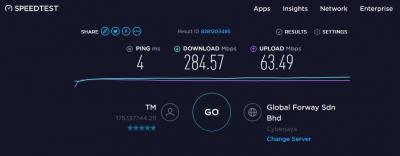
|
|
|
Dec 23 2019, 12:56 PM
Return to original view | IPv6 | Post
#78
|
|
Senior Member
4,333 posts Joined: Jan 2003
|
QUOTE(CrimsonKing @ Dec 22 2019, 04:56 PM) Why did you buy an Asus RT-AC88U when your old router works very well? Itchy backside.  |
|
|
Feb 4 2020, 11:12 PM
Return to original view | IPv6 | Post
#79
|
|
Senior Member
4,333 posts Joined: Jan 2003
|
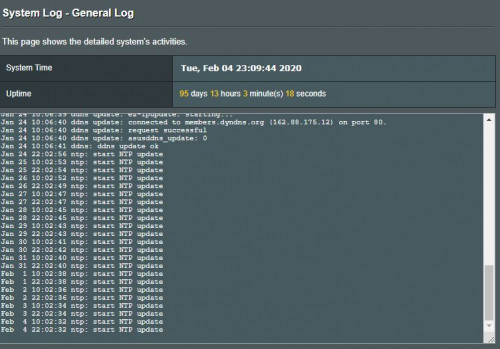 Mine is quite stable. |
| Change to: |  0.2029sec 0.2029sec
 0.37 0.37
 7 queries 7 queries
 GZIP Disabled GZIP Disabled
Time is now: 7th December 2025 - 07:25 PM |
 Quote
Quote