Welcome Guest ( Log In | Register )

5 Pages « < 2 3 4 5 >Bottom

Outline · [ Standard ] · Linear+

Home Networking ASUS Malaysia Networking User & Technical Support, Managed by ASUS Malaysia Representative

views
     
Jjuggler
post Apr 11 2020, 04:56 AM

Narcissistic Genius
******
Senior Member
1,341 posts

Joined: Dec 2016
QUOTE(jonathanwhm @ Apr 10 2020, 09:11 PM)
Anyone encountered the errors below? I am getting the errors after I completed the firmware upgraded this noon on my BRT-AC828. And one of the line was down after the firmware upgrade.

Apr 10 21:00:27 pppd[25817]: Timeout waiting for PADO packets
Apr 10 21:01:42 pppd[25817]: Timeout waiting for PADO packets
Apr 10 21:02:57 pppd[25817]: Timeout waiting for PADO packets
Apr 10 21:04:13 pppd[25817]: Timeout waiting for PADO packets
Apr 10 21:05:28 pppd[25817]: Timeout waiting for PADO packets
Apr 10 21:06:43 pppd[25817]: Timeout waiting for PADO packets
*
It seems like the BRT-AC828 unable to establish PPPoE connection or worst come to worst, your line is down currently. Does the previous firmware cause you such issue?
Jjuggler
post Apr 11 2020, 02:16 PM

Narcissistic Genius
******
Senior Member
1,341 posts

Joined: Dec 2016
QUOTE(jonathanwhm @ Apr 11 2020, 12:47 PM)
No such issue on previous firmware. Anyhow, I managed to fixed it by reset the router sweat.gif  sweat.gif
Thanks!
*
reseting the router after flashning new firmware is recommended to start everything from fresh. Well, I am glad that solves your problem. Enjoy your new ax router dude.
Jjuggler
post Apr 24 2020, 11:53 AM

Narcissistic Genius
******
Senior Member
1,341 posts

Joined: Dec 2016
QUOTE(beebee @ Apr 23 2020, 10:54 PM)
I was thinking of straight jump to RT-AC86U and should be enough for my usage and coverage or RT-AC66U is sufficient?
*
ax56u or ax3000 would be better choice over here - futureproof
ac86u with better processor although it lacks one core compared to the tri-core clocked at 1.5GHz for the two models on above, but still a good choice for wireless coverage - non-futureproof.

Avoid ac68u completely. Its an old router with old hardware. Not really recommended these days. Minimum AC86u is recommended.

This post has been edited by Jjuggler: Apr 24 2020, 11:56 AM
Jjuggler
post Apr 24 2020, 11:54 AM

Narcissistic Genius
******
Senior Member
1,341 posts

Joined: Dec 2016
deleted.

This post has been edited by Jjuggler: Apr 24 2020, 11:55 AM
Jjuggler
post May 12 2020, 06:57 AM

Narcissistic Genius
******
Senior Member
1,341 posts

Joined: Dec 2016
QUOTE(rosizzat1000 @ May 11 2020, 03:26 AM)

I just can’t digest of this newer router (ax56u) that comes in only 2 antennas as compared to older router that has a minimum of 3 / 4 antennas.

*
I can vouch that AX56U's wireless coverage way better than AC68U. I am an ex-AC68U user, the router with three-antennas.

Refer here for the answer towards the question above.
Jjuggler
post May 12 2020, 07:52 PM

Narcissistic Genius
******
Senior Member
1,341 posts

Joined: Dec 2016
QUOTE(rosizzat1000 @ May 12 2020, 03:01 PM)
Oh ok.. thanks for the reply bro.. yesterday I tested The Asus Blue Cave router and the performance was great.. Huge WiFi coverage!! Now don’t know wether to get Blue Cave or Ax56u.. haha
*
My suggestion only, because you're the one who can decide what is best for you. Go for AX56U or AX58U (also known as AX3000). AC routers are not relevant these days.
Jjuggler
post May 22 2020, 04:30 PM

Narcissistic Genius
******
Senior Member
1,341 posts

Joined: Dec 2016
QUOTE(dp82 @ May 22 2020, 11:26 AM)
Hi guys, im using RT-AC68U and i switch to 2.5g channel to have a better coverage. Lately i have been experiencing random WIFI disconnect (the whole wifi signal is gone) and it will auto reconnect after few seconds. I doubt it is the issue of the distance between router n my device. I had this issue when i was in my room and the router is just outside of my room.

Updated to latest firmware too. It is a brand new router. What could be the issue ya?

Another advise, should i enable both 2.4 & 5.0, so that my device will auto connect the best option? Earlier i disabled 5.0, coz the signal was very weak in some part of my house. And most of my devices are mobile.
*
You're not alone mate. The wireless coverage for AC68U is not good as it was before. The current best option is to enable both 5GHz and 2.4GHz. Pick the maximum channel width, i.e. 40MHz (you also can try to set either 20/40MHz or 40MHz) for 2.4GHz and 80MHz for 5GHz. The best channel for 2.4GHz are non-overlapping channels such as 1, 6 and 11. I always put on channel 11 while for the 5GHz, I always pick channel 149. It works for me well. It doesn't improve much, but it certainly better compared to stock settings, i.e. auto.
Jjuggler
post May 29 2020, 05:48 AM

Narcissistic Genius
******
Senior Member
1,341 posts

Joined: Dec 2016
QUOTE(dp82 @ May 22 2020, 08:38 PM)
Looks like i need to play around with the channels. I did try to enable both 2.4 & 5Ghz. But 1 thing i dont like is when i get weak signal for 5Ghz, it will auto route me to 2.4Ghz. I'll get a disconnect in between the switching process. Not so practical when i'm in the middle of Zoom call etc. Any workaround for this?
*
Hi mate. You have to play around with the 5GHz channels and use WI-Fi analyzer for android to scan through your home network to see which channel is the most congested. At least it will help. The signal strength of AC68U is not good as it used to be. So ya. hmm.gif
Jjuggler
post May 29 2020, 01:43 PM

Narcissistic Genius
******
Senior Member
1,341 posts

Joined: Dec 2016
QUOTE(dp82 @ May 29 2020, 11:39 AM)
Not many people use 5Ghz in my area. Probably <2. I can try to explore that. I was wondering whether i should switch on both 2.4Ghz n 5Ghz based on following requirements. Not sure if this can fully optimize my router.

Currently all devices are connected to 2.4Ghz. Sometimes all are connected to the router at one point of time.

2.4Ghz
Handphone x 2.
I am very mobile using this 2 devices. The wifi signal is super low in certain areas if i use 5ghz. So far the signal for 2.4ghz is ok.

5Ghz
Laptop x 2
Handphone x 1
Ipad x 1
Most of the above devices are very near to my router. Wifi signal is good.
*
» Click to show Spoiler - click again to hide... «


As mentioned by brother blacktubi, use both bands. Do note that 5GHz signal has limited coverage unlike 2.4GHz, this is where the mesh system was designed to overcome this limitation.
It can be too much of obstacles, i.e. walls from your device to the router that affects the 5GHz delivery.
Jjuggler
post Aug 8 2020, 02:34 AM

Narcissistic Genius
******
Senior Member
1,341 posts

Joined: Dec 2016
QUOTE(kskoay @ Aug 7 2020, 09:14 PM)
Still thinking which 1 to go - asus tuf ax3000 or asus ax3000
*
tuf ax3000
Jjuggler
post Aug 8 2020, 09:03 PM

Narcissistic Genius
******
Senior Member
1,341 posts

Joined: Dec 2016
QUOTE(kskoay @ Aug 8 2020, 07:11 AM)
I picked asus rt-ax3000, can get it with less than rm600, tuf ax3000 the cheapest I found still rm7xx...basically the spec between them are identical, the benefit for tuf is only focus on gaming (with game port & additional kind of QOS with help/stabilize for online gaming)...

Also bought the tplink tx3000e pcie card  tongue.gif
*
I vote for tuf-gaming ax3000 due to multiple vpn feature. It is a useful feature. That's why.
Jjuggler
post Sep 9 2020, 07:07 PM

Narcissistic Genius
******
Senior Member
1,341 posts

Joined: Dec 2016
QUOTE(xyz_cityhunter @ Sep 9 2020, 06:56 PM)
Hi AsusMy,

Planning upgrade from N12HP to AX56U, possible to port over the UNIFI user/password from the old to new?
*
Yes. That is just your PPPoE credentials. A good real world example will be logging into your facebook acc using a new laptop/PC from old laptop/PC. So ya, you can save your PPPoE credentials to be used in your new router.

EDIT: Just makesure to keep the credentials for future use, just as a safety precaution. biggrin.gif

This post has been edited by Jjuggler: Sep 9 2020, 07:08 PM
Jjuggler
post Sep 10 2020, 10:26 AM

Narcissistic Genius
******
Senior Member
1,341 posts

Joined: Dec 2016
QUOTE(xyz_cityhunter @ Sep 9 2020, 07:17 PM)
Well, how to do that? I know my FB password while I dunno my UNIFI password... tongue.gif
*
Refer to your unifi installation document (blue paper) or you can request from unifi itself. Just say you accidentally reset your router and need the credentials to set up the router back again. Or another simple method is to gain your PPPoE username and password through the wireless router admin panel (also you can refer to this thread - credit to bro soonwai, just in case) and its pretty simple if you follow the right guide especially if you're a novice user. Sorry for the delayed response mate. biggrin.gif
Jjuggler
post Sep 21 2020, 12:59 PM

Narcissistic Genius
******
Senior Member
1,341 posts

Joined: Dec 2016
QUOTE(tharmaraj @ Sep 18 2020, 10:30 AM)
now I'm having the same issue that someone reported here. I'm loosing connection to my WIFI 5GHZ connection even though I have change the channels numerous times on RT-AX56U. I bought this router a month ago. I have also provided feedback from the router interface. Please fix this issue ASAP I'm going mad now because I'm WFH and I need a reliable connection.
*
My old AC68U faced the same problem, unstable 5ghz band even with merlin fw flashed and died last week. Not only one model affected, I believe.

QUOTE(sHawTY @ Sep 18 2020, 03:43 PM)
Told you the AX56U is problematic
But ASUS refused to admit it, and surprise surprise, it's still on sale everywhere in Malaysia

How much more angry customers should there be until ASUS finally admit this & pull it back from sales?
Answer: ASUS Malaysia simply doesn't care. All they care about is profits
*
AX56U will undergo a proper patch process. However, I opt for deco m5 (read my reply to bro tharmaraj since deco m4 is too good as WAP already. The decision to switch to tp-link was made since the good reputation of deco series as WAP, and with its quad-core cpu, it will be a decent WAP for my edgerouter.
Jjuggler
post Feb 17 2021, 01:46 PM

Narcissistic Genius
******
Senior Member
1,341 posts

Joined: Dec 2016
Any idea on the actual date for the patches of DNSmasq vulnerabilities will be live for the public to download for the affected router models?
Jjuggler
post Feb 17 2021, 04:03 PM

Narcissistic Genius
******
Senior Member
1,341 posts

Joined: Dec 2016
QUOTE(ASUSmy @ Feb 17 2021, 02:01 PM)
Hi Jjuggler,

Most of the router models firmware can be downloaded from our websites. It is in beta version.

Thank you
*
My bad. I forget to mention official firmware. Pardon me for my language. I am not keen to use beta firmware which will be hassle for me to setup the router from scratch later on after so much customization has been done.
Jjuggler
post Mar 13 2021, 12:23 PM

Narcissistic Genius
******
Senior Member
1,341 posts

Joined: Dec 2016
QUOTE(jpong1 @ Mar 12 2021, 12:13 AM)
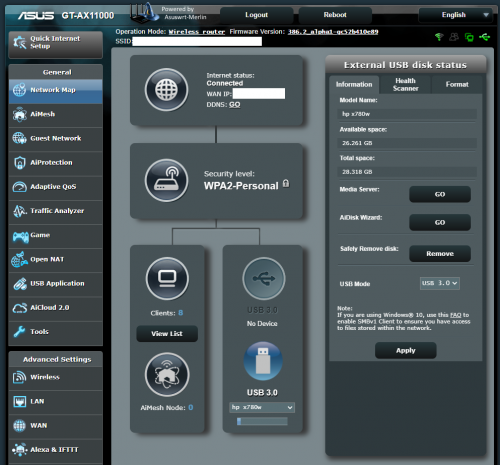
From a security point of view, it is not safe to use a USB port on a router (if implemented wrongly). However there are a few ways you can put a good use of the USB port apart from sharing printers or ext hdds.

user posted image

I mainly use my router's USB port to run skynet scripts.
Jjuggler
post Apr 7 2021, 02:16 AM

Narcissistic Genius
******
Senior Member
1,341 posts

Joined: Dec 2016
QUOTE(huruhara @ Apr 6 2021, 01:07 PM)
wow, ok juga..yup i dont use universal serial bus. rolleyes.gif
Lagi..any suggestion? other brand also ok, if permitted to mention here  rolleyes.gif

cheers..!
*
Mau jimat pi D brand or T brand. Nanti lepas setahun mungkin xkan dapat firmware patch (nanti kalau ada severe CVE, memang kampeni akan purax2 ignore. 'A' brand worth it la, cuma duit kena kikis lebih sikit untuk dpt a decent router. Lagipun beli yang ada support merlin. Tu je nasihat sy. nod.gif

This post has been edited by Jjuggler: Apr 7 2021, 02:17 AM
Jjuggler
post Apr 10 2021, 08:35 AM

Narcissistic Genius
******
Senior Member
1,341 posts

Joined: Dec 2016
QUOTE(supersaiyain @ Apr 10 2021, 06:49 AM)
Hi...I wish to buy a ax11000 then aimesh wirelessly with 2nos old gt-ac2900.
Will there any issue?

Thanks
*
Both supported officially by Asus-Merlin. Should be fine then. I can't give comment on the aimesh functionality since I am not using it. Usually merlin firmware slightly stable over stock firmware.
Jjuggler
post May 20 2021, 07:18 AM

Narcissistic Genius
******
Senior Member
1,341 posts

Joined: Dec 2016
QUOTE(splinter @ May 19 2021, 11:47 PM)
I see. Lastly would like Clarify if the model RT AC86U AC2900 is the support model for expressvpn? As expressvpn website dint show compatible this model in list.

https://s.lazada.com.my/s.2ZmAS
Edit :
The OpenVPN manual configuration does not offer the same security and privacy benefits as the ExpressVPN app. If your router does not support AES-NI (e.g., Asus RT-AX88U and RT-AC86U), you may experience occasional speed
Does it affected?
*
Beli AX86U kalau ada budget or buy any asus router in your budget and flash to asus-merlin. Merlin firmware configuration for vpn is far more advance than the stock version. Makesure you buy the router supported by asus-merlin. Flashing to merlin firmware wont break or harm your router. It gives more superiority compared to the stock version. Please refer to the image provided below for your referrence. VPN settings for GT-Ax11000 (flashed with asus-merlin)

https://pictr.com/image/BPihQJ

Kelebihan merlin software:

[1] - Kill-switch - route specific client through a special vpn profile
[2] - Can add more vpn profile - sama macam itu fungsi Multi VPN (TUF-punya naming scheme) or VPN Fusion (ROG punya naming scheme)

EDIT:
I am personally using Surfshark. Planning to add more vpn profile in the future (probably express)

This post has been edited by Jjuggler: May 20 2021, 07:22 AM

5 Pages « < 2 3 4 5 >Top
 

Change to:
| Lo-Fi Version
0.0406sec    0.51    7 queries    GZIP Disabled
Time is now: 9th December 2025 - 10:54 AM