Welcome Guest ( Log In | Register )

826 Pages « < 223 224 225 226 227 > » Bottom

Outline · [ Standard ] · Linear+

Home Networking ASUS Malaysia Networking User & Technical Support, Managed by ASUS Malaysia Representative

views
     
KIntos
post Mar 1 2016, 01:39 PM

Regular
******
Senior Member
1,132 posts

Joined: Dec 2008
Hi ASUSmy,

Where i could buy asus powerline adaptor as stated below in klang valley?

PL-X51P/PL-X52P 500 Mbps 4 Gigabit ports powerline adapter kit

olivur
post Mar 1 2016, 09:50 PM

ollie ollie oxen free
******
Senior Member
1,277 posts

Joined: Jul 2011
ASUSmy

using my old rtn56u as a repeater and i noticed that the update exclamation mark keeps blinking while i was using firmware 3.0.0.4.376.3879

tried using the beta firmware which is 3.0.0.4.378.4850 and it's still blinking

please advise, thank you :)
yfyap69
post Mar 2 2016, 10:10 PM

Enthusiast
*****
Senior Member
852 posts

Joined: Mar 2005
From: Penang


Hi, I have RT-AC68U router and just update the firmware to3.0.04.380_1842. However after update, my 2.4GHz wifi is not working anymore. Only 5 GHz worked. MY current setting is :

Wireless mode : Auto
b/g protection : Yes
Channel bandwidth : 20 Hz
Control channel : Auto
Authentication method : WPA2-Personnal
WPA encryption : AES
Protected Management Frame : Disable
Network key rotation interval : 3600

I tried downgrade back to old firmware but still not working

This post has been edited by yfyap69: Mar 2 2016, 10:11 PM
myeddylim
post Mar 2 2016, 10:50 PM

Getting Started
**
Junior Member
189 posts

Joined: Feb 2009

hello Asusmy, any latest firmware for RTN12 C1 with unifi? minhe is 2.1.1.1.33-3unifi, having problem with disconnection.thanks

This post has been edited by myeddylim: Mar 2 2016, 10:50 PM
G K Lai
post Mar 3 2016, 03:24 PM

Enthusiast
*****
Senior Member
839 posts

Joined: Aug 2009


Hi ASUSmy

I'm using RT-AC55UHP, I realized whenever the router boot up, my default browser will pops up and open this page (http://www.msn.com/en-my/?ocid=wispr), is there any way to disable this?

Thanks in advanced! thumbsup.gif
voncrane
post Mar 3 2016, 03:36 PM

Noir et fier!
*******
Senior Member
7,120 posts

Joined: Oct 2011
From: Wakanda


QUOTE(G K Lai @ Mar 3 2016, 03:24 PM)
Hi ASUSmy

I'm using RT-AC55UHP, I realized whenever the router boot up, my default browser will pops up and open this page (http://www.msn.com/en-my/?ocid=wispr), is there any way to disable this?

Thanks in advanced!  thumbsup.gif
*
Check your system for malware, etc.. Also check the browser's default startup page settings, change it.. I.e to say "blank page". Very unlikely it's the fault of the router.

This post has been edited by voncrane: Mar 3 2016, 03:37 PM
G K Lai
post Mar 3 2016, 03:55 PM

Enthusiast
*****
Senior Member
839 posts

Joined: Aug 2009


QUOTE(voncrane @ Mar 3 2016, 03:36 PM)
Check your system for malware, etc.. Also check the browser's default startup page settings, change it.. I.e to say "blank page". Very unlikely it's the fault of the router.
*
Thanks for help, voncrane, and indeed my browser was set to show "Blank page" on startup (how did you know? tongue.gif ).

I ask here because the very first time I install the router for setup, my browser automatically open Asus' router setup page, I also don't know why, that's the reason I suspect this is a "call" from the router. Anyway, I'll scan my PC for any malware later... (finger crossed).

Thanks again and have a great day, voncrane. icon_rolleyes.gif
voncrane
post Mar 3 2016, 06:26 PM

Noir et fier!
*******
Senior Member
7,120 posts

Joined: Oct 2011
From: Wakanda


QUOTE(G K Lai @ Mar 3 2016, 03:55 PM)
Thanks for help, voncrane, and indeed my browser was set to show "Blank page" on startup (how did you know?  tongue.gif ).

I ask here because the very first time I install the router for setup, my browser automatically open Asus' router setup page, I also don't know why, that's the reason I suspect this is a "call" from the router. Anyway, I'll scan my PC for any malware later... (finger crossed).

Thanks again and have a great day, voncrane.  icon_rolleyes.gif
*
You r welcome.. Did a bit of reading around and it appears that there's a bug that mimics such browser launching behavior.. tongue.gif. From what I've gathered, it's a firmware bug. Perhaps check for an updated firmware & if you've recently upgraded (+ the required reset), try rolling back a version or 2.. biggrin.gif

Edit: Start here.

This post has been edited by voncrane: Mar 3 2016, 06:28 PM
blacktubi
post Mar 3 2016, 09:05 PM

-
Group Icon
Elite
8,409 posts

Joined: Jul 2008

QUOTE(yfyap69 @ Mar 2 2016, 10:10 PM)
Hi, I have RT-AC68U router and just update the firmware to3.0.04.380_1842. However after update, my 2.4GHz wifi is not working anymore. Only 5 GHz worked. MY current setting is :

Wireless mode : Auto
b/g protection : Yes
Channel bandwidth : 20 Hz
Control channel : Auto
Authentication method : WPA2-Personnal
WPA encryption : AES
Protected Management Frame : Disable
Network key rotation interval : 3600

I tried downgrade back to old firmware but still not working
*
Have you try a factory reset?
MtV
post Mar 3 2016, 10:04 PM

Starry Starry Skies
******
Senior Member
1,685 posts

Joined: Jan 2003
From: Bandar Puchong Jaya


Hi all , i just bought rt n12hp for my maxis adsl, upon plug in and set up everything. I cant access internet, i tried the network diagnose and it able to ping to google.com.

I have change the wan ip to 192.168.2.1 and clone MAC. what else do i need to configure?
G K Lai
post Mar 3 2016, 11:46 PM

Enthusiast
*****
Senior Member
839 posts

Joined: Aug 2009


QUOTE(voncrane @ Mar 3 2016, 06:26 PM)
You r welcome.. Did a bit of reading around and it appears that there's a bug that mimics such browser launching behavior.. tongue.gif.  From what I've gathered, it's a firmware bug. Perhaps check for an updated firmware & if you've recently upgraded (+ the required reset), try rolling back a version or 2..  biggrin.gif

Edit: Start here.
*
Hey! How did you do that? Before I post here, I tried searching high and low but just can't find anything close to this kind of "feature", and you just show the page to me!!! thumbup.gif

Due to the very informative link you provided, I think I have a clue which direction to dig into... laugh.gif
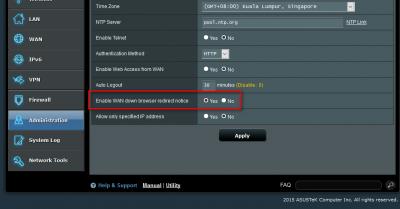
Since the discussion mentioned "whenever there's a connectivity issue", I think this particular "feature" below are doing the trick:

» Click to show Spoiler - click again to hide... «


The only different is, instead of "detailing the problem", mine was showing me a Microsoft page. doh.gif

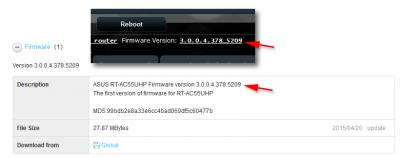
And, for your information, the router already pre-installed with the latest firmware, in fact, Asus only have 1 version of firmware at their support page:

» Click to show Spoiler - click again to hide... «


Thank you very much again because I've finally found out why is this happened to me. Please accept my worship. notworthy.gif

**************************************************************************************************
EDIT:
Another thing: One of the reason why I choose Asus router was because I saw this thread and is maintain by Asus people,
hoping that I can get support easier, but I only realized this is not the case... sweat.gif Luckily voncrane is so helpful and keep
helping around. thumbsup.gif


**************************************************************************************************

This post has been edited by G K Lai: Mar 3 2016, 11:56 PM

ypkhoo
post Mar 4 2016, 12:04 AM

New Member
*
Junior Member
32 posts

Joined: Sep 2008


Hi, anyone want to let go RT-AC56U, do PM.thx

voncrane
post Mar 4 2016, 12:33 AM

Noir et fier!
*******
Senior Member
7,120 posts

Joined: Oct 2011
From: Wakanda


QUOTE(G K Lai @ Mar 3 2016, 11:46 PM)
Hey! How did you do that? Before I post here, I tried searching high and low but just can't find anything close to this kind of "feature", and you just show the page to me!!!  thumbup.gif

Due to the very informative link you provided, I think I have a clue which direction to dig into...  laugh.gif
Since the discussion mentioned "whenever there's a connectivity issue", I think this particular "feature" below are doing the trick:

» Click to show Spoiler - click again to hide... «


The only different is, instead of "detailing the problem", mine was showing me a Microsoft page.  doh.gif

And, for your information, the router already pre-installed with the latest firmware, in fact, Asus only have 1 version of firmware at their support page:

» Click to show Spoiler - click again to hide... «


Thank you very much again because I've finally found out why is this happened to me. Please accept my worship. notworthy.gif

**************************************************************************************************
EDIT:
Another thing: One of the reason why I choose Asus router was because I saw this thread and is maintain by Asus people,
hoping that I can get support easier, but I only realized this is not the case...  sweat.gif  Luckily voncrane is so helpful and keep
helping around.  thumbsup.gif


**************************************************************************************************
*
It's all good.. We learn everyday.. biggrin.gif notworthy.gif
G K Lai
post Mar 4 2016, 12:35 AM

Enthusiast
*****
Senior Member
839 posts

Joined: Aug 2009


QUOTE(voncrane @ Mar 4 2016, 12:33 AM)
It's all good.. We learn everyday..  biggrin.gif  notworthy.gif
*
Haha... finally got a proper helpful info after a test reboot just now. icon_idea.gif

Attached Image
voncrane
post Mar 4 2016, 12:50 AM

Noir et fier!
*******
Senior Member
7,120 posts

Joined: Oct 2011
From: Wakanda


QUOTE(G K Lai @ Mar 4 2016, 12:35 AM)
Haha... finally got a proper helpful info after a test reboot just now.  icon_idea.gif

Attached Image
*
Aha, just needed a little push in the right direction, that's all.. Troubleshooting sucks, console.gif.. hope the issue gets resolved.. Funny, I've been following this thread for quite awhile & yet to buy the ASUS RT-AC55UHP that brought me here in the first place.. Still evaluating certain wants & needs vs price, pending a Unifi plan upgrade in a couple of months.
pl95077
post Mar 4 2016, 01:04 PM

Getting Started
**
Junior Member
245 posts

Joined: Feb 2010
QUOTE(myeddylim @ Mar 2 2016, 11:50 PM)
hello Asusmy, any latest firmware for RTN12 C1 with unifi? minhe is 2.1.1.1.33-3unifi, having problem with disconnection.thanks
*
Please find this link:
https://www.asus.com/Networking/RTN12_C1/HelpDesk_Download/

ASUS RT-N12C1 Firmware version 3.0.0.4.376.3754
-Fixed infosvr security issue.
-Fixed Cross-site request forgery security issue
pl95077
post Mar 4 2016, 01:05 PM

Getting Started
**
Junior Member
245 posts

Joined: Feb 2010
QUOTE(KIntos @ Mar 1 2016, 02:39 PM)
Hi ASUSmy,

Where i could buy asus powerline adaptor as stated below in klang valley?

PL-X51P/PL-X52P 500 Mbps 4 Gigabit ports powerline adapter kit
*
i think ASUS don't sell this thing in Malaysia la......
yfyap69
post Mar 4 2016, 01:51 PM

Enthusiast
*****
Senior Member
852 posts

Joined: Mar 2005
From: Penang


QUOTE(blacktubi @ Mar 3 2016, 09:05 PM)
Have you try a factory reset?
*
Thanks for the advise. Problem solved. Root cause is due to NAT Acceleration need to be enable. There is a bug in the latest firmware. If you disable the NAT acceleration, this will happen.
chowtf
post Mar 4 2016, 02:26 PM

New Member
*
Newbie
1 posts

Joined: Mar 2016
I got the new RT-AC88U.
I followed Blacktubi website instructions to set up as wireless router, connected to Unifi modem. http://www.blacktubi.com/unifi/setup-asus-router-for-unifi/

But i keep getting timeout message.

I tested the same steps for existing DLink router, and it worked.

Appreciate any help.


Attached thumbnail(s)
Attached Image
anything98
post Mar 4 2016, 09:08 PM

Getting Started
**
Junior Member
96 posts

Joined: Jun 2009
Hi Asus,

Part 1

I recently bought Asus DSL-N12U_c1 (the latest revision confirmed), and I would like to ask how to check wireless clients via 192.168.1.1 (those who connected to my internet).

Or the modem does not allow this function?

[Solved] Sorry for my stupidity, I just found out that there is a button on the Network Map which allows me to monitor who is actually connected to the modem. rclxm9.gif

Part 2

Further to that, does the modem need a hard reset after its firmware is updated? (If so, I don't really get it why it needs to be reseted hardly).*

*I have updated and configured my newly bought DSL-N12U_c1 but I did not reset it except reboot. And I have received the same or similar info as posted by G K Lai, at Post #4494, above.

But I just closed it, then tried to connect to websites and it worked so I don't really care what its about.

Please enlighten me on this.

Thanks

This post has been edited by anything98: Mar 5 2016, 07:03 PM

826 Pages « < 223 224 225 226 227 > » Top
 

Change to:
| Lo-Fi Version
0.0252sec    0.44    6 queries    GZIP Disabled
Time is now: 8th December 2025 - 01:19 AM