Outline ·
[ Standard ] ·
Linear+
Home Networking ASUS Malaysia Networking User & Technical Support, Managed by ASUS Malaysia Representative
|
XeactorZ
|
 Mar 18 2021, 01:09 AM Mar 18 2021, 01:09 AM
|

|
QUOTE(afif92 @ Mar 18 2021, 12:53 AM) If you are already ok with that firmware, just stick with it. If using RT-AX3000, I will suggest to use Merlin. Will continue stick for current firmware, until next firmware nobody complaint about it then will update  Btw I use tuf-ax3000, reason being I need to use vpn for multiple device |
|
|
|
|
|
XeactorZ
|
Mar 18 2021, 06:16 PM
|
|
|
QUOTE(afif92 @ Mar 18 2021, 01:51 AM) In Merlin, you can do it too but with more advanced function. Too bad already bought tuf-ax3000 |
|
|
|
|
|
XeactorZ
|
Mar 20 2021, 04:50 PM
|
|
|
QUOTE(blacktubi @ Mar 20 2021, 01:55 PM) What VPN you use and what is the max speed you can get while connected to the VPN? I use nordvpn, connect to SG server Can get around 200mbps, as I am using unifi 300mbps |
|
|
|
|
|
XeactorZ
|
Mar 21 2021, 06:10 PM
|
|
|
QUOTE(joeyrm @ Mar 21 2021, 03:04 PM) Your reason for getting TUF-AX3000 is exactly the same as mine. I actually swapped from RT-AX3000 just for VPN Fusion coz the Merlin firmware was not stable enough to perform multiple VPN connections. Wow, luckily I bought tuf-ax3000 Another reason I get tuf-ax3000 instead rt-ax3000 instead as I bought it around RM 400+ during last year 11th November |
|
|
|
|
|
XeactorZ
|
Mar 21 2021, 10:56 PM
|
|
|
QUOTE(blacktubi @ Mar 21 2021, 09:28 PM) Is that with NordVPN running via the OpenVPN client feature directly on the ASUSWRT firmware? If that's the case, then 200Mbps is surprisingly quick. Nope, 200mbps is connected using nordvpn sofware on pc If use openvpn client feature on asus router, speed normally around 50mbps As I need to download the config from nordvpn website, and it doesn't allow me to choose which server Since on computer, if I notice this SG server is slow, then I switch to another one  |
|
|
|
|
|
XeactorZ
|
Mar 23 2021, 12:29 AM
|
|
|
QUOTE(afif92 @ Mar 22 2021, 10:15 PM) Actually you can download your preferred server by changing server name at download link I go to this >> https://nordvpn.com/servers/tools/?_ga=2.82...8938.1616430501As mentioned from nordvpn FAQ website: https://support.nordvpn.com/Connectivity/Ro...are-AsusWRT.htmI only able to change country, server type and protocol only When click show available protocol, it list down those udp, tcp, etc ... QUOTE(blacktubi @ Mar 22 2021, 10:38 PM) I happen to found this link recently. Used to do the manual way previously. https://nordvpn.com/ovpn/Wow this is much better |
|
|
|
|
|
XeactorZ
|
Mar 28 2021, 04:44 PM
|
|
|
QUOTE(moskau12 @ Mar 28 2021, 01:21 PM) dear sifu, I plan to extend my coverage in my house to cater my cctv outside. What is the extender or aimesh that compatible with RT-AX3000? Cheap one solution if available Thanks try rt-ax55? I recommend this as this is the cheapest wifi 6 router with aimesh compatible |
|
|
|
|
|
XeactorZ
|
Mar 28 2021, 07:17 PM
|
|
|
QUOTE(kkm @ Mar 28 2021, 06:06 PM) Missed your chance, could be bought for rm250 during Lazada sale yesterday. I also missed out to get a mouse yesterday Now can wait for upcoming 4th April Shopee sales |
|
|
|
|
|
XeactorZ
|
May 2 2021, 03:13 AM
|
|
|
QUOTE(dadah @ May 1 2021, 11:19 PM) i am still having the problematic bug with the router. I cannot get to the router page with 192.168.1.1  but the router.asus bug is fixed. download asus discovery utility then you will know your router ip address https://www.asus.com/support/FAQ/1037094/for my case, i cannot go router.asus.com, keep show "This site can’t be reached" |
|
|
|
|
|
XeactorZ
|
Jun 7 2021, 08:01 PM
|
|
|
for those using tuf ax3000, did you updated to version 3.0.0.4.386.43241? Currently I still using version 3.0.0.4.384.10177 |
|
|
|
|
|
XeactorZ
|
Jul 16 2021, 04:27 PM
|
|
|
QUOTE(nikrizal @ Jul 16 2021, 02:58 PM) Currently I’m using TUF AX3000, it works well. Just lately I found some blindspot especially in the farthest part of my house. Will zenwifi XD4 good enough? I plan to use ethernet backhaul. Thanks Why don't consider get RT-AX55 or 56 to make the aimesh? |
|
|
|
|
|
XeactorZ
|
Jul 16 2021, 11:48 PM
|
|
|
QUOTE(nikrizal @ Jul 16 2021, 08:06 PM) Oh, never thought about that! They’re much cheaper, right? Ya, can wait for upcoming 8.8 sales  |
|
|
|
|
|
XeactorZ
|
Aug 7 2021, 10:10 PM
|
|
|
QUOTE(Reyz @ Aug 7 2021, 05:52 PM) anyone know how exactly to use the vpn fusion?let say i want to use surfshark vpn on my iphone then i need to add all my connnected device into exception list even 30 device connected and just left my iphone not into list? 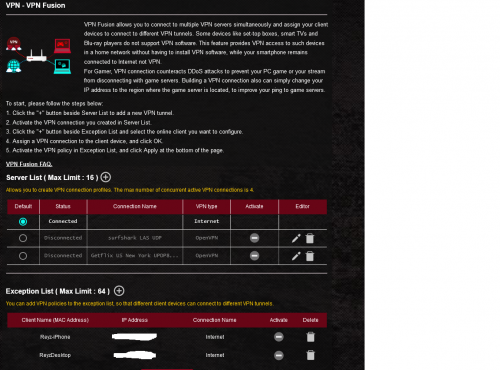 1st download the config, then add into router After added into router then activate it Then on bottom there, exception list, find your iphone mac address, then on connection there change to VPN But I not recommend to do so as with this way VPN speed very slow, better use surfshark app directly connect Although connect using router count as 1 user |
|
|
|
|
|
XeactorZ
|
Jul 21 2023, 10:12 AM
|
|
|
Been using TUF-AX3000 since year 2020 with unifi 300mbps package
All device can get around 200+ mbps speed with Wi-Fi 5
Since now I had more and more device support Wi-Fi 6, should I turn on Wi-Fi 6 on my router?
|
|
|
|
|
|
XeactorZ
|
Jul 21 2023, 11:27 AM
|
|
|
QUOTE(blacktubi @ Jul 21 2023, 11:19 AM) No harm to turn on Wi-Fi 6, in my testing it doesn't seem to slow down speed for my Wi-Fi 5 / 802.11ac devices. But, I will turn off Wi-Fi 6 on 2.4GHz band. Some of my smart home devices don't play well with Wi-Fi 6. No idea can turn off Wi-Fi 6 2.4Ghz band or not, let me try tonight If not mistaken only can select enable or disable Wi-Fi 6 only  |
|
|
|
|
|
XeactorZ
|
Jul 21 2023, 12:52 PM
|
|
|
QUOTE(blacktubi @ Jul 21 2023, 11:48 AM) You can't disable them separately if you use smart connect function I am using smart connect, 2.4Ghz and 5Ghz as same SSID So I had to turn it off |
|
|
|
|
|
XeactorZ
|
Oct 8 2023, 03:08 PM
|
|
|
Since Unifi thread super fast responce which I might miss to read some post, hence I ask here since I'm using Asus TUF-AX3000 As I am using swu 3.0 300mbps, 1st year speed upgrade to 500mbps But all my devices on Wi-Fi getting around 300mbps, max is around 350+mbps, on LAN no issue getting 500+mbps Should I turn on 160Mhz then set channel bandwidth for 5Ghz to 20/40/80/160Mhz? 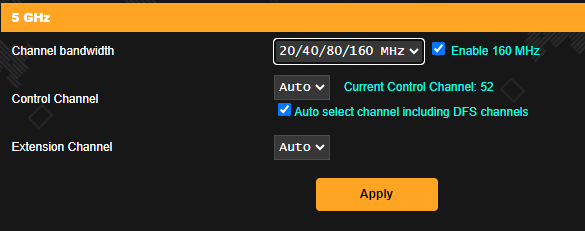 *I am using smart connect which both 2.4Ghz and 5Ghz using same SSID and didn't turn on 160Mhz This post has been edited by XeactorZ: Oct 8 2023, 03:09 PM |
|
|
|
|
|
XeactorZ
|
Oct 9 2023, 03:49 PM
|
|
|
QUOTE(PRSXFENG @ Oct 8 2023, 07:25 PM) I suppose it doesn't hurt to try and see if it makes any difference? QUOTE(WaNaWe900 @ Oct 8 2023, 10:48 PM) I'm usually get >480Mbps on wifi with RT-AX86U and yes tick the 160Mhz in setting  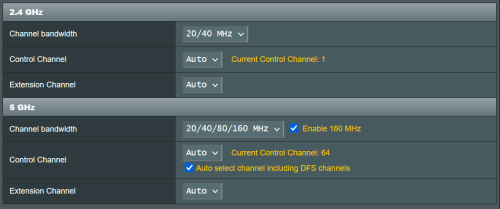 Try enable and speed seems more worse Let me monitor for few more days |
|
|
|
|
|
XeactorZ
|
Oct 10 2023, 10:49 PM
|
|
|
does tuf-ax4200 got huge difference against my current tuf-ax3000? As I noticed even I had turn on 160Mhz, wi-fi speed seems worse or should straight go for tuf-ax6000? |
|
|
|
|
|
XeactorZ
|
Oct 14 2023, 10:15 PM
|
|
|
QUOTE(shinjite @ Oct 14 2023, 10:07 PM) I will setup back my RT-AX55 later tonight to reconfirm. If my old one can get max speed up close, then it's the new router 😂 Tried ookla, it goes like 2 patterns most of the time (up close to the router), 1) it bursts to 4xx mbps then it suddenly hits a big drop till 2xx then slowly goes back to 3xxmbps. 2) it bursts till 3xx and just stays there Other than that, wifi is pretty much stable. Unlike those refurbished US sets 🤣 I using TUF-AX3000 since year 2020, since sign up SWU 3.0 offer me 1st year 500mbps, mostly also getting 400+ mbps via Wi-Fi (test in front my router, using my s23 ultra or iphone 12 pro max also same) via LAN no issue, on desktop which using intel ax211 also getting about the same |
|
|
|
|



 Quote
Quote
 0.0499sec
 0.46
0.46
 7 queries
 GZIP Disabled