Welcome Guest ( Log In | Register )

5 Pages < 1 2 3 4 5 >Bottom

Outline · [ Standard ] · Linear+

Home Networking ASUS Malaysia Networking User & Technical Support, Managed by ASUS Malaysia Representative

views
     
Jjuggler
post Mar 20 2020, 02:48 PM

Narcissistic Genius
******
Senior Member
1,341 posts

Joined: Dec 2016
QUOTE(yongtjunkit @ Mar 20 2020, 10:24 AM)
Does this count as an overload?
Usually only see below 10% cpu usage for both CPU cores, today suddenly see high cpu usage... and the web UI is slow
Is there any way to see what is hogging the CPU resources?
Router: RT-AC68U
user posted image
*
If you good at ssh procedure, you can enter "top" comment on the terminal to find out which background program uses/utilises most cpu resources. Usually, as mentioned by bro/sis jusbella, torrenting is one of the cause, or a minor bug in the recent released firmware (only if you're using asuswrt). Try to reboot the router and see how it performs. Try to flash into merlin firmware to see if your cpu spikes or remains below 10% in its idle state. In some best cases, factory reset the router to see if the problem persists. nod.gif
Jjuggler
post Mar 20 2020, 03:20 PM

Narcissistic Genius
******
Senior Member
1,341 posts

Joined: Dec 2016
QUOTE(WaNaWe900 @ Mar 20 2020, 03:08 PM)
Nope not using any VPN currently  mega_shok.gif
yes the apps show the IP but when still cannot  icon_question.gif
*
Hmm. Usually the vpn program is culprit here since most of the time (perhaps due to kill-switch or invinsibility on LAN feature). Clear cache on your standard browsers (or use incognito mode) or use a different browser than chrome, i.e. firefox (private window). In some best cases, factory set your router. You can follow the guide provided by ASUS here.
Jjuggler
post Mar 20 2020, 03:45 PM

Narcissistic Genius
******
Senior Member
1,341 posts

Joined: Dec 2016
QUOTE(yongtjunkit @ Mar 20 2020, 03:33 PM)
I wonder what process is this?
user posted image
*
A few users of AC68U faced this problem already as discussed here. It is weird when I don't face such problem before. hmm.gif Even loaded with a few scripts on my ac68u, the cpu still stays idle below than 10%. Have you tried to reset your router mate?
Jjuggler
post Mar 20 2020, 03:46 PM

Narcissistic Genius
******
Senior Member
1,341 posts

Joined: Dec 2016
QUOTE(WaNaWe900 @ Mar 20 2020, 03:40 PM)
Just notice that the uninstalled VPN left a network connection setting... so removed it and walla  thumbup.gif  thumbup.gif  thumbup.gif  thanks guys
*
Haha. I guessed it so. Haha. Enjoy mate. Hope you have wonder #WFM ahead. Stay safe. rclxms.gif
Jjuggler
post Mar 20 2020, 05:02 PM

Narcissistic Genius
******
Senior Member
1,341 posts

Joined: Dec 2016
QUOTE(WaNaWe900 @ Mar 20 2020, 03:53 PM)
Indeed #WFH this round  whistling.gif  whistling.gif  whistling.gif
*
Haha.

QUOTE(yongtjunkit @ Mar 20 2020, 04:22 PM)
My first time encountering this issue, factory reset this router on Tuesday already
*
Are you by any chance using stock firmware? Try to flash to merlin firmware and see if it helps.
Jjuggler
post Mar 20 2020, 07:30 PM

Narcissistic Genius
******
Senior Member
1,341 posts

Joined: Dec 2016
QUOTE(yongtjunkit @ Mar 20 2020, 05:26 PM)
Yup, stock firmware... My only issue with merlin is somehow internal DNS doesn't work properly.... I'm using Pi-Hole as my DNS
*
One small clarification from your side, before you update to the latest firmware, is your router cpu usage graph, high?
Jjuggler
post Mar 20 2020, 07:58 PM

Narcissistic Genius
******
Senior Member
1,341 posts

Joined: Dec 2016
QUOTE(yongtjunkit @ Mar 20 2020, 07:52 PM)
Nope( I recall it being pretty low on usage), the latest firmware I’m running is the one that protects against the krook attack
*
Then you may report to ASUSmy regarding this. Since this is more into a firmware issue. If the previous firmware don't really cause a huge spike while the newer one does, then there is bug in the firmware that needed to be addressed by the developer itself, immediately.

This post has been edited by Jjuggler: Mar 20 2020, 07:58 PM
Jjuggler
post Mar 20 2020, 08:46 PM

Narcissistic Genius
******
Senior Member
1,341 posts

Joined: Dec 2016
QUOTE(yongtjunkit @ Mar 20 2020, 08:01 PM)
Is it possible to downgrade the firmware for the time being, or maybe I should try factory resetting the router to make sure that I didn't messed up configuring the router?
*
Yes. You can. Proceed with normal method of upgrading the firmware. biggrin.gif
Jjuggler
post Mar 20 2020, 09:04 PM

Narcissistic Genius
******
Senior Member
1,341 posts

Joined: Dec 2016
QUOTE(yongtjunkit @ Mar 20 2020, 08:51 PM)
I’m assuming after downgrading, it’s best to reset the router?
*
First monitor first if the problem were solved. If not, reset the router.
Jjuggler
post Mar 21 2020, 12:30 PM

Narcissistic Genius
******
Senior Member
1,341 posts

Joined: Dec 2016
QUOTE(yongtjunkit @ Mar 21 2020, 07:54 AM)
A factory reset significantly reduced the router CPU usage, still got spikes from time to time but not as high as it used to maintain roughly at least 90% of cpu usage

user posted image
*
The the unit running on the latest firmware or the previous firmware? Factory reset tends to solve the problem always, it is just, most of us quite hesitate to choose it as an option since 'malas' want to reconfigure everything from scratch. I do understand that feeling. biggrin.gif
Jjuggler
post Mar 21 2020, 12:58 PM

Narcissistic Genius
******
Senior Member
1,341 posts

Joined: Dec 2016
QUOTE(yongtjunkit @ Mar 21 2020, 12:56 PM)
Latest firmware, yup.... actually feel malas to do it but no choice
*
Im glad. Do update us if any prob persists near in the future. biggrin.gif
Jjuggler
post Mar 21 2020, 05:31 PM

Narcissistic Genius
******
Senior Member
1,341 posts

Joined: Dec 2016
QUOTE(WaNaWe900 @ Mar 21 2020, 05:17 PM)
So like most gadget... Factory reset do resolve something ya  thumbup.gif will kept that in mind too
You got that right bro. Actualy there are a few ways to reduce the time taken to solve a problem if we play our part first in troubleshooting the problem before (most of the time, factory reset does the trick) seeking for the helpdesk.

This post has been edited by Jjuggler: Mar 21 2020, 05:32 PM
Jjuggler
post Mar 21 2020, 06:33 PM

Narcissistic Genius
******
Senior Member
1,341 posts

Joined: Dec 2016
QUOTE(WaNaWe900 @ Mar 21 2020, 06:01 PM)
Also in my case this group member being supportive too... luckily no need to factory reset  notworthy.gif  notworthy.gif  notworthy.gif
We all learning bro. Nothing wrong if sharing the knowledge together. That's the purpose of this and every other forums out there. Sharing knowledge. biggrin.gif
Jjuggler
post Mar 23 2020, 01:13 PM

Narcissistic Genius
******
Senior Member
1,341 posts

Joined: Dec 2016
QUOTE(hongli.11.hongli @ Mar 23 2020, 12:09 AM)
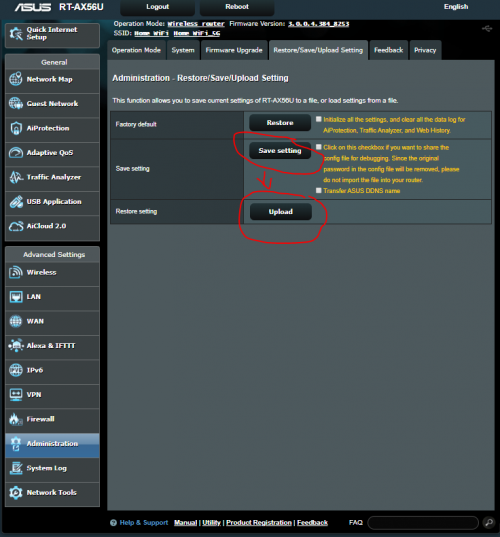
Use the save setting, I remember when I change my previous ASUS router to RT-AX56U, I just restored what I back up from previous router to new router, It work perfectly, you can try in in future.

user posted image
*
I won't advise to do such act especially for novice users. This is because the purpose of factory reset is to change all the values to its factory default settings in the firmware and yes, it is a 'leceh' process of setting up everything once again so most of us skip from saving the settings and reconfigure everything from scratch. By restoring the saved configuration (settings) may cause trouble in the future. If you configure the settings correctly and import it after factory reset, then it shouldn't be a problem at all.

Jjuggler
post Mar 27 2020, 08:20 PM

Narcissistic Genius
******
Senior Member
1,341 posts

Joined: Dec 2016
QUOTE(yongtjunkit @ Mar 27 2020, 07:26 PM)
An update, the issue came back again, didn't mess with the router... somehow it went up on its own
ASUSmy is this a known issue with this firmware?
Router: Asus RT-AC68U
firmware version: 3.0.0.4.385_20253
user posted image
*
Hi there mate. Thank you for your update. However, I am running asus-merlin with scripts (Diversion + Skynet + Uptime monitoring + speedtest). This is my cpu reading.

user posted image

QUOTE(Jjuggler @ Mar 20 2020, 07:58 PM)
Then you may report to ASUSmy regarding this. Since this is more into a firmware issue. If the previous firmware don't really cause a huge spike while the newer one does, then there is bug in the firmware that needed to be addressed by the developer itself, immediately.
*
I believe it should be a firmware issue (bugs). Don't worry mate, you're not alone as discussed in a dedicated ASUS RT-AC68U Firmware version 3.0.0.4.385.20253 thread, here. Downgrading towards the previous firmware solves the issue. Just use the feedback feature through the asuswrt panel to submit your report. nod.gif

This post has been edited by Jjuggler: Mar 27 2020, 08:23 PM
Jjuggler
post Mar 27 2020, 08:35 PM

Narcissistic Genius
******
Senior Member
1,341 posts

Joined: Dec 2016
QUOTE(yongtjunkit @ Mar 27 2020, 08:33 PM)
I see, thanks for letting me know that's I'm not the only one experiencing this issue
*
If downgrading to the previous firmware gives you good result, then it is a bug issue. You're welcome mate.
Jjuggler
post Mar 27 2020, 08:36 PM

Narcissistic Genius
******
Senior Member
1,341 posts

Joined: Dec 2016
QUOTE(boxsystem @ Mar 27 2020, 08:34 PM)
Waiting for my AX3000 to be integrated together with AC86u and AC68u. Hopefully, things will go well.
*
I am more interested to get the AX86U. tongue.gif
Jjuggler
post Mar 27 2020, 08:58 PM

Narcissistic Genius
******
Senior Member
1,341 posts

Joined: Dec 2016
QUOTE(yongtjunkit @ Mar 27 2020, 08:41 PM)
yup, in the meantime, time to send a report to Asus, with 6 hours debug log attached
user posted image
*
They will issue a fix soon. No worries.

QUOTE(yongtjunkit @ Mar 27 2020, 08:47 PM)
the AX86U has less gamer ish look... which I will definitely appreciate, my current router still works fine for now( other than the firmware bug)
*
I am planning to upgrade my current router. The ac68u had served me for nearly two-years and it gives me less headache. Easy to maintain and highly customizable. If the ax86u suits my budget, then I will buy one. thumbup.gif
Jjuggler
post Mar 27 2020, 09:09 PM

Narcissistic Genius
******
Senior Member
1,341 posts

Joined: Dec 2016
QUOTE(yongtjunkit @ Mar 27 2020, 09:00 PM)
I'm using it since early 2016 thumbup.gif
*
Then your AC68U is my AC68U's senpai. Hahaha. biggrin.gif
Jjuggler
post Mar 28 2020, 06:09 PM

Narcissistic Genius
******
Senior Member
1,341 posts

Joined: Dec 2016
QUOTE(yongtjunkit @ Mar 28 2020, 07:49 AM)
Downgrading did reduce the CPU usage, time to wait for a new firmware to be released by ASUSmy in the meantime

thank you for your help
user posted image
*
You're welcome mate. icon_rolleyes.gif

5 Pages < 1 2 3 4 5 >Top
 

Change to:
| Lo-Fi Version
0.0494sec    1.04    7 queries    GZIP Disabled
Time is now: 9th December 2025 - 11:50 AM