hi..
i just brought ASUS RT-N56U...
i cant connect with my modem Sierra 320u
when i try connect with my old modem and it can connect..
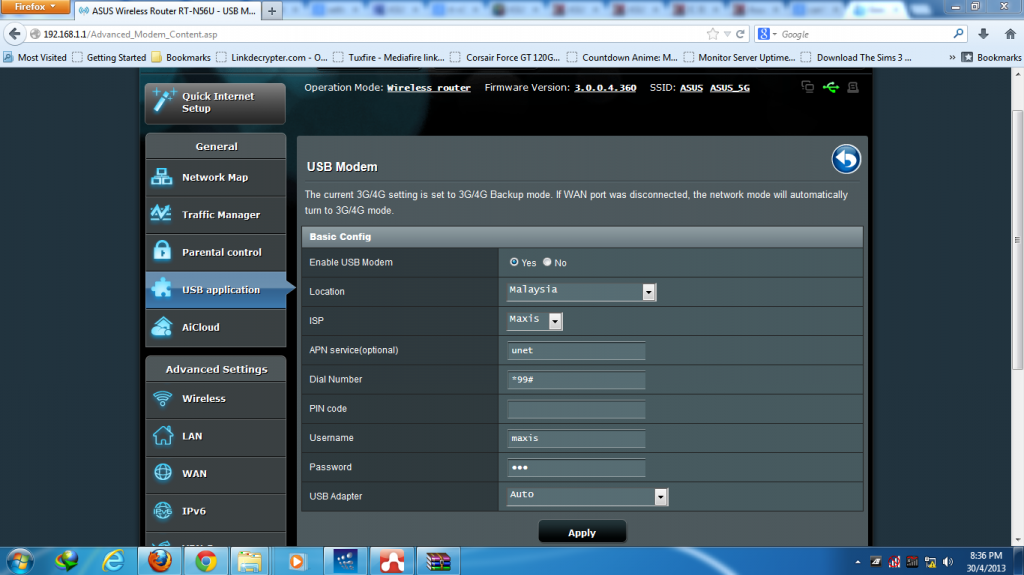
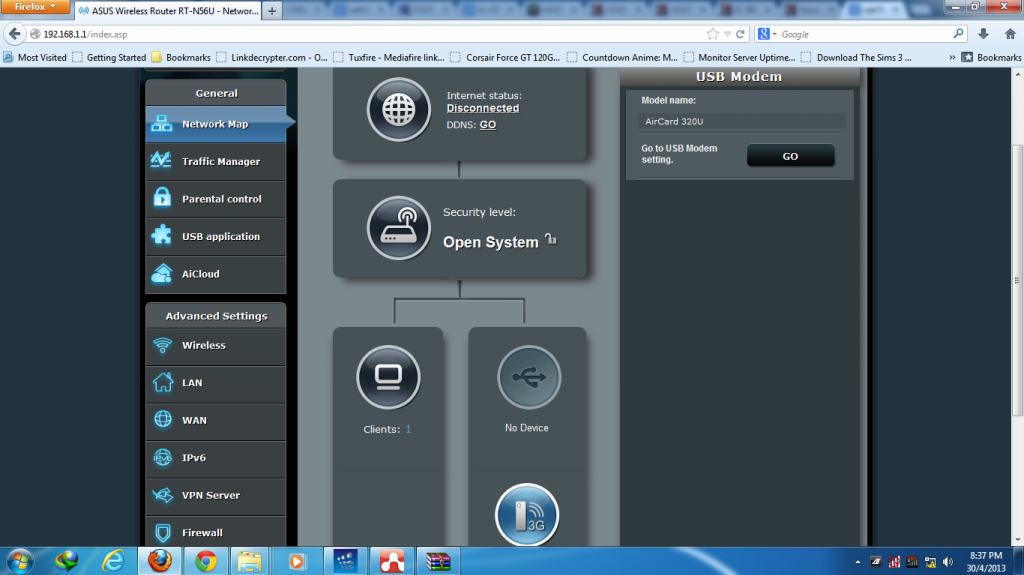
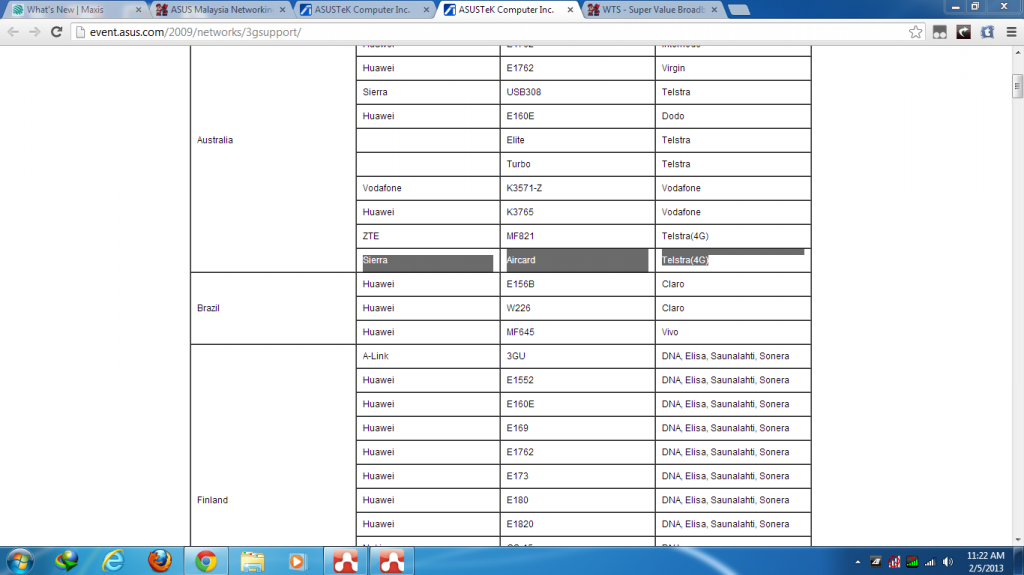
here my setting and my log file
» Click to show Spoiler - click again to hide... «
» Click to show Spoiler - click again to hide... «
Jan 1 00:00:13 syslogd started: BusyBox v1.17.4
Jan 1 00:00:13 syslog: module ledtrig-usbdev not found in modules.dep
Jan 1 00:00:13 syslog: module leds-usb not found in modules.dep
Jan 1 00:00:13 kernel: The CPU feqenuce set to 500 MHz
Jan 1 00:00:13 kernel: CPU revision is: 0001974c
Jan 1 00:00:13 kernel: Determined physical RAM map:
Jan 1 00:00:13 kernel: memory: 08000000 @ 00000000 (usable)
Jan 1 00:00:13 kernel: Built 1 zonelists. Total pages: 32512
Jan 1 00:00:13 kernel: Primary instruction cache 64kB, physically tagged, 4-way, linesize 32 bytes.
Jan 1 00:00:13 kernel: Primary data cache 32kB, 4-way, linesize 32 bytes.
Jan 1 00:00:13 kernel: cause = c0808000, status = 11000000
Jan 1 00:00:13 kernel: PID hash table entries: 512 (order: 9, 2048 bytes)
Jan 1 00:00:13 kernel: calculating r4koff... 001e8480(2000000)
Jan 1 00:00:13 kernel: CPU frequency 500.00 MHz
Jan 1 00:00:13 kernel: Using 250.000 MHz high precision timer.
Jan 1 00:00:13 kernel: Dentry cache hash table entries: 16384 (order: 4, 65536 bytes)
Jan 1 00:00:13 kernel: Inode-cache hash table entries: 8192 (order: 3, 32768 bytes)
Jan 1 00:00:13 kernel: Mount-cache hash table entries: 512
Jan 1 00:00:13 kernel: RALINK_PCI_PCICFG_ADDR = 0
Jan 1 00:00:13 kernel: *************** Ralink PCIe RC mode *************
Jan 1 00:00:13 kernel: registering PCI controller with io_map_base unset
Jan 1 00:00:13 kernel: 2->[1][0][0][30]=0
Jan 1 00:00:13 kernel: 5->[1][0][0][30]=fffffffe
Jan 1 00:00:13 kernel: 2->[1][0][0][30]=0
Jan 1 00:00:13 kernel: 5->[1][0][0][30]=0
Jan 1 00:00:13 kernel: BAR0 at slot 0 = 0
Jan 1 00:00:13 kernel: bus=0, slot = 0x0
Jan 1 00:00:13 kernel: P2P(PCI) 0x00 = 08021814
Jan 1 00:00:13 kernel: P2P(PCI) 0x04 = 00100007
Jan 1 00:00:13 kernel: P2P(PCI) 0x08 = 06040001
Jan 1 00:00:13 kernel: P2P(PCI) 0x0c = 00010014
Jan 1 00:00:13 kernel: P2P(PCI) 0x10 = 00000000
Jan 1 00:00:13 kernel: P2P(PCI) 0x14 = 20100000
Jan 1 00:00:13 kernel: P2P(PCI) 0x18 = 00010100
Jan 1 00:00:13 kernel: P2P(PCI) 0x1c = 000000f0
Jan 1 00:00:13 kernel: P2P(PCI) 0x20 = 20002000
Jan 1 00:00:13 kernel: P2P(PCI) 0x24 = 0000fff0
Jan 1 00:00:13 kernel: P2P(PCI) 0x28 = 00000000
Jan 1 00:00:13 kernel: P2P(PCI) 0x2c = 00000000
Jan 1 00:00:13 kernel: P2P(PCI) 0x30 = 00000000
Jan 1 00:00:13 kernel: P2P(PCI) 0x34 = 00000040
Jan 1 00:00:13 kernel: P2P(PCI) 0x38 = 00000000
Jan 1 00:00:13 kernel: P2P(PCI) 0x3c = 00040100
Jan 1 00:00:13 kernel: res[0]->start = 0
Jan 1 00:00:13 kernel: res[0]->end = 1ffffff
Jan 1 00:00:13 kernel: res[1]->start = 20100000
Jan 1 00:00:13 kernel: res[1]->end = 2010ffff
Jan 1 00:00:13 kernel: res[2]->start = 0
Jan 1 00:00:13 kernel: res[2]->end = 0
Jan 1 00:00:13 kernel: res[3]->start = 0
Jan 1 00:00:13 kernel: res[3]->end = 0
Jan 1 00:00:13 kernel: res[4]->start = 0
Jan 1 00:00:13 kernel: res[4]->end = 0
Jan 1 00:00:13 kernel: res[5]->start = 0
Jan 1 00:00:14 kernel: res[5]->end = 0
Jan 1 00:00:14 kernel: bus=1, slot = 0x0
Jan 1 00:00:14 kernel: dev III(PCIe) 0x00 = 30911814
Jan 1 00:00:14 kernel: dev III(PCIe) 0x04 = 00100000
Jan 1 00:00:14 kernel: dev III(PCIe) 0x08 = 02800000
Jan 1 00:00:14 kernel: dev III(PCIe) 0x0c = 00000000
Jan 1 00:00:14 kernel: dev III(PCIe) 0x10 = 20000000
Jan 1 00:00:14 kernel: dev III(PCIe) 0x14 = 00000000
Jan 1 00:00:14 kernel: dev III(PCIe) 0x18 = 00000000
Jan 1 00:00:14 kernel: dev III(PCIe) 0x1c = 00000000
Jan 1 00:00:14 kernel: dev III(PCIe) 0x20 = 00000000
Jan 1 00:00:14 kernel: dev III(PCIe) 0x24 = 00000000
Jan 1 00:00:14 kernel: dev III(PCIe) 0x28 = 00000000
Jan 1 00:00:14 kernel: dev III(PCIe) 0x2c = 30911814
Jan 1 00:00:14 kernel: dev III(PCIe) 0x30 = 00000000
Jan 1 00:00:14 kernel: dev III(PCIe) 0x34 = 00000040
Jan 1 00:00:14 kernel: dev III(PCIe) 0x38 = 00000000
Jan 1 00:00:14 kernel: dev III(PCIe) 0x3c = 000001ff
Jan 1 00:00:14 kernel: res[0]->start = 20000000
Jan 1 00:00:14 kernel: res[0]->end = 2000ffff
Jan 1 00:00:14 kernel: res[1]->start = 0
Jan 1 00:00:14 kernel: res[1]->end = 0
Jan 1 00:00:14 kernel: res[2]->start = 0
Jan 1 00:00:14 kernel: res[2]->end = 0
Jan 1 00:00:14 kernel: res[3]->start = 0
Jan 1 00:00:14 kernel: res[3]->end = 0
Jan 1 00:00:14 kernel: res[4]->start = 0
Jan 1 00:00:14 kernel: res[4]->end = 0
Jan 1 00:00:14 kernel: res[5]->start = 0
Jan 1 00:00:14 kernel: res[5]->end = 0
Jan 1 00:00:14 kernel: IP route cache hash table entries: 1024 (order: 0, 4096 bytes)
Jan 1 00:00:14 kernel: TCP established hash table entries: 4096 (order: 3, 32768 bytes)
Jan 1 00:00:14 kernel: TCP bind hash table entries: 4096 (order: 2, 16384 bytes)
Jan 1 00:00:14 kernel: Amd/Fujitsu Extended Query Table at 0x0040
Jan 1 00:00:14 kernel: mtd: partition "linux" extends beyond the end of device "Ralink SoC physically mapped flash" -- size truncated to 0x7b0000
Jan 1 00:00:14 kernel: mtd: partition "rootfs" extends beyond the end of device "Ralink SoC physically mapped flash" -- size truncated to 0x6b4f40
Jan 1 00:00:14 kernel: mtd: partition "rootfs" doesn't start on an erase block boundary -- force read-only
Jan 1 00:00:14 kernel: RT3xxx EHCI/OHCI init.
Jan 1 00:00:14 kernel: pcie_portdrv_probe->Dev[1814:0802] has invalid IRQ. Check vendor BIOS
Jan 1 00:00:14 kernel: assign_interrupt_mode Found MSI capability
Jan 1 00:00:14 kernel: GPIO MODE: 181d
Jan 1 00:00:14 kernel: Ralink gpio driver initialized
Jan 1 00:00:14 kernel: software reset RTL8367M...
Jan 1 00:00:14 kernel: rtk_switch_init() return 0
Jan 1 00:00:14 kernel: rtk_port_macForceLinkExt0_set(): return 0
Jan 1 00:00:14 kernel: rtk_port_macForceLinkExt1_set(): return 0
Jan 1 00:00:14 kernel: power down all ports
Jan 1 00:00:14 kernel: org Ext0 txDelay: 0, rxDelay: 0
Jan 1 00:00:14 kernel: org Ext1 txDelay: 0, rxDelay: 0
Jan 1 00:00:14 kernel: new Ext0 txDelay: 1, rxDelay: 0
Jan 1 00:00:14 kernel: rtk_port_rgmiiDelayExt0_set(): return 0
Jan 1 00:00:14 kernel: new Ext1 txDelay: 1, rxDelay: 0
Jan 1 00:00:14 kernel: rtk_port_rgmiiDelayExt1_set(): return 0
Jan 1 00:00:14 kernel: rtk_led_enable_set(LED_GROUP_0...): return 0
Jan 1 00:00:14 kernel: rtk_led_enable_set(LED_GROUP_1...): return 0
Jan 1 00:00:14 kernel: rtk_led_operation_set(): return 0
Jan 1 00:00:14 kernel: rtk_led_groupConfig_set(LED_GROUP_0...): return 0
Jan 1 00:00:14 kernel: rtk_led_groupConfig_set(LED_GROUP_1...): return 0
Jan 1 00:00:14 kernel: current led blinkRate: 0
Jan 1 00:00:14 kernel: rtk_switch_maxPktLen_get(): return 0
Jan 1 00:00:14 kernel: current rtk_switch_maxPktLen: 3
Jan 1 00:00:14 kernel: rtk_switch_maxPktLen_set(): return 0
Jan 1 00:00:14 kernel: rtk_switch_greenEthernet_get(): return 0
Jan 1 00:00:14 kernel: current rtk_switch_greenEthernet state: 1
Jan 1 00:00:14 kernel: rtk_switch_greenEthernet_set(): return 0
Jan 1 00:00:14 kernel: RTL8367M driver initialized
Jan 1 00:00:14 kernel: rdm_major = 254
Jan 1 00:00:14 kernel: Ralink APSoC Ethernet Driver Initilization. v3.0 256 rx/tx descriptors allocated, mtu = 1500!
Jan 1 00:00:14 kernel: GMAC1_MAC_ADRH -- : 0x00000860
Jan 1 00:00:14 kernel: GMAC1_MAC_ADRL -- : 0x6ee90975
Jan 1 00:00:14 kernel: PROC INIT OK!
Jan 1 00:00:14 kernel: u32 classifier
Jan 1 00:00:14 kernel: OLD policer on
Jan 1 00:00:14 kernel: Netfilter messages via NETLINK v0.30.
Jan 1 00:00:14 kernel: nf_conntrack version 0.5.0 (1024 buckets, 8192 max)
Jan 1 00:00:14 kernel: ipt_time loading
Jan 1 00:00:14 kernel: ip_tables: © 2000-2006 Netfilter Core Team
Jan 1 00:00:14 kernel: net/ipv4/netfilter/tomato_ct.c [Apr 1 2013 12:02:15]
Jan 1 00:00:14 kernel: ip6_tables: © 2000-2006 Netfilter Core Team
Jan 1 00:00:14 kernel: VFS: Mounted root (squashfs filesystem) readonly.
Jan 1 00:00:14 kernel: Warning: unable to open an initial console.
Jan 1 00:00:14 kernel: GPIOMODE before: 181d
Jan 1 00:00:14 kernel: GPIOMODE writing: 185d
Jan 1 00:00:14 kernel: power down all ports
Jan 1 00:00:14 kernel: set unknown unicast strom control rate as: 20
Jan 1 00:00:14 kernel: set unknown multicast strom control rate as: 20
Jan 1 00:00:14 kernel: set multicast strom control rate as: 20
Jan 1 00:00:14 kernel: set multicast strom control rate as: 20
Jan 1 00:00:14 kernel: rt2860v2_ap: module license 'unspecified' taints kernel.
Jan 1 00:00:14 kernel: === pAd = c0054000, size = 811000 ===
Jan 1 00:00:14 kernel: <-- RTMPAllocAdapterBlock, Status=0
Jan 1 00:00:14 kernel: register rt2860
Jan 1 00:00:14 kernel: === pAd = c02e7000, size = 725944 ===
Jan 1 00:00:14 kernel: <-- RTMPAllocTxRxRingMemory, Status=0
Jan 1 00:00:14 kernel: <-- RTMPAllocAdapterBlock, Status=0
Jan 1 00:00:14 kernel: pAd->CSRBaseAddress =0xc0120000, csr_addr=0xc0120000!
Jan 1 00:00:14 kernel: Algorithmics/MIPS FPU Emulator v1.5
Jan 1 00:00:15 kernel: NTFS support included
Jan 1 00:00:15 kernel: Built_for__asus_n56u_2011-11-22
Jan 1 00:00:15 kernel: usb 1-2: config 1 has an invalid interface number: 7 but max is 5
Jan 1 00:00:15 kernel: usb 1-2: config 1 has no interface number 5
Jan 1 00:00:15 kernel: Raeth v3.0 (Tasklet,SkbRecycle)
Jan 1 00:00:16 kernel: phy_tx_ring = 0x072d2000, tx_ring = 0xa72d2000
Jan 1 00:00:16 kernel: phy_rx_ring0 = 0x072d3000, rx_ring0 = 0xa72d3000
Jan 1 00:00:16 kernel: GMAC1_MAC_ADRH -- : 0x00000860
Jan 1 00:00:16 kernel: GMAC1_MAC_ADRL -- : 0x6ee90975
Jan 1 00:00:16 kernel: GDMA2_MAC_ADRH -- : 0x00000860
Jan 1 00:00:16 kernel: GDMA2_MAC_ADRL -- : 0x6ee90974
Jan 1 00:00:16 kernel: eth3: ===> VirtualIF_open
Jan 1 00:00:16 kernel: CDMA_CSG_CFG = 81000007
Jan 1 00:00:16 kernel: GDMA1_FWD_CFG = C0710000
Jan 1 00:00:16 kernel: GDMA2_FWD_CFG = C0710000
Jan 1 00:00:16 kernel: RX DESC a745f000 size = 2048
Jan 1 00:00:16 kernel: APSDCapable[0]=1
Jan 1 00:00:16 kernel: APSDCapable[1]=1
Jan 1 00:00:16 kernel: APSDCapable[2]=1
Jan 1 00:00:16 kernel: APSDCapable[3]=1
Jan 1 00:00:16 kernel: APSDCapable[4]=1
Jan 1 00:00:16 kernel: APSDCapable[5]=1
Jan 1 00:00:16 kernel: APSDCapable[6]=1
Jan 1 00:00:16 kernel: APSDCapable[7]=1
Jan 1 00:00:16 kernel: APSDCapable[8]=1
Jan 1 00:00:16 kernel: APSDCapable[9]=1
Jan 1 00:00:16 kernel: APSDCapable[10]=1
Jan 1 00:00:16 kernel: APSDCapable[11]=1
Jan 1 00:00:16 kernel: APSDCapable[12]=1
Jan 1 00:00:16 kernel: APSDCapable[13]=1
Jan 1 00:00:16 kernel: APSDCapable[14]=1
Jan 1 00:00:16 kernel: APSDCapable[15]=1
Jan 1 00:00:16 kernel: Key1Str is Invalid key length(0) or Type(0)
Jan 1 00:00:16 kernel: Key2Str is Invalid key length(0) or Type(0)
Jan 1 00:00:16 kernel: Key3Str is Invalid key length(0) or Type(0)
Jan 1 00:00:16 kernel: Key4Str is Invalid key length(0) or Type(0)
Jan 1 00:00:16 kernel: RtmpChipOpsEepromHook::e2p_type=0, inf_Type=5
Jan 1 00:00:16 kernel: NVM is FLASH mode
Jan 1 00:00:16 kernel: 1. Phy Mode = 9
Jan 1 00:00:16 kernel: 2. Phy Mode = 9
Jan 1 00:00:16 kernel: 3. Phy Mode = 9
Jan 1 00:00:16 kernel: ^[[mAntCfgInit: primary/secondary ant 0/1
Jan 1 00:00:16 kernel: ^[[mRTMPSetPhyMode: channel is out of range, use first channel=0
Jan 1 00:00:16 kernel: MCS Set = ff ff 00 00 01
Jan 1 00:00:16 kernel: SYNC - BBP R4 to 20MHz.l
Jan 1 00:00:19 kernel: =====================================================
Jan 1 00:00:19 kernel: Channel 1 : Dirty = 0, False CCA = 377, Busy Time = 10405, Skip Channel = FALSE
Jan 1 00:00:19 kernel: Channel 2 : Dirty = 0, False CCA = 301, Busy Time = 8484, Skip Channel = FALSE
Jan 1 00:00:19 kernel: Channel 3 : Dirty = 0, False CCA = 12, Busy Time = 629, Skip Channel = FALSE
Jan 1 00:00:19 kernel: Channel 4 : Dirty = 0, False CCA = 22, Busy Time = 631, Skip Channel = FALSE
Jan 1 00:00:19 kernel: Channel 5 : Dirty = 0, False CCA = 11, Busy Time = 326, Skip Channel = FALSE
Jan 1 00:00:19 kernel: Channel 6 : Dirty = 0, False CCA = 106, Busy Time = 2692, Skip Channel = FALSE
Jan 1 00:00:19 kernel: Channel 7 : Dirty = 0, False CCA = 101, Busy Time = 2954, Skip Channel = FALSE
Jan 1 00:00:19 kernel: Channel 8 : Dirty = 0, False CCA = 31, Busy Time = 984, Skip Channel = FALSE
Jan 1 00:00:19 kernel: Channel 9 : Dirty = 0, False CCA = 12, Busy Time = 394, Skip Channel = FALSE
Jan 1 00:00:19 kernel: Channel 10 : Dirty = 0, False CCA = 7, Busy Time = 166, Skip Channel = FALSE
Jan 1 00:00:19 kernel: Channel 11 : Dirty = 0, False CCA = 236, Busy Time = 6528, Skip Channel = FALSE
Jan 1 00:00:19 kernel: Channel 12 : Dirty = 0, False CCA = 96, Busy Time = 2673, Skip Channel = FALSE
Jan 1 00:00:19 kernel: Channel 13 : Dirty = 0, False CCA = 1, Busy Time = 21, Skip Channel = FALSE
Jan 1 00:00:19 kernel: =====================================================
Jan 1 00:00:19 kernel: Rule 1 CCA value : Min Dirtiness (Include extension channel) ==> Select Channel 3
Jan 1 00:00:19 kernel: Min Dirty = 0
Jan 1 00:00:19 kernel: ExChannel = 7 , 0
Jan 1 00:00:19 kernel: BW = 40
Jan 1 00:00:19 kernel: SYNC - BBP R4 to 20MHz.l
Jan 1 00:00:19 kernel: SYNC - BBP R4 to 20MHz.l
Jan 1 00:00:20 kernel: SYNC - BBP R4 to 20MHz.l
Jan 1 00:00:20 kernel: SYNC - BBP R4 to 20MHz.l
Jan 1 00:00:20 kernel: SYNC - BBP R4 to 20MHz.l
Jan 1 00:00:21 kernel: SYNC - BBP R4 to 20MHz.l
Jan 1 00:00:21 kernel: SYNC - BBP R4 to 20MHz.l
Jan 1 00:00:21 kernel: SYNC - BBP R4 to 20MHz.l
Jan 1 00:00:21 kernel: SYNC - BBP R4 to 20MHz.l
Jan 1 00:00:22 kernel: SYNC - BBP R4 to 20MHz.l
Jan 1 00:00:22 kernel: Main bssid = 08:60:6e:e9:09:74
Jan 1 00:00:22 kernel: <==== rt28xx_init, Status=0
Jan 1 00:00:22 kernel: 0x1300 = 00064380
Jan 1 00:00:22 kernel: RX DESC a720b000 size = 2048
Jan 1 00:00:22 kernel: <-- RTMPAllocTxRxRingMemory, Status=0
Jan 1 00:00:22 kernel: Key1Str is Invalid key length(0) or Type(0)
Jan 1 00:00:22 kernel: Key2Str is Invalid key length(0) or Type(0)
Jan 1 00:00:22 kernel: Key3Str is Invalid key length(0) or Type(0)
Jan 1 00:00:22 kernel: Key4Str is Invalid key length(0) or Type(0)
Jan 1 00:00:22 kernel: 1. Phy Mode = 8
Jan 1 00:00:22 kernel: 2. Phy Mode = 8
Jan 1 00:00:22 kernel: 3. Phy Mode = 8
Jan 1 00:00:22 kernel: RTMPSetPhyMode: channel is out of range, use first channel=0
Jan 1 00:00:22 kernel: MCS Set = ff ff ff 00 01
Jan 1 00:00:22 kernel: SYNC - BBP R4 to 20MHz.l
Jan 1 00:00:23 kernel: =====================================================
Jan 1 00:00:23 kernel: Channel 36 : Dirty = 0, False CCA = 0, Busy Time = 0, Skip Channel = FALSE
Jan 1 00:00:23 kernel: Channel 40 : Dirty = 0, False CCA = 0, Busy Time = 0, Skip Channel = FALSE
Jan 1 00:00:23 kernel: Channel 44 : Dirty = 0, False CCA = 0, Busy Time = 0, Skip Channel = FALSE
Jan 1 00:00:23 kernel: Channel 48 : Dirty = 0, False CCA = 0, Busy Time = 0, Skip Channel = FALSE
Jan 1 00:00:23 kernel: =====================================================
Jan 1 00:00:23 kernel: Rule 1 CCA value : Min Dirtiness (Include extension channel) ==> Select Channel 36
Jan 1 00:00:23 kernel: Min Dirty = 0
Jan 1 00:00:23 kernel: ExChannel = 0 , 0
Jan 1 00:00:23 kernel: BW = 40
Jan 1 00:00:23 kernel: Main bssid = 08:60:6e:e9:09:75
Jan 1 00:00:23 kernel: <==== rt28xx_init, Status=0
Jan 1 00:00:23 kernel: 0x1300 = 00064380
Jan 1 00:00:23 stop_nat_rules: apply the redirect_rules!
Jan 1 00:00:24 WAN Connection: Ethernet link down.
Jan 1 00:00:24 RT-N56U: start httpd
Jan 1 00:00:24 kernel: set watchdog pid as: 508
Jan 1 00:00:24 kernel: set watchdog pid as: 508
Jan 1 00:00:25 kernel: GDMA2_MAC_ADRH -- : 0x00000860
Jan 1 00:00:25 kernel: GDMA2_MAC_ADRL -- : 0x6ee90974
Jan 1 00:00:25 kernel: eth3: ===> VirtualIF_open
Jan 1 00:00:30 pppd[534]: Connect script failed
Jan 1 00:00:35 rc_service: wanduck 475:notify_rc restart_wan_if 0
Jan 1 00:00:35 stop_wan(): perform DHCP release
Jan 1 00:00:35 kernel: eth3: ===> VirtualIF_close
Jan 1 00:00:37 kernel: GDMA2_MAC_ADRH -- : 0x00000860
Jan 1 00:00:37 kernel: GDMA2_MAC_ADRL -- : 0x6ee90974
Jan 1 00:00:37 kernel: eth3: ===> VirtualIF_open
Jan 1 00:00:39 rc_service: wanduck 475:notify_rc restart_wan_if 1
Jan 1 00:00:41 stop_wan(): perform DHCP release
Jan 1 00:00:46 pppd[610]: Connect script failed
Jan 1 00:00:48 WAN Connection: Fail to connect with some issues.
Jan 1 00:01:00 rc_service: wanduck 475:notify_rc restart_wan_if 1
Jan 1 00:01:00 pppd[610]: Child process /bin/comgt -d /dev/ttyUSB3 -s /etc/ppp/3g/Generic_conn.scr (pid 642) terminated with signal 1
Jan 1 00:01:00 pppd[610]: Connect script failed
Jan 1 00:01:00 stop_wan(): perform DHCP release
Jan 1 00:01:04 pppd[665]: Connect script failed
Jan 1 00:01:04 rc_service: wanduck 475:notify_rc restart_wan_if 0
Jan 1 00:01:04 stop_wan(): perform DHCP release
Jan 1 00:01:04 kernel: eth3: ===> VirtualIF_close
Jan 1 00:01:06 kernel: GDMA2_MAC_ADRH -- : 0x00000860
Jan 1 00:01:06 kernel: GDMA2_MAC_ADRL -- : 0x6ee90974
Jan 1 00:01:06 kernel: eth3: ===> VirtualIF_open
Jan 1 00:01:07 rc_service: wanduck 475:notify_rc restart_wan_if 0
Jan 1 00:01:07 stop_wan(): perform DHCP release
Jan 1 00:01:07 kernel: eth3: ===> VirtualIF_close
Jan 1 00:01:09 kernel: GDMA2_MAC_ADRH -- : 0x00000860
Jan 1 00:01:09 kernel: GDMA2_MAC_ADRL -- : 0x6ee90974
Jan 1 00:01:09 kernel: eth3: ===> VirtualIF_open
Jan 1 00:01:11 rc_service: wanduck 475:notify_rc restart_wan_if 1
Jan 1 00:01:13 stop_wan(): perform DHCP release
Jan 1 00:01:19 pppd[725]: Connect script failed
Jan 1 00:01:27 rc_service: wanduck 475:notify_rc restart_wan_if 1
Jan 1 00:01:27 stop_wan(): perform DHCP release
Jan 1 00:01:31 rc_service: wanduck 475:notify_rc restart_wan_if 0
Jan 1 00:01:31 stop_wan(): perform DHCP release
Jan 1 00:01:31 kernel: eth3: ===> VirtualIF_close
Jan 1 00:01:31 kernel: GDMA2_MAC_ADRH -- : 0x00000860
Jan 1 00:01:31 kernel: GDMA2_MAC_ADRL -- : 0x6ee90974
Jan 1 00:01:31 kernel: eth3: ===> VirtualIF_open
Jan 1 00:01:33 pppd[758]: Connect script failed
Jan 1 00:01:47 pppd[758]: Connect script failed
Jan 1 00:01:55 rc_service: wanduck 475:notify_rc restart_wan_if 0
Jan 1 00:01:55 stop_wan(): perform DHCP release
Jan 1 00:01:55 kernel: eth3: ===> VirtualIF_close
Jan 1 00:01:57 kernel: GDMA2_MAC_ADRH -- : 0x00000860
Jan 1 00:01:57 kernel: GDMA2_MAC_ADRL -- : 0x6ee90974
Jan 1 00:01:57 kernel: eth3: ===> VirtualIF_open
Jan 1 00:01:59 rc_service: wanduck 475:notify_rc restart_wan_if 1
Jan 1 00:02:00 pppd[758]: Child process /bin/comgt -d /dev/ttyUSB3 -s /etc/ppp/3g/Generic_conn.scr (pid 826) terminated with signal 15
Jan 1 00:02:00 pppd[758]: Connect script failed
Jan 1 00:02:01 stop_wan(): perform DHCP release
Jan 1 00:02:05 pppd[849]: Connect script failed
Jan 1 00:02:20 pppd[849]: Connect script failed
Jan 1 00:02:21 rc_service: wanduck 475:notify_rc restart_wan_if 1
Jan 1 00:02:21 stop_wan(): perform DHCP release
Jan 1 00:02:25 rc_service: wanduck 475:notify_rc restart_wan_if 0
Jan 1 00:02:25 stop_wan(): perform DHCP release
Jan 1 00:02:25 kernel: eth3: ===> VirtualIF_close
Jan 1 00:02:27 pppd[904]: Connect script failed
Jan 1 00:02:27 kernel: GDMA2_MAC_ADRH -- : 0x00000860
Jan 1 00:02:27 kernel: GDMA2_MAC_ADRL -- : 0x6ee90974
Jan 1 00:02:27 kernel: eth3: ===> VirtualIF_open
Jan 1 00:02:33 rc_service: wanduck 475:notify_rc restart_wan_if 0
Jan 1 00:02:33 stop_wan(): perform DHCP release
Jan 1 00:02:33 kernel: eth3: ===> VirtualIF_close
Jan 1 00:02:33 kernel: GDMA2_MAC_ADRH -- : 0x00000860
Jan 1 00:02:33 kernel: GDMA2_MAC_ADRL -- : 0x6ee90974
Jan 1 00:02:33 kernel: eth3: ===> VirtualIF_open
Jan 1 00:02:35 rc_service: wanduck 475:notify_rc restart_wan_if 1
Jan 1 00:02:37 stop_wan(): perform DHCP release
Jan 1 00:02:42 pppd[972]: Connect script failed
Jan 1 00:02:57 pppd[972]: Connect script failed
Jan 1 00:03:03 rc_service: wanduck 475:notify_rc restart_wan_if 1
Jan 1 00:03:03 stop_wan(): perform DHCP release
Jan 1 00:03:07 rc_service: wanduck 475:notify_rc restart_wan_if 0
Jan 1 00:03:07 stop_wan(): perform DHCP release
Jan 1 00:03:07 kernel: eth3: ===> VirtualIF_close
Jan 1 00:03:09 pppd[1035]: Connect script failed
Jan 1 00:03:09 kernel: GDMA2_MAC_ADRH -- : 0x00000860
Jan 1 00:03:09 kernel: GDMA2_MAC_ADRL -- : 0x6ee90974
Jan 1 00:03:09 kernel: eth3: ===> VirtualIF_open
Jan 1 00:03:10 rc_service: wanduck 475:notify_rc restart_wan_if 0
Jan 1 00:03:10 stop_wan(): perform DHCP release
Jan 1 00:03:10 kernel: eth3: ===> VirtualIF_close
Jan 1 00:03:12 kernel: GDMA2_MAC_ADRH -- : 0x00000860
Jan 1 00:03:12 kernel: GDMA2_MAC_ADRL -- : 0x6ee90974
Jan 1 00:03:12 kernel: eth3: ===> VirtualIF_open
Jan 1 00:03:14 rc_service: wanduck 475:notify_rc restart_wan_if 1
Jan 1 00:03:14 stop_wan(): perform DHCP release
Jan 1 00:03:17 rc_service: wanduck 475:notify_rc restart_wan_if 1
Jan 1 00:03:18 pppd[1073]: Child process /bin/comgt -d /dev/ttyUSB3 -s /etc/ppp/3g/Generic_conn.scr (pid 1074) terminated with signal 15
Jan 1 00:03:18 pppd[1073]: Connect script failed
Jan 1 00:03:19 stop_wan(): perform DHCP release
Jan 1 00:03:22 rc_service: wanduck 475:notify_rc restart_wan_if 0
Jan 1 00:03:22 stop_wan(): perform DHCP release
Jan 1 00:03:22 kernel: eth3: ===> VirtualIF_close
Jan 1 00:03:23 pppd[1097]: Connect script failed
Jan 1 00:03:24 kernel: GDMA2_MAC_ADRH -- : 0x00000860
Jan 1 00:03:24 kernel: GDMA2_MAC_ADRL -- : 0x6ee90974
Jan 1 00:03:24 kernel: eth3: ===> VirtualIF_open
Jan 1 00:03:33 rc_service: wanduck 475:notify_rc restart_wan_if 0
Jan 1 00:03:33 stop_wan(): perform DHCP release
Jan 1 00:03:33 kernel: eth3: ===> VirtualIF_close
Jan 1 00:03:33 kernel: GDMA2_MAC_ADRH -- : 0x00000860
Jan 1 00:03:33 kernel: GDMA2_MAC_ADRL -- : 0x6ee90974
Jan 1 00:03:33 kernel: eth3: ===> VirtualIF_open
Jan 1 00:03:35 rc_service: wanduck 475:notify_rc restart_wan_if 1
Jan 1 00:03:36 pppd[1097]: Child process /bin/comgt -d /dev/ttyUSB3 -s /etc/ppp/3g/Generic_conn.scr (pid 1128) terminated with signal 15
Jan 1 00:03:36 pppd[1097]: Connect script failed
Jan 1 00:03:37 stop_wan(): perform DHCP release
Jan 1 00:03:41 pppd[1151]: Connect script failed
Jan 1 00:03:55 pppd[1151]: Connect script failed
Jan 1 00:04:03 rc_service: wanduck 475:notify_rc restart_wan_if 1
Jan 1 00:04:03 stop_wan(): perform DHCP release
Jan 1 00:04:07 rc_service: wanduck 475:notify_rc restart_wan_if 0
Jan 1 00:04:07 stop_wan(): perform DHCP release
Jan 1 00:04:07 kernel: eth3: ===> VirtualIF_close
Jan 1 00:04:08 pppd[1206]: Connect script failed
Jan 1 00:04:09 kernel: GDMA2_MAC_ADRH -- : 0x00000860
Jan 1 00:04:09 kernel: GDMA2_MAC_ADRL -- : 0x6ee90974
Jan 1 00:04:09 kernel: eth3: ===> VirtualIF_open
Jan 1 00:04:11 rc_service: wanduck 475:notify_rc restart_wan_if 0
Jan 1 00:04:11 stop_wan(): perform DHCP release
Jan 1 00:04:11 kernel: eth3: ===> VirtualIF_close
Jan 1 00:04:11 kernel: GDMA2_MAC_ADRH -- : 0x00000860
Jan 1 00:04:11 kernel: GDMA2_MAC_ADRL -- : 0x6ee90974
Jan 1 00:04:11 kernel: eth3: ===> VirtualIF_open
Jan 1 00:04:13 rc_service: wanduck 475:notify_rc restart_wan_if 1
Jan 1 00:04:15 stop_wan(): perform DHCP release
Jan 1 00:04:20 pppd[1274]: Connect script failed
This post has been edited by FireRider: Apr 30 2013, 08:52 PM 


 Apr 29 2013, 10:43 AM


 Quote
Quote




 0.0291sec
 0.59
0.59
 6 queries
 GZIP Disabled