QUOTE(ASUSmy @ Jan 13 2015, 01:50 PM)
Hi lau6311,
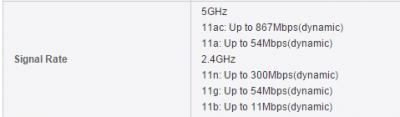
Both the 2.4GHz and 5GHz are running together for dual-band router. You can differentiate them easily by using different SSID name. RT-AC87U is a dual band router with the max speed of 600 Mbps for 2.4GHz and 1734 Mbps for 5GHz.
And by setting the channel bandwidth to 80MHz when connecting to the 5GHz, you sould be able to see the full speed.
Thank you
Hi Asusmy, your message is very clear and helpful, much appreciated.
Earlier, I did set 2.4GHz and 5GHz with different SSIDs. By reading from some useful forums before hand, I learned to set 5GHz for bandwidth 80MHz and 2.4GHz for 40MHz in order to potentially benefitting with the full speed of both bands provided by the router. In the 87AC wireless manual: "Hide SSID" is highlighed for "NO" for both 2.4 & 5GHz.
However, I could not detect or see the 5GHz activities. I explain:
I am using wifi tool such as the "Acrylic" to detect/see the wifi activities. I could see 87AC selected a SINGLE channel 6 in 2.4GHz with strong signals, but could NOT see similar but "empty" 5GHz activities (means no highlighted channel & selected frequency band) when clicking the 5GHz graph. Was it that I interpreted incorrectly.
Please help: I would want to utilize high speed 5GHz wifi for movies/music streaming, etc.. I believe Asus 87AC is a wonderful tool that can accomplish a challenging job. I admit that I am NEW in the IT world and much to learn.
Notes:
1. When choosing 2.4 GHz for 20 or 20/40 MHz band width, "Acrylic" detected max speed is 217.6 Mbps; changed to 40 MHz, it showed uprating to 450Mbps (double up, I guess it became instant bi-directional data flow). Question: Why it was NOT showing max 600 Mbps design speed? How do I get design 600 Mbps at 2.4GHz (I mean showing the product max speed, practical speed is expected to be lower)? I can see other detected routers showing 300 and 54 Mbps, a consistent sign.
2. I would talk to TP-Link for setup procedure for T4U USB AC (867+300) adapter. The setup is too "automatic" choosing channel 1+5 and tested speed is 145 Mbps N mode at 6m away, without a chance to chose channel and 2.4/5GHz bands. I am hoping Asus can lead the way. High end router is a complex but a wonderful gadget, and Asus 87AC deserves the praise and I need to show its strength.
3. For QoS setting, I like to activate adaptive QoS and to 'Enable Smart QoS' to be "ON". Please advise what upload & download bandwidth I should use? I am having maxis fibre 20 Mbps and always detecting very close to 20 Mbps. Or showing me the right way od doing.
Many thanks again to you--- ASUSmy.....
This post has been edited by lau6311: Jan 13 2015, 02:33 PM 


 Jan 12 2015, 12:38 PM


 Quote
Quote





 0.0226sec
 0.22
0.22
 6 queries
 GZIP Disabled