Welcome Guest ( Log In | Register )

4 Pages < 1 2 3 4 >Bottom

Outline · [ Standard ] · Linear+

Home Networking ASUS Malaysia Networking User & Technical Support, Managed by ASUS Malaysia Representative

views
     
XeactorZ
post Dec 16 2020, 06:31 PM

♥ PandaDog ♥
*********
All Stars
31,608 posts

Joined: Aug 2010
QUOTE(ryansxs @ Dec 16 2020, 03:15 PM)
wireless mode configuration on router, leave it as auto. then it will should allow all legacy devices to get connected to it.
give router a reboot too
*
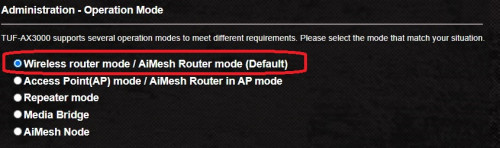
Did you mean select the 1st one

user posted image

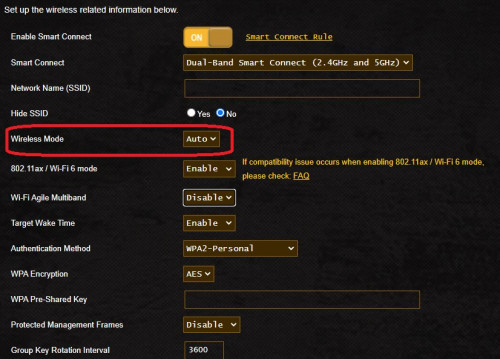
Then leave auto like this one?

user posted image

QUOTE(ryansxs @ Dec 16 2020, 05:46 PM)
At router configuration page, at LAN setup change the IP there. I have changed to 192.168.0.1 to access my router in future.
and DHCP range is from 192.168.0.2 onwards
*
I only able to access router by type its IP address which is 192.168.0.1
But I saw other people able to access by type router.asus.com, whenever I surf router.asus.com, all my browser unable to access at all

QUOTE(dpo_99_sl @ Dec 16 2020, 06:15 PM)
Thanks bro.

I also added domain name = router.asus.com
Now I can access it via router.asus.com or 192.168.50.1 (haven't change my ip).
*
I tried your method, add router.asus.com at domain name, but still unable to access via router.asus.com
Only able to access by type the IP address rclxub.gif
XeactorZ
post Dec 16 2020, 08:11 PM

♥ PandaDog ♥
*********
All Stars
31,608 posts

Joined: Aug 2010
QUOTE(dpo_99_sl @ Dec 16 2020, 07:00 PM)
My settings is similar to both your screenshots.
Except on the second screenshot I did not enable smart control.
No idea what that is , I'm still very new to this router smile.gif

I'm now on another computer in the same network, I can access to my router both via ip 192.168.50.1 and router.asus.com
Luckily I installed the Asus Router app on my phone, it's from there I realised the new ip of my router just now.

Right after I added router.asus.com as domain name, I think within a minute I already can access it with the domain name.

By the way I'm running on the latest official firmware 3.0.0.4.384_10177
*
Did you mean smart connect? If yes it combine both 2.4 and 5Ghz into single SSID
By default Asus set the default IP for fouter is 192.168.50.1, I changed it to 192.168.0.1
I didn't install Asus router app on phone, and I tried add router.asus.com on the domain name still unable to access it, only can access router IP
Not sure what wrong at all sweat.gif
XeactorZ
post Dec 17 2020, 06:42 PM

♥ PandaDog ♥
*********
All Stars
31,608 posts

Joined: Aug 2010
QUOTE(dpo_99_sl @ Dec 17 2020, 10:20 AM)
Last night some of my devices cannot login via router.asus.com , but some can.
Then I realise that those that could not access is because they had custom dns on them.
Once I remove them then I can access it with router.asus.com again.
Remember to clear your dns cache each time when you change the dns settings to see the effect.
*
I tried to remove the Cloudflare DNS on my laptop, still not able to access router.asus.com sad.gif
Not sure what wrong at all sweat.gif
XeactorZ
post Dec 17 2020, 10:56 PM

♥ PandaDog ♥
*********
All Stars
31,608 posts

Joined: Aug 2010
QUOTE(dpo_99_sl @ Dec 17 2020, 08:01 PM)
Did you flush your dns ?
On windows it’s something like ipconfig /flushdns
I actually did that on my macbook, need to flush dns then it works.

Also did you try on your other device like phone or tablet to see if router.asus.com works?

I’m also very curious why it didn’t work on your end now.
I have another windows desktop at home, later I try and play around with it.
*
I just tried to flush DNS on my laptop, using cmd, type ipconfig /flushdns as you mentioned and restart, still same
But I try to remove DNS on my iPhone, it works
Then I try set DNS back on iPhone not working again, so is DNS causing the issue laugh.gif
Anyway thanks for the help, so DNS is the culprit here biggrin.gif
XeactorZ
post Dec 18 2020, 07:39 PM

♥ PandaDog ♥
*********
All Stars
31,608 posts

Joined: Aug 2010
QUOTE(dpo_99_sl @ Dec 18 2020, 01:52 PM)
Great. At least we can now confirm dns is the one causing issue smile.gif
*
Ya, did you have any idea how to set the DNS on the router itself?
So I no need to set Google DNS on all my device laugh.gif

But the disadvantage is whoever connected to the Wi-Fi, all are using Google DNS biggrin.gif
XeactorZ
post Dec 20 2020, 05:00 PM

♥ PandaDog ♥
*********
All Stars
31,608 posts

Joined: Aug 2010
QUOTE(Curian_K @ Dec 20 2020, 03:17 PM)
Just got myself ax55. Im on unifi 100mbps without hyptv. I follow blacktubi guide. But still no Internet connection. Did i do something wrong? Pls guide sifu. Thanks.
*
Try follow Asus Malaysia YouTube guide?


XeactorZ
post Jan 2 2021, 12:40 AM

♥ PandaDog ♥
*********
All Stars
31,608 posts

Joined: Aug 2010
Just wondering, does you guys use the Aiprotection?
XeactorZ
post Jan 2 2021, 10:35 PM

♥ PandaDog ♥
*********
All Stars
31,608 posts

Joined: Aug 2010
QUOTE(ryansxs @ Jan 2 2021, 11:19 AM)
Yup. Its On all the time.
*
Will try and on it see how it goes

QUOTE(blacktubi @ Jan 2 2021, 11:41 AM)
I don’t use it as it slows things down.

Most browsers should come with malicious URL filtration by default now.
*
Yea, as well as the antivirus will prompt you when visit malicious website
Anyway, will turn on see how it goes

QUOTE(enduser @ Jan 2 2021, 12:17 PM)
Ya, am using it.
No slowdown whatsoever

I can see malious sites blocking under insight asus apps.
*
Alright thanks
XeactorZ
post Jan 9 2021, 05:11 PM

♥ PandaDog ♥
*********
All Stars
31,608 posts

Joined: Aug 2010
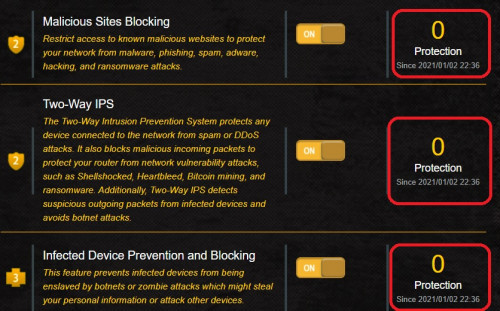
Turned on AiProtection since last week
But I noticed number 2 until 4, protection showing 0 since last week
Does it means I didn't visited any malicious websites until now?

user posted image
XeactorZ
post Jan 10 2021, 01:25 AM

♥ PandaDog ♥
*********
All Stars
31,608 posts

Joined: Aug 2010
QUOTE(WaNaWe900 @ Jan 9 2021, 05:57 PM)
maybe not yet 😅 do you expected any breach?
*
So far not at all

QUOTE(blacktubi @ Jan 9 2021, 07:00 PM)
https://www.wicar.org/test-malware.html

I always use this site to test whether AiProtection is working. You can give it a try.

Edit: It contains no actual malware.
*
Chrome already block it laugh.gif
And I didn't continue to proceed
XeactorZ
post Jan 29 2021, 01:03 PM

♥ PandaDog ♥
*********
All Stars
31,608 posts

Joined: Aug 2010
QUOTE(nikrizal @ Jan 29 2021, 07:06 AM)
Dear AsusMy and other sifus,
I have similar problem after updating latest firmware for TUF AX3000. All xiaomi devices cannot connect, even after I separated the 2.4 & 5Ghz. I opted to revert back to previous firmware and it solves the problem.

I think TUF AX3000 latest firmware have issue with xiaomi devices
*
Are you using version 3.0.0.4.386.41700?
Weird though, my tuf ax3000 didn't automatically update to latest firmware itself sweat.gif
Still running 3.0.0.4.384_10177
XeactorZ
post Jan 29 2021, 02:55 PM

♥ PandaDog ♥
*********
All Stars
31,608 posts

Joined: Aug 2010
QUOTE(nikrizal @ Jan 29 2021, 01:56 PM)
Yes, but I reverted back to 3.0.0.4.384_10177 after that issue with xiaomi devices. It affected xiaomi phones & Mijia Xiaomi cameras
*
Then I better on hold on upgrading it 1st tongue.gif
XeactorZ
post Jan 31 2021, 09:17 PM

♥ PandaDog ♥
*********
All Stars
31,608 posts

Joined: Aug 2010
QUOTE(pull007 @ Jan 31 2021, 03:24 PM)
Don't buy TUF AX3000. There's wifi dropping issues. Others maybe ok as per suggestions by blacktubi.
*
Had been using tuf ax3000 around 3 months
So far so good, no wifi dropping issue at all blink.gif
XeactorZ
post Feb 1 2021, 12:53 AM

♥ PandaDog ♥
*********
All Stars
31,608 posts

Joined: Aug 2010
QUOTE(nikrizal @ Jan 31 2021, 11:38 PM)
Me too, never had wifi dropping issue. TUF AX3000 really has good coverage. My house, ground floor 40 x 95 feet and 1st floor 65 x 30 feet, all well covered, solely by the router, without need any mesh system. Lowest speed tested in the weakest area is over 70Mbps 😊
*
Same didn't use any mesh at all, only 1 router laugh.gif
Weakest area speed is around 80Mbps biggrin.gif
XeactorZ
post Feb 1 2021, 10:39 PM

♥ PandaDog ♥
*********
All Stars
31,608 posts

Joined: Aug 2010
QUOTE(ryansxs @ Feb 1 2021, 05:37 PM)
Been using TUF AX3000 paired with AX3000 for mesh setup, for around 3 months as well. The connection reliability is solid.
I needed mesh as TUF alone cannot reach very end corners of my house. Pair them both, im getting minimum 250Mbps around the house.
*
As long as the devices getting above 100mbps on WiFi I am happy already
Computer and console are connected via LAN cable biggrin.gif
XeactorZ
post Feb 7 2021, 04:28 PM

♥ PandaDog ♥
*********
All Stars
31,608 posts

Joined: Aug 2010
QUOTE(murv90 @ Feb 7 2021, 09:23 AM)
Hi guys, I recently purchased a new Asus RT-AX3000 router for Unifi 800mbps plan. Did the setup and all with no problems, but I was trying to access the router settings page via router.asus.com and also via the IPv4 address which is 192.168.50.7, but still turns up as 'This site can't be reached'. Want to know is there any other way to access the settings page?

Thank you in advance guys smile.gif
*
Few months ago I also had the same issue as yours
Then I download Asus Device Discovery from below link to let it scan the IP address of your router

https://www.asus.com/support/FAQ/1037094/
XeactorZ
post Feb 16 2021, 10:34 PM

♥ PandaDog ♥
*********
All Stars
31,608 posts

Joined: Aug 2010
QUOTE(Kyu @ Feb 16 2021, 09:19 PM)
Hello, I am having problem configuring nordvpn on asus RT-AC66U on maxis fibre. Anyone has experience in configuring the vpn? Thanks
*
try below link method?
https://support.nordvpn.com/Connectivity/Ro...are-AsusWRT.htm
XeactorZ
post Mar 16 2021, 10:46 PM

♥ PandaDog ♥
*********
All Stars
31,608 posts

Joined: Aug 2010
asus router inside got speedtest? how come I could not find it on my tuf-ax3000 hmm.gif
XeactorZ
post Mar 17 2021, 07:12 PM

♥ PandaDog ♥
*********
All Stars
31,608 posts

Joined: Aug 2010
QUOTE(afif92 @ Mar 17 2021, 01:36 AM)
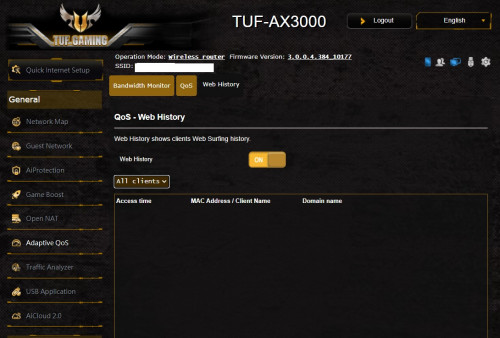
It is beside web history in adaptive qos section
*
Looks nothing hmm.gif

user posted image

QUOTE(joeyrm @ Mar 17 2021, 04:18 PM)
Unfortunately, TUF-AX3000 don't have that option yet.. But its weird that AX56U and AX55U have that option already.
*
No wonder, guess I will continue to wait then laugh.gif
XeactorZ
post Mar 17 2021, 11:40 PM

♥ PandaDog ♥
*********
All Stars
31,608 posts

Joined: Aug 2010
QUOTE(afif92 @ Mar 17 2021, 08:02 PM)
No wonder you don't have. It is only on the latest 386 version firmware.
*
No wonder
As few page previously somebody said latest firmware got bug, that why until right now I still haven't update the firmware yet laugh.gif

4 Pages < 1 2 3 4 >Top
 

Change to:
| Lo-Fi Version
0.0417sec    0.49    7 queries    GZIP Disabled
Time is now: 7th December 2025 - 07:16 PM