Welcome Guest ( Log In | Register )

826 Pages « < 96 97 98 99 100 > » Bottom

Outline · [ Standard ] · Linear+

Home Networking ASUS Malaysia Networking User & Technical Support, Managed by ASUS Malaysia Representative

views
     
aidilaidilaidil
post Oct 23 2014, 11:13 PM

Getting Started
**
Junior Member
100 posts

Joined: Jan 2010
QUOTE(mwtang @ Oct 23 2014, 08:55 PM)
If only it can stand . Using my ac68 as repeater mode
*
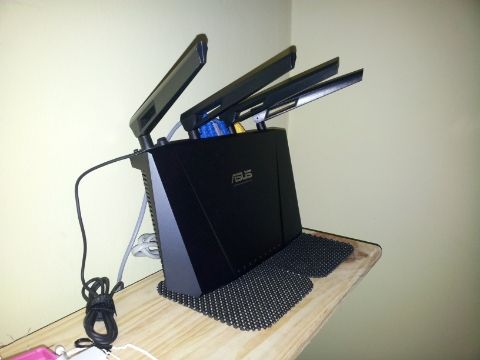
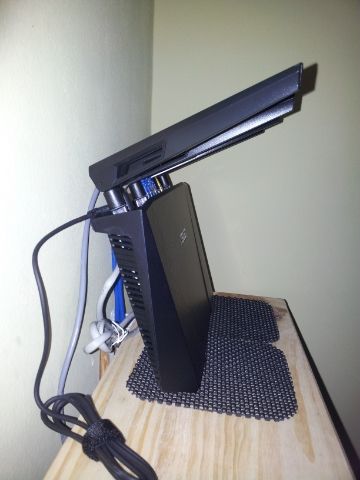
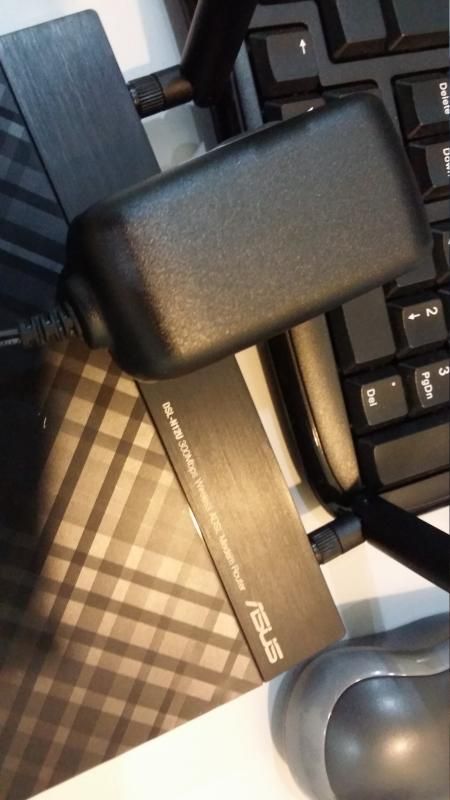
DIY tongue.gif . Put it on a frame / souvenir stand or lean it againts the wall like I do.

Horizontal position:
2Ghz : > 52°c
5Ghz : > 65°c
CPU : > 80°c

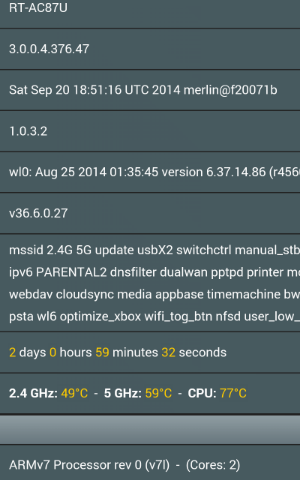
Vertical position:
2Ghz : < 50°c
5Ghz : < 62°c
CPU : < 75°c

This post has been edited by aidilaidilaidil: Oct 23 2014, 11:15 PM
mwtang
post Oct 23 2014, 11:24 PM

Enthusiast
*****
Senior Member
765 posts

Joined: May 2005
QUOTE(aidilaidilaidil @ Oct 23 2014, 11:13 PM)
DIY  tongue.gif . Put it on a frame / souvenir stand or lean it againts the wall like I do.

Horizontal position:
2Ghz : > 52°c
5Ghz : > 65°c
CPU : > 80°c

Vertical position:
2Ghz : < 50°c
5Ghz : < 62°c
CPU : < 75°c
*
PICS !!!

kaysure
post Oct 24 2014, 12:04 AM

New Member
*
Junior Member
26 posts

Joined: Oct 2014
QUOTE(ASUSmy @ Oct 16 2014, 06:10 PM)
Hi kaysure,

May I ask, are you using the dual WAN function? If yes, what connection type did you choose for the YES Zoom.

You can try use the Dual WAN function where the second WAN as Automatic IP connected to the YES Zoom.

Do use different subnet mask between the 2 device.

Thank you
*
Dear ASUSmy,

I know the dual WAN function can work with the YES 4G GO USB dongle.
But the DDNS client from asus will post an error saying the ip address from YES has an issue.

Recently YES replied me via email indirectly saying they don't support DDNS client even on their
YES Zoom even though on the box it says it does. They are very nice.

So the problem is not with Asus ddns client, rather with YES itself.

------------------------------------------------------------------------------------------------

Reference no. : SR YES-844329

Dear Valued Customer,

Thank you for contacting YesCare.

With reference to your inquiry,your email has been noted. Kindly be informed that we are no longer support for port forwarding services.

Please do not hesitate to contact us at 0183330000 if you have any further inquiries.

Always at your service

Syairah Ahmad
Customer Advocate
yescare@yes.my

--------------------------------------------------------------------------------------

Actually, I am using the YES Zoom because the antenna is omni directional and it is more
powerful than the USB GO dongle. The reception here is bad.

I will plug it to the LAN port 4 of the ASUS RT-N66U.

So I don't really understand your instruction on dual WAN and setting it at Automatic IP.
I can only set automatic IP for the primary WAN link. If I do that , I loose my unifi link.
Exactly how do I go about setting two subnets and how does this help in a failover mode for WAN ?

Can you provide some documentation to clarify the matter for me.


aidilaidilaidil
post Oct 24 2014, 12:23 AM

Getting Started
**
Junior Member
100 posts

Joined: Jan 2010
QUOTE(mwtang @ Oct 23 2014, 11:24 PM)
PICS !!!
*
user posted image

user posted image

user posted image

This post has been edited by aidilaidilaidil: Oct 24 2014, 01:38 AM
mwtang
post Oct 24 2014, 07:35 AM

Enthusiast
*****
Senior Member
765 posts

Joined: May 2005
QUOTE(aidilaidilaidil @ Oct 24 2014, 12:23 AM)
user posted image

user posted image

user posted image
*
cool !!!

jolmy
post Oct 24 2014, 08:55 AM

Meow
******
Senior Member
1,182 posts

Joined: Jan 2003


QUOTE(kaysure @ Oct 24 2014, 12:04 AM)
Dear ASUSmy,

I know the dual WAN function can work with the YES 4G GO USB dongle.
But the DDNS client from asus will post an error saying the ip address from YES has an issue.

Recently YES replied me via email indirectly saying they don't support DDNS client even on their
YES Zoom even though on the box it says it does. They are very nice.

So the problem is not with Asus ddns client, rather with YES itself.

*
In the early days of YES, they assign a dynamic public IP address to each user. But a few months back, due to shortage of IP address & increase in subscribers, YES has resorted to assign private IP address in the 10.0.0.0/8 range - just like what Maxis does for Maxis Fiber subscribers.

Hence, DDNS & Port Forwarding no longer works.
TSASUSmy
post Oct 24 2014, 12:03 PM

Look at all my stars!!
*******
Senior Member
2,319 posts

Joined: Mar 2010
QUOTE(oneamen @ Oct 23 2014, 10:38 PM)
Hi Asusmy,

Please confirm whether Asus RT-N14U support Yes dongle? What is the firmware version support Yes Dongle?

Thks.
*
Hi oneamen,

Yes, it able to support but the current firmware on the web got some bug. We will upload the new firmware ASAP.

Thank you
TSASUSmy
post Oct 24 2014, 12:04 PM

Look at all my stars!!
*******
Senior Member
2,319 posts

Joined: Mar 2010
QUOTE(oneamen @ Oct 23 2014, 10:58 PM)
Hi Asusmy,

Is Asus WL-330N3G support Yes 4G dongle?

Thks.
*
Hi oneamen,

Nope, it does not support.

Thank you
oneamen
post Oct 24 2014, 12:12 PM

New Member
*
Junior Member
41 posts

Joined: Mar 2011
QUOTE(ASUSmy @ Oct 24 2014, 12:03 PM)
Hi oneamen,

Yes, it able to support but the current firmware on the web got some bug. We will upload the new firmware ASAP.

Thank you
*
Hi ASUSmy,

Noted with thanks. Update us once the new firmware is uploaded.


dj2004
post Oct 24 2014, 05:41 PM

Casual
***
Junior Member
471 posts

Joined: Dec 2004
From: Petaling Jaya


im having an issue after upgrading my asus RT-N56U router to the latest firmware..some pages like fb and other sites refuse to load after the router is on for more then 2 hours.tried to reset and setup modem back still same..using google dns tries to switch to TM dns & open DNS still same..anyone here can address this issue?

dj2004
post Oct 24 2014, 05:41 PM

Casual
***
Junior Member
471 posts

Joined: Dec 2004
From: Petaling Jaya


im having an issue after upgrading my asus RT-N56U router to the latest firmware..some pages like fb and other sites refuse to load after the router is on for more then 2 hours.tried to reset and setup modem back still same..using google dns tries to switch to TM dns & open DNS still same..anyone here can address this issue?

dj2004
post Oct 24 2014, 05:41 PM

Casual
***
Junior Member
471 posts

Joined: Dec 2004
From: Petaling Jaya


im having an issue after upgrading my asus RT-N56U router to the latest firmware..some pages like fb and other sites refuse to load after the router is on for more then 2 hours.tried to reset and setup modem back still same..using google dns tried to switch to TM dns & open DNS still same..anyone here can address this issue?

This post has been edited by dj2004: Oct 24 2014, 07:57 PM
SUSraynman
post Oct 24 2014, 06:38 PM

Look at all my stars!!
*******
Senior Member
4,333 posts

Joined: Jan 2003


Revert back to the firmware before the upgrade and see if the problem still persists.
dj2004
post Oct 24 2014, 07:57 PM

Casual
***
Junior Member
471 posts

Joined: Dec 2004
From: Petaling Jaya


QUOTE(raynman @ Oct 24 2014, 06:38 PM)
Revert back to the firmware before the upgrade and see if the problem still persists.
*
i think theres a new firmware just launched im using the latest one now will see how it goes from here.

now using 3.0.0.4.376_1665


This post has been edited by dj2004: Oct 24 2014, 07:58 PM
ahchun
post Oct 25 2014, 02:20 PM

MiddleAge
******
Senior Member
1,147 posts

Joined: Jan 2003
From: HeRe
hi ASUSmy

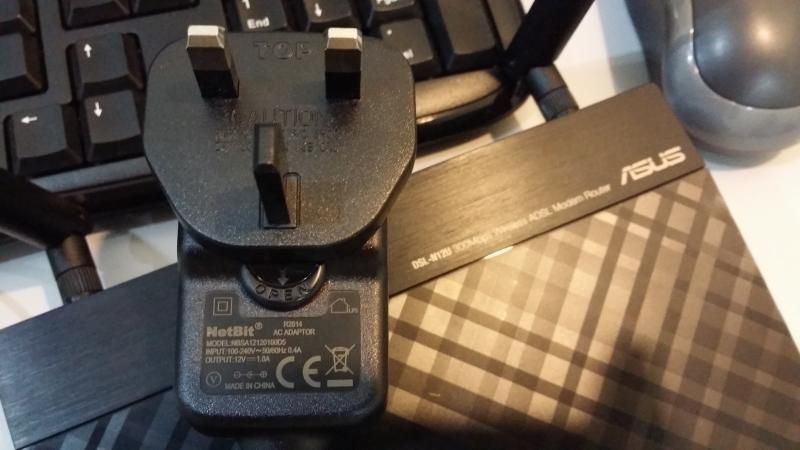
i just got myself new DSL wifi router n12u_c1

i notice the adapter do not have any asus branding n labeling on it, is it normal ? it is label as Netbits instead
my previous asus router which used at other place have asus labeling with better quality

attach are picture of the adapter from n12u router

user posted image
» Click to show Spoiler - click again to hide... «

patienceGNR
post Oct 26 2014, 04:11 PM

♥ Ride All Day ♥
*******
Senior Member
2,058 posts

Joined: Mar 2011
From: Today: 9:03 AM


Hi ASUSmy

Just to let you know the router replacement you've provided is working good so far. smile.gif

No hiccups like the A1 revision. I will further comment if coming months the router still give any problems.
TSASUSmy
post Oct 28 2014, 11:19 AM

Look at all my stars!!
*******
Senior Member
2,319 posts

Joined: Mar 2010
QUOTE(ahchun @ Oct 25 2014, 02:20 PM)
hi ASUSmy

i just got myself new DSL wifi router n12u_c1

i notice the adapter do not have any asus branding n labeling on it, is it normal ? it is label as Netbits instead
my previous asus router which used at other place have asus labeling with better quality

attach are picture of the adapter from n12u router

user posted image
» Click to show Spoiler - click again to hide... «

*
Hi ahchun,

Checked with HQ, it is the original adapter. Those that came with ASUS logo mostly is dual band router.

Thank you
ahchun
post Oct 28 2014, 02:57 PM

MiddleAge
******
Senior Member
1,147 posts

Joined: Jan 2003
From: HeRe
QUOTE(ASUSmy @ Oct 28 2014, 11:19 AM)
Hi ahchun,

Checked with HQ, it is the original adapter. Those that came with ASUS logo mostly is dual band router.

Thank you
*
Thanks for the reply icon_rolleyes.gif
kenhirai83
post Oct 28 2014, 06:03 PM

Getting Started
**
Junior Member
85 posts

Joined: May 2007
Hi guys,

What is the average file transfer speed on wifi ?

tried to transfer one file from laptop to usb hdd (attached to rounter).
The transfer speed about 2MB/s only.

Model: RT-AC68U
vickyrao
post Oct 28 2014, 10:22 PM

Regular
******
Senior Member
1,531 posts

Joined: Mar 2005
From: Bandar Sunway


Hi,

Can i know if the Asus RT-N66U now supports Astro IPTV with Maxis Fiber? Cause i just saw the LAN-IPTV setting with more options for Maxis Fiber with IPTV. Does this mean i can now use it with Maxi Fiber? Is it officially supported?

826 Pages « < 96 97 98 99 100 > » Top
 

Change to:
| Lo-Fi Version
0.0209sec    0.94    6 queries    GZIP Disabled
Time is now: 9th December 2025 - 11:42 PM