

Has anyone tried using VPN fusion Wireguard with WARP?
Home Networking ASUS Malaysia Networking User & Technical Support, Managed by ASUS Malaysia Representative
Home Networking ASUS Malaysia Networking User & Technical Support, Managed by ASUS Malaysia Representative
|
|
 Aug 1 2025, 04:22 PM Aug 1 2025, 04:22 PM
Show posts by this member only | IPv6 | Post
#16421
|
 
Junior Member
481 posts Joined: Jan 2007 
|
Has anyone tried using VPN fusion Wireguard with WARP?
|
|
|
|
|
|
Aug 5 2025, 01:41 PM
Show posts by this member only | IPv6 | Post
#16422
|

Junior Member
26 posts Joined: Dec 2008 
|
how to know my router is broken? been reset few times still the same and suddenly happen today. only the power light is on.
 |
|
|
Aug 5 2025, 02:43 PM
Show posts by this member only | IPv6 | Post
#16423
|
|
Senior Member
3,032 posts Joined: Dec 2011
|
Try firmware restoration method: https://www.asus.com/my/support/faq/1000814/ QUOTE(doket @ Aug 5 2025, 01:41 PM) how to know my router is broken? been reset few times still the same and suddenly happen today. only the power light is on.  WaNaWe900 liked this post
|
|
|
Aug 9 2025, 11:15 AM
|
|
Newbie
13 posts Joined: Feb 2009
|
Any one know how to solve this, My asus router able to get IP address from unifi but it dont have gateway and leas time.
 |
|
|
Aug 9 2025, 11:57 AM
Show posts by this member only | IPv6 | Post
#16425
|

Junior Member
566 posts Joined: Jun 2005 From: Somewhere over the rainbow
|
169.254 means you're not receiving an ip address from the dhcpd
|
|
|
Aug 21 2025, 06:26 PM
|

Senior Member
3,657 posts Joined: Jan 2003
|
Recently I setup AI Mesh router in my home with my old Asus router (node) with new Asus router (main), although I stand near to main router, but don't know why phone still "like" to connect to old router rather than to new router (main).
Is there a way to block/filter my node to connect to selected devices? I cannot find many setting on node. Or maybe blocked all wifi connection from node to all devices thru Wifi? Actually on node I can use only LAN connection. |
|
|
|
|
|
Aug 21 2025, 06:58 PM
|
 
Elite
8,401 posts Joined: Jul 2008 
|
QUOTE(sam240 @ Aug 21 2025, 06:26 PM) Recently I setup AI Mesh router in my home with my old Asus router (node) with new Asus router (main), although I stand near to main router, but don't know why phone still "like" to connect to old router rather than to new router (main). So if you want your node to work like a wireless to LAN receiver, use media bridge modeIs there a way to block/filter my node to connect to selected devices? I cannot find many setting on node. Or maybe blocked all wifi connection from node to all devices thru Wifi? Actually on node I can use only LAN connection. It's faster than AiMesh |
|
|
Aug 21 2025, 07:18 PM
|
|
Senior Member
3,657 posts Joined: Jan 2003
|
QUOTE(blacktubi @ Aug 21 2025, 06:58 PM) So if you want your node to work like a wireless to LAN receiver, use media bridge mode oh, I forgot mention I have 1 main router + 2 node. So 1 of node can set as wireless to LAN receiver? So just need to set as media bridge mode? Thanks for the tips, tonight will go and try and see.It's faster than AiMesh |
|
|
Aug 21 2025, 07:34 PM
Show posts by this member only | IPv6 | Post
#16429
|

Senior Member
1,593 posts Joined: Jan 2016
|
Just checking, anyone here using AX88U with 3.0.0.4.388_24224 or newer firmware?
DDNS seems to stop working (www.asus.com) and cant be registered using this domain. Even when registered through the app it would stopped working after restarting the router |
|
|
Aug 21 2025, 07:49 PM
|
|
Elite
8,401 posts Joined: Jul 2008
|
QUOTE(sam240 @ Aug 21 2025, 07:18 PM) oh, I forgot mention I have 1 main router + 2 node. So 1 of node can set as wireless to LAN receiver? So just need to set as media bridge mode? Thanks for the tips, tonight will go and try and see. Just reset that node then choose media bridge during initial setup sam240 liked this post
|
 |
Aug 25 2025, 11:24 AM
|

Senior Member
2,319 posts Joined: Mar 2010
|
QUOTE(QuantumEdge @ Aug 21 2025, 07:34 PM) Just checking, anyone here using AX88U with 3.0.0.4.388_24224 or newer firmware? Hi QuantumEdge,DDNS seems to stop working (www.asus.com) and cant be registered using this domain. Even when registered through the app it would stopped working after restarting the router May I ask does the problem still happening even with the latest firmware? When you click Apply button in the router GUI, are you able to register the DDNS again? Does it show "Registration is successful." Thank you |
|
|
Aug 25 2025, 05:21 PM
Show posts by this member only | IPv6 | Post
#16432
|
|
Senior Member
1,593 posts Joined: Jan 2016
|
QUOTE(ASUSmy @ Aug 25 2025, 11:24 AM) Hi QuantumEdge, I'm running 3.0.0.4.388_24284 at the momentMay I ask does the problem still happening even with the latest firmware? When you click Apply button in the router GUI, are you able to register the DDNS again? Does it show "Registration is successful." Thank you Still the same, with no option to use ASUS's DDNS (asuscomm.com) Need to set it through the app, but once I restarted the router it would be disabled again 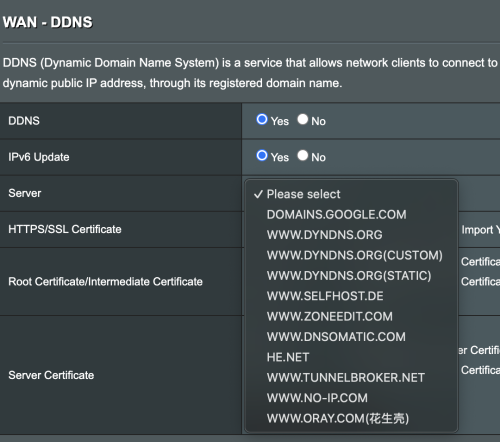 |
|
|
Aug 25 2025, 08:14 PM
Show posts by this member only | IPv6 | Post
#16433
|
|
Elite
8,401 posts Joined: Jul 2008
|
QUOTE(QuantumEdge @ Aug 25 2025, 05:21 PM) I'm running 3.0.0.4.388_24284 at the moment Have you try to reset the routerStill the same, with no option to use ASUS's DDNS (asuscomm.com) Need to set it through the app, but once I restarted the router it would be disabled again Had this bug previously, reset the router fixed it |
|
|
|
|
|
Aug 25 2025, 08:16 PM
Show posts by this member only | IPv6 | Post
#16434
|
|
Senior Member
1,593 posts Joined: Jan 2016
|
QUOTE(blacktubi @ Aug 25 2025, 08:14 PM) Have you try to reset the router Tried, still the sameHad this bug previously, reset the router fixed it This happened even on recent Merlin builds somehow |
|
|
Aug 25 2025, 08:21 PM
Show posts by this member only | IPv6 | Post
#16435
|
|
Elite
8,401 posts Joined: Jul 2008
|
QUOTE(QuantumEdge @ Aug 25 2025, 08:16 PM) Tried, still the same Your RT-AX88U is local unit or china unit?This happened even on recent Merlin builds somehow FYI DDNS function is removed on all China units |
|
|
Aug 25 2025, 08:22 PM
Show posts by this member only | IPv6 | Post
#16436
|
|
Senior Member
1,593 posts Joined: Jan 2016
|
QUOTE(blacktubi @ Aug 25 2025, 08:21 PM) Your RT-AX88U is local unit or china unit? China, but before that particular version it worked perfectly fineFYI DDNS function is removed on all China units |
|
|
Aug 25 2025, 08:31 PM
Show posts by this member only | IPv6 | Post
#16437
|
|
Elite
8,401 posts Joined: Jul 2008
|
QUOTE(QuantumEdge @ Aug 25 2025, 08:22 PM) China, but before that particular version it worked perfectly fine Yup, that explains it allYou are actually using a China specific model and it's not the RT-AX88U sold by ASUS Malaysia DDNS is now illegal in China so ASUS disabled it on all China SKU |
|
|
Aug 25 2025, 09:05 PM
Show posts by this member only | IPv6 | Post
#16438
|

Senior Member
2,399 posts Joined: Jul 2009 From: /dev/null
|
need more high paying customer onboard unifi ultra, then we can have cheap cheap internet  cHiLdHo0drEaMz, tng55, and 3 others liked this post
|
|
|
Aug 25 2025, 09:34 PM
Show posts by this member only | IPv6 | Post
#16439
|
|
Senior Member
1,593 posts Joined: Jan 2016
|
QUOTE(blacktubi @ Aug 25 2025, 08:31 PM) Yup, that explains it all Ah got it, I will stick to the older firmware thenYou are actually using a China specific model and it's not the RT-AX88U sold by ASUS Malaysia DDNS is now illegal in China so ASUS disabled it on all China SKU |
|
|
Aug 25 2025, 09:56 PM
|
|
Junior Member
446 posts Joined: Nov 2015
|
QUOTE(Anime4000 @ Aug 25 2025, 09:05 PM) need more high paying customer onboard unifi ultra, then we can have cheap cheap internet If the ''entry level plan'' reduced from RM89 to RM59 or even RM39. Lots of B40 or even those "single home" will finally have fibre Internet for the first time. |
| Change to: |  0.0246sec 0.0246sec
 0.33 0.33
 6 queries 6 queries
 GZIP Disabled GZIP Disabled
Time is now: 2nd December 2025 - 02:12 PM |
 Quote
Quote