Welcome Guest ( Log In | Register )

826 Pages « < 765 766 767 768 769 > » Bottom

Outline · [ Standard ] · Linear+

Home Networking ASUS Malaysia Networking User & Technical Support, Managed by ASUS Malaysia Representative

views
     
blacktubi
post Oct 8 2023, 08:04 PM

-
Group Icon
Elite
8,413 posts

Joined: Jul 2008

QUOTE(adrianteo @ Oct 8 2023, 05:47 PM)
Hi all, need your recommendation to set up mesh wifi. TM provided a modem and also 2 DLink DIR-X1860Z mesh.

Currently considering getting XT8 because the coverage at my home is poor with the Dlink and the speed I’m getting is only 100mb (I have the 300mbps package but seems like Unifi will upgrade to 500mbps?)

Was wondering if i need to configure the TM modem or is just plug and play.

Also, will the XD5 work and be a cheaper option noting that this is not a triband?

Thanks in advance.
*
If you are talking about mesh node speed, XD5 will give you around 250-300Mbps when connected on the node.

XT8 will give you around 500-600Mbps on the mesh node.

The performance of XT8 is around double of XD5, hence the price is around double too.

ASUS is quite fair at pricing laugh.gif
WaNaWe900
post Oct 8 2023, 10:48 PM

చąហ ąచҽ™
******
Senior Member
1,397 posts

Joined: Feb 2012
From: sOuL SoCiETY.. iSKaNDaRPuTeRi.. JB.. JDT


QUOTE(XeactorZ @ Oct 8 2023, 03:08 PM)
Since Unifi thread super fast responce which I might miss to read some post, hence I ask here since I'm using Asus TUF-AX3000

As I am using swu 3.0 300mbps, 1st year speed upgrade to 500mbps
But all my devices on Wi-Fi getting around 300mbps, max is around 350+mbps, on LAN no issue getting 500+mbps

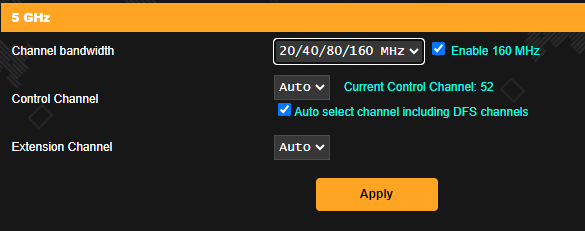
Should I turn on 160Mhz then set channel bandwidth for 5Ghz to 20/40/80/160Mhz?

user posted image

*I am using smart connect which both 2.4Ghz and 5Ghz using same SSID and didn't turn on 160Mhz
*
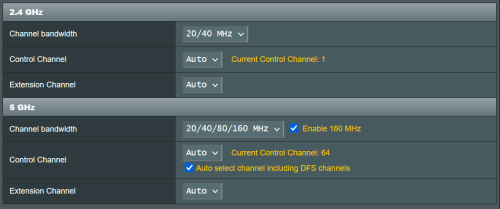
I'm usually get >480Mbps on wifi with RT-AX86U and yes tick the 160Mhz in setting icon_rolleyes.gif

user posted image

This post has been edited by WaNaWe900: Oct 8 2023, 10:49 PM
n20nine
post Oct 8 2023, 10:52 PM

Enthusiast
*****
Senior Member
909 posts

Joined: Jan 2003
From: London


Hi guys, what is a good Wifi 6/6E mesh router to use with TIME? I have a very large condo. Currently on TP-Link, was good many years ago when it was new but despite reboots/reset on TIME end, the speeds aren't great on Wifi, even if I am 25ft away.
TSASUSmy
post Oct 9 2023, 10:49 AM

Look at all my stars!!
*******
Senior Member
2,319 posts

Joined: Mar 2010
QUOTE(aa123aa @ Oct 7 2023, 03:12 PM)
Hi asus, im facing issue to update both my rt-ax3000 to3.0.0.4.388_23925. tried both via app and web. it will eventually still go back to 924 version. kindly advise pls.
*
Hi aa123aa,

Can you try manually updating the firmware? If still same, maybe you can try the firmware restoration method.

Manual firmware update.
https://www.asus.com/support/FAQ/1008000/#a2

Firmware restoration
https://www.asus.com/my/support/FAQ/1000814/

Firmware restoration Application
https://dlcdnets.asus.com/pub/ASUS/wireless...?model=RT-AC68U

Thank you
sheemmet
post Oct 9 2023, 03:43 PM

Casual
***
Junior Member
380 posts

Joined: Jul 2014
Hi all , need opinions of adding new asus router to current setup. Currently on 500Mbps unifi plan.

For now I am running two units of ac86u on aimesh. And plan to add either tuf-ax6000 or the ax86u pro as the main replacing the main unit of ac86u ( to be setup as part of the aimesh )

Open to other Asus router as well , with aimesh supported of course , thanks 🙏


XeactorZ
post Oct 9 2023, 03:49 PM

♥ PandaDog ♥
*********
All Stars
31,608 posts

Joined: Aug 2010
QUOTE(PRSXFENG @ Oct 8 2023, 07:25 PM)
I suppose it doesn't hurt to try and see if it makes any difference?
*
QUOTE(WaNaWe900 @ Oct 8 2023, 10:48 PM)
I'm usually get >480Mbps on wifi with RT-AX86U and yes tick the 160Mhz in setting  icon_rolleyes.gif

user posted image
*
Try enable and speed seems more worse hmm.gif

Let me monitor for few more days
wiraone
post Oct 9 2023, 10:10 PM

Who cares about all the stars?
*******
Senior Member
3,892 posts

Joined: Jan 2003
From: Back on earth!
QUOTE(blacktubi @ Oct 8 2023, 08:04 PM)
If you are talking about mesh node speed, XD5 will give you around 250-300Mbps when connected on the node.

XT8 will give you around 500-600Mbps on the mesh node.

The performance of XT8 is around double of XD5, hence the price is around double too.

ASUS is quite fair at pricing laugh.gif
*
Wondering why Asus Malaysia doesn't bring in XT9, I was trying to decide on Asus and Deco and google keeps comparing XT9 and Deco X95. It seems it is due to the chipset I guess.
blacktubi
post Oct 9 2023, 10:17 PM

-
Group Icon
Elite
8,413 posts

Joined: Jul 2008

QUOTE(wiraone @ Oct 9 2023, 10:10 PM)
Wondering why Asus Malaysia doesn't bring in XT9, I was trying to decide on Asus and Deco and google keeps comparing XT9 and Deco X95. It seems it is due to the chipset I guess.
*
That's because current version of ZenWiFi XT8 V2 for sale in the market is already the same hardware to ZenWiFi XT9 with the faster 1.7GHz Quad Core CPU


ben3003
post Oct 10 2023, 06:15 AM

10k Club
********
All Stars
10,859 posts

Joined: Jan 2003
From: Sarawak


Wanna ask if i get another ax4200 and use aimesh for my wifi5 device, will the wifi speed halved as what normal mesh setup would do?
satriaguy
post Oct 10 2023, 09:49 AM

Casual
***
Junior Member
306 posts

Joined: Jan 2003


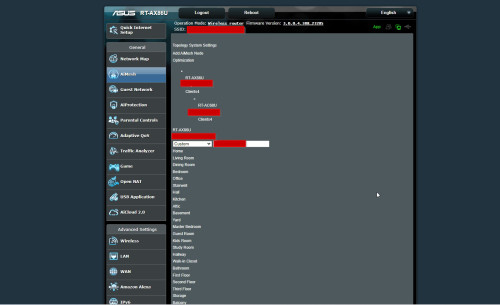
Hi, i just got AX86u and set it up as Primary router and another AC68u as AiMesh node, in AX86u under the AiMesh page, i always got the below screen, occasionally it is back to the normal UI (very rare), what happen ya.

user posted image
TSASUSmy
post Oct 10 2023, 10:13 AM

Look at all my stars!!
*******
Senior Member
2,319 posts

Joined: Mar 2010
QUOTE(ben3003 @ Oct 10 2023, 06:15 AM)
Wanna ask if i get another ax4200 and use aimesh for my wifi5 device, will the wifi speed halved as what normal mesh setup would do?
*
Hi ben3003,

Yes, it will be half also unless you are using Ethernet backhaul or a dedicated WiFi backhaul.

Thank you
shinjite
post Oct 10 2023, 10:13 AM

�ŞħĬΩĵΐŦ��
********
All Stars
19,321 posts

Joined: Jan 2003
From: Klang


https://shopee.com.my/Asus-TUF-Gaming-TUF-A...3f-758469ac1310

Guys, found this router at a great price!
With the RM25 rebate, seller voucher of RM10 and spend 3000 shopee coins, you can drop it down to RM519 excluding shipping fee. Left 4 to 5 units if I remember correctly

This post has been edited by shinjite: Oct 10 2023, 10:17 AM
TSASUSmy
post Oct 10 2023, 10:16 AM

Look at all my stars!!
*******
Senior Member
2,319 posts

Joined: Mar 2010
QUOTE(satriaguy @ Oct 10 2023, 09:49 AM)
Hi, i just got AX86u and set it up as Primary router and another AC68u as AiMesh node, in AX86u under the AiMesh page, i always got the below screen, occasionally it is back to the normal UI (very rare), what happen ya.

user posted image
*
Hi satriaguy,

Maybe you can try using other browser/device and see whether it will be ok or not.

Thank you
AVFAN
post Oct 10 2023, 10:23 AM

20k VIP Club
*********
All Stars
24,454 posts

Joined: Nov 2010
QUOTE(shinjite @ Oct 10 2023, 10:13 AM)
https://shopee.com.my/Asus-TUF-Gaming-TUF-A...3f-758469ac1310

Guys, found this router at a great price!
With the RM25 rebate, seller voucher of RM10 and spend 3000 shopee coins, you can drop it down to RM519 excluding shipping fee. Left 4 to 5 units if I remember correctly
*
TQVM.

only 5 pcs available!
JasonthegreatTWO
post Oct 10 2023, 10:36 AM

Casual
***
Junior Member
323 posts

Joined: Sep 2022
Hi, What is the difference between RT-AX1800U and RT-AX53U?
I want to get either one to Mesh with my TUF-AX5400. Will they work?
TSASUSmy
post Oct 10 2023, 10:41 AM

Look at all my stars!!
*******
Senior Member
2,319 posts

Joined: Mar 2010
QUOTE(JasonthegreatTWO @ Oct 10 2023, 10:36 AM)
Hi, What is the difference between RT-AX1800U and RT-AX53U?
I want to get either one to Mesh with my TUF-AX5400. Will they work?
*
Hi JasonthegreatTWO,

Both are having the same spec, just the name is different.

Yes, both able support AiMesh.

https://www.asus.com/my/product-compare?Pro...-Servers-WiFi-6

Thank you

This post has been edited by ASUSmy: Oct 10 2023, 10:42 AM
dc89
post Oct 10 2023, 10:42 AM

Getting Started
**
Junior Member
181 posts

Joined: Dec 2015


QUOTE(shinjite @ Oct 10 2023, 10:13 AM)
https://shopee.com.my/Asus-TUF-Gaming-TUF-A...3f-758469ac1310

Guys, found this router at a great price!
With the RM25 rebate, seller voucher of RM10 and spend 3000 shopee coins, you can drop it down to RM519 excluding shipping fee. Left 4 to 5 units if I remember correctly
*
I can only get RM553.90 (including shipping) how come cannot get RM519 ?
AVFAN
post Oct 10 2023, 10:51 AM

20k VIP Club
*********
All Stars
24,454 posts

Joined: Nov 2010
QUOTE(dc89 @ Oct 10 2023, 10:42 AM)
I can only get RM553.90 (including shipping) how come cannot get RM519 ?
*
584 -25 cash rebate voucher -10 shop voucher -30 coins = 519.

can also do:
584 -10 shop voucher -30 coins -54 (10% coins cashback to earn) = 490
dc89
post Oct 10 2023, 10:54 AM

Getting Started
**
Junior Member
181 posts

Joined: Dec 2015


QUOTE(AVFAN @ Oct 10 2023, 10:51 AM)
584 -25 cash rebate voucher -10 shop voucher -30 coins = 519.

can also do:
584 -10 shop voucher -30 coins -54 (10% coins cashback to earn) = 490
*
how you get 30 coins bro ?
AVFAN
post Oct 10 2023, 10:57 AM

20k VIP Club
*********
All Stars
24,454 posts

Joined: Nov 2010
QUOTE(dc89 @ Oct 10 2023, 10:54 AM)
how you get 30 coins bro ?
*
of course, u must hv earned them previously.

30 or 10% price is max allowed to use per purchase.

this coin thingy is optimized if u keep rolling them.

like this purchase if u make it, u get 54.4 to be used on next purchase that accept coins.

826 Pages « < 765 766 767 768 769 > » Top
 

Change to:
| Lo-Fi Version
0.0341sec    0.44    6 queries    GZIP Disabled
Time is now: 9th December 2025 - 04:17 PM