Welcome Guest ( Log In | Register )

826 Pages « < 764 765 766 767 768 > » Bottom

Outline · [ Standard ] · Linear+

Home Networking ASUS Malaysia Networking User & Technical Support, Managed by ASUS Malaysia Representative

views
     
sHawTY
post Oct 5 2023, 12:35 PM

Frequent Reporter
********
All Stars
14,909 posts

Joined: Jul 2005

QUOTE(jiaen0509 @ Oct 5 2023, 09:55 AM)
Can my Wireless Router still can use? Or can only use Unifi provided modem/router?
You can still use the ASUS router but you will be limited to around 900Mb/s download speed
When the TM contractor goes to your place to change the modem/router, you can tell them to set it as bridge mode so the ASUS router will still do the PPPoE dialup
jiaen0509
post Oct 5 2023, 12:48 PM

Look at all my stars!!
*******
Senior Member
3,305 posts

Joined: Dec 2012
QUOTE(sHawTY @ Oct 5 2023, 12:35 PM)
You can still use the ASUS router but you will be limited to around 900Mb/s download speed
When the TM contractor goes to your place to change the modem/router, you can tell them to set it as bridge mode so the ASUS router will still do the PPPoE dialup
*
Mean, I will get one ONR from TM. Then use Lan cable connect to my Asus Router?
sHawTY
post Oct 5 2023, 03:14 PM

Frequent Reporter
********
All Stars
14,909 posts

Joined: Jul 2005

QUOTE(jiaen0509 @ Oct 5 2023, 12:48 PM)
Mean, I will get one ONR from TM. Then use Lan cable connect to my Asus Router?
Correct. Ask them to set the ONR as bridge mode
This will disable the DHCP functionality and at the same time turn off the Wi-Fi function
But just to let you know that not all installer knows how to do it

I had to cancel 1 installer because of this and another installer came on the next day to do what I wanted them to do
jiaen0509
post Oct 5 2023, 03:49 PM

Look at all my stars!!
*******
Senior Member
3,305 posts

Joined: Dec 2012
QUOTE(sHawTY @ Oct 5 2023, 03:14 PM)
Correct. Ask them to set the ONR as bridge mode
This will disable the DHCP functionality and at the same time turn off the Wi-Fi function
But just to let you know that not all installer knows how to do it

I had to cancel 1 installer because of this and another installer came on the next day to do what I wanted them to do
*
Does it involve technical knowledge? We can do that after done set up? Just worry there required some password to do that.
sHawTY
post Oct 5 2023, 04:18 PM

Frequent Reporter
********
All Stars
14,909 posts

Joined: Jul 2005

QUOTE(jiaen0509 @ Oct 5 2023, 03:49 PM)
Does it involve technical knowledge? We can do that after done set up? Just worry there required some password to do that.
Your PPPoE password shouldn't change even after the upgrade
If the installer can set the ONR to bridge mode by themselves, then you don't need to do anything
But if not, you may have to get the login password for the ONR from the installer to set the bridge mode by yourself
blacktubi
post Oct 5 2023, 04:20 PM

-
Group Icon
Elite
8,413 posts

Joined: Jul 2008

QUOTE(sHawTY @ Oct 5 2023, 03:14 PM)
Correct. Ask them to set the ONR as bridge mode
This will disable the DHCP functionality and at the same time turn off the Wi-Fi function
But just to let you know that not all installer knows how to do it

I had to cancel 1 installer because of this and another installer came on the next day to do what I wanted them to do
*
Wait, they let people to change the D-LINK ONR to bridge mode now?


yongtjunkit
post Oct 5 2023, 05:01 PM

Look at all my stars!!
*******
Senior Member
2,516 posts

Joined: Mar 2016
Hi, just wondering does the AX92U supports speeds more than 500mbps?
sHawTY
post Oct 5 2023, 05:27 PM

Frequent Reporter
********
All Stars
14,909 posts

Joined: Jul 2005

QUOTE(blacktubi @ Oct 5 2023, 04:20 PM)
Wait, they let people to change the D-LINK ONR to bridge mode now?
I'm not sure if we can really do it by ourselves as I have never tested it
But changing to bridge mode is possible because that's what they did to my office D-Link ONU when we upgrade from 800Mb/s to 1Gb/s
We're using our own Fortinet firewall to do the PPPoE dial-up hence the reason for bridging mode

The installer also gave me the password for the ONT while mentioning that we can use that password to login into the ONR if we ever need to modify something

This post has been edited by sHawTY: Oct 5 2023, 05:39 PM
mohd_ikh1
post Oct 6 2023, 02:24 PM

New Member
*
Newbie
8 posts

Joined: Nov 2010
From: Putrajaya/Seremban


Hello ASUS Msia..need some help..with the recent changes on Unifi upgrading speed, I'm from 500mbps is now upgraded to 800mbps..
The problem now, I manage to get 800mbps or more with provided Unifi router (D-Link DIR-X3060Z)..but if I use my TUF-AX3000 router, only get bout 500-600mbps only..
Is there any settings I need to change? Thanks in advance..
jusbella
post Oct 6 2023, 02:31 PM

Look at all my stars!!
*******
Senior Member
3,034 posts

Joined: Dec 2011


QUOTE(mohd_ikh1 @ Oct 6 2023, 02:24 PM)
Hello ASUS Msia..need some help..with the recent changes on Unifi upgrading speed, I'm from 500mbps is now upgraded to 800mbps..
The problem now, I manage to get 800mbps or more with provided Unifi router (D-Link DIR-X3060Z)..but if I use my TUF-AX3000 router, only get bout 500-600mbps only..
Is there any settings I need to change? Thanks in advance..
*
https://www.blacktubi.com/review/asus-tuf-ax3000/

Try turn off Ai Protection and turn off QoS? Turn off other accelerator as well to test 1 by 1 find which one is culprit.

This post has been edited by jusbella: Oct 6 2023, 02:43 PM
fcchung
post Oct 6 2023, 04:41 PM

Getting Started
**
Junior Member
291 posts

Joined: Aug 2008


hi, i staying 3 stories landed house..i would like to change my router for UNIFI 500mpbs...any recommend?thanks...
White2000
post Oct 7 2023, 07:44 AM

Getting Started
**
Junior Member
272 posts

Joined: Oct 2016
Can all IT Hypermarket selling Asus Router be trusted? Asus RT-86U Pro around 1.3k

They didn't have LazMall label means Lazada cannot guarantee delivery or genuine product right?


+ Also RT-86U pro is a good Asus router right? No known issues?

This post has been edited by White2000: Oct 7 2023, 07:45 AM
Singh93
post Oct 7 2023, 07:51 AM

Getting Started
**
Junior Member
224 posts

Joined: Sep 2019


QUOTE(White2000 @ Oct 7 2023, 08:44 AM)
Can all IT Hypermarket selling Asus Router be trusted? Asus RT-86U Pro around 1.3k

They didn't have LazMall label means Lazada cannot guarantee delivery or genuine product right?
+ Also RT-86U pro is a good Asus router right? No known issues?
*
yes ax86u pro is a good trouble free router
PRSXFENG
post Oct 7 2023, 10:53 AM

Look at all my stars!!
*******
Senior Member
2,608 posts

Joined: Nov 2020


QUOTE(White2000 @ Oct 7 2023, 07:44 AM)
Can all IT Hypermarket selling Asus Router be trusted? Asus RT-86U Pro around 1.3k

They didn't have LazMall label means Lazada cannot guarantee delivery or genuine product right?
+ Also RT-86U pro is a good Asus router right? No known issues?
*
All IT is a large chain store, they got physical branches, but usually more expensive physically

LazMall just guarantees genuine, if the product didn't get delivered you'll still get a refund
Same applies for Shopee Mall I suppose

As for why sellers don't want to join these programs
It actually costs the seller more to join these Preferred or Mall programs, the platform will take a larger cut of their profits due to their status
They're depending on their already existing reputation of being a retail chain, so they don't bother with getting Mall tag

So yeah, totally ok to get from them
aa123aa
post Oct 7 2023, 03:12 PM

Getting Started
**
Junior Member
180 posts

Joined: Mar 2015
Hi asus, im facing issue to update both my rt-ax3000 to3.0.0.4.388_23925. tried both via app and web. it will eventually still go back to 924 version. kindly advise pls.
AVFAN
post Oct 8 2023, 08:51 AM

20k VIP Club
*********
All Stars
24,454 posts

Joined: Nov 2010
QUOTE(blacktubi @ Jul 26 2023, 09:54 AM)
I will recommend the ASUS TUF-AX4200

Excellent product, almost flagship level performance at mid-tier price point

Get it before ASUS increase the price, they have been slowly raising their prices over the years laugh.gif
*
hi again!
there is news with the recent unifi speed upgrades that i will get upgraded from 800mbps to 1 or even 2 gbps next year.
is the ASUS TUF-AX4200 still a great choice for 1 or 2 gbps?
or wud u recommend something else?
usage is not heavy but i try to avoid mesh if possible.
10.10 may see a good discount bringing it to <rm600.
of course, i can wait till the upgrade happens, see what new equipment TM provides or sell.
thanks for comment.

QUOTE(AVFAN @ Jul 26 2023, 09:26 AM)
currently using RTAC1300UHP, no mesh.
unifi 800mbps, double storey house, longest distance about 60ft diagonal.
average 3-4 devices at any time, max 8; most are not new, 2-8 years old.
for last 5 years, i hv been pleased with the router, good.
lately, i am using wifi upstairs quite a bit more.
for pc, android tv, entertainment boxes.... netflix 4khdr, disney+H uhd, etc.
it's OK overall but sometimes, the signal gets too weak, disruption.
at this time, what current model and setup wud u recommend?
not in a rush as i am planning to change a couple of devices to new first.
what else shud i be mindful when buying new devices?

*
This post has been edited by AVFAN: Oct 8 2023, 09:00 AM
blacktubi
post Oct 8 2023, 10:07 AM

-
Group Icon
Elite
8,413 posts

Joined: Jul 2008

QUOTE(AVFAN @ Oct 8 2023, 08:51 AM)
hi again!
there is news with the recent unifi speed upgrades that i will get upgraded from 800mbps to 1 or even 2 gbps next year.
is the ASUS TUF-AX4200 still a great choice for 1 or 2 gbps?
or wud u recommend something else?
usage is not heavy but i try to avoid mesh if possible.
10.10 may see a good discount bringing it to <rm600.
of course, i can wait till the upgrade happens, see what new equipment TM provides or sell.
thanks for comment.
*
Still one of the best in class at the moment

It even outperforms AX5400 from other brands and ASUS own AX5400 router
XeactorZ
post Oct 8 2023, 03:08 PM

♥ PandaDog ♥
*********
All Stars
31,608 posts

Joined: Aug 2010
Since Unifi thread super fast responce which I might miss to read some post, hence I ask here since I'm using Asus TUF-AX3000

As I am using swu 3.0 300mbps, 1st year speed upgrade to 500mbps
But all my devices on Wi-Fi getting around 300mbps, max is around 350+mbps, on LAN no issue getting 500+mbps

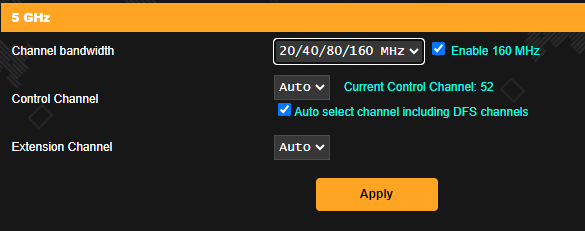
Should I turn on 160Mhz then set channel bandwidth for 5Ghz to 20/40/80/160Mhz?

user posted image

*I am using smart connect which both 2.4Ghz and 5Ghz using same SSID and didn't turn on 160Mhz

This post has been edited by XeactorZ: Oct 8 2023, 03:09 PM
adrianteo
post Oct 8 2023, 05:47 PM

Getting Started
**
Junior Member
188 posts

Joined: Jan 2008


Hi all, need your recommendation to set up mesh wifi. TM provided a modem and also 2 DLink DIR-X1860Z mesh.

Currently considering getting XT8 because the coverage at my home is poor with the Dlink and the speed I’m getting is only 100mb (I have the 300mbps package but seems like Unifi will upgrade to 500mbps?)

Was wondering if i need to configure the TM modem or is just plug and play.

Also, will the XD5 work and be a cheaper option noting that this is not a triband?

Thanks in advance.

This post has been edited by adrianteo: Oct 8 2023, 05:50 PM
PRSXFENG
post Oct 8 2023, 07:25 PM

Look at all my stars!!
*******
Senior Member
2,608 posts

Joined: Nov 2020


QUOTE(XeactorZ @ Oct 8 2023, 03:08 PM)
Since Unifi thread super fast responce which I might miss to read some post, hence I ask here since I'm using Asus TUF-AX3000

As I am using swu 3.0 300mbps, 1st year speed upgrade to 500mbps
But all my devices on Wi-Fi getting around 300mbps, max is around 350+mbps, on LAN no issue getting 500+mbps

Should I turn on 160Mhz then set channel bandwidth for 5Ghz to 20/40/80/160Mhz?

user posted image

*I am using smart connect which both 2.4Ghz and 5Ghz using same SSID and didn't turn on 160Mhz
*
I suppose it doesn't hurt to try and see if it makes any difference?

QUOTE(adrianteo @ Oct 8 2023, 05:47 PM)
Hi all, need your recommendation to set up mesh wifi. TM provided a modem and also 2 DLink DIR-X1860Z mesh.

Currently considering getting XT8 because the coverage at my home is poor with the Dlink and the speed I’m getting is only 100mb (I have the 300mbps package but seems like Unifi will upgrade to 500mbps?)

Was wondering if i need to configure the TM modem or is just plug and play.

Also, will the XD5 work and be a cheaper option noting that this is not a triband?

Thanks in advance.
*
to configure, you need your PPPoE Username and Password which you can get by asking TM
guide, can refer to this youtube video
https://www.youtube.com/watch?v=kHisnAEsKik

as for recommendation of hardware, I have no comment since I don't have experience with those models

826 Pages « < 764 765 766 767 768 > » Top
 

Change to:
| Lo-Fi Version
0.0381sec    1.00    6 queries    GZIP Disabled
Time is now: 10th December 2025 - 12:00 AM