Outline ·
[ Standard ] ·
Linear+
Home Networking ASUS Malaysia Networking User & Technical Support, Managed by ASUS Malaysia Representative
TSASUSmy
|
 Apr 18 2014, 04:23 PM Apr 18 2014, 04:23 PM
|

|
QUOTE(shinkawa @ Apr 18 2014, 03:02 PM) i have this n66u. already create asuscomm.com with download manager installed to usb hdd. test from home can access very fast. but at office cannot. dafuk? Hi shinkawa, Has you Enable the "WAN network" as shown at the picture below? Remember to on the Firewall before you do so. After you on the "WAN network", you will need to put :8081 behind your domain name in order to access it remotely. Thank you This post has been edited by ASUSmy: Apr 18 2014, 04:23 PM Attached thumbnail(s)
|
|
|
|
|
|
cyclone2
|
Apr 21 2014, 12:05 PM
|
|
|
Hi ASUSMy,
May I know where is the service centre of ASUS at JOHOR BAHRU?
|
|
|
|
|
|
Aoshi_88
|
Apr 21 2014, 06:40 PM
|
|
|
I am attempting to find out if upgrading from the 3.0.0.4.246 firmware to the latest available on the Asus website 3.0.0.4.374 will cause me to lose the Unifi VPN settings.
Model: RT-N16
Can anyone advice?
Are you on the latest Asus firmware?
I intend to upgrade for security and stability purposes.
This post has been edited by Aoshi_88: Apr 21 2014, 06:41 PM
|
|
|
|
|
|
TSASUSmy
|
Apr 22 2014, 11:08 AM
|
|
|
QUOTE(cyclone2 @ Apr 21 2014, 12:05 PM) Hi ASUSMy, May I know where is the service centre of ASUS at JOHOR BAHRU? Hi cyclone2, JB don't have service centre for networking device, you will need to send back to the place you bought for warranty claim. Thank you |
|
|
|
|
|
TSASUSmy
|
Apr 22 2014, 11:14 AM
|
|
|
QUOTE(Aoshi_88 @ Apr 21 2014, 06:40 PM) I am attempting to find out if upgrading from the 3.0.0.4.246 firmware to the latest available on the Asus website 3.0.0.4.374 will cause me to lose the Unifi VPN settings. Model: RT-N16Can anyone advice? Are you on the latest Asus firmware? I intend to upgrade for security and stability purposes. Hi Aoshi_88, The current newest firmware version for RT-N16 is 3.0.0.4.374.5517. And due to this and previous version add many new features, please press the reset button more than 5 seconds to reset the RT-N16 after firmware upgraded to prevent unexpected problem. You will need to manually redo all the setting even for the VPN. http://www.asus.com/my/Networking/RTN16/HelpDesk_Download/Thank you |
|
|
|
|
|
ysc
|
Apr 23 2014, 08:17 AM
|
|
|
Does rt-14u support unifi out of the box?
Meaning, I would connect 14u direct to the BTU.
|
|
|
|
|
|
TSASUSmy
|
Apr 23 2014, 10:14 AM
|
|
|
QUOTE(ysc @ Apr 23 2014, 08:17 AM) Does rt-14u support unifi out of the box? Meaning, I would connect 14u direct to the BTU. Hi ysc, It should be able to support, in the event you unable to connect to UNIFI, you can always update the firmware to the latest. http://www.asus.com/Networking/RTN14U/HelpDesk_Download/Thank you |
|
|
|
|
|
Aoshi_88
|
Apr 23 2014, 04:23 PM
|
|
|
QUOTE(ASUSmy @ Apr 22 2014, 11:14 AM) Hi Aoshi_88, The current newest firmware version for RT-N16 is 3.0.0.4.374.5517. And due to this and previous version add many new features, please press the reset button more than 5 seconds to reset the RT-N16 after firmware upgraded to prevent unexpected problem. You will need to manually redo all the setting even for the VPN. http://www.asus.com/my/Networking/RTN16/HelpDesk_Download/Thank you Okay... so I bricked the router but managed to recover it and it's now running the latest firmware. I quick-googled and seems like OKRLY is having some IPv6 issues. I too, am having this issue. See below for screencap of IPv6 config. Jan 1 08:00:25 syslog: module nf_conntrack_ipv6 not found in modules.dep Jan 1 08:00:35 rc_service: ipv6-up 325:notify_rc start_rdnssd Jan 1 08:00:35 syslog: module nf_conntrack_ipv6 not found in modules.dep 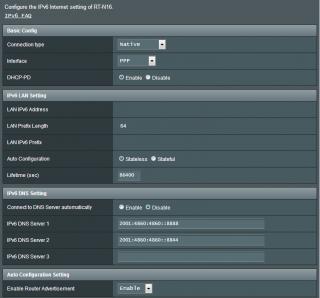
EDIT: Scratch that... seems like IPv6 is now working again.This post has been edited by Aoshi_88: Apr 23 2014, 04:25 PM |
|
|
|
|
|
TSASUSmy
|
Apr 23 2014, 04:33 PM
|
|
|
QUOTE(Aoshi_88 @ Apr 23 2014, 04:23 PM) Okay... so I bricked the router but managed to recover it and it's now running the latest firmware. I quick-googled and seems like OKRLY is having some IPv6 issues. I too, am having this issue. See below for screencap of IPv6 config. Jan 1 08:00:25 syslog: module nf_conntrack_ipv6 not found in modules.dep Jan 1 08:00:35 rc_service: ipv6-up 325:notify_rc start_rdnssd Jan 1 08:00:35 syslog: module nf_conntrack_ipv6 not found in modules.dep
EDIT: Scratch that... seems like IPv6 is now working again.Hi Aoshi_88, The new firmware should be able to work with the IPv6. Do check with TM whether your area is supported. Especially for dynamic WAN IP. Thank you |
|
|
|
|
|
ysc
|
Apr 24 2014, 08:09 AM
|
|
|
QUOTE(ASUSmy @ Apr 23 2014, 10:14 AM) Hi ysc, It should be able to support, in the event you unable to connect to UNIFI, you can always update the firmware to the latest. http://www.asus.com/Networking/RTN14U/HelpDesk_Download/Thank you So the latest firmware definitely can support unifi for rt-14u...? |
|
|
|
|
|
eauyong
|
Apr 24 2014, 07:44 PM
|
Getting Started

|
Hi Asus Support, Can you please let me know the link, if any for the latest FW for Router DSL-N12U to enable the 4G Wimax usb dongle from YES. Thank you. Ed.  |
|
|
|
|
|
Geenic
|
Apr 24 2014, 08:28 PM
|
New Member
|
I recently purchase a RT-N12HP router and was using it without problem until yesterday. the wifi stopped working but LAN connected pc are still able to get on the internet. The wifi led blink sometime but not constant or constant blinking. Signal cannot be found, even in very very near to the router. anyone know why  This post has been edited by Geenic: Apr 24 2014, 08:30 PM This post has been edited by Geenic: Apr 24 2014, 08:30 PM |
|
|
|
|
|
TSASUSmy
|
Apr 25 2014, 12:39 PM
|
|
|
QUOTE(eauyong @ Apr 24 2014, 07:44 PM) Hi Asus Support, Can you please let me know the link, if any for the latest FW for Router DSL-N12U to enable the 4G Wimax usb dongle from YES. Thank you. Ed. Hi eauyong, DSL-N12U unable to support the YES 4G GO dongle. For DSL model, at least need DSL-N55U and above. Thank you |
|
|
|
|
|
TSASUSmy
|
Apr 25 2014, 12:41 PM
|
|
|
QUOTE(Geenic @ Apr 24 2014, 08:28 PM) I recently purchase a RT-N12HP router and was using it without problem until yesterday. the wifi stopped working but LAN connected pc are still able to get on the internet. The wifi led blink sometime but not constant or constant blinking. Signal cannot be found, even in very very near to the router. anyone know why Hi Geenic, Try do a factory reset and see you able to detect the signal or not, if no then there might be something wrong with the WiFi. Thank you |
|
|
|
|
|
mnharon
|
Apr 25 2014, 05:32 PM
|
New Member
|
Can I change asuscomm.com(DNS) username on RT-N12HP router?
Any conflic if just overide old name?
|
|
|
|
|
|
TSASUSmy
|
Apr 25 2014, 06:24 PM
|
|
|
QUOTE(mnharon @ Apr 25 2014, 05:32 PM) Can I change asuscomm.com(DNS) username on RT-N12HP router? Any conflic if just overide old name? Hi mnharon, Yes, you can change it and it will override your old one. Thank you |
|
|
|
|
|
eauyong
|
Apr 25 2014, 07:13 PM
|
Getting Started
|
QUOTE(ASUSmy @ Apr 25 2014, 12:39 PM) Hi eauyong, DSL-N12U unable to support the YES 4G GO dongle. For DSL model, at least need DSL-N55U and above. Thank you Thank you for the reply. Please advise whether RT-N15U can support YES 4G? |
|
|
|
|
|
tomastan4134
|
Apr 26 2014, 11:10 PM
|
|
|
hey guys..
i have the n66u router setup at home..
its connected to 4mbps streamyx..
ive connected usb hdd to the router. and also NAS hdd to the router
i have xunlei vip membership access where it has the offline download function.
i was wondering how do i configure the router to accept xunlei offline download to my NAS or usb hdd attached to the router?
|
|
|
|
|
|
jojoe
|
Apr 26 2014, 11:24 PM
|
|
|
hi asus support....
possible to get instant replacement for Asus wifi router N16 if i send to
AV Future Link (KL) Sdn Bhd
No. 14, Jalan 4/152, Taman Perindustrian OUG, Jalan Puchong, Kuala Lumpur, 58200, Kuala Lumpur, WP Kuala Lumpur
Tel 03-7783 0011 Fax 03-7781 6295
Website www.avf.com.my
ScanArt Data System (M) Sdn. Bhd
Ground Floor, Kompleks Penchala, No.50, Jalan Penchala, Seksyen 51, 46050 Petaling Jaya, Selangor.
Tel: 03-7782 4700 Fax: 03-7782 4701
Website www.scanart.com.my/v2/
the router is brick after upgrade firmware... can't recover by asus firmware recovery utility.....
understand that.... replacement need 1 month time... based on my last experience....
|
|
|
|
|
|
ysc
|
Apr 27 2014, 10:57 AM
|
|
|
QUOTE(ASUSmy @ Apr 23 2014, 10:14 AM) Hi ysc, It should be able to support, in the event you unable to connect to UNIFI, you can always update the firmware to the latest. http://www.asus.com/Networking/RTN14U/HelpDesk_Download/Thank you So the latest firmware definitely can support unifi for rt-14u...? |
|
|
|
|



 Quote
Quote


 0.0256sec
 0.45
0.45
 6 queries
 GZIP Disabled