Outline ·
[ Standard ] ·
Linear+
Hardware Acer Aspire P3 /Acer Iconia W700 Discussion Thread, Powerful Intel Processor Windows8 Tablet
|
dman
|
 Jun 25 2013, 05:39 PM Jun 25 2013, 05:39 PM
|

|
W700 has excellent fullhd screen. Sometimes very hard to touch the tiny button when in fullhd res especially in desktop mode. Battery can last 5-6 hrs normal usage. The only thing which dun really like is the almost 1kg w700 tablet body. A bit heavy to my liking. The lack of SDcard slot is the real turn off as the SSD space is quite limited. LCD screen once spoiled and replaced under warranty in just 4 days.  Overall is good machine. |
|
|
|
|
|
jameslow
|
Jun 25 2013, 05:44 PM
|
Getting Started

|
QUOTE(dman @ Jun 25 2013, 05:39 PM) W700 has excellent fullhd screen. Sometimes very hard to touch the tiny button when in fullhd res especially in desktop mode. Battery can last 5-6 hrs normal usage. The only thing which dun really like is the almost 1kg w700 tablet body. A bit heavy to my liking. The lack of SDcard slot is the real turn off as the SSD space is quite limited. Overall is good machine. I agree with you... |
|
|
|
|
|
jameslow
|
Jun 25 2013, 05:48 PM
|
Getting Started
|
QUOTE(wilsonha @ Jun 25 2013, 11:43 AM) hahaha,jameslow,how your w700,enjoying and satisfy with it? everything go smooth .what is the pro and con ,sharing,i hear got somebody said if normal work can last to 7 hour to 8 hour ,is this true... ... Overall is quite good but a bit heavy, I seldom bring out, so no issue. Never experience 7-8 hours, 4-5 hours got la... It's a real good buy imho. |
|
|
|
|
|
TSfarkingdom
|
Jun 25 2013, 08:31 PM
|
|
|
QUOTE(dman @ Jun 25 2013, 05:39 PM) W700 has excellent fullhd screen. Sometimes very hard to touch the tiny button when in fullhd res especially in desktop mode. Battery can last 5-6 hrs normal usage. The only thing which dun really like is the almost 1kg w700 tablet body. A bit heavy to my liking. The lack of SDcard slot is the real turn off as the SSD space is quite limited. LCD screen once spoiled and replaced under warranty in just 4 days. Overall is good machine. You can scale up your desktop to fit the 1080p screen, here's how: Control Panel > Appearance and Personalization > Make text and other items larger and smaller; then scale it up to the largest. Now everything is larger while remain sharp and HD quality., this is one of the cool new Windows 8 feature. 8.1 coming soon will do much more. Cheers  |
|
|
|
|
|
jun88
|
Jun 25 2013, 09:35 PM
|
|
|
Hi. My W700 come with leather case and dock..didnt come with Keyboard cover.. I bought the Rapoo E2700 keyboard with touch pad .. Very slim and cost rm 104.00 the ori Acer keyboard cover cost rm200..sell at Highpoint.. This post has been edited by jun88: Jun 25 2013, 09:42 PM Attached thumbnail(s)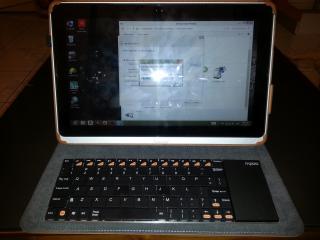
|
|
|
|
|
|
dman
|
Jun 26 2013, 09:31 AM
|
|
|
QUOTE(jun88 @ Jun 25 2013, 09:35 PM) Hi. My W700 come with leather case and dock..didnt come with Keyboard cover.. I bought the Rapoo E2700 keyboard with touch pad .. Very slim and cost rm 104.00 the ori Acer keyboard cover cost rm200..sell at Highpoint.. For the keyboard or mouse, its better to get the bluetooth version as the USB version will used up the one and only usb port available in the w700 body. Unless u dock it. |
|
|
|
|
|
SJ Chua
|
Jun 27 2013, 09:01 PM
|
Getting Started
|
selling off W700 later model i3-2375 1.5GHZ with original keyboard cover (tab installed with SP) guys anybody interested can PM me |
|
|
|
|
|
thirstydude
|
Jul 4 2013, 10:21 AM
|
New Member
|
hi guys,
ive had my w7 for a month now, so far liking everything about it but the weight. anyways, tht aside, i normally do a lot of annotation on previous tablets, was wondering whts the best stylus to use to annotate on w7.
im looking at buying adonit pro jot, but so far havent found it in the shops yet. will pop by machines or epicentre to get.
anyone here using tht?
just wondering if its worth buying cos i need a fine point stylus.
|
|
|
|
|
|
hkh m43
|
Jul 4 2013, 11:49 AM
|
Getting Started
|
QUOTE(thirstydude @ Jul 4 2013, 10:21 AM) hi guys, ive had my w7 for a month now, so far liking everything about it but the weight. anyways, tht aside, i normally do a lot of annotation on previous tablets, was wondering whts the best stylus to use to annotate on w7. im looking at buying adonit pro jot, but so far havent found it in the shops yet. will pop by machines or epicentre to get. anyone here using tht? just wondering if its worth buying cos i need a fine point stylus. I found that stylus with a metal mesh tip (I think boxwave and other makes) works best. Much better than normal rubber tips and skips less than a jot pro tip. Which annotation or note programs do you use? |
|
|
|
|
|
thirstydude
|
Jul 4 2013, 01:03 PM
|
New Member
|
QUOTE(hkh m43 @ Jul 4 2013, 11:49 AM) I found that stylus with a metal mesh tip (I think boxwave and other makes) works best. Much better than normal rubber tips and skips less than a jot pro tip. Which annotation or note programs do you use? i use a free one , think its called pdf annotator. i browsed the boxwave site, didnt see a sharp point stylus...i hate using those rubbery stylus tips...too big to be accurate... thts y only one i saw tht cld possibly work is the adonit ones |
|
|
|
|
|
hkh m43
|
Jul 4 2013, 01:52 PM
|
Getting Started
|
QUOTE(thirstydude @ Jul 4 2013, 01:03 PM) i use a free one , think its called pdf annotator. i browsed the boxwave site, didnt see a sharp point stylus...i hate using those rubbery stylus tips...too big to be accurate... thts y only one i saw tht cld possibly work is the adonit ones I bought another brand where the tip goes in to the barrel like a biro but here's the link for the boxwave one: http://www.boxwave.com/stylus/evertouch-ca...ylus/bwpds/mpk/fiber mesh tip...much better than rubber and is actually accurate and not too broad. The problem is the digitiser itself doesn't recognise very small writing. I've tried adonit and the fiber mesh one worked best for me |
|
|
|
|
|
thirstydude
|
Jul 4 2013, 04:09 PM
|
New Member
|
QUOTE(hkh m43 @ Jul 4 2013, 01:52 PM) I bought another brand where the tip goes in to the barrel like a biro but here's the link for the boxwave one: http://www.boxwave.com/stylus/evertouch-ca...ylus/bwpds/mpk/fiber mesh tip...much better than rubber and is actually accurate and not too broad. The problem is the digitiser itself doesn't recognise very small writing. I've tried adonit and the fiber mesh one worked best for me interesting feedback...may i ask what's your main usage for the stylus? I normally have pdf files that i review, ie proof reading, circling words and commenting aka more like how a teacher goes thru exam papers. do you think this stylus would suit my usage style? cos my main issue with the broad rubber based tip ones, is that i find it hard to write like how i would with a pen. |
|
|
|
|
|
hkh m43
|
Jul 5 2013, 11:25 AM
|
Getting Started
|
QUOTE(thirstydude @ Jul 4 2013, 04:09 PM) interesting feedback...may i ask what's your main usage for the stylus? I normally have pdf files that i review, ie proof reading, circling words and commenting aka more like how a teacher goes thru exam papers. do you think this stylus would suit my usage style? cos my main issue with the broad rubber based tip ones, is that i find it hard to write like how i would with a pen. Yes, I do the same thing. Of course a digitiser would be much better esp as there's palm rejection, but it's not bad. I saw the free adobe reader has a good markup tool now btw. |
|
|
|
|
|
Sean93
|
Jul 6 2013, 07:19 PM
|
Getting Started
|
does p3 comes with Microsoft Office preinstalled?
|
|
|
|
|
|
TSfarkingdom
|
Jul 7 2013, 12:40 PM
|
|
|
QUOTE(Sean93 @ Jul 6 2013, 07:19 PM) does p3 comes with Microsoft Office preinstalled? It does come with MS Office 2010 /2013 Trial that you need a key to activate it. The free full version of Microsoft Office 2013 will only be preinstalled in smaller tablet forms such as 7" or 8". Anything above 10" screen requires purchase of the software. Currently, there is only one tablet at such form factor which is the Acer Iconia W3, though there might be more in the future by other manufacturers. Especially when Windows 8.1 with better scaling and improvements is released. |
|
|
|
|
|
nexus2238
|
Jul 7 2013, 05:25 PM
|
|
|
QUOTE(Sean93 @ Jul 6 2013, 07:19 PM) does p3 comes with Microsoft Office preinstalled? MS Office RT (word, excel, powerpoint, onenote) come with tablet / hybrid that has WinRT. W8 don't come with MS Office for free  |
|
|
|
|
|
SJ Chua
|
Jul 7 2013, 09:04 PM
|
Getting Started
|
if u don't want to go the not-so-legal way of using full MS Office, might consider Kingsoft Office http://www.kingsoftstore.com/looks VERY FAMILIAR to Microsoft version XD |
|
|
|
|
|
TSfarkingdom
|
Jul 8 2013, 12:15 AM
|
|
|
QUOTE(nexus2238 @ Jul 7 2013, 05:25 PM) MS Office RT (word, excel, powerpoint, onenote) come with tablet / hybrid that has WinRT. W8 don't come with MS Office for free Microsoft is giving away MS Office Home & Student for free on smaller tablet forms. And these tablets run full Windows 8, and not WinRT. So your statement is only partially true  Source here Source here |
|
|
|
|
|
nexus2238
|
Jul 8 2013, 12:30 AM
|
|
|
QUOTE(farkingdom @ Jul 8 2013, 12:15 AM) Microsoft is giving away MS Office Home & Student for free on smaller tablet forms. And these tablets run full Windows 8, and not WinRT. So your statement is only partially true Source hereThanks for the link. Will wait and see if the products come to Malaysia  |
|
|
|
|
|
nazila
|
Jul 9 2013, 09:29 AM
|
New Member
|
what is "system disc"
its same with OS installation disc?
im using acer P3
i insert recovery disc (disc 1 of 2) into my external dvd drive,
then i push the power button + windows key, just appear for reset setting...
i want to reformat and reinstall windows 8.
how can i do?
my recovery dvd cover printed "windows 8 64 bit recovery dvd"
|
|
|
|
|



 Quote
Quote


 0.0248sec
 0.46
0.46
 6 queries
 GZIP Disabled