

QUOTE(fwhoam @ Jan 17 2013, 12:01 PM)
i am still using my n70.
bought in 2006

That's why I said those are Nokia type lol,I use my previous Nokia phone for 5 yearsbought in 2006
Google NEXUS 7 Official Thread @V4, Welcome to 2013!!Now with Android 4.2.1
|
|
 Jan 17 2013, 12:20 PM Jan 17 2013, 12:20 PM
Return to original view | Post
#81
|
 
Senior Member
3,516 posts Joined: Nov 2011 From: Subang Jaya  
|
QUOTE(fwhoam @ Jan 17 2013, 12:01 PM) i am still using my n70. That's why I said those are Nokia type lol,I use my previous Nokia phone for 5 yearsbought in 2006 |
|
|
|
|
|
Jan 19 2013, 10:13 AM
Return to original view | Post
#82
|
|
Senior Member
3,516 posts Joined: Nov 2011 From: Subang Jaya
|
Guys,we have new nexus 7 competitor,ainol novo 7 Venus,much better specs with $50 cheaper
|
|
|
Jan 19 2013, 10:48 AM
Return to original view | Post
#83
|
|
Senior Member
3,516 posts Joined: Nov 2011 From: Subang Jaya
|
QUOTE(IwanAGP @ Jan 19 2013, 10:38 AM) http://www.ainol-novo.com/ainol-novo-7-ven...etooth-gps.html But even its clone,ainol quite reliable,a lot of my friends uses ainol,no problem encounter so far,screen quality even better than my nexus 7  This is completely a Nexus 7 clone in appearance. This is completely a Nexus 7 clone in appearance.That chipset... Looks good on spec But... It will be no match for Nexus 7 even if $50 dolar cheaper. $50 is definitly worth since Nexus 7 is supported by Google. The chipset used in Nexus 7, even though seems similar to that in Ainol, that GPU unit will be a huge problem for compatibility since almost no other well known chipset is using that GPU. On the other hand, Tegra 3 is used in so many devices that most of the apps will support tegra 3 instead. Ainol tablets also normally very hot... I don't think they'll handle this issue better than Nexus 7. Lastly, looking at the massive support by developer community, Ainol lose out completely  However, I guess that Ainol should have a better IPS panel than the one in Nexus 7 Since the one in Nexus 7 is too easy to be beaten ,and overall specs,Venus still better,but I prefer nexus 7 because always up to date |
|
|
Jan 19 2013, 12:01 PM
Return to original view | Post
#84
|
|
Senior Member
3,516 posts Joined: Nov 2011 From: Subang Jaya
|
QUOTE(IwanAGP @ Jan 19 2013, 11:57 AM) Ya... Screen quality should be only aspect it's superior to Nexus 7. Other than that, Nexus 7 should win. Camera I don't really care much,and heat really that worst?Ignore that 2MP black camera I know ainol is quite reliable. But heat is also an issue, even in their single core model which my friend is using. Just use for a while without wifi it'll get hot. Use with wifi, extremely hot. |
|
|
Jan 19 2013, 10:25 PM
Return to original view | Post
#85
|
|
Senior Member
3,516 posts Joined: Nov 2011 From: Subang Jaya
|
QUOTE(mscw88 @ Jan 19 2013, 06:10 PM) which one is good, nexus 10 or nexus 7....in term of compatibility n performance ! tqvm sure nexus 10 la,cannot compare A9 to A15,exynos 5 chip some more |
|
|
Jan 19 2013, 11:29 PM
Return to original view | Post
#86
|
|
Senior Member
3,516 posts Joined: Nov 2011 From: Subang Jaya
|
QUOTE(everyday_ @ Jan 19 2013, 11:09 PM) Seriously, Nexus 10 is better than Nexus 7? I mean how is it not better than nexus 7? |
|
|
|
|
|
Jan 20 2013, 10:06 PM
Return to original view | Post
#87
|
|
Senior Member
3,516 posts Joined: Nov 2011 From: Subang Jaya
|
QUOTE(cocooh @ Jan 20 2013, 09:58 PM) I did saw someone posted before, it cost RM 100 and above So cheap?galaxy nexus also need RM500 already |
|
|
Jan 21 2013, 12:00 AM
Return to original view | Post
#88
|
|
Senior Member
3,516 posts Joined: Nov 2011 From: Subang Jaya
|
QUOTE(mtxx @ Jan 20 2013, 11:54 PM) http://forum.xda-developers.com/showthread.php?t=2011169 DIY yourself a stand(very easy one la),use USB OTG and plug in keyboard USB,there you have,your keyboard case!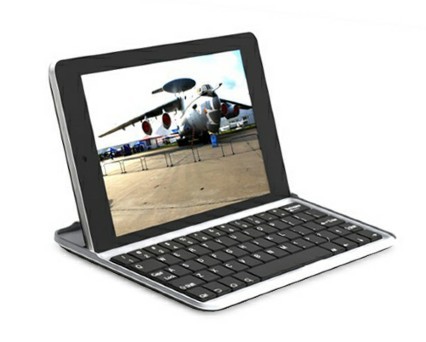 check out this awesome case. perfect for me since i use the tablet naked, the keyboard can work as a case to cover the front. video review » Click to show Spoiler - click again to hide... « written review » Click to show Spoiler - click again to hide... « check the price in ebay is around 20-25USD. i really feel like getting one. anyone already have this? sold in malaysia or not? |
|
|
Jan 21 2013, 03:10 PM
Return to original view | Post
#89
|
|
Senior Member
3,516 posts Joined: Nov 2011 From: Subang Jaya
|
QUOTE(mscw88 @ Jan 21 2013, 03:06 PM) My Final Question.......After reading the entire thread here.....i still hv a pre-purchase confusion here....i m still struggle which should i go for........some said Galaxy Tab 2 is better...some said Nexus 7 is terrific........pls help me before i proceed....i use it mainly for game playing(football, car racing...shoot'em up games), watching HD vid.......really appreciate the help.......tq I can 99.99% confirm the 'some' you said is sure a samsungfag |
|
|
Jan 22 2013, 03:30 PM
Return to original view | Post
#90
|
|
Senior Member
3,516 posts Joined: Nov 2011 From: Subang Jaya
|
QUOTE(mtxx @ Jan 22 2013, 11:03 AM) its soft, so many people tend to open max volume and hear long long. Sorry to say I always on full volume watching anime at least 9 hours a day,imagine that EVERYDAY,yet mine didn't have any problem,using almost 6 months already,so I believe is a defectya its a common issue. just keep the volume below 80% and should be fine. during my first few weeks with it i on max volume and watch alot youtube until it spoil. |
|
|
Jan 22 2013, 03:50 PM
Return to original view | Post
#91
|
|
Senior Member
3,516 posts Joined: Nov 2011 From: Subang Jaya
|
QUOTE(BlackWoods @ Jan 22 2013, 03:47 PM) Or I would say you are more lucky than others? I believe its a defect,I got a perfectly fine unit since 1st day,2nd day got dead pixel and screen flickering,that's all the problem I hadOr maybe yours also going to spoil soon, or maybe they really get a defective or inferior speaker. |
|
|
Jan 22 2013, 04:32 PM
Return to original view | Post
#92
|
|
Senior Member
3,516 posts Joined: Nov 2011 From: Subang Jaya
|
QUOTE(Cynox @ Jan 22 2013, 04:18 PM) wow... din know there is such job - Full Time Anime Reviewer, so envy. I finish 500+ episode of one piece in less than 3 months  But at least 9 hours a day everyday for the pass 6 months was quite a hectic workload. But at least 9 hours a day everyday for the pass 6 months was quite a hectic workload.   |
|
|
Jan 22 2013, 05:26 PM
Return to original view | Post
#93
|
|
Senior Member
3,516 posts Joined: Nov 2011 From: Subang Jaya
|
QUOTE(benny888 @ Jan 22 2013, 04:36 PM) Looks like he cannot be a student or working guy if he can spend 9 hours per day watching anime I study from 9am to 3 pm,wake up at 7am,bath everything finish at 7:30am,watch anime 1 hour,then eat breakfast,then ride bike to school,break time got 15 minutes,so can watch at least 1 episode,after that lunch time,go home eat 1 hour,eat 15 mins,watch 1 episode,after 3pm go back home,watch anime till 5:30pm then eat dinner,watch 1 hour,then study and do homework(usually 1-2 hours),then go to gym,after gym come back watch till 12-1pm/am |
|
|
|
|
|
Jan 22 2013, 05:36 PM
Return to original view | Post
#94
|
|
Senior Member
3,516 posts Joined: Nov 2011 From: Subang Jaya
|
QUOTE(danio @ Jan 22 2013, 05:32 PM) can anyone here enlighten me about the OTG without root? mine is running on 4.2.1. You've just answer yourselfif i can use OTG without root, then i already waste 3.99usd for bought that nexus media importer apps. |
|
|
Jan 22 2013, 08:55 PM
Return to original view | Post
#95
|
|
Senior Member
3,516 posts Joined: Nov 2011 From: Subang Jaya
|
Anyone here can help me root my nexus 7 and flash to cm10?
|
|
|
Jan 22 2013, 09:05 PM
Return to original view | Post
#96
|
|
Senior Member
3,516 posts Joined: Nov 2011 From: Subang Jaya
|
QUOTE(skywardsword @ Jan 22 2013, 09:01 PM) QUOTE(benny888 @ Jan 22 2013, 09:03 PM) Root - use Nexus 7 toolkit : it is simple n straightforward. It is menu driven - as long as you know how to launch the program , just select n click only I'm like that one la,I watch you do 1 time,next time I know,I wanna root before myself,but some forumers said I'm not ready which makes me feel scareUse it to install recovery too Boot tablet to recovery mode and flash CM10 zip file from there ( select wipe caches n dalvik cache n wipe data first ) Use it and you will be ashamed to ask people to help you. It is so freaking easy that I always say is a no brainer tool , literary means no need brain also know how to use the toolkit Just follow the guided instructions |
|
|
Jan 22 2013, 09:25 PM
Return to original view | Post
#97
|
|
Senior Member
3,516 posts Joined: Nov 2011 From: Subang Jaya
|
QUOTE(skywardsword @ Jan 22 2013, 09:11 PM) Nexus toolkit instruction - can one touch root, plus install recovery. Wow,that was easy,so is there video of flashing to cm10?http://forum.xda-developers.com/showthread.php?t=1809195 Just follow the Toolkit action, 1-6/ http://www.youtube.com/watch?v=Lg_QU9w5xCU This one is touch recovery. http://forum.xda-developers.com/showthread...t=nexus+toolkit CM10 instruction http://forum.xda-developers.com/showthread.php?t=2050821 |
|
|
Jan 22 2013, 10:02 PM
Return to original view | Post
#98
|
|
Senior Member
3,516 posts Joined: Nov 2011 From: Subang Jaya
|
lol sorry guys,never expected that rooting and flashing rom is so easy lol,is just that people lower down my confident,thanks benny and skywardsword
|
|
|
Jan 23 2013, 01:07 AM
Return to original view | Post
#99
|
|
Senior Member
3,516 posts Joined: Nov 2011 From: Subang Jaya
|
guys,when i wanna make full driver configuration,they give me this instructions:
Step 1: Uninstalling Previous Drivers To ensure driver configuration goes smoothly, it is advised to first remove any previous drivers you may have already attempted to configure: 1.) Plug your device in with USB debugging enabled - Settings > Developer Options > check USB Debugging 2.) Launch Device Manager using the button bellow. - Identify whatever device resembles your Nexus and right click it - Select 'Unistall' - Check the box for 'Delete the driver software for this device' - Select 'OK' 3.) Unplug your device and Launch USBDevice using the button bellow - Use USBDeview to uninstall any; - Android ADB Interface device's, - Samsung USB devices, - Google USB drivers - ... or ANYTHING else you see that resembles your Nexus. - In particular look for devices with Vendor ID - "18d1" or... "04e8" - Simply right click these devices, and select the option to: - "Uninstall Selected Devices" 4.) Reboot your computer (recommended) then proceed to step 2 ... so where's the "check the box for 'Delete the driver software for this device'? |
|
|
Jan 23 2013, 01:31 AM
Return to original view | Post
#100
|
|
Senior Member
3,516 posts Joined: Nov 2011 From: Subang Jaya
|
sian la,spending whole night just for these SIMPLE rooting steps,still cannot detect USB even its connected
|
|
Topic ClosedOptions
|
| Change to: |  0.0458sec 0.0458sec
 0.31 0.31
 7 queries 7 queries
 GZIP Disabled GZIP Disabled
Time is now: 7th December 2025 - 04:41 AM |
 Quote
Quote