

Y400 user reporting in~
Lenovo IdeaPad Y Series Thread v2, When Y480/580 meet Y400/500
Lenovo IdeaPad Y Series Thread v2, When Y480/580 meet Y400/500
|
|
 Dec 28 2012, 10:32 PM Dec 28 2012, 10:32 PM
Return to original view | Post
#1
|
 
Junior Member
74 posts Joined: Oct 2006  
|
Y400 user reporting in~
|
|
|
|
|
|
Jan 1 2013, 10:18 AM
Return to original view | Post
#2
|
|
Junior Member
74 posts Joined: Oct 2006
|
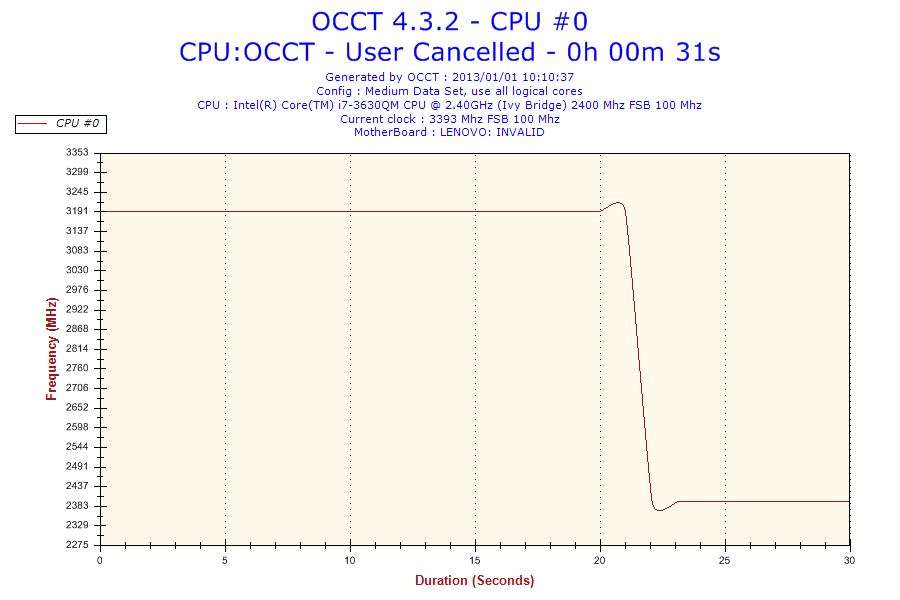
When running the OCCT cpu test with all the test mode on Y400, after around 20sec, the cpu drop to 2.4ghz from 3.2ghz. Is this normal?
 |
|
|
Jan 1 2013, 11:34 AM
Return to original view | Post
#3
|
|
Junior Member
74 posts Joined: Oct 2006
|
QUOTE(sss2sssss @ Jan 1 2013, 10:40 AM) ur CPU temp and GPU temp? Max CPU temp 80ish - 90. When the CPU drop to 2.4ghz, temp around 70ish. GPU temp ard 50ish. Is this consider as throttling issue? Anyway to turn on thee turbo boost function?look from graph is the turbo boost function turn off ady, which mean GPU or CPU or both is on 6X-7X degree Celsius  |
|
|
Jan 1 2013, 11:47 AM
Return to original view | Post
#4
|
|
Junior Member
74 posts Joined: Oct 2006
|
QUOTE(izaydi @ Jan 1 2013, 11:41 AM) how do u check that?i would like to test on my y400 U can download OCCT from here:http://www.ocbase.com/index.php/download to test out your CPU and GPU. |
|
|
Jan 1 2013, 01:18 PM
Return to original view | Post
#5
|
|
Junior Member
74 posts Joined: Oct 2006
|
QUOTE(mrl @ Jan 1 2013, 12:39 PM) Yup, it's completely different... while it's intuitive with touch screen, traditional input will have some learning curve... I've tested Win8 since consumer preview so it's not that alien for me (to be frank, I still stutter and struggle for certain functions) but for those who just getting to know it, I can understand the frustration. Tried to get into bios but nothing much there...Desktop function is only to:- 1. maintain compatibility with older Windows apps 2. File Explorer And the worst thing is, the search function is actually degraded from previous iteration Windows  (and the previous is already bad). Good thing it boots up fast, and I actually like the Start screen better now because it leave my desktop clean of icons and I dont have to struggle looking for my games in cluttered Start Menu (and the previous is already bad). Good thing it boots up fast, and I actually like the Start screen better now because it leave my desktop clean of icons and I dont have to struggle looking for my games in cluttered Start Menu  I'm not 100% sure but I believe if there's an option for that, it will be in the BIOS menu... |
|
|
Jan 2 2013, 02:27 PM
Return to original view | Post
#6
|
|
Junior Member
74 posts Joined: Oct 2006
|
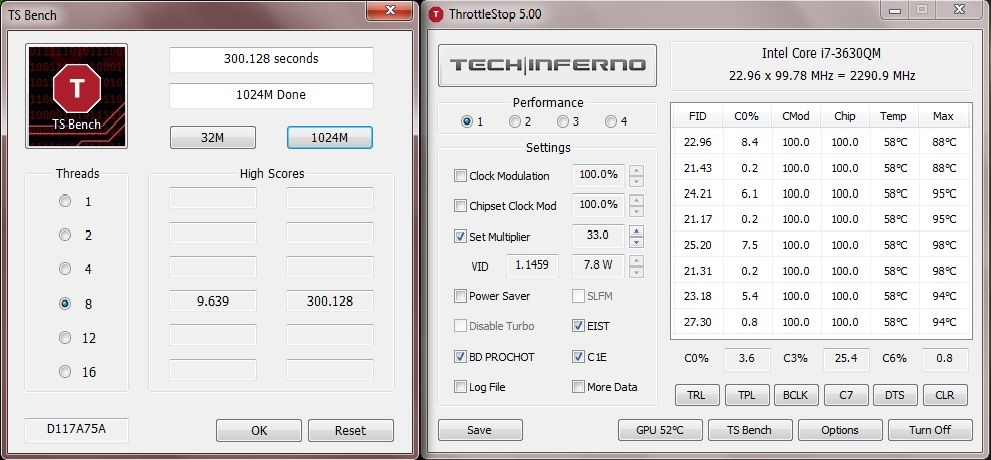
It seems like the lenovo had set to throttle down the CPU speed to 2.4ghz after reaching 90C, attached is the testing using throttlestop to maintain the speed after 90C and max the CPU temp reach 98C without cooler.
 This post has been edited by kujiro: Jan 2 2013, 02:28 PM |
|
Topic ClosedOptions
|
| Change to: |  0.0438sec 0.0438sec
 0.54 0.54
 7 queries 7 queries
 GZIP Disabled GZIP Disabled
Time is now: 7th December 2025 - 08:03 PM |
 Quote
Quote