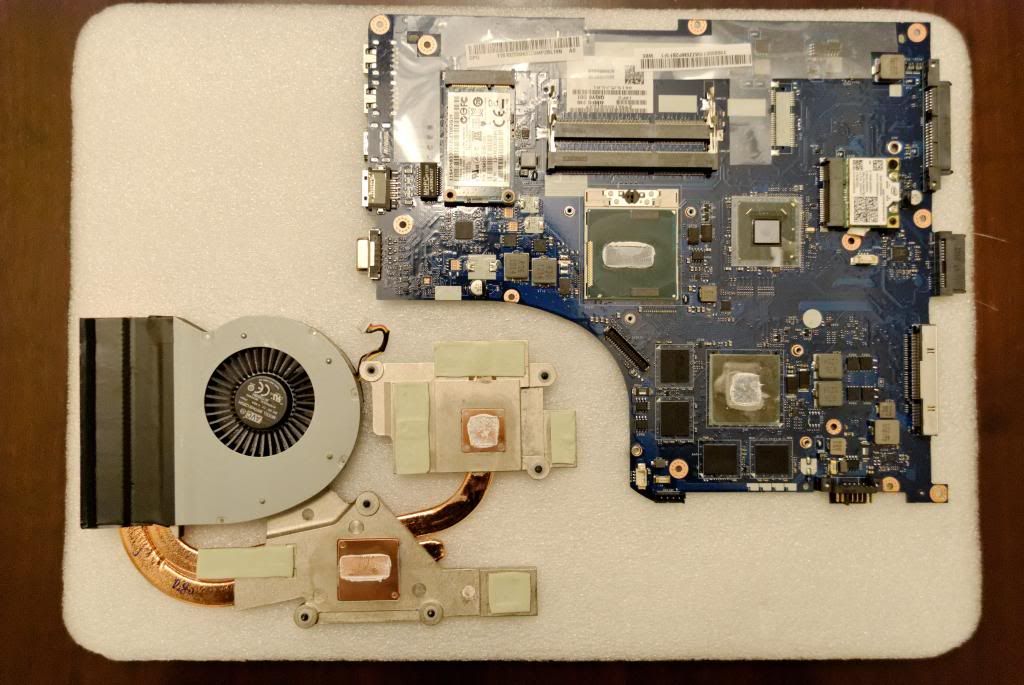
Did anyone have tried overclock their Y500?
Lenovo IdeaPad Y Series Thread v2, When Y480/580 meet Y400/500
Lenovo IdeaPad Y Series Thread v2, When Y480/580 meet Y400/500
|
|
 Apr 1 2013, 05:57 PM Apr 1 2013, 05:57 PM
Return to original view | Post
#1
|
 
Junior Member
109 posts Joined: Nov 2011 
|
Did anyone have tried overclock their Y500?
|
|
|
|
|
|
Apr 2 2013, 12:17 AM
Return to original view | Post
#2
|
|
Junior Member
109 posts Joined: Nov 2011
|
QUOTE(romeo57 @ Apr 1 2013, 10:21 PM) Tried to overclock using Afterburner, and also using Nvidia Inspector, but it seems the value didn't change. It stuck at 790Mhz for GPU clock. I think so, I have read from forum.notebookreview.com that you need a modded bios :3Do i have to unlock the bios or something?  The instructions seems look complicated, one mistake brick your Y500.  This post has been edited by AiSheep: Apr 2 2013, 12:20 AM |
|
|
Apr 3 2013, 04:28 PM
Return to original view | Post
#3
|
|
Junior Member
109 posts Joined: Nov 2011
|
QUOTE(ssxcool @ Apr 2 2013, 12:26 PM) wow lenovo y400 will equip latest gt 750m gpu !! I wonder does that 750M GPU will come along with Sli version for Y500 as well? |
|
|
Apr 6 2013, 04:53 PM
Return to original view | Post
#4
|
|
Junior Member
109 posts Joined: Nov 2011
|
was thinking want to raid my 128gb msata and 128gb of ssd, i realize the bios don't have raid as an option.
|
|
|
Apr 8 2013, 12:46 PM
Return to original view | Post
#5
|
|
Junior Member
109 posts Joined: Nov 2011
|
QUOTE(slimfox @ Apr 8 2013, 10:54 AM) Very true, but its the next best thing since got no raid 0. Can ExpressCache works with two 128 SSD's? I know it sounds stupid. But, curiosity kills...Yeah, I never know this don't support raid :3 |
|
|
Apr 8 2013, 06:45 PM
Return to original view | Post
#6
|
|
Junior Member
109 posts Joined: Nov 2011
|
QUOTE(slimfox @ Apr 8 2013, 06:32 PM) Ya I suppose so. When doing research before I bought my mSata, I found out that the mSata slot runs at 6gb/s and the hard drive maxes out at 3gb/s. That means that mSata ssd will perform better than your sata ssd. For me I installed a 60gb mSata then with the express cache installed I'm enjoying <10sec boot times. I cannot imagine the notebook with both mSata ssd and a sata ssd. Now you got me thinking.......... Yeah, I'm very curious about this too :3 How I wish Lenovo will release a BIOS frimware update that enable RAID, because intel HM76 supports RAID. I want a hardware RAID and most of Lenovo Y400/Y500 users all over the world wants it badly. I have contact Lenovo for this matter, but haven't receive their reply yet. |
|
|
|
|
|
Apr 9 2013, 12:12 AM
Return to original view | Post
#7
|
|
Junior Member
109 posts Joined: Nov 2011
|
QUOTE(tennytyy @ Apr 8 2013, 08:12 PM) HM76 doesn't support raid 0. Only HM77 does. QUOTE(fezrul @ Apr 8 2013, 09:58 PM) yup, sumore you cannot simply update/mod bios to enable raid unless the mobo it self have raid controller chip. Ohh.... thanks for heads up.  |
|
|
Apr 15 2013, 09:49 PM
Return to original view | Post
#8
|
|
Junior Member
109 posts Joined: Nov 2011
|
Hmm, ask you guys a question. Should I peel the stickers?
|
|
|
Apr 16 2013, 06:28 PM
Return to original view | Post
#9
|
|
Junior Member
109 posts Joined: Nov 2011
|
QUOTE(Mr_47 @ Apr 16 2013, 01:16 AM) for what? Because, the sides start to peel, so I have to peel it (The ideapad sticker on the left side with showing those functions)and where you get the SLi sticker from? This post has been edited by AiSheep: Apr 16 2013, 07:53 PM |
|
|
Apr 16 2013, 10:00 PM
Return to original view | Post
#10
|
|
Junior Member
109 posts Joined: Nov 2011
|
QUOTE(romeo57 @ Apr 16 2013, 09:01 PM) And where did you get the SLI sticker? I think ebay, i saw one hongkong seller sell it for RM 9.47 + free shipping.Nvidia SLi Ready Sticker I heard if you flash vbios into your ultrabay gpu you can overclock both of them  This post has been edited by AiSheep: Apr 16 2013, 10:07 PM |
|
|
Apr 17 2013, 06:26 PM
Return to original view | Post
#11
|
|
Junior Member
109 posts Joined: Nov 2011
|
QUOTE(xowangzi @ Apr 17 2013, 04:54 PM) No.... I guess i need a cooler Maybe your thermal compound is getting dried, suggest send to SC. (Assumptions) even in Air Con room i got this shyt temperature.What's your idle temperature for your Y500? » Click to show Spoiler - click again to hide... « This post has been edited by AiSheep: Apr 17 2013, 06:29 PM |
|
|
Apr 17 2013, 07:04 PM
Return to original view | Post
#12
|
|
Junior Member
109 posts Joined: Nov 2011
|
QUOTE(holloway @ Apr 17 2013, 06:57 PM) Hi all.. Suggest wait for new model which is 750M GPU ones :3Im here on behalf of my friend.. He went around lowyat forum asking regarding the y500.. But most of them are out of stock.. Or some selling that comes without the external gou..So have to buy separately.. Other seller are selling for myr3699/3799 U guys know anyone selling cheaper thAn that? I think ive seen somewhere someone selling around myr 3499 .. Or is it the normal price.. I myself havent really check since it will not be my laptop  Thanks alot lenovo community  or If your friend insist to want it URGENTLY! http://forum.lowyat.net/topic/2597921 <- there :3 make sure is malaysia SET, refer to page 1. This post has been edited by AiSheep: Apr 17 2013, 07:06 PM |
|
|
Apr 17 2013, 07:09 PM
Return to original view | Post
#13
|
|
Junior Member
109 posts Joined: Nov 2011
|
QUOTE(slimfox @ Apr 17 2013, 07:05 PM) From what I know thermal compound is not suppose to dry up. Either not enough is applied or its applied unevenly. Either way SC will be happy to look into it. Agree with that, it sounds like a hairdryer.Seems to me maybe Lenovo has some QC issues because some units have no problem and while some has so many issues. May I ask for those of you facing heat (CPU/GPU) issues, are you guys covering the vents at the bottom of the notebook? Or maybe using the notebook on your bed? This could be the reason why your GPU/CPU heats up so much. If you click "Dust Removal" in power options you can see how powerful the fans are in the Y500. Impressive if you ask me. |
|
|
|
|
|
Apr 17 2013, 09:43 PM
Return to original view | Post
#14
|
|
Junior Member
109 posts Joined: Nov 2011
|
QUOTE(volant @ Apr 17 2013, 09:31 PM) anyone facing lower wifi signal or slow connectivity on ur y500/y400? overheating, wifi issue and the touchpad are the main users complain. Is your WiFi card from Intel 2230 or Qualcomm Atheros AR9485WB-EG? Both of these cards are problematic, as for Atheros, I do recall you need adjust some settings manually. If not because of Whitelist, I shall change the current WiFi card. Unless someone here manage to find Lenovo's Y500 FRU approved Intel 6300 Ultimate-N if not flash the mod bios is the only way which... I still don't get it how it works, only if someone willing to teach me how to do so :/ » Click to show Spoiler - click again to hide... « This post has been edited by AiSheep: Apr 17 2013, 09:45 PM |
|
|
Apr 19 2013, 05:33 PM
Return to original view | Post
#15
|
|
Junior Member
109 posts Joined: Nov 2011
|
QUOTE(slimfox @ Apr 19 2013, 02:35 PM) Last I talk to SC guy, seems y500 internal GPU can be change. Anyone care to confirm? I think what he mean't is the ultrabay :3» Click to show Spoiler - click again to hide... « Base on the spoiler, i think the internal GPU is soldered :/ |
|
|
Apr 27 2013, 10:17 PM
Return to original view | Post
#16
|
|
Junior Member
109 posts Joined: Nov 2011
|
QUOTE(sharp903sh finder @ Apr 27 2013, 08:28 PM) bioshock become damm lag after update driver to 314.22 Try the latest new 320.00 beta driver. 20% performance :3reverting to older version iszit just install de older version should be ok rite? |
|
Topic ClosedOptions
|
| Change to: |  0.0236sec 0.0236sec
 0.44 0.44
 7 queries 7 queries
 GZIP Disabled GZIP Disabled
Time is now: 2nd December 2025 - 01:57 PM |
 Quote
Quote