

Been spending a lot lately.

Hope you guys like it.
Regards.
Attached thumbnail(s)

Hardware Your Mac Desktop / Apple Hardware
|
|
 Jun 11 2009, 12:50 AM Jun 11 2009, 12:50 AM
Return to original view | Post
#1
|
 
Junior Member
348 posts Joined: Jun 2008 
|
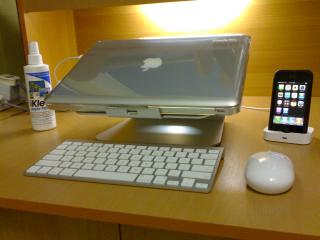
My setup for my MacBook 2.4 Aluminum Unibody as a desktop replacement. Been accessorizing ever since I got it, my dream setup is now materialized!!
Been spending a lot lately. Hope you guys like it. Regards. Attached thumbnail(s)
|
|
|
|
|
|
Jun 11 2009, 12:27 PM
Return to original view | Post
#2
|
|
Junior Member
348 posts Joined: Jun 2008
|
QUOTE(rx330 @ Jun 11 2009, 08:59 AM) crazy, i dun think it has been discon, still ada Thanks, trust me it's worth it. It is so much easier to type now with the Apple Wireless Keyboard with the stand.it was my 1st choice wen i got my imac... till now i masih suka.. but the problem is i dun listen to it often.. hence have been putting it off from 07 till now ujoewong, nice... i always like tat stand... but too bad.. u need another keyboard n mouse for easy access  |
|
|
Jun 11 2009, 03:08 PM
Return to original view | Post
#3
|
|
Junior Member
348 posts Joined: Jun 2008
|
QUOTE(sets84 @ Jun 11 2009, 02:18 PM) how much is that stand and where did you get it? It looks awesome...!! It is the Rain Design mStand and it was designed to match the Aluminum design with the Unibody MacBook. Bought it off at Machines for RM180. It is quite heavy as it is also made from a solid piece of Aluminum. Actually I wanted to get the XSTAND PRO, but since this also nice and does what it advertised. So, I went for this product instead.  P/S: Did you guys notice there are 2 Moshi products that I've invested to my MacBook?  The Moshi ClearGuard and Moshi Palmguard on my MacBook. Both are awesome and are kick-asz products that I have no regret after purchasing it. The Moshi ClearGuard and Moshi Palmguard on my MacBook. Both are awesome and are kick-asz products that I have no regret after purchasing it.  @Hongraphics, I connect my MacBook using the DVI>HDMI Cable to my HDTV I have in my house. The 52" Sony Bravia 200MHZ MotionFlow Z Series. In my opinion, this is the best external monitor you get for now  . I post the picture of my set-up at home once I'm back home as I'm pursuing my studies in College in KL now. . I post the picture of my set-up at home once I'm back home as I'm pursuing my studies in College in KL now.  Regards. |
|
|
Jun 11 2009, 05:51 PM
Return to original view | Post
#4
|
|
Junior Member
348 posts Joined: Jun 2008
|
QUOTE(Hongraphics @ Jun 11 2009, 05:35 PM) God..that's the tv i like the most now. It must be very cool! Thanks, it's not mine. It belongs to my parents. I also got a Sony Bravia HDTV at home, just not as good as yours. They always say I'm spoiling their TV by connecting my MacBook as an external display and stealing their "ASTRO" time. Ha ha. Come to think of it, wonder when can I afford one for myself in the future.... |
|
|
Jul 23 2009, 09:16 PM
Return to original view | Post
#5
|
|
Junior Member
348 posts Joined: Jun 2008
|
QUOTE(Snecx @ Jul 23 2009, 08:34 PM) Hi guys! Here's my workspace. 17" MacBook Pro + mStand by RainDesign + Wired Keyboard and Wireless MM + WD External HDD + Apple Universal Dock with what gadget?   Perfect lighting as well. Also, the car on the background.  |
|
|
Jul 23 2009, 10:22 PM
Return to original view | Post
#6
|
|
Junior Member
348 posts Joined: Jun 2008
|
QUOTE(Snecx @ Jul 23 2009, 09:40 PM) Wow, you definitely caught up a lot of details. On the dock is the first gen iPod Touch 32GB, my first Apple product. I started to convert to Mac 2 months after iPod purchase. It was an iMac 24" which is barely visible in the picture above, in the reflection of the sliding door. 12 months have passed since my convert and I am now 100% Mac, except for my development machines. Now that you mention it, there is an iMac in the reflection. It's a bliss to be on Mac.  Haha. I have almost all the accessories you have on your table though mine is a MacBook 13" 2.4. I'm a student anyway. Need to survive with cup noodles for my mStand and Apple Wireless Keyboard.  I think my set-up is few pages back. Yeah, din't really regret going into Mac. I got my 1st MacBook after using the iPhone 3G for months i guess. I think my set-up is few pages back. Yeah, din't really regret going into Mac. I got my 1st MacBook after using the iPhone 3G for months i guess.  . Some more can use iWork KeyNote to do presentation in a more stylish way than Microsoft Office PowerPoint. . Some more can use iWork KeyNote to do presentation in a more stylish way than Microsoft Office PowerPoint. By the way, typing is so much better on an Apple Wireless Keyboard (in my case) with a mStand. |
|
|
|
|
|
Jul 25 2009, 11:48 PM
Return to original view | Post
#7
|
|
Junior Member
348 posts Joined: Jun 2008
|
QUOTE(Snecx @ Jul 25 2009, 11:08 PM) Thanks everyone! I have only completed that workspace last month actually. The Markus swivel chair from IKEA is my first office chair. Very nice. The battery lasted around few months already and yet still in 85%. Numpad? I'm used to a laptop keyboard already. So, no big deal for it.  @ujoewong: How's the wireless keyboard? Got miss the numpad and can the battery tahan long? It looks very neat without wires. |
|
|
Oct 1 2009, 08:19 PM
Return to original view | Post
#8
|
|
Junior Member
348 posts Joined: Jun 2008
|
Yea, he sticks his Apple Sticker there. Haha.
|
|
|
Oct 4 2009, 11:29 PM
Return to original view | Post
#9
|
|
Junior Member
348 posts Joined: Jun 2008
|
@bizkutrai,
King of USB's !!  . How did you do that? Mod? . How did you do that? Mod?  |
|
|
Oct 26 2009, 06:46 PM
Return to original view | Post
#10
|
|
Junior Member
348 posts Joined: Jun 2008
|
@ Crusader, Cool looking Mamba there eh.
|
|
|
Nov 10 2009, 11:00 PM
Return to original view | Post
#11
|
|
Junior Member
348 posts Joined: Jun 2008
|
Someone here got Apple Magic Mouse eh?? How about mine??

This post has been edited by ujoewong: Nov 10 2009, 11:01 PM |
|
|
Nov 11 2009, 10:29 PM
Return to original view | Post
#12
|
|
Junior Member
348 posts Joined: Jun 2008
|
QUOTE(llsphinxll @ Nov 11 2009, 01:21 PM) is your mac on a mstand or xtand pro? Yeap thats kinda the setup im aiming for. mstand + wireless keyboad + orochi! . mStand + Wireless Keyboard + Razer Orochi.Apple Wireless Mighty Mouse now in my drawer collecting dust. |
|
|
Nov 14 2009, 07:34 PM
Return to original view | Post
#13
|
|
Junior Member
348 posts Joined: Jun 2008
|
QUOTE(llsphinxll @ Nov 13 2009, 10:08 PM) how do you feel abt those 3 combo? Just get a fully black keyboard protector silicon skin for your wireless keyboard. althou the color of the orochi might b a lil weird compared to the magic mouse, but i think my preference will b orochi too, compared to the magic mouse. |
|
|
|
|
|
Nov 18 2009, 09:55 PM
Return to original view | Post
#14
|
|
Junior Member
348 posts Joined: Jun 2008
|
Hi there,
Wanted to share something out of the sudden. 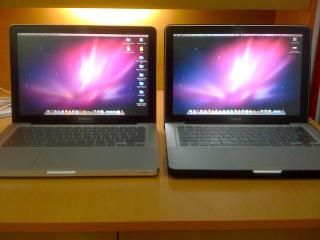
On the left, Friend's MacBook Pro 2.53 13" with Moshi iVisor, Moshi Clearguard and Moshi Palmguard. On the right is my MacBook 2.4 13" with the same accessories as well. But mine got Speck Satin. Apparently, the viewing angles on the Pro is way better. If put side by side, it makes my MacBook's Screen washout.  . Who cares right? I still love mine. . Who cares right? I still love mine.  Hahaha. But I equipped my MacBook with Intel X-25 Gen 2 SSD and my friend's using WD 500GB Scorpio Blue. So, mine is a lot faster than that "Pro". Hehe. Hahaha. But I equipped my MacBook with Intel X-25 Gen 2 SSD and my friend's using WD 500GB Scorpio Blue. So, mine is a lot faster than that "Pro". Hehe.
I just love Moshi's packaging. Gotta snap it. . I poison my friend's brain kaw kaw until he got a MacBook Pro and some accessories he saw me using on my MacBook Aluminum.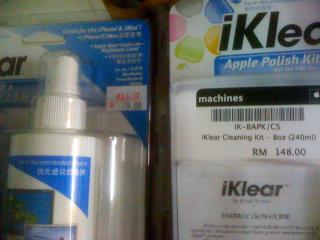
Off topic guys. Apparently I am really piss off with Machines. If you want to buy iKlear, you should go ALL IT Hypermarket. See the prices differences? I can buy 2 of those with the price I paid in Machines.  . I din't hesitate at all when I saw it on the shelve in ALL IT. Just grab. . I din't hesitate at all when I saw it on the shelve in ALL IT. Just grab.  It's the same thing. It's the same thing.This post has been edited by ujoewong: Nov 18 2009, 09:56 PM |
|
|
Nov 19 2009, 10:11 AM
Return to original view | Post
#15
|
|
Junior Member
348 posts Joined: Jun 2008
|
@daydreaming and llsphinxll,
Im talking about the 8oz bottle. Not the 2oz ones. Machines selling 2oz (Small Bottle) for RM88. With RM79 can get 8oz bottle in ALL IT!!!  . Imagine Machines profit??? . I'm not happy. . Imagine Machines profit??? . I'm not happy.So, don't make my mistake. Attached thumbnail(s) 

|
|
|
Nov 19 2009, 12:57 PM
Return to original view | Post
#16
|
|
Junior Member
348 posts Joined: Jun 2008
|
QUOTE(cRazYee @ Nov 19 2009, 10:41 AM) it's so obvious left side iklear is replica or pirated Yea. Old Stock. Check out YouTube for reviews.or old stock, i remember new one is not those kind of packaging It's the same packaging when I bought it few months back. |
|
|
Nov 22 2009, 04:13 PM
Return to original view | Post
#17
|
|
Junior Member
348 posts Joined: Jun 2008
|
QUOTE(siawgu @ Nov 22 2009, 02:41 PM) I got new Apple Magic Mouse as birthday present from my gf. So nice.. Wow that's sweet. I use Matte Sticker to protect it from scratches.. Before  After  Matte sticker? From Apple Store itself? You MacBook's Keyboard look shiny. Using any forms of protection? |
|
|
Nov 22 2009, 05:04 PM
Return to original view | Post
#18
|
|
Junior Member
348 posts Joined: Jun 2008
|
QUOTE(siawgu @ Nov 22 2009, 04:26 PM) For the Matte Sticker, you can get it from normal pc shop, it is a transparent notebook protector skin. You will feel the different after you applied it. it looked more cleaner and not that oily. Hmm so you cut it yourself?? Haha. and for my MBP Keyboard, I din use any protector, it's because i always use my keyboard until it become glossy. I think for those who got MBP with Black Keyboard will have this problem. |
|
|
Nov 24 2009, 11:55 PM
Return to original view | Post
#19
|
|
Junior Member
348 posts Joined: Jun 2008
|
QUOTE(MinK @ Nov 24 2009, 11:44 PM) has anyone here gotten or is planning to get the SSD from apple ? i heard in terms of applications performance it doesnt improve much but start up times and booting is much shorter. and it saves batteries too since theres no moving parts. Don't get SSD's from Apple. Buy only Intel X-25M Generation 2 SSD. They are the best. Provide read speeds up to 250MB. While Apple's SSD only up to 80MB.I'm using Intel SSD and I'm one happy customer. |
|
|
Nov 25 2009, 01:15 AM
Return to original view | Post
#20
|
|
Junior Member
348 posts Joined: Jun 2008
|
QUOTE(MinK @ Nov 25 2009, 01:09 AM) oh really ?? how mch was it ?? Now around RM900 range for the 80GB unit. It's a good investment if compared to RAM or other stuff. |
|
Topic ClosedOptions
|
| Change to: |  0.0429sec 0.0429sec
 0.45 0.45
 7 queries 7 queries
 GZIP Disabled GZIP Disabled
Time is now: 8th December 2025 - 05:44 AM |
 Quote
Quote