

QUOTE(AzamAbAziz @ Dec 15 2012, 08:25 PM)
TQ bro! 

most welcome 
enjoy your speed

Tp LInk TL-MR3420 Owner CLub V2
|
|
 Dec 15 2012, 08:32 PM Dec 15 2012, 08:32 PM
|
 
Junior Member
224 posts Joined: Mar 2009   
|
QUOTE(AzamAbAziz @ Dec 15 2012, 08:25 PM) TQ bro! most welcome enjoy your speed |
|
|
|
|
|
Dec 15 2012, 08:56 PM
|
 
Elite
6,931 posts Joined: Apr 2011 From: Bolehland for sure ^_^
|
QUOTE(Skylinestar @ Dec 15 2012, 07:55 PM) My MR3420 is version 1.2 Wireless G alone or wireless G+N both option will be fine,I set the wireless mode to 11G only & with channel 11. Got my wifi back. Yay  Wireless G alone transmittion rate = 54Mbps while wireless G+N transmittion rate = should be 65Mbps as i am using wireless G+N now with Channel Width 20MHz Wireless G+N if Channel Width 40MHz , transmittion should be around 130Mbps +/- only wireless N alone with Channel Width 40MHz = 300 Mbps ( which only can really work in V2 only due to V1, V1.2, V1.3 all have wireless bug issue with Wireless N alone ) correct me if i am wrong This post has been edited by chuahcs79: Dec 15 2012, 08:57 PM |
|
|
Dec 15 2012, 09:48 PM
|
|
Junior Member
224 posts Joined: Mar 2009
|
hi guys, im back with the news from TP LINK
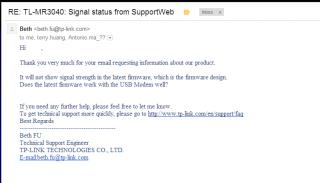
So clear now  upgrade to the latest firmware not my fault / customer fault yaaa   |
|
|
Dec 15 2012, 10:33 PM
|

Senior Member
558 posts Joined: Jun 2006 From: Lowyat.Net
|
QUOTE(chuahcs79 @ Dec 15 2012, 08:56 PM) Wireless G alone or wireless G+N both option will be fine, Confirmed. G+N 20Mhz = 65MbpsWireless G alone transmittion rate = 54Mbps while wireless G+N transmittion rate = should be 65Mbps as i am using wireless G+N now with Channel Width 20MHz Wireless G+N if Channel Width 40MHz , transmittion should be around 130Mbps +/- only wireless N alone with Channel Width 40MHz = 300 Mbps ( which only can really work in V2 only due to V1, V1.2, V1.3 all have wireless bug issue with Wireless N alone ) correct me if i am wrong If use 40Mhz, can't even detect network. |
|
|
Dec 16 2012, 02:40 AM
|
|
Elite
6,931 posts Joined: Apr 2011 From: Bolehland for sure ^_^
|
QUOTE(LcBoy135z @ Dec 15 2012, 09:48 PM) hi guys, im back with the news from TP LINK looks like tplink is trying to remove the signal % on coming latest firmware too,.
So clear now upgrade to the latest firmware not my fault / customer fault yaaa may be due to super bug anyway,. but at least TP LINK service representative is response very fast |
|
|
Dec 16 2012, 04:28 AM
|
|
Junior Member
96 posts Joined: Aug 2010
|
what's function for WDS bridging? do we need to enable or disable? one more, which mode better to select? b,g,n or only n mode? new learner..
|
|
|
|
|
|
Dec 16 2012, 04:38 AM
|
|
Elite
6,931 posts Joined: Apr 2011 From: Bolehland for sure ^_^
|
QUOTE(aerozs @ Dec 16 2012, 04:28 AM) what's function for WDS bridging? do we need to enable or disable? one more, which mode better to select? b,g,n or only n mode? new learner.. depends on whether u are using V1~1.3 or V2for V2 wireless N 300Mbps channel width 40MHz alone is fine where by V1~V1.3 model, can only use up to wireless G+N in channel width 20MHz,.. anymore futher it will cause the wireless Bug issue happen and wireless will be either connected but no response, or DC often if your area is not very huge, Wireless G alone with prefer wireless Channel ( normally many choose channel 11 ) is fine,. |
|
|
Dec 16 2012, 07:40 AM
|

Junior Member
10 posts Joined: Oct 2012
|
1. Huawei E392 or Huawei E398. Which one would you prefer?
2. Does TL-MR3420 v2 support E392? (E392 also seem quite wider so I wonder if it can't be plug on because mr3420 v2 has curve design around the USB port)  |
|
|
Dec 16 2012, 11:12 AM
|
|
Junior Member
224 posts Joined: Mar 2009
|
QUOTE(AzamAbAziz @ Dec 16 2012, 07:40 AM) 1. Huawei E392 or Huawei E398. Which one would you prefer? Answer in red color..Depend on your pocket money...both arounf 4 - 5 star modem for me 2. Does TL-MR3420 v2 support E392? (E392 also seem quite wider so I wonder if it can't be plug on because mr3420 v2 has curve design around the USB port) Yes can use without any problem. Refer first post.tq enjoy |
|
|
Dec 16 2012, 12:08 PM
|

Elite
8,409 posts Joined: Jul 2008 
|
QUOTE(AzamAbAziz @ Dec 16 2012, 07:40 AM) 1. Huawei E392 or Huawei E398. Which one would you prefer? E398 and never look back2. Does TL-MR3420 v2 support E392? (E392 also seem quite wider so I wonder if it can't be plug on because mr3420 v2 has curve design around the USB port) E392 is hot and unstable MR3420 support E392 |
|
|
Dec 16 2012, 01:33 PM
|

Senior Member
8,025 posts Joined: Feb 2005 From: Planet Boleland
|
I been using this on my router, i duno yours supports it
My surfing experience is much smoother using it. 
|
|
|
Dec 16 2012, 02:15 PM
|
|
Elite
6,931 posts Joined: Apr 2011 From: Bolehland for sure ^_^
|
QUOTE(blacktubi @ Dec 16 2012, 12:08 PM) E398 and never look back Hope to join E398 never look back club E392 is hot and unstable MR3420 support E392  since MR3420 V2 /V1 both no issue with it |
|
|
Dec 16 2012, 02:26 PM
|

Junior Member
554 posts Joined: Nov 2006
|
QUOTE(digilife @ Dec 16 2012, 01:33 PM) I been using this on my router, i duno yours supports it What is your router setup?My surfing experience is much smoother using it.
|
|
|
|
|
|
Dec 16 2012, 02:42 PM
|
|
Senior Member
8,025 posts Joined: Feb 2005 From: Planet Boleland
|
QUOTE(BladeRider88 @ Dec 16 2012, 02:26 PM) What is your router setup? 
|
|
|
Dec 16 2012, 03:35 PM
|
|
Junior Member
554 posts Joined: Nov 2006
|
QUOTE(digilife @ Dec 16 2012, 02:42 PM)
Am i right? |
|
|
Dec 16 2012, 03:39 PM
|
|
Elite
6,931 posts Joined: Apr 2011 From: Bolehland for sure ^_^
|
QUOTE(BladeRider88 @ Dec 16 2012, 03:35 PM) I assume your setup is like this 3G Modem + TP-Link MR3420 ---> D-Link DIR-615 if using as DHCP,.. any wireless router will do a good job,. Am i right? i am using my V1 as DHCP while V2 dialing the modem,. no matter V1 with STock tplink firmware or with openwrt firmware in DHCP mode, it really make no different,. This post has been edited by chuahcs79: Dec 16 2012, 03:40 PM |
|
|
Dec 16 2012, 03:41 PM
|
|
Junior Member
554 posts Joined: Nov 2006
|
QUOTE(chuahcs79 @ Dec 16 2012, 03:39 PM) if using as DHCP,.. any wireless router will do a good job,. My Asus rt-n13U seems having issues with Repeater mode...I bet it is a firmware issue as my Unifi setup, using D-Link DIR-825 running DD-WRT and act as Client Bridge, no such issue like auto DC |
|
|
Dec 16 2012, 03:43 PM
|
|
Elite
6,931 posts Joined: Apr 2011 From: Bolehland for sure ^_^
|
QUOTE(BladeRider88 @ Dec 16 2012, 03:41 PM) My Asus rt-n13U seems having issues with Repeater mode... u might want to try other version firmware ,. I bet it is a firmware issue as my Unifi setup, using D-Link DIR-825 running DD-WRT and act as Client Bridge, no such issue like auto DC |
|
|
Dec 16 2012, 03:44 PM
|
|
Junior Member
554 posts Joined: Nov 2006
|
QUOTE(chuahcs79 @ Dec 16 2012, 03:43 PM) u might want to try other version firmware ,. Yeah...i might try to flash DD-WRT to my asus router, anyway, now waiting for the V2 OpenWRT firmware development to be completed |
|
|
Dec 16 2012, 03:45 PM
|
|
Elite
6,931 posts Joined: Apr 2011 From: Bolehland for sure ^_^
|
QUOTE(BladeRider88 @ Dec 16 2012, 03:44 PM) Yeah...i might try to flash DD-WRT to my asus router, anyway, now waiting for the V2 OpenWRT firmware development to be completed yeah that's might work out better as repeater mode,. yeah finger cross waiting,.. just hope the new openwrt for V2 able to the 4G modem too |
|
Topic ClosedOptions
|
| Change to: |  0.0275sec 0.0275sec
 0.63 0.63
 6 queries 6 queries
 GZIP Disabled GZIP Disabled
Time is now: 7th December 2025 - 09:28 PM |
 Quote
Quote