

QUOTE(chuahcs79 @ Dec 18 2012, 04:13 PM)
i can give you answer when i receive my E398 

thanks chuah.. i'll be waiting for uuuuuuuu! 
Tp LInk TL-MR3420 Owner CLub V2
|
|
 Dec 18 2012, 04:14 PM Dec 18 2012, 04:14 PM
Return to original view | Post
#21
|
 
Junior Member
36 posts Joined: Apr 2012 
|
QUOTE(chuahcs79 @ Dec 18 2012, 04:13 PM) i can give you answer when i receive my E398 thanks chuah.. i'll be waiting for uuuuuuuu! |
|
|
|
|
|
Dec 18 2012, 06:11 PM
Return to original view | Post
#22
|
|
Junior Member
36 posts Joined: Apr 2012
|
crap ping T_T means no gaming lorh
Attached thumbnail(s) 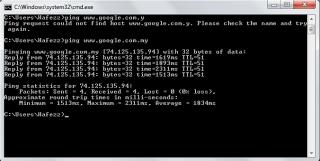
|
|
|
Dec 19 2012, 12:58 AM
Return to original view | Post
#23
|
|
Junior Member
36 posts Joined: Apr 2012
|
[quote=ibnuasad,Dec 18 2012, 11:02 PM]
Why ping so bad   Usually local ping <150ms and international ping <350ms Added on December 18, 2012, 11:45 pm I have no idea.. so I used setting 5 as suggested in the first post.. it was ok for a bit (with crap ping).. please refer to the pic below.. i need to reboot the router as i cant press connect in order to connect to the internet - due to the router trying to identify the modem..  Attached thumbnail(s) 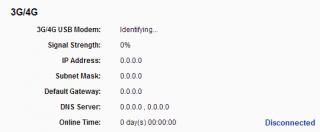

|
|
|
Dec 19 2012, 07:18 AM
Return to original view | Post
#24
|
|
Junior Member
36 posts Joined: Apr 2012
|
QUOTE(LcBoy135z @ Dec 19 2012, 06:34 AM) to @redyakuza87 direct connection so far has no problem.. how do we get the rssi? last time when the router was able to give the signal strength, it was 51%.. speed test with direct connection, i've forgotten what were the DL n UL.. will do it again later but i think it was fine.. how to paste system log? (me noobie) last method, check via direct cable without using router...try to get the rssi..this very important to know your signal is ok or not...do speed test...then back connect using router. so far i dont face any issue with my method..  try to do new setup for your router if u still take time too long to connect. otherwise paste your system log file here as i can make comparison with mine  |
|
|
Dec 25 2012, 11:07 PM
Return to original view | Post
#25
|
|
Junior Member
36 posts Joined: Apr 2012
|
QUOTE(blacktubi @ Dec 24 2012, 12:21 AM) Fully compatible with my MR3420 V1 without any BIN file i need directions on solving V2 issues please.. anyone can help what will be the best setup/settings/firmware/bin file with e398? thanks! OpenWRT shouldn't be any issue V2 having some issue which can be solved with a few clicks |
|
|
Dec 25 2012, 11:24 PM
Return to original view | Post
#26
|
|
Junior Member
36 posts Joined: Apr 2012
|
QUOTE(LcBoy135z @ Dec 25 2012, 11:21 PM) Right now just download the latest FW bro what about modem firmware? bin file for e398? i thot based on your post before, chuah mentioned about new router FW and new Modem FW?latest solution from tplink.. need link?go to first post and click the link there and download  thanks tubi2 for firmware! save 1 antenna for me! or maybe 2! wait till 10 Jan 2013.. we'll see how.. hehe eh 43.++ MB?  last time was only few hundred bytes oni last time was only few hundred bytes oniThis post has been edited by redyakuza87: Dec 25 2012, 11:26 PM |
|
|
Dec 25 2012, 11:33 PM
Return to original view | Post
#27
|
|
Junior Member
36 posts Joined: Apr 2012
|
QUOTE(LcBoy135z @ Dec 25 2012, 11:30 PM) that what im taking abot, new FW for router mr3420, not E398 huawei la bro ok cool.. now we have latest FW for both E398 and V2   http://www.tp-link.com/Resources/software/...0_V2_121206.zip |
|
Topic ClosedOptions
|
| Change to: |  0.0728sec 0.0728sec
 0.70 0.70
 7 queries 7 queries
 GZIP Disabled GZIP Disabled
Time is now: 10th December 2025 - 01:19 AM |
 Quote
Quote