Welcome Guest ( Log In | Register )

3 Pages  1 2 3 >Bottom

Outline · [ Standard ] · Linear+

 * Samsung Galaxy Tab 7.7 *(GT-P6800) V3, 7.7 inch SUPER AMOLED PLUS Display

views
     
TSNorameen
post Nov 19 2012, 05:53 AM, updated 12y ago

Error
******
Senior Member
1,165 posts

Joined: Jun 2010
From: Gombak, Selangor


SAMSUNG GALAXY TAB 7.7 (GT-P6800)

Price (RRP) for SAMSUNG GALAXY TAB 7.7 SME set 16gb 3g&wifi version : RM1899 (1 year Samsung Malaysia (SME) warranty)

General Rules

Read compiled F.A.Qs below before asking

Search before asking. (Search button available via bottom of the post. Sample below)

user posted image

Respect each other. We do not want flame wars here.
Obey rules in LYN Forum.
Strictly no warez / crack / forbidden discussion as stated in LYN rules.
Enjoy yourself here along with other members. We are a big family.

|PRE-THREAD|<----- click here for previous thread!!

|V1|<----- click here for *Samsung Galaxy Tab 7.7 V1 thread!!

|V2|<----- click here for *Samsung Galaxy Tab 7.7 V2 thread!!


SPECIFICATION

» Click to show Spoiler - click again to hide... «


user posted image

This post has been edited by Norameen: Nov 19 2012, 06:12 AM
TSNorameen
post Nov 19 2012, 05:54 AM

Error
******
Senior Member
1,165 posts

Joined: Jun 2010
From: Gombak, Selangor


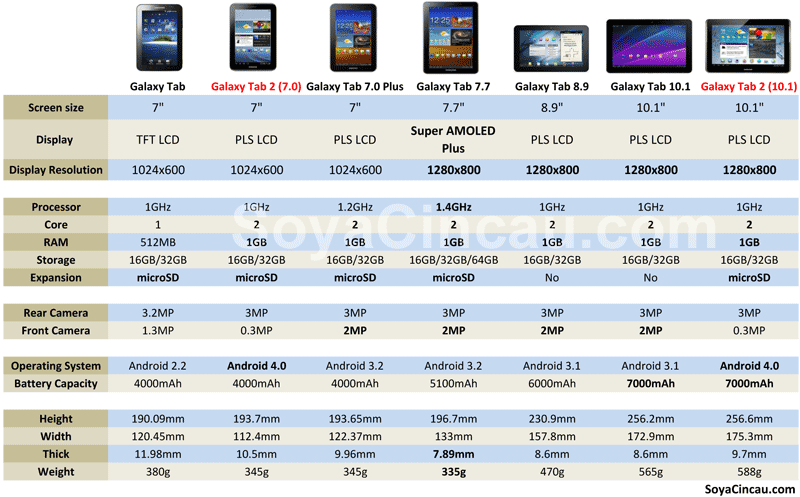
SAMSUNG GALAXY TAB FAMILY & COMPARISON until JUNE 2012

» Click to show Spoiler - click again to hide... «


This post has been edited by Norameen: Nov 19 2012, 06:13 AM
TSNorameen
post Nov 19 2012, 05:55 AM

Error
******
Senior Member
1,165 posts

Joined: Jun 2010
From: Gombak, Selangor


REVIEWS


POCKETNOW
QUOTE
The Galaxy Tab 7.7 has got almost everything right: it's a great size, it's lightweight, plus has terrific battery life, a fast processor, and a gorgeous display. It is Honeycomb that hampers the Tab 7.7 almost to the point of rendering it unusable at times. The Tab 7.7 is promised an upgrade to ICS in Q1, which can't come soon enough.
Read Full Review Here


UNCLE BENNY
QUOTE
I have been using the latest Galaxy tab 7.7 for more than a week and I must say this is the best Android tablet I have used to date. My experience with Android tablets includes the Acer Iconia, Galaxy tab ( 7 inch), Galaxy Tab 10.1 and Galaxy Tab 7.0 plus. Unlike those previous Android tablets, the 7.7 is the smoothest with virtually no lag .

Moving among homescreens is silky smooth just like my iPad2. Launching and executing apps is also noticeably faster compared to the previous Android tablets. Using it as a phone is not practical as it is simply too big. The phone functions works very well and calls are crystal clear.
Read Full Review Here
ANDROIDNZ
QUOTE
The Galaxy Tab 7.7 is beautiful. The build quality, materials, looks and ergonomics are simply top notch. People who find themselves frequently disheartened at Samsung's choice of materials, and the accompanying 'plasticky' look and feel will find this a breath of fresh air. Right now, at least in the humble opinion of this reviewer, the only other tablet that reaches the same giddy aesthetic heights is the ASUS Transformer Prime.
Read Full Review Here
RITCHIE'SROOM
QUOTE
The Galaxy Tab 7.7 takes a completely different tact, being lighter and slimmer than, well, any Honeycomb-based tablet we’ve seen so far. Compared to the original Tab which relied on a reworked mobile phone OS, it’s a much more mature product and fits snugly between a smartphone and large screen tablet. This may actually be the product to redefine what a small screen tablet is capable of.
Read Full Review Here
NETBOOKNEWS
QUOTE
The Samsung Galaxy Tab 7.7 is our favorite tablet currently on the market, its thin profile, amazing display and portability have won us over. We might even go so far to say that the Galaxy Tab 7.7 is the iPad Killer because the smaller portable form factor makes it easier manage for on the go use.
Read Full Review Here


GALAXY TAB 7.7 IS SMOOTH ON ICS

watch this video comparison between Honeycomb 3.1 7.7 & ICS 4.0 7.7


The latest Flash Player For ICS Tab 7.7

this file link to the last flash update for ics...

http://download.macromedia.com/pub/flashpl..._player_ics.apk

This post has been edited by Norameen: Dec 6 2012, 02:36 PM
TSNorameen
post Nov 19 2012, 05:55 AM

Error
******
Senior Member
1,165 posts

Joined: Jun 2010
From: Gombak, Selangor


FREQUENTLY ASKED QUESTIONS

1. How to reset the TAB to factory settings ?

» Click to show Spoiler - click again to hide... «


2. How do I take a screenshot without using any app ?

» Click to show Spoiler - click again to hide... «


3. Is there a SD card inside the Galaxy Tab ?

» Click to show Spoiler - click again to hide... «


4. How do I uninstall 3rd party apps ?

» Click to show Spoiler - click again to hide... «


5. How do I uninstall built-in apps ?

» Click to show Spoiler - click again to hide... «


6. How do I save my camera and video shots on the external micro-SD card ?

» Click to show Spoiler - click again to hide... «


7. Since there is a built-in Task Manager, do I still need to install Task Killers on the TAB ?

» Click to show Spoiler - click again to hide... «


8. What is KIES ?

» Click to show Spoiler - click again to hide... «


9. How do I make payment for Paid apps in the market ?

» Click to show Spoiler - click again to hide... «


10. Can I use the Galaxy TAB 7.7 as a modem ?

» Click to show Spoiler - click again to hide... «


11. I plan to use galaxy tab as phone. Any problem? Does it have build in mic in it?

» Click to show Spoiler - click again to hide... «


12. Seriously, how many of you guys use the Galaxy TAB as a main mobile phone ?

» Click to show Spoiler - click again to hide... «


13. HONEYCOMB limitation you cannot write/copy stuffs onto external SD card from tab itself
Root it and overcome this limitation by editing some system files


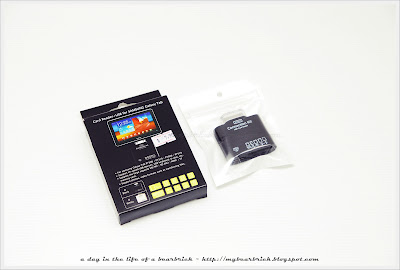
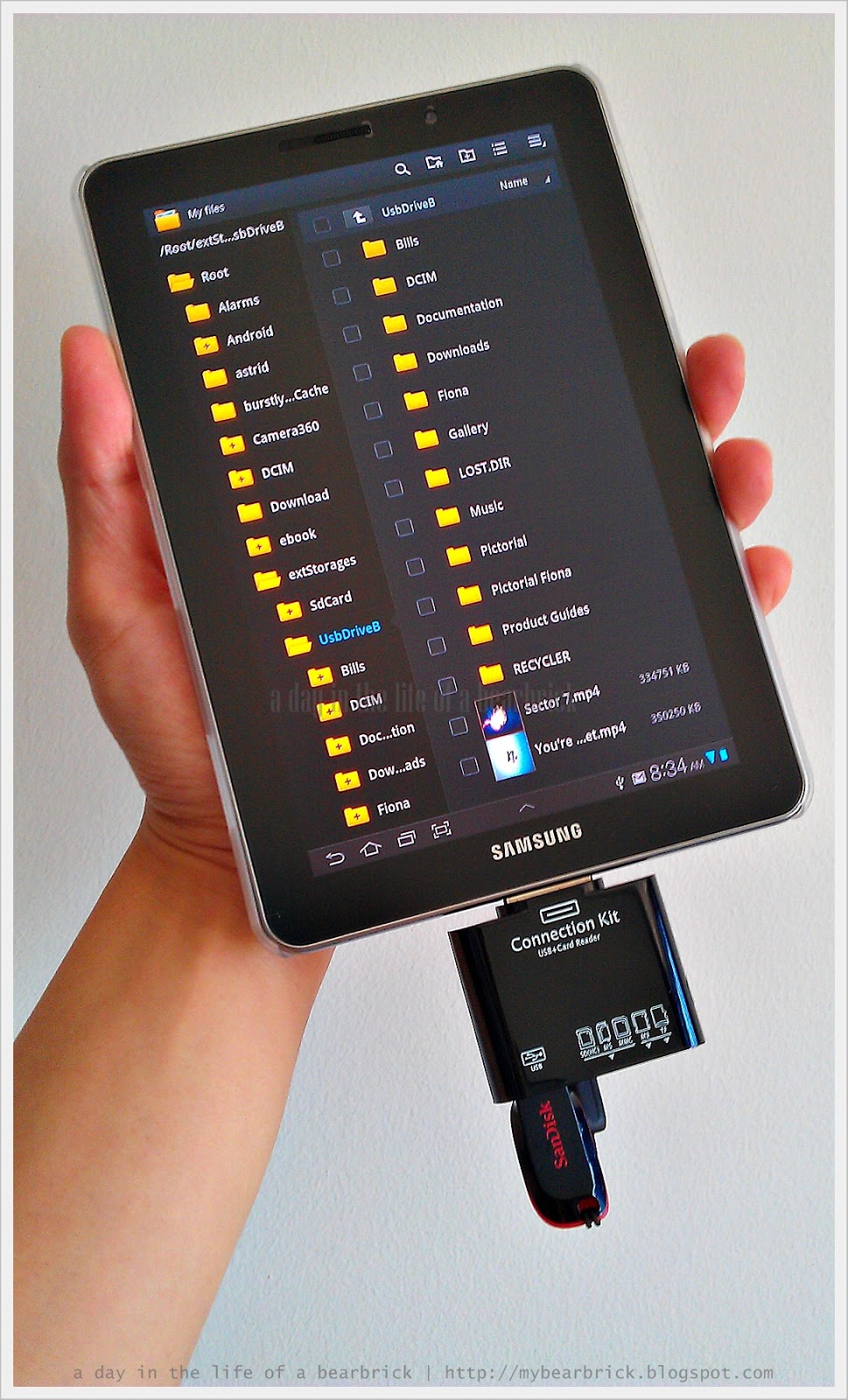
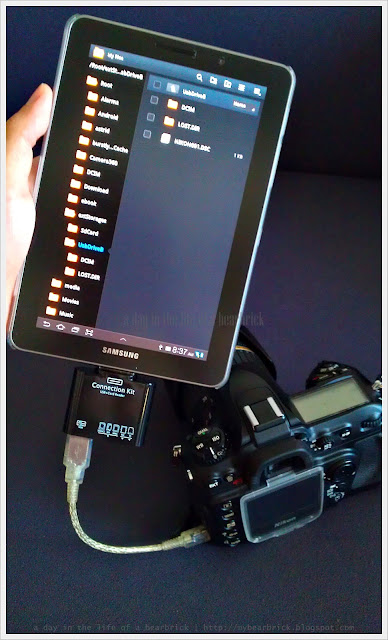
14. With a OTG connector like below, can Samsung Galaxy Tab 7.7:
a) connect to an external hard disk / pendrive / flash drive? The hard disk is self powered - 500GB.?
b) If the 500GB HDD capacity can be recognised by the Tab, can files from SD Card be copied directly to the external hard disk when both are connected at the same time to the connector?

» Click to show Spoiler - click again to hide... «


to be continue...

This post has been edited by Norameen: Nov 19 2012, 06:05 AM

TSNorameen
post Nov 19 2012, 05:56 AM

Error
******
Senior Member
1,165 posts

Joined: Jun 2010
From: Gombak, Selangor


Rooting and installing ClockworkMod Recovery.
Gentle Reminder rooting may void your warranty.

The step taken from Benny 888 blog..Thanks a lot thumbup.gif

Rooting the Galaxy tab 7.7 : I used the same method as in the Galaxy Tab 7 plus model
PreRequisites :
- Install the USB Samsung phone drivers through KIES. Download the latest version of KIES HERE . Run the exe file in PC to install
- Download and Install ODIN 1.85 in PC . Download Odin 1.85 from HERE
STEPS to root :
1. Download the file root.zip from HERE
2. Connect Tab to PC. Copy the root.zip file to Tab EXTERNAL micro SDCard
3. Switch off the Galaxy Tab 7.7
4. Boot to Recovery mode by holding down Vol UP + Power button simultaneously. Once you see the Galaxy Tab logo, let go the POWER button while still holding down the Vol UP button
5. Select install update from EXTERNAL Storage
6. Browse with vol up/down button and locate the file root.zip and select it with power button
7. Phone will flash the root.zip file. When completed phone will reboot
8. Download the apps SUPERUSER from Market and installed it
9. Tab is now rooted


INSTALLING CLOCKWORKMOD RECOVERY ver 5.0.2.7
1. Download the recovery tar file P6800_recovery.tar from HERE
2. On PC , make sure KIES is not running.
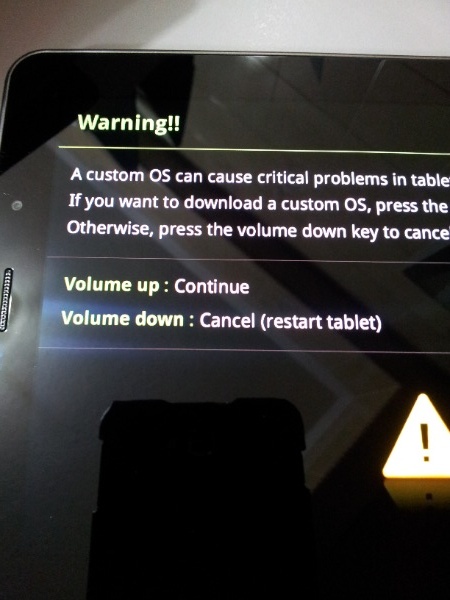
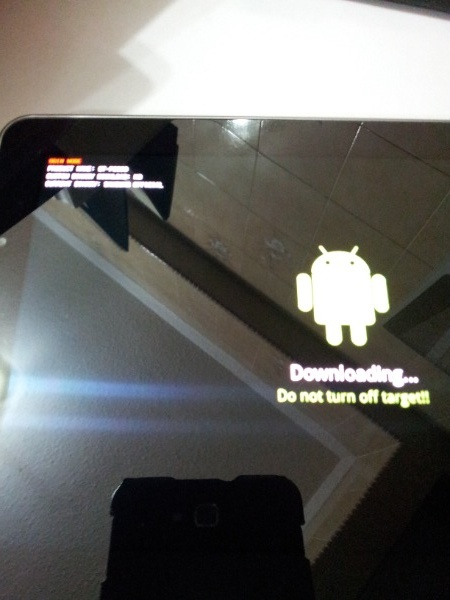
3. Switch off Tab. Boot into DOWNLOAD mode by simultaneously pressing VOL DOWN and POWER button. You will see below image:

» Click to show Spoiler - click again to hide... «


4. Select VOL UP to continue

» Click to show Spoiler - click again to hide... «


5. Connect Tab to PC using the USB cable
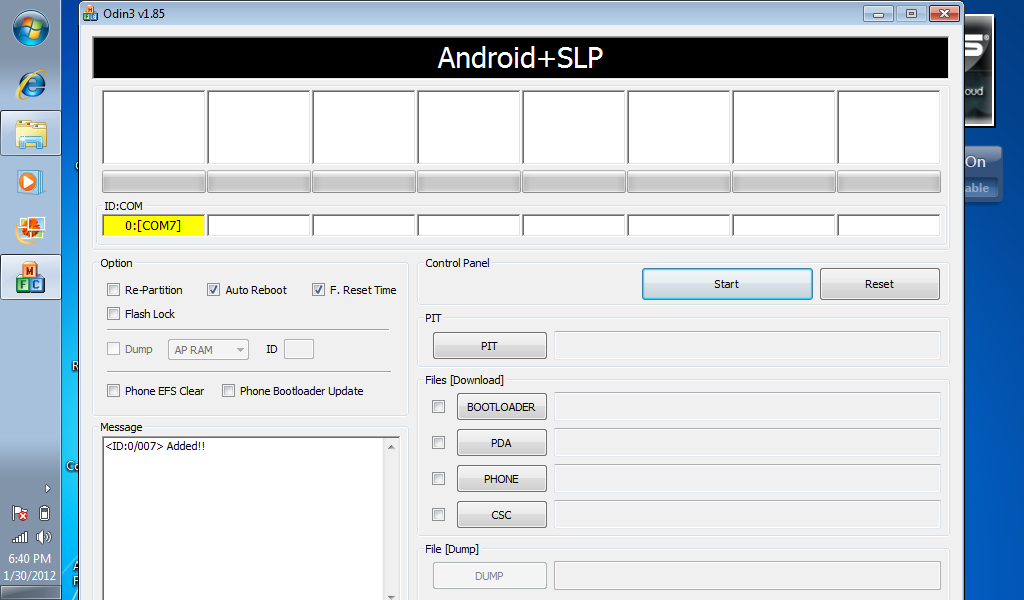
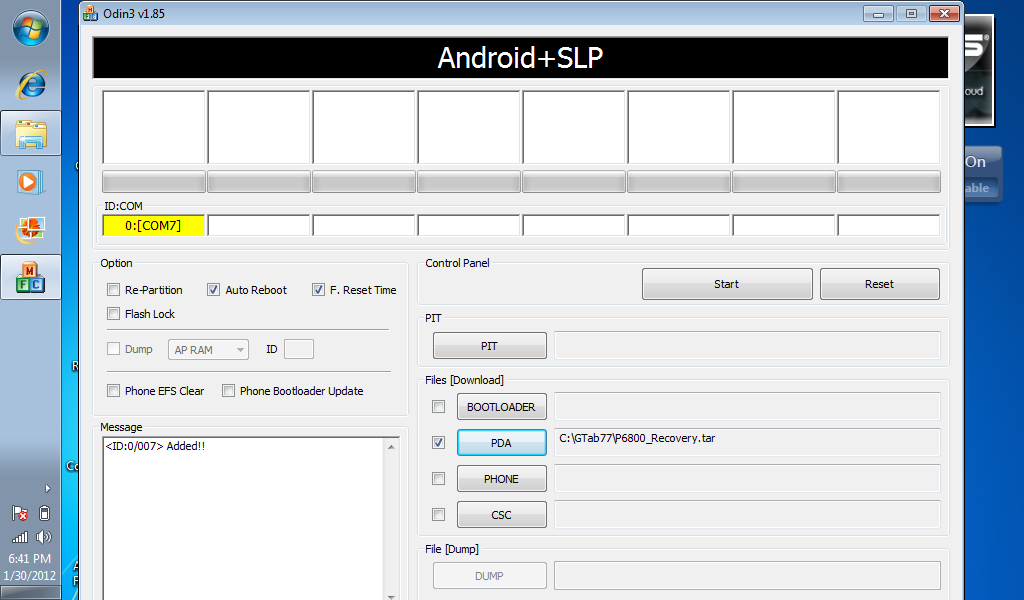
6. Launch Odin 1.85. Tab will be recognized by PC and you will see the ID:COMM port ( at top left ) turn yellow with a port number

» Click to show Spoiler - click again to hide... «


7. SELECT PDA and browse to where you have saved the P6800_Recovery.tar file

» Click to show Spoiler - click again to hide... «


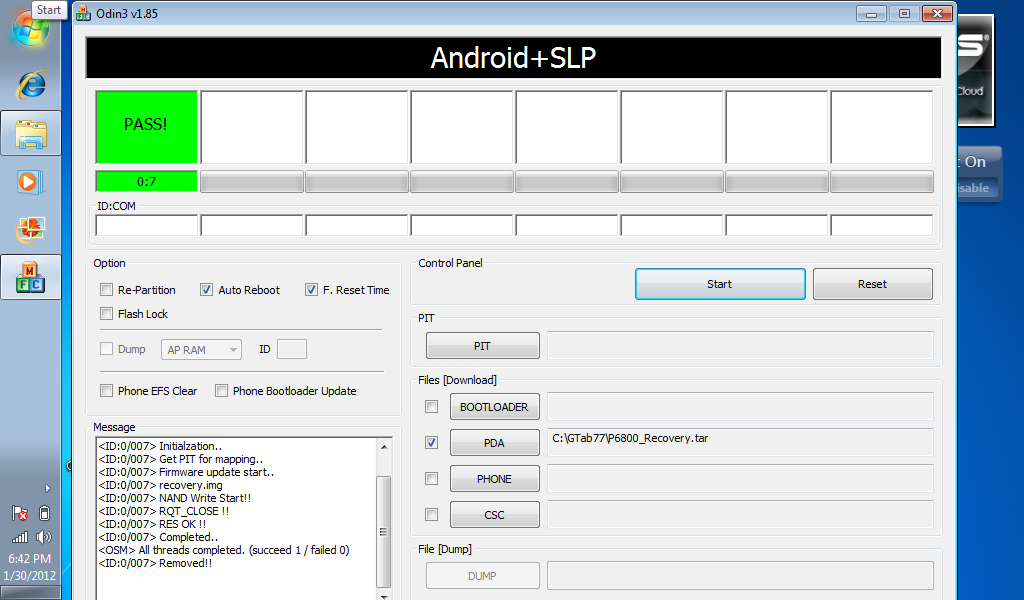
8. Press START. Odin will now flash the recovery file. After complete you will see this

» Click to show Spoiler - click again to hide... «


The TAB will reboot after you see PASS in the Odin window

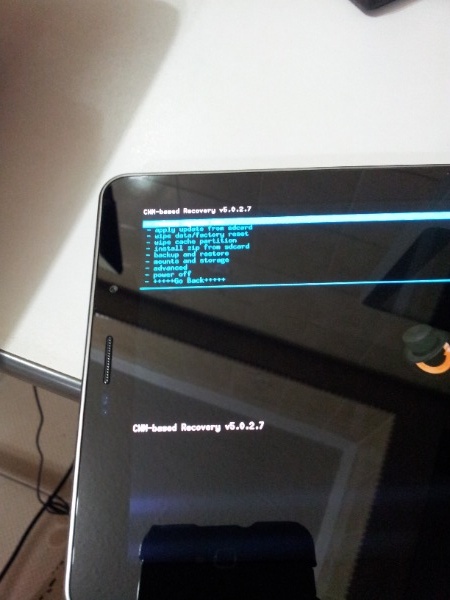
To confirm that ClockworkMod is successfully installed, switch off Tab and boot into RECOVERY mode using the Vol UP+Power button

» Click to show Spoiler - click again to hide... «


You will see than the ClockworkMod Recovery menu

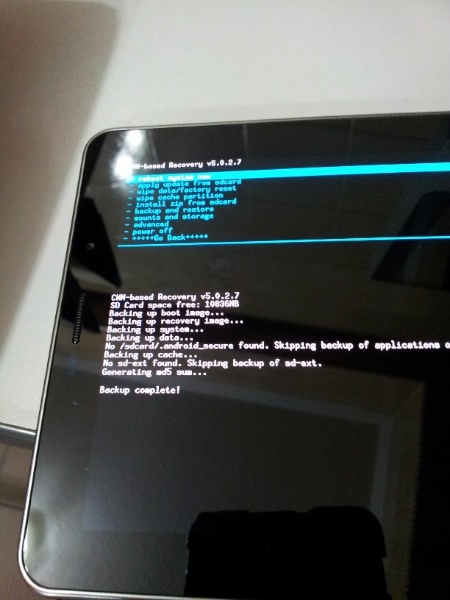
Now test it out and do a backup of current rom. Use vol button scroll up/down to select Backup/Restore. The Tab will go into backup mode and in about 5-8 minutes time ( depending on how much data you have ) , backup will be completed

» Click to show Spoiler - click again to hide... «


Forum XDA links on these :
Root : http://forum.xda-developers.com/showthread.php?t=1454112
CWM : http://forum.xda-developers.com/showthread.php?t=1470896

This post has been edited by Norameen: Nov 19 2012, 06:06 AM
TSNorameen
post Nov 19 2012, 05:57 AM

Error
******
Senior Member
1,165 posts

Joined: Jun 2010
From: Gombak, Selangor


ACCESSORIES

CASES

1. ANYMODE TYPE
2. SAMSUNG BOOKCASE WITH SWAROVSKI
3. ROCK Light&Cool Leather Case
4. ROCK Ultra Thin Nakedshell Faceplate
5. SAMSUNG bookcase
6. TPU Silicone Soft Case Skin
7. YOOBAO Real Cow Leather Case Skin
8. Thin PU Leather Case Skin
9. Hard Plastic Case Skin Faceplate
10. ZENUS PRESTIGE PORTFOLIO Refer to this LINK for picture..

Another type of Casing - Refer to this LINK


SCREEN PROTECTOR
» Click to show Spoiler - click again to hide... «


SAMSUNG GALAXY TAB OTG CONNECTION KIT

user posted image

» Click to show Spoiler - click again to hide... «


This post has been edited by Norameen: Nov 19 2012, 06:08 AM
TSNorameen
post Nov 19 2012, 05:57 AM

Error
******
Senior Member
1,165 posts

Joined: Jun 2010
From: Gombak, Selangor


LYN TAB 7.7 OWNER LIST

» Click to show Spoiler - click again to hide... «


P/S :For user that cant find their name in the user list...Please PM me...I will add your name in LYN Forum user list..icon_rolleyes.gif icon_rolleyes.gif

This post has been edited by Norameen: Nov 30 2012, 08:04 PM
TSNorameen
post Nov 19 2012, 06:23 AM

Error
******
Senior Member
1,165 posts

Joined: Jun 2010
From: Gombak, Selangor


QUOTE(Jmy08 @ Nov 19 2012, 06:16 AM)
welcome to Samsung Galaxy Tab 7.7 V3 thread
*
Yeah...welcome home....
TSNorameen
post Nov 19 2012, 10:23 AM

Error
******
Senior Member
1,165 posts

Joined: Jun 2010
From: Gombak, Selangor


QUOTE(edan1979 @ Nov 19 2012, 09:41 AM)
if not because of istupid claims on many thing to this device... it would be great...
*
Yes... Agree with u.. Btw this devices is great... The inside is special... Running great even i have almost 200 apps in it... Plus the design the quality of built also ok.. No wonder the selling price of this device is still high... And now its is very rare to own 7.7...
TSNorameen
post Nov 19 2012, 03:15 PM

Error
******
Senior Member
1,165 posts

Joined: Jun 2010
From: Gombak, Selangor


QUOTE(spoiler83 @ Nov 19 2012, 11:26 AM)
Wahh... so much apps u have bro...  thumbup.gif
no lag ha???  brows.gif

BTW, just update my tab last nite.. arnd 20mb++ file size only..
but no difference at all.. update just for fixing some bug maybe ???
*
yes..atm running great..with austria stock rom...i also dunno what apps...mostly games..as this tab for my enterntainment..watch video and play games...until last month..need to bought sd card...previously all dump in in internal memory 16gb..until full...now uninstall some apps..such as real football..too many space makan in my tab...
TSNorameen
post Nov 19 2012, 04:33 PM

Error
******
Senior Member
1,165 posts

Joined: Jun 2010
From: Gombak, Selangor


QUOTE(buyei @ Nov 19 2012, 03:41 PM)
New user reporting in.
*
added..edan right...u should be on ics...
TSNorameen
post Nov 19 2012, 07:07 PM

Error
******
Senior Member
1,165 posts

Joined: Jun 2010
From: Gombak, Selangor


QUOTE(buyei @ Nov 19 2012, 06:59 PM)
Upgraded to ics, but i wonder why there new update (about 20+mb)? Issit for fixing bugs. Since im a new user cant experience much. Just use this tab for game & surf.
*
fixing wifi bugs..but i wonder why i didnt receive ota for updates..maybe i did flash austria stock rom...but as long as it works well..lazy to find out how to update it..btw what games u playing...
TSNorameen
post Nov 21 2012, 04:52 AM

Error
******
Senior Member
1,165 posts

Joined: Jun 2010
From: Gombak, Selangor


QUOTE(Ruzumaki @ Nov 21 2012, 12:32 AM)
I saw my friend tab 7.7 on screen time 18 hour with 3G and still left 45% battery juice left...

T^T my tab only able to last 6~7 hours... so sad, I take to warranty again to check what is the problem
*
seriously screen on time 18 hours??? shakehead.gif shakehead.gif shakehead.gif ...me same like u....6-7 hours only...really unbelievable... ohmy.gif ohmy.gif ohmy.gif
TSNorameen
post Nov 22 2012, 08:27 AM

Error
******
Senior Member
1,165 posts

Joined: Jun 2010
From: Gombak, Selangor


QUOTE(xingai @ Nov 22 2012, 03:04 AM)
wanna ask u guys, are your tab now is 4.0.4 ?

i previously had a software update through kies, so now its 4.0.4

the battery is damn strong, today is my 4th day(up to date should be around 85hour already without charging) still in 32% battery.

daily usage of 1 hour phone call, 1 hour online, and 30 minutes Video playing, other short stuff like playing sudoku for 2 hour etc, until now...lolz
*
can u take screenshot of yoyr battery stats and also screen on time..u on 3g all the time or using wifi..btw screen is the most eat battery...
TSNorameen
post Nov 22 2012, 11:24 PM

Error
******
Senior Member
1,165 posts

Joined: Jun 2010
From: Gombak, Selangor


QUOTE(jhonsonlee @ Nov 22 2012, 10:49 PM)
But Uncle Benny said Nexus 7 is the best but I don't like it without MicroSD Card slot and phone capabilities.
*
sometimes the best dont suit u right... tongue.gif tongue.gif tongue.gif ..
TSNorameen
post Nov 24 2012, 12:57 PM

Error
******
Senior Member
1,165 posts

Joined: Jun 2010
From: Gombak, Selangor


QUOTE(ocz @ Nov 24 2012, 12:32 PM)
Where can i get it bro? Besides retail store. I mean online? or in LYN Garage sales that you can recommend?
*
saw somenone selling uset set of nilkin back cover....search for sller name thirumaran...

http://forum.lowyat.net/index.php?showtopic=2575555&hl=

but sadly nilkin one is sold... doh.gif doh.gif
TSNorameen
post Nov 26 2012, 09:35 PM

Error
******
Senior Member
1,165 posts

Joined: Jun 2010
From: Gombak, Selangor


maybe downloading takes too long because slow internet connection
TSNorameen
post Nov 27 2012, 09:11 PM

Error
******
Senior Member
1,165 posts

Joined: Jun 2010
From: Gombak, Selangor


QUOTE(jhonsonlee @ Nov 27 2012, 08:05 PM)
Would keen to have some opinion, is it still worth to get G.TAB7.7 or get the Nexus 7.

G.TAB 7.7 older hardware and OS.
*
my opinion yes...as for me i use this to watch movie...play games and another sort of entertainment...with good screen..good battery life...external sd card...and 3g capabilities..it is all i need as i already have 2 nexus devices without sd capabilities...my 2cent....
TSNorameen
post Nov 29 2012, 12:31 PM

Error
******
Senior Member
1,165 posts

Joined: Jun 2010
From: Gombak, Selangor


will do put the video on first page tomorrow..no access to laptop..as im at maha now..so crowded maha..many people...damn..
TSNorameen
post Nov 30 2012, 08:18 PM

Error
******
Senior Member
1,165 posts

Joined: Jun 2010
From: Gombak, Selangor


QUOTE(edan1979 @ Nov 29 2012, 07:04 AM)
download buildProp Editor by Benjamin Wulfert from playstore.

found this comparison between old busted honeycomb and ics on 7.7


op could put it on 1st page...  laugh.gif
*
try to put..but dont know how to embedded the video..actually..forget...hehehe

3 Pages  1 2 3 >Top
 

Change to:
| Lo-Fi Version
0.0361sec    0.79    7 queries    GZIP Disabled
Time is now: 15th December 2025 - 09:47 PM