

dude pls pm me the price for q5ii q6ii and q10 with postage to johor
HiMedia Q3II,Q5II,Q6II,Q10II, Q9... Android BOX, Best Android Smart TV BOX
HiMedia Q3II,Q5II,Q6II,Q10II, Q9... Android BOX, Best Android Smart TV BOX
|
|
 Nov 8 2013, 10:49 AM Nov 8 2013, 10:49 AM
Return to original view | Post
#1
|
 
Senior Member
6,142 posts Joined: May 2006 From: Planet called "EARTH"   
|
dude pls pm me the price for q5ii q6ii and q10 with postage to johor
|
|
|
|
|
|
Dec 27 2013, 11:21 AM
Return to original view | Post
#2
|
|
Senior Member
6,142 posts Joined: May 2006 From: Planet called "EARTH"
|
guys.. anyone of you manage to install xbmc that support hardware acceleration? I am having issue with my xbmc that runs on software rendering.. my fullhd movie lags a lot
|
|
|
Dec 27 2013, 05:27 PM
Return to original view | Post
#3
|
|
Senior Member
6,142 posts Joined: May 2006 From: Planet called "EARTH"
|
QUOTE(Orias @ Dec 26 2013, 11:55 PM) hi there, how's himedia q10ii sound to you?i'm currently searching for a media player. can u recommend me a good full HD media player based on my requirements below: 1. budget around 200-400 (might stretch a bit if player is good) 2. menu in english 3. wifi optional 4. built in HDD slot would be preferable 5. 3D support not required 6. Supports up to 7.1 sound. Gonna connect it to my AVR. i'm very new in this and not sure what else is needed in a good media player. can u recommend me any? thank you in advance.   |
|
|
Dec 30 2013, 08:15 AM
Return to original view | Post
#4
|
|
Senior Member
6,142 posts Joined: May 2006 From: Planet called "EARTH"
|
QUOTE(Orias @ Dec 27 2013, 11:40 PM) seems nice. price is nearly the 500 range rite? and also i read ur post about this lagging issue with software renderers when playing movie in full HD. is this player affected with the issue? sorry with the noob questions as i'm quite clueless when it comes to media players. erm.. sorry for misleading.. i installed XBMC (third party software into the system). This software is giving me some lagging issue as it doesnt support hardware acceleration on their current release yet.  This player come with default media player. u can use those media player and it will not gave u the issue that i face.  |
|
|
Feb 25 2014, 05:47 PM
Return to original view | Post
#5
|
|
Senior Member
6,142 posts Joined: May 2006 From: Planet called "EARTH"
|
QUOTE(bruce07 @ Feb 25 2014, 03:50 PM) can someone guide me how to access my laptop movies from himedia q5II??? and also where to download the latest Himedia firmware???? me either but manage to do some translate.. name me ur model emmc or non emmc?can't read chinese well... T.T for laptop u can find out how to share over network as samba... i remember u need to share to everyone.. then from himedia u got to samba then u will see your folder there and put in ur credential if required.. voila.. u get ur shared folder there.. so far using wifi i can work up to 720p smooth.. 1080p lag at starting and sometime in between the run... |
|
|
Feb 26 2014, 08:57 AM
Return to original view | Post
#6
|
|
Senior Member
6,142 posts Joined: May 2006 From: Planet called "EARTH"
|
QUOTE(bruce07 @ Feb 25 2014, 10:34 PM) mine is the non-emmc model... i tried the NFS Server but can't get Himedia to detect my shared folder... bro try the samba option from herethanks in advance for your guidance ^^  as for the update you can reach here.. http://pan.baidu.com/s/1jGFkHqY#dir/path=%...9E%9C%E5%97%A8Q look for QII file without emmc. I think that will bring u to 1.0.5 which integrated with mangoTV 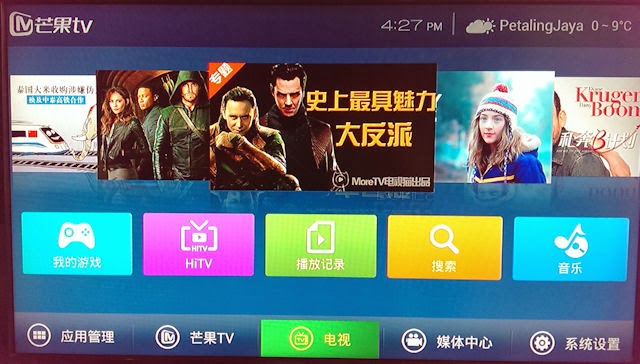 Your interface will be changed to something like attached. You will lose application like PlayStore so if you highly rely on PlayStore its recommended not to upgrade to 1.0.5 |
|
|
|
|
|
Feb 26 2014, 08:58 AM
Return to original view | Post
#7
|
|
Senior Member
6,142 posts Joined: May 2006 From: Planet called "EARTH"
|
QUOTE(AVFAN @ Feb 26 2014, 02:09 AM) good news for qe5ii owners finding lagging in xbmc 720p/1080p streaming. dude can this work for 12.3 Froyo version? one way (not sure if it is the only way) is to overwrite a file to change the cache size so that a bigger buffer is used. very impt, first read and do what this page says: http://wiki.xbmc.org/index.php?title=HOW-T...the_video_cache save the file named advancedsettings.xml described in the article on a usb drive (sd1), plug into machine. using es file explorer, find this file: /sdcard/Android/data/org.xbmc.xbmc/files/.xbmc/userdata copy the xml file onto it; u will be asked to overwrite existing file, ok. the xml file is this: <advancedsettings> <network> <cachemembuffersize>104857600</cachemembuffersize> </network> </advancedsettings> not sure if all default is the same but that new file modifies the cache size, increases it by 5 times. 100mb cache apparently requires 300mb ram which is ok for q5ii which has 1gb ram. 720p aac2.0 is now easy, 720p dd5.1 even dts 5.1 ok. 1080p dd5.1 seems to be a bit jerky still. not responsible if the above will give you problems but it worked for me, so just sharing, ya?  another tip - the "grrrr" noise when streaming 720p/1080p... this seems to be the problem only with hdmi. if you connect the audio via coaxial/optical to avr, the audio is perfect - for both dolby and dts.  |
|
|
Feb 26 2014, 10:15 AM
Return to original view | Post
#8
|
|
Senior Member
6,142 posts Joined: May 2006 From: Planet called "EARTH"
|
QUOTE(AVFAN @ Feb 26 2014, 09:58 AM) actually, is 1.0.5 a beta version? erm.. i am not sure if that is official but can be fetch from himedia forum. i dont read chinese so i m not sure..becos when i checked at system upgrade, it says my current firmware is the latest, no update... think i'll wait for official release... dun wanna lose playstore n anything else! for the system firmware i checked thru the system its still 1.0.3. now i have find my own apk since playstore never there already.. troublesome indeed |
|
|
Feb 26 2014, 10:17 AM
Return to original view | Post
#9
|
|
Senior Member
6,142 posts Joined: May 2006 From: Planet called "EARTH"
|
QUOTE(AVFAN @ Feb 26 2014, 10:03 AM) the xml file i showed is supposedly good for xbmc v12. cool then.. i might wan to try on that.. but xbmc itself will lag for local media (not streaming) 720p. have u experience that?i did that on frodo 12.3, worked good. now have gotham already they might already fix that but the problem is the addon is not compatible with gotham so it forces me to stick with froyo |
|
|
Feb 26 2014, 03:55 PM
Return to original view | Post
#10
|
|
Senior Member
6,142 posts Joined: May 2006 From: Planet called "EARTH"
|
QUOTE(bruce07 @ Feb 26 2014, 10:39 AM) did more research on SMB and NFS... it seems that SMB is more for SD quality media, it is recommended to use NFS for HD quality media. it might be true but the configuration for NFS are more complicated... I am not sure if there's anyone able to sucessfully doing so from a PC or latop. As far as i know we need to have a software or application that will read the folder that you share and serve it on network something like NAS.source: http://www.mpcclub.com/temp/MPC_SMB_and_NFS_Guide_PCH.pdf |
|
|
Apr 7 2014, 03:50 PM
Return to original view | Post
#11
|
|
Senior Member
6,142 posts Joined: May 2006 From: Planet called "EARTH"
|
QUOTE(chilskater @ Apr 3 2014, 03:54 PM) How to get back this menu go to the setting change back to TV mode if u r on phone mode or the otherwise  ?When i start CloudTV, it played the last channels i watch..before this it has this menu appeared on the side..thanks ?When i start CloudTV, it played the last channels i watch..before this it has this menu appeared on the side..thanks |
|
Topic ClosedOptions
|
| Change to: |  0.0273sec 0.0273sec
 0.83 0.83
 7 queries 7 queries
 GZIP Disabled GZIP Disabled
Time is now: 2nd December 2025 - 08:22 PM |
 Quote
Quote