

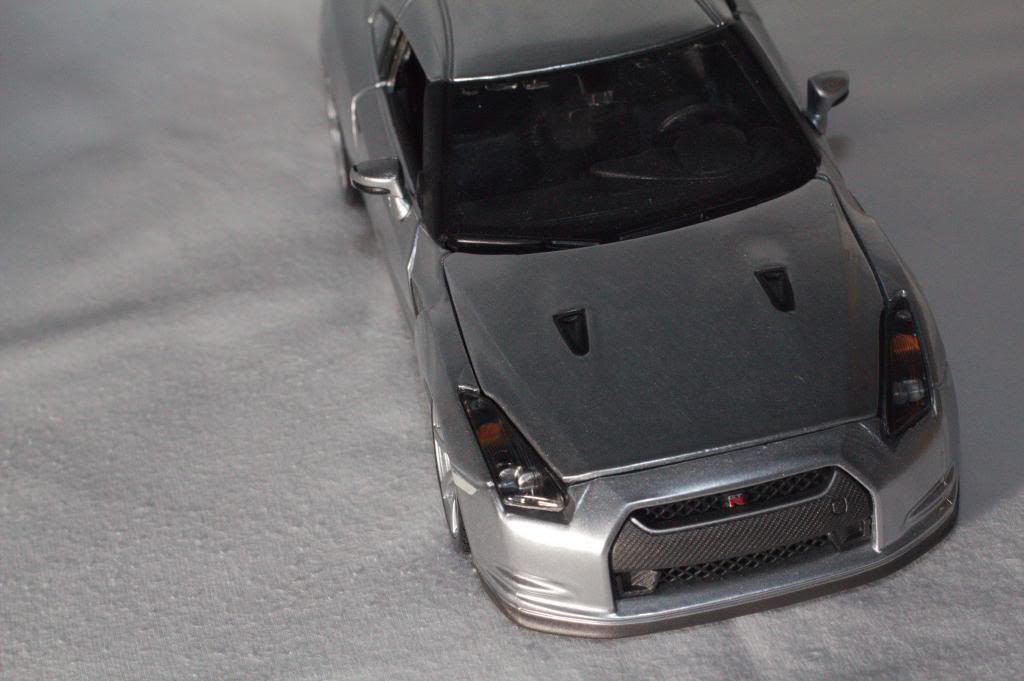
am i expecting too much from this budget lens? or my skills are not up to par yet? or just something wrong with my eyes o.o
*ignore the uneven surface lol, its shot on my shirt*
thx alot! all comments are appreciated
need comments on my photo, shot with 50mm f1.8, 60D, off flash
|
|
  Nov 19 2012, 12:23 AM, updated 14y ago Nov 19 2012, 12:23 AM, updated 14y ago
Show posts by this member only | Post
#1
|
 
Junior Member
163 posts Joined: Feb 2011  
|
this picture was shot at f11, off camera flash ,on tripod, and for some reason i feel that the picture is just not sharp enough? fyi i focus around the wiper spray
am i expecting too much from this budget lens? or my skills are not up to par yet? or just something wrong with my eyes o.o *ignore the uneven surface lol, its shot on my shirt* thx alot! all comments are appreciated |
|
|
|
|
|
Nov 19 2012, 12:29 AM
Show posts by this member only | Post
#2
|

Junior Member
461 posts Joined: Jul 2005 From: klang la..
|
ur car need a carwash..
|
|
|
Nov 19 2012, 12:35 AM
Show posts by this member only | Post
#3
|
 
Forum Admin
44,415 posts Joined: Jan 2003  
|
1. your composition is not good.
2. the image is under-exposed. 3. lighting is bad, if you have 1 off camera flash - you can actually create a really nice shot of a car like this.  4. choice of surface not good. you want example? |
|
|
Nov 19 2012, 12:51 AM
Show posts by this member only | Post
#4
|
|
Junior Member
163 posts Joined: Feb 2011
|
QUOTE(goldfries @ Nov 19 2012, 12:35 AM) 1. your composition is not good. Want want2. the image is under-exposed. 3. lighting is bad, if you have 1 off camera flash - you can actually create a really nice shot of a car like this. 4. choice of surface not good. you want example?  Actually how do I get the exposure right huh? Usually I will take a test shot 1st, review it and if it looks underexposed I will adjust the shutter to let in more light, it looks fine on camera after that but once I put it in the comp , all look abit diff one This post has been edited by JaniceWLV: Nov 19 2012, 01:03 AM |
|
|
Nov 19 2012, 01:03 AM
Show posts by this member only | Post
#5
|
 
Staff
30,735 posts Joined: Jan 2003
|
that car is what scale? 1:32? 1:48? looks small.
anyway what lens u using? at so close its not easy to get the whole car sharp, so easiest is to work the angles. something like this was shot for fun...tho wished i had 1 more light to give some seperation. 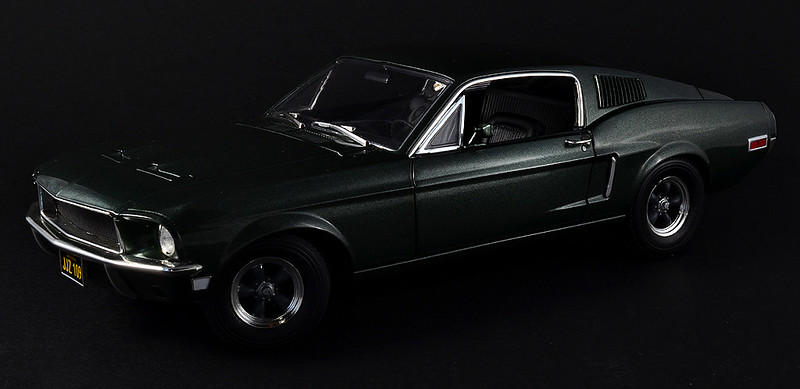 |
|
|
Nov 19 2012, 01:09 AM
Show posts by this member only | Post
#6
|

Senior Member
1,267 posts Joined: Sep 2010 
|
QUOTE(JaniceWLV @ Nov 19 2012, 12:51 AM) Want want if you using nikon or canon i think there is a meter on your viewfinder(bottom), well exposed when its in the center(underexposed=left side)Actually how do I get the exposure right huh? Usually I will take a test shot 1st, review it and if it looks underexposed I will adjust the shutter to let in more light, it looks fine on camera after that but once I put it in the comp , all look abit diff one the pic looks grainy , i think u set to high iso  every pic sure look nice on camera screen. bcuz ur high resolution pic is cramped on that small screen with max brightness  |
|
|
|
|
|
Nov 19 2012, 01:14 AM
Show posts by this member only | Post
#7
|
|
Forum Admin
44,415 posts Joined: Jan 2003
|
everdying posted a nice example of how it could be taken.
but it looks like taken with 2 lights.Added on November 19, 2012, 1:14 am QUOTE(JaniceWLV @ Nov 19 2012, 12:51 AM) Actually how do I get the exposure right huh? Usually I will take a test shot 1st, review it and if it looks underexposed I will adjust the shutter to let in more light, it looks fine on camera after that but once I put it in the comp , all look abit diff one if your camera LCD brightness is at default (middle) or higher - that's the problem.oh and you may learn to use Histogram. |
|
|
Nov 19 2012, 01:15 AM
Show posts by this member only | Post
#8
|
|
Staff
30,735 posts Joined: Jan 2003
|
ya, 2 flashes left and right both diffused.
i didnt have a 3rd flash to give seperation from the background  Added on November 19, 2012, 1:18 am QUOTE(JaniceWLV @ Nov 19 2012, 12:51 AM) Want want u using the cheapest 50mm? doubt it can resolve well enough on the 60D...go get a nice macro lens.Actually how do I get the exposure right huh? Usually I will take a test shot 1st, review it and if it looks underexposed I will adjust the shutter to let in more light, it looks fine on camera after that but once I put it in the comp , all look abit diff one but ignoring lens issue for now, adjust by playing with the flash power after you set what aperture and shutter u need. This post has been edited by Everdying: Nov 19 2012, 01:18 AM |
|
|
Nov 19 2012, 02:21 AM
Show posts by this member only | Post
#9
|

Junior Member
333 posts Joined: May 2010
|
err... shutter speed dont effect flash exposure...
aperture and iso does... |
|
|
Nov 19 2012, 02:56 AM
|
|
Forum Admin
44,415 posts Joined: Jan 2003
|
QUOTE(Everdying @ Nov 19 2012, 01:15 AM) u using the cheapest 50mm? doubt it can resolve well enough on the 60D...go get a nice macro lens. 50mm f1.8 II on 60D.  Single Flash + Styrofoam Reflector by goldfries, on Flickr  Resolve well enough, no? Anyway, just an example of how you can use a single flash and a reflector (mirror, cloth, styrofoam, whatever). In this image, the flash is on right and back, raised to an angle above the subject. On the left of the subject was my styrofoam reflector. Did this simple shot to illustrate the usage of single light source to light subject. As you can see the image was cropped - sometimes, you need not show the full subject. In this image I used the flash to highlight the curves of the subject, and the reflector to highlight the dark areas a bit. This adds dimension to the subject. |
|
|
Nov 19 2012, 02:16 PM
|
|
Junior Member
163 posts Joined: Feb 2011
|
thx guys, will try to shoot a similar shot again later
Added on November 19, 2012, 4:23 pmflash on left and shirt as reflector on right , this shot was made of 2 different photos , one for the left headlight area and the other for the other areas how does this look huh? ok or not? btw goldfries, what surface should i use? for this shot i use my school uniform 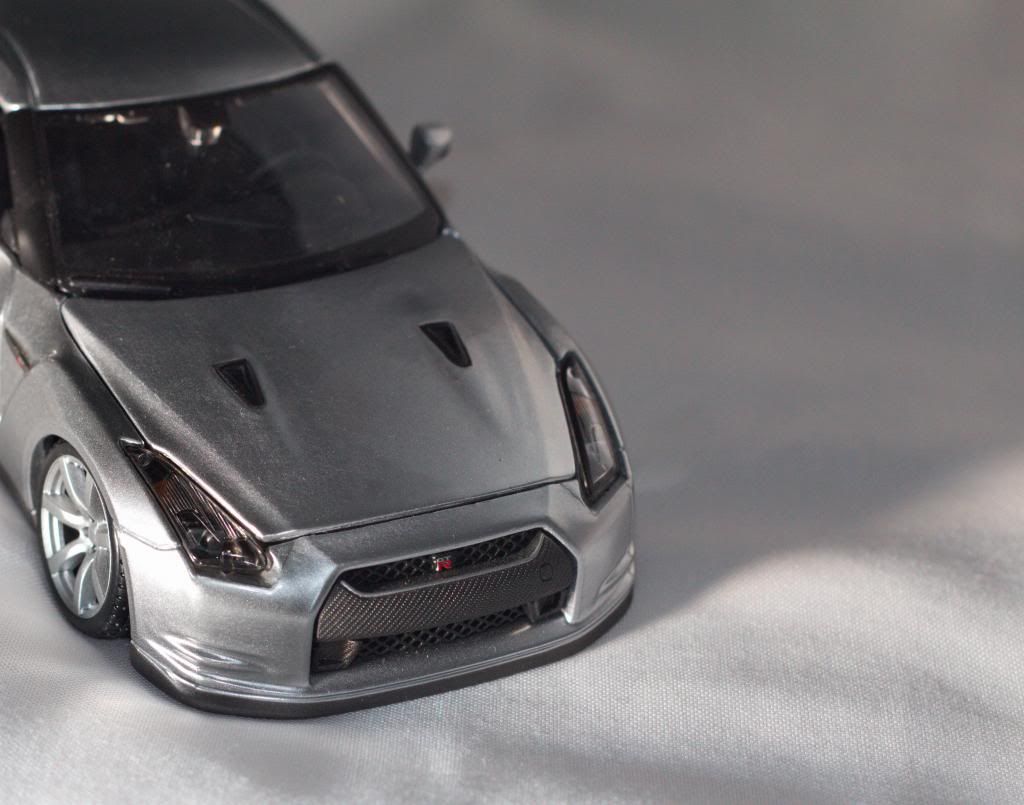 This post has been edited by JaniceWLV: Nov 19 2012, 04:23 PM |
|
|
Nov 19 2012, 06:57 PM
|

Senior Member
7,916 posts Joined: Jul 2005 From: Kuala Lumpur
|
surface? it's a car...use the road as ur surface
i think a lower angle will look more realistic. i don't feel it's natural to look at a car from this high anglethe 2nd shot is definitely an improvement in terms of focus though. good job |
|
|
Nov 19 2012, 08:38 PM
|
|
Staff
30,735 posts Joined: Jan 2003
|
i cant tell if TS is trolling or not
what surface to use? use cardboard la. easiest way to shoot? point flash straight up and bounce from ceiling. like this one is just 1 nikon flash straight up and triggered with a fuji point n shoot...and yes that is just a rm3 piece of cardboard u can buy in stationery shops.  |
|
|
|
|
|
Nov 19 2012, 08:39 PM
|

Senior Member
1,699 posts Joined: Jun 2011 From: Home of Bak Kut Teh! :) 
|
Surface even you can use mounting board or this type of board I forgot what its called,
This is mine shot only using your everyday fluorescent light and the BG is just the wall and use a white paper to reflect the light for the back of the car. Scale of the car is 1/18 btw.  » Click to show Spoiler - click again to hide... « This post has been edited by sp6068: Nov 19 2012, 08:40 PM |
|
|
Nov 19 2012, 09:05 PM
|

Senior Member
1,589 posts Joined: May 2008
|
Thanks for sharing guys.. lot of info here...
 |
|
|
Nov 19 2012, 11:47 PM
|
|
Forum Admin
44,415 posts Joined: Jan 2003
|
aihh TS - if so difficult, you could just find the corner of your living space (hopefully white walls and ceiling) then point the flash upwards and left, and the shoot.
chances are you could get something decent.anyway here's another example.  Single Flash Product Shoot by goldfries, on Flickr Canon EOS 60D with EF 50mm f/1.8 II, pop-up triggering a Canon 430EX II speedlight placed 1-feet away from subject, with head tilted at 45 degree and fired at 1/4. Camera setting is at 1/250 | ISO100 | f/8 | 5500 Kelvin WB Subject placed on black cloth, with a styrofoam board just about 4 inches behind the subject. Image was taken in JPG. This image was direct from camera (meaning no alteration to colors nor brightness - only watermarked and resized). The photo shoot session was about 10 minutes. |
|
|
Nov 20 2012, 12:38 AM
|
|
Senior Member
1,589 posts Joined: May 2008
|
QUOTE(goldfries @ Nov 19 2012, 11:47 PM) » Click to show Spoiler - click again to hide... « useful info.  btw with my pop up flash is enough for this kind of shoots ?? This post has been edited by mls_gamer: Nov 20 2012, 12:42 AM |
|
|
Nov 20 2012, 10:38 AM
|

Staff
7,529 posts Joined: Jan 2003
|
TS
your pic is underexposed. Since you're using off-shoe flash, you could try to compensate it with the EV on either your camera or flash. Simplest thing that i'd assume is that due to the low light, the grains are more prominent thus making it look not as sharp as you'd expect it to be. besides, you've removed all your exif data so i cant comment much |
|
|
Dec 17 2012, 11:14 PM
|

Junior Member
179 posts Joined: Oct 2010 From: Kuantan MlK
|
i think the degree angle of your flash also will affect your photo. are you using 90 degree upward bounce?
|
|
|
Dec 18 2012, 02:05 PM
|

Junior Member
281 posts Joined: May 2008 From: kay el
|
good thread...i learn alot just by reading this
|
| Change to: |  0.0174sec 0.0174sec
 0.49 0.49
 5 queries 5 queries
 GZIP Disabled GZIP Disabled
Time is now: 21st December 2025 - 02:55 AM |
 Quote
Quote
