Outline ·
[ Standard ] ·
Linear+
NirSoft WakeMeOnLan [Free]
|
TScybpsych
|
  Nov 16 2012, 06:56 PM, updated 13y ago Nov 16 2012, 06:56 PM, updated 13y ago
|

|
WakeMeOnLan v1.45http://www.nirsoft.net/utils/wakemeonlan.ziphttp://www.nirsoft.net/utils/wake_on_lan.htmlQUOTE This utility allows you to easily turn on one or more computers remotely by sending Wake-on-LAN (WOL) packet to the remote computers.
When your computers are turned on, WakeMeOnLan allows you to scan your network, and collect the MAC addresses of all your computers, and save the computers list into a file. Later, when your computers are turned off or in standby mode, you can use the stored computers list to easily choose the computer you want to turn on, and then turn on all these computers with a single click.
WakeMeOnLan also allows you to turn on a computer from command-line, by specifying the computer name, IP address, or the MAC address of the remote network card. 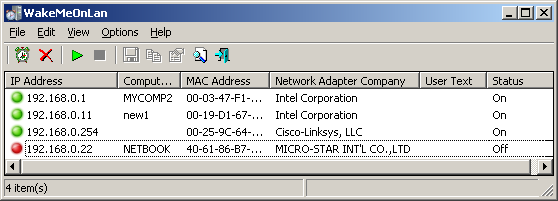
|
|
|
|
|
|
TScybpsych
|
Nov 20 2012, 02:11 AM
|
|
|
WakeMeOnLan v1.46http://www.nirsoft.net/utils/wakemeonlan.zipFixed /wakeup command-line option to accept MAC Address in xxxxxxxxxxxx format, when the computer is not in the list.
|
|
|
|
|
|
TScybpsych
|
Dec 25 2012, 01:30 AM
|
|
|
WakeMeOnLan v1.47http://www.nirsoft.net/utils/wakemeonlan.zipFixed issue: The properties dialog-box and other windows opened in the wrong monitor, on multi-monitors system. Added 'Mark Odd/Even Rows' option, under the View menu. When it's turned on, the odd and even rows are displayed in different color, to make it easier to read a single line.
|
|
|
|
|
|
elmodistortion
|
Dec 25 2012, 07:14 AM
|
|
|
TQ.
Im IT administrator in company. really usefull
|
|
|
|
|
|
TScybpsych
|
Jan 24 2013, 07:58 AM
|
|
|
WakeMeOnLan v1.48http://www.nirsoft.net/utils/wakemeonlan.zipUpdated the internal MAC addresses database.
|
|
|
|
|
|
TScybpsych
|
Feb 22 2013, 07:36 AM
|
|
|
WakeMeOnLan v1.50http://www.nirsoft.net/utils/wakemeonlan.zipAdded 'Use Broadcast Address According to IP Address' option. When it's turn on, the broadcast address is calculated according to the IP address. For Example, if the IP address is 192.168.0.10, then 192.168.0.255 will be used as broadcast address. Fixed bug: WakeMeOnLan failed to load the external MAC addresses file (oui.txt) when every line has 2 leading space characters. (Sometimes this file is provided with leading space characters, I don't really know why...)
|
|
|
|
|
|
TScybpsych
|
May 15 2013, 05:35 PM
|
|
|
WakeMeOnLan v1.51http://www.nirsoft.net/utils/wakemeonlan.zipWhen you choose to scan specific IP addresses range, WakeMeOnLan now automatically skips the broadcast addresses, according to the IP addresses/Subnet masks settings of every network adapter. The default button of the delete question-box is 'No', in order to avoid from deleting by mistake.
|
|
|
|
|
|
TScybpsych
|
Jul 13 2013, 05:43 PM
|
|
|
WakeMeOnLan v1.52http://www.nirsoft.net/utils/wakemeonlan.zipAdded 'Auto Size Columns+Headers' option. Added option to choose the font displayed on the main window of WakeMeOnLan.
|
|
|
|
|
|
TScybpsych
|
Aug 16 2013, 06:45 AM
|
|
|
WakeMeOnLan v1.53http://www.nirsoft.net/utils/wakemeonlan.zipUpdated the internal MAC addresses database.
|
|
|
|
|
|
TScybpsych
|
Oct 4 2013, 05:33 PM
|
|
|
WakeMeOnLan v1.55http://www.nirsoft.net/utils/wakemeonlan.zipAdded /cfg command-line option, which instructs WakeMeOnLan to use a config file in another location instead if the default config file, for example: WakeMeOnLan.exe /cfg "%AppData%\WakeMeOnLan.cfg"
|
|
|
|
|
|
TScybpsych
|
Oct 29 2013, 03:40 PM
|
|
|
WakeMeOnLan v1.60http://www.nirsoft.net/utils/wakemeonlan.zipAdded 'Change Wake Up Settings of Selected Items' option, which allows you to assign for every item the port number and the broadcast address that will be used instead of the default port number/broadcast address. You can select multiple items and then change the port number and broadcast address for all selected items at once.
|
|
|
|
|



 Quote
Quote


 0.0189sec
 0.14
0.14
 5 queries
 GZIP Disabled