Welcome Guest ( Log In | Register )

Outline · [ Standard ] · Linear+

 Continuous short beeps, restarts, and continues, Gigabyte Z77P-D3

views
     
SUSedge85
post Nov 2 2012, 01:23 AM, updated 14y ago

hepi hepi goyang bersama
******
Senior Member
1,299 posts

Joined: Jun 2008


I'm setting up my new desktop now. But I'm having a problem.

I've checked all the connectors, they seem fine. But when I power on the CPU this happesn:
- short continuous beep sounds (about 20x), then it shuts off, and starts all over again.

All 3 fans will spin during the beeps.

Where have I missed out?

Gigabyte Z77P-D3
Intel i5-3570
Kingston 4GBx2 1333MHz
Gigabyte GTX650
Seagate 750GB HDD
Aerocool PSU 500W
Samsung DVD Writer
Cooler Master Elite Chassis

» Click to show Spoiler - click again to hide... «


» Click to show Spoiler - click again to hide... «
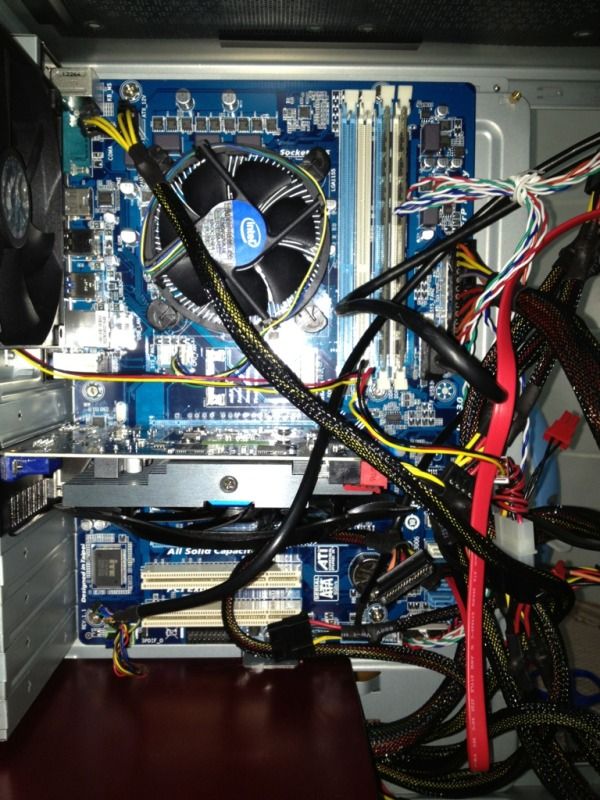

» Click to show Spoiler - click again to hide... «
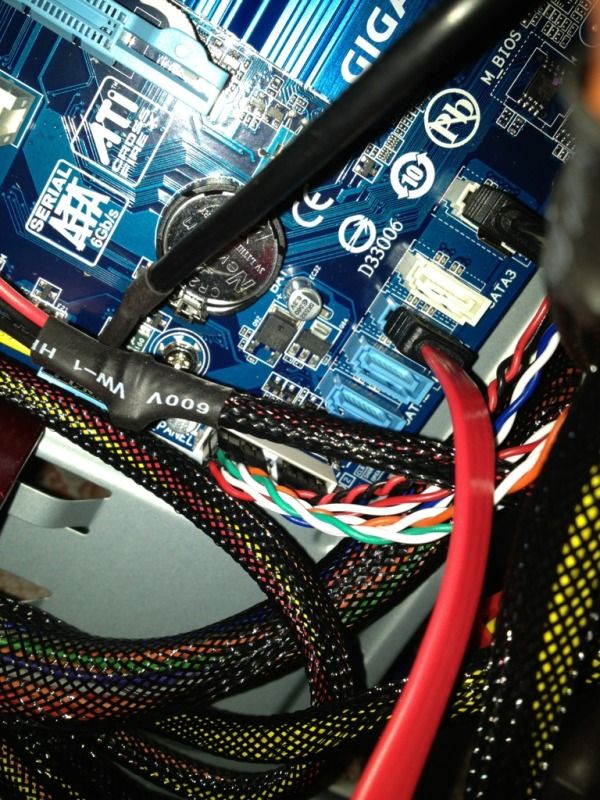

» Click to show Spoiler - click again to hide... «
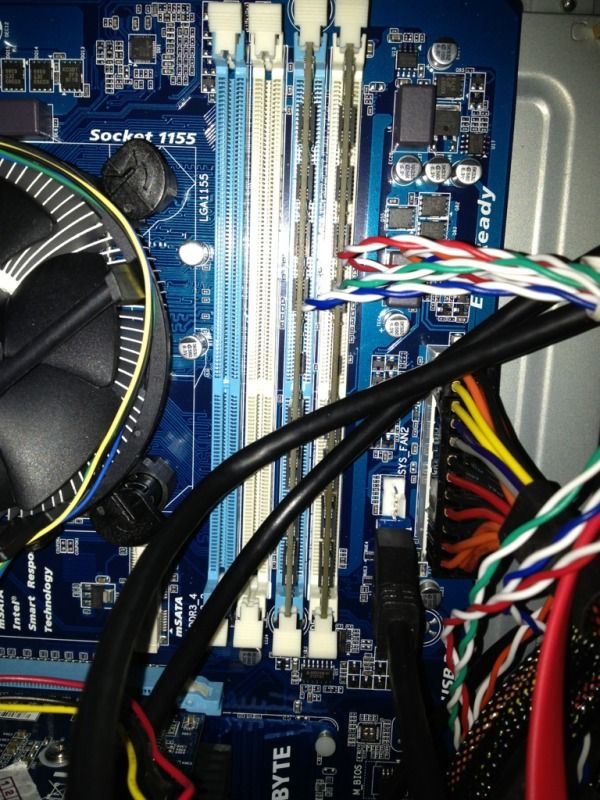

» Click to show Spoiler - click again to hide... «

This post has been edited by edge85: Nov 2 2012, 03:13 AM
mikicun
post Nov 2 2012, 01:27 AM

Casual
***
Junior Member
444 posts

Joined: Nov 2006
From: somewhere i belong...
reseat your ram and restart...
SUSedge85
post Nov 2 2012, 01:29 AM

hepi hepi goyang bersama
******
Senior Member
1,299 posts

Joined: Jun 2008


QUOTE(mikicun @ Nov 2 2012, 01:27 AM)
reseat your ram and restart...
*
OK, I've tried this. Still the same problem.
mikicun
post Nov 2 2012, 01:31 AM

Casual
***
Junior Member
444 posts

Joined: Nov 2006
From: somewhere i belong...
whats your bios?
Amibios? Award?
SUSedge85
post Nov 2 2012, 01:33 AM

hepi hepi goyang bersama
******
Senior Member
1,299 posts

Joined: Jun 2008


QUOTE(mikicun @ Nov 2 2012, 01:31 AM)
whats your bios?
Amibios? Award?
*
From the manual it says "Gigabyte - 3D Bios"

Note that the screen is blank.

HDD lights are on.

This post has been edited by edge85: Nov 2 2012, 01:34 AM
mikicun
post Nov 2 2012, 01:36 AM

Casual
***
Junior Member
444 posts

Joined: Nov 2006
From: somewhere i belong...
QUOTE(edge85 @ Nov 2 2012, 01:33 AM)
From the manual it says "Gigabyte - 3D Bios"

Note that the screen is blank.

HDD lights are on.
*
searching for "Gigabyte ZP-D3" but no results...
can give full mobo model?
SUSedge85
post Nov 2 2012, 01:37 AM

hepi hepi goyang bersama
******
Senior Member
1,299 posts

Joined: Jun 2008


QUOTE(mikicun @ Nov 2 2012, 01:36 AM)
searching for "Gigabyte ZP-D3" but no results...
can give full mobo model?
*
Sorry, typo there.

Full model is Gigabyte Z77P-D3,
mikicun
post Nov 2 2012, 01:43 AM

Casual
***
Junior Member
444 posts

Joined: Nov 2006
From: somewhere i belong...
QUOTE
BIOS
2 x 64 Mbit flash
Use of licensed AMI EFI BIOS
Support for DualBIOSâ„¢
PnP 1.0a, DMI 2.0, SM BIOS 2.6, ACPI 2.0a


u using AMIBIOS..

checking Amibios beep codes...
SUSedge85
post Nov 2 2012, 01:43 AM

hepi hepi goyang bersama
******
Senior Member
1,299 posts

Joined: Jun 2008


QUOTE(mikicun @ Nov 2 2012, 01:43 AM)
u using AMIBIOS..

checking Amibios beep codes...
*
thank you. will do immediately


Added on November 2, 2012, 2:04 amAMI Bios' list shows up to 11 short beeps only.

But mine CPU is beeping up to 20-30 times.

Can't sleep tonight lol...

This post has been edited by edge85: Nov 2 2012, 02:04 AM
Steve Lum
post Nov 2 2012, 02:14 AM

Ayyyyy
*****
Senior Member
709 posts

Joined: Apr 2012
From: Damansara


Post the picture of how you setup your motherboard here.Wanna see if you did place everything properly or not
SUSedge85
post Nov 2 2012, 03:14 AM

hepi hepi goyang bersama
******
Senior Member
1,299 posts

Joined: Jun 2008


QUOTE(Steve Lum @ Nov 2 2012, 02:14 AM)
Post the picture of how you setup your motherboard here.Wanna see if you did place everything properly or not
*
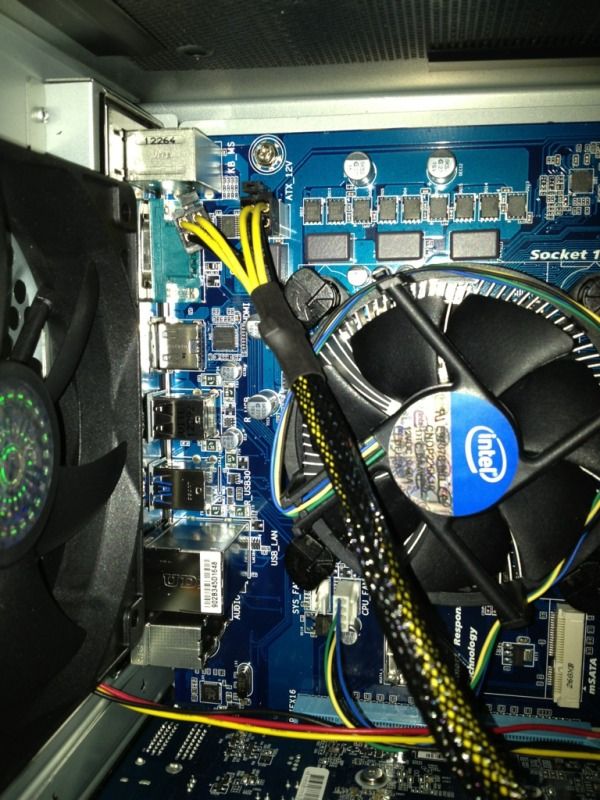
I've updated the first post with pictures. Thank you =)

I'm not sure if this is relevant, but my mobo has 1 x 4-pin ATX 12V power connector. But the PSU comes with 2x4-pin ATX12V.

This post has been edited by edge85: Nov 2 2012, 03:29 AM
Steve Lum
post Nov 2 2012, 03:38 AM

Ayyyyy
*****
Senior Member
709 posts

Joined: Apr 2012
From: Damansara


Is every part inside new? (mainly the HDD) and also,do you manage to go into POST or BIOS screen? or plain blank ?


Added on November 2, 2012, 3:41 amThe only thing i could come out with now is that it is not getting enough power supply.I calculated the amount of voltage required using Cooler Master PSU calculator and it seems that urs is insufficient. Did the instruction manual of the mobo mention anything regarding the beeps?It could lead to the problem detected by the mobo

This post has been edited by Steve Lum: Nov 2 2012, 03:41 AM
SUSedge85
post Nov 2 2012, 03:41 AM

hepi hepi goyang bersama
******
Senior Member
1,299 posts

Joined: Jun 2008


QUOTE(Steve Lum @ Nov 2 2012, 03:38 AM)
Is every part inside new? (mainly the HDD) and also,do you manage to go into POST or BIOS screen? or plain blank ?
*
Yes, everything is brand new.

No, the screen remains blank. (Samsung monitor, the power light just blinks slowly)
Steve Lum
post Nov 2 2012, 03:42 AM

Ayyyyy
*****
Senior Member
709 posts

Joined: Apr 2012
From: Damansara


The only thing i could come out with now is that it is not getting enough power supply.I calculated the amount of voltage required using Cooler Master PSU calculator and it seems that urs is insufficient. Did the instruction manual of the mobo mention anything regarding the beeps?It could lead to the problem detected by the mobo

SUSedge85
post Nov 2 2012, 03:48 AM

hepi hepi goyang bersama
******
Senior Member
1,299 posts

Joined: Jun 2008


QUOTE(Steve Lum @ Nov 2 2012, 03:42 AM)
The only thing i could come out with now is that it is not getting enough power supply.I calculated the amount of voltage required using Cooler Master PSU calculator and it seems that urs is insufficient. Did the instruction manual of the mobo mention anything regarding the beeps?It could lead to the problem detected by the mobo
*
1. I tried the calculator after reading your post. But my result says it needs only 368W.

2. No, the manual does not mention anything on troubleshooting.
Steve Lum
post Nov 2 2012, 04:02 AM

Ayyyyy
*****
Senior Member
709 posts

Joined: Apr 2012
From: Damansara


This is calculated using advanced calculation and it is estimated.What about the graphic card? does it have any power supply for it?


Attached thumbnail(s)
Attached Image
Choongster
post Nov 2 2012, 06:21 AM

Banned From Lowyat.net
******
Senior Member
1,606 posts

Joined: Jan 2008
From: Car Junk


in order to troubleshoot hardware ...
remove all other devices except for RAM , Graphic Card , Motherboard , HDD ..
Try to boot ....

You have seat your RAM "incorrectly" ... using the blue slots only ..
try using the one ram stick to boot to see if there is any problem ... try swapping the ram stick if still fail to boot..

that way you can narrow down the problem..

try to remove CMOS battery, unplug your power cable from PSU and leave it for few minutes .. and try again ..(*reset BIOS settings)

if all else fails , you might be looking at a faulty MOBO or power supply.

This post has been edited by Choongster: Nov 2 2012, 06:23 AM
mikicun
post Nov 2 2012, 08:39 AM

Casual
***
Junior Member
444 posts

Joined: Nov 2006
From: somewhere i belong...
QUOTE(edge85 @ Nov 2 2012, 01:23 AM)
I'm setting up my new desktop now. But I'm having a problem.

I've checked all the connectors, they seem fine. But when I power on the CPU this happesn:
- short continuous beep sounds (about 20x), then it shuts off, and starts all over again.

All 3 fans will spin during the beeps.

Where have I missed out?

Gigabyte Z77P-D3
Intel i5-3570
Kingston 4GBx2 1333MHz
Gigabyte GTX650
Seagate 750GB HDD
Aerocool PSU 500W
Samsung DVD Writer
Cooler Master Elite Chassis

» Click to show Spoiler - click again to hide... «

*
try putting the ram in slots according to color...
put ram in slot 1 & 2 or slot 3 & 4 and try again...
some mobo are built like this..

Hilmax
post Nov 2 2012, 08:39 AM

Look at all my stars!!
*******
Senior Member
4,042 posts

Joined: Jan 2011
From: Alor Gajah, Melaka


QUOTE(edge85 @ Nov 2 2012, 01:23 AM)
I'm setting up my new desktop now. But I'm having a problem.

I've checked all the connectors, they seem fine. But when I power on the CPU this happesn:
- short continuous beep sounds (about 20x), then it shuts off, and starts all over again.

All 3 fans will spin during the beeps.

Where have I missed out?

Gigabyte Z77P-D3
Intel i5-3570
Kingston 4GBx2 1333MHz
Gigabyte GTX650
Seagate 750GB HDD
Aerocool PSU 500W
Samsung DVD Writer
Cooler Master Elite Chassis

» Click to show Spoiler - click again to hide... «


» Click to show Spoiler - click again to hide... «


» Click to show Spoiler - click again to hide... «


» Click to show Spoiler - click again to hide... «


» Click to show Spoiler - click again to hide... «

*
Please re-seat the RAM slot to first slot beside CPU cooler.
seanlimys
post Nov 2 2012, 09:28 AM

Look at all my stars!!
*******
Senior Member
2,751 posts

Joined: Jan 2003
From: Taiping


juz try a stick of ram first...
primaroti
post Nov 2 2012, 10:25 AM

Mess With Me Die Like Rest
*******
Senior Member
3,706 posts

Joined: Jul 2011
From: Taiping


QUOTE(Hilmax @ Nov 2 2012, 08:39 AM)
Please re-seat the RAM slot to first slot beside CPU cooler.
*
+1 try it...btw it so messy la ur cable management...
SUSedge85
post Nov 2 2012, 06:10 PM

hepi hepi goyang bersama
******
Senior Member
1,299 posts

Joined: Jun 2008


QUOTE(primaroti @ Nov 2 2012, 10:25 AM)
+1 try it...btw it so messy la ur cable management...
*
hehe, haven't finalised yet that's why the cables not tidy. But I just zip locked them, now all OK.

Guess the problem was with the RAM. I did not fully push the sticks into the slots doh.gif

Case solved!


Change to:
| Lo-Fi Version
0.0196sec    0.95    6 queries    GZIP Disabled
Time is now: 18th December 2025 - 09:46 AM