QUOTE(andyjyneo @ Aug 10 2007, 07:31 PM)
yes, i did
when i set modem (linksys AM300) to 192.168.0.1, i cannot login at all

I not sure AM300 settings. Since u already change it to 192.168.0.1
If yr network setup is
>PC>Modem(AM300) go to Step 00
>PC>Router(WRT54GL)>Modem(AM300) Step 20
Step 00
» Click to show Spoiler - click again to hide... «
Start>Run>CMD
type "ping -t 192.168.0.1"
>if it show
Request timed out proceed Step 01
don't close the windows "ping -t 192.168.0.1"
>if it show
Reply from 192.168.0.1: bytes=32 time=1ms TTL=63 proceed Step 10
Step 01
» Click to show Spoiler - click again to hide... «
right click at network card(which connect to the AM300)>Status>Support
make sure is default gateway is 192.168.0.1
subnet 255.255.255.0
ip address 192.168.0.xxx (xxx could be 2-200) 192.168.0.2
if no, try click repair.
go back to the windows "ping -t 192.168.0.1"
>if it show
Request timed out proceed Step 02
>if it show
Reply from 192.168.0.1: bytes=32 time=1ms TTL=63 proceed Step 10
Step 02
» Click to show Spoiler - click again to hide... «
You have to manual type in the IP address
right click yr network card(which connect to the AM300)>Status>Properties
at the General>Highlight the Internet Protocol (TCP/IP)>Properties
at Internet Protocol (TCP/IP) Properties
Use the following IP address
IP address 192.168.0.2 (or pick any number from 2-200)
Subnet : 255.255.255.0
Default gateway : 192.168.0.1
click>ok>ok
go back to the windows "ping -t 192.168.0.1"
>if it show
Request timed out proceed Step 03
>if it show
Reply from 192.168.0.1: bytes=32 time=1ms TTL=63 proceed Step 10
Step 03
» Click to show Spoiler - click again to hide... «
Reset yr Modem(AM300). Try post screenshot of yr Modem(AM300)
Step 10
» Click to show Spoiler - click again to hide... «
Now try to access yr Modem(AM300) with IE or firefox.
If you failed to access Modem(AM300) proceed Step 30
Step 20
» Click to show Spoiler - click again to hide... «
If u trying to access yr modem thru the router. Sorry u can't. You need to add in some command 1st for Router(WRT54GL). proceed Step 30
Step 30
» Click to show Spoiler - click again to hide... «
Wait for further instruction
Btw good luck
Added on August 11, 2007, 7:10 amQUOTE(slacx @ Aug 11 2007, 06:11 AM)
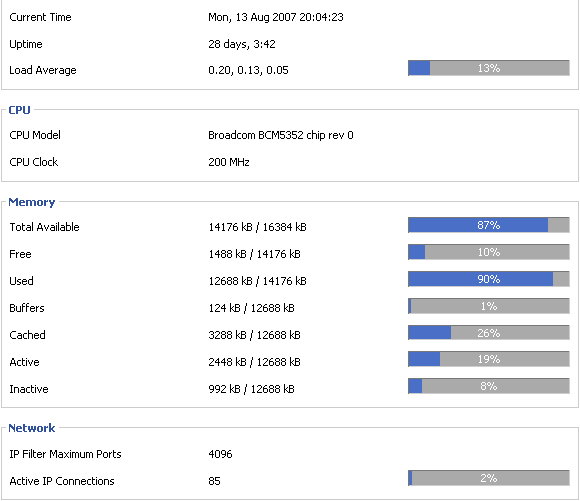
I'm using this DD-WRT for about one week now. My problem is my internet connection always dc and sometimes i cannot log in to 192.168.1.1. The uptime is 5hours and below and the memory is always almost full (around 94~95%). How can I fix this?
If you do P2P(emule,bittorrent,dc,...) proceed Step 00
Step 00
» Click to show Spoiler - click again to hide... «
Try this
Login to Router > 192.168.xxx.xxx
>Administration
>Management
>IP Filter Settings

>Save Settings
>Reboot Router
If you still having the same problem proceed Step 10
Step 10
» Click to show Spoiler - click again to hide... «
Internet slow with P2P 24/7,
try enable QoS.
Suggest u play around with the settings
>Applications & Gaming
>QoS
>Port WAN
>243 Uplink kbps & 640 Downlink kbps (you can play around here)
>Services Priority
>Add>bittorrent>Priority (Bulk)
>Add/Edit Service>bittorrent port (e.g 29999)>Apply>Close
If you still having the same problem proceed Step 20
Step 20
» Click to show Spoiler - click again to hide... «
Wait for further instruction
This post has been edited by waifaq: Aug 11 2007, 07:10 AM 

 Feb 22 2006, 04:33 AM


 Quote
Quote




 0.0479sec
 0.17
0.17
 7 queries
 GZIP Disabled