

Oh this thread for fans only? I have a WRT54G but I'm not a fan... so I guess I'm not welcome here... hehehe...
THE DD-WRT V1, For Linksys WRT54G/GL/GS Fans -ONLY-
THE DD-WRT V1, For Linksys WRT54G/GL/GS Fans -ONLY-
|
|
 Mar 29 2006, 03:24 PM Mar 29 2006, 03:24 PM
Return to original view | Post
#1
|
 
Senior Member
6,113 posts Joined: Jan 2003 From: Pokey Oaks   
|
Oh this thread for fans only? I have a WRT54G but I'm not a fan... so I guess I'm not welcome here... hehehe...
|
|
|
|
|
|
Apr 13 2006, 12:00 PM
Return to original view | Post
#2
|
|
Senior Member
6,113 posts Joined: Jan 2003 From: Pokey Oaks
|
Okay, just flashed to this firmware from the original Linksys yesterday. First attempt, the browser timed out midway of updating... I had a scare. Then I refreshed and tried again... successful. I have many questions...
1) I have a WRT54G v2.2. A few pages back someone mentioned v2.2 has some wireless problems, may I know what it is? 2) What's this QoS which can supposedly improve BT? Is it in the network properties at Windows? Becos I've seen it there with the TCP/IP settings. 3) What are some good settings to try? So far I've only changed the xMit value to 42mW (someone said it's a good value to try). 4) From the wireless connection icon in Windows, I see that the speed fluctuates greatly... it changes all the time, 2Mbps, 6Mbps, 48Mbps, 36Mbps, 12Mbps... what happened? 4) In the pic below, how come my PC is not listed as one of the clients? I set the IP manually to 192.168.1.100. DHCP starting IP is from 192.168.1.100. Thanks for any help. 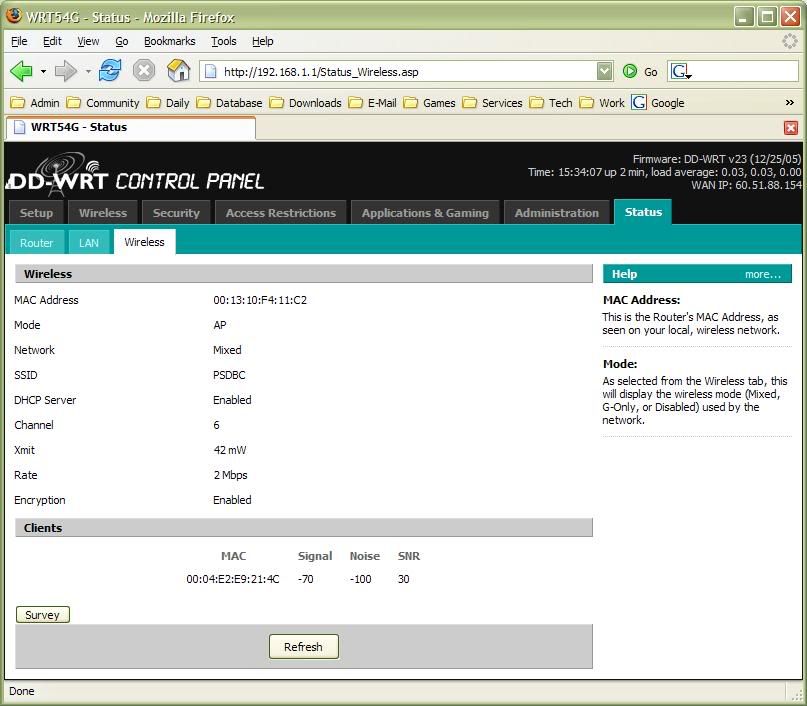 This post has been edited by Dannyl: Apr 13 2006, 12:02 PM |
|
|
Apr 13 2006, 02:32 PM
Return to original view | Post
#3
|
|
Senior Member
6,113 posts Joined: Jan 2003 From: Pokey Oaks
|
QUOTE(DeLarafi @ Apr 13 2006, 01:25 PM) 00:04:E2:E9:21:4C ...whos MAC is it anyway??? Oops, my bad. It's there after all. But at another screen, it's totally not there... hmm... |
|
|
Apr 19 2006, 05:35 PM
Return to original view | Post
#4
|
|
Senior Member
6,113 posts Joined: Jan 2003 From: Pokey Oaks
|
Hey I have a problem with WRT54G v2.2 with DD-WRT. Not sure this problem is becos of DD-WRT or not. When I got Streamyx at my new place I straightaway flashed with DD-WRT.
The PC sometimes cannot access the router admin page.. it's like it's stuck, or disconnected, Internet doesn't work too. But the wireless status is still connected. I've tried changing some settings as suggested (set 4096, 120, 120 to some variables, I forgot which ones) but it still happens sometimes. I guess this is not Streamyx problem, right? Becos router page also can't access. Normally I would powercycle the router and modem or restart the PC to fix this problem. Normally it works, but sometimes it still doesn't work. Anybody facing the same problem? |
|
|
May 16 2006, 05:45 PM
Return to original view | Post
#5
|
|
Senior Member
6,113 posts Joined: Jan 2003 From: Pokey Oaks
|
QUOTE(prasys @ May 15 2006, 04:44 PM) Version 2 is known for its famous WiFi 'drop' bug..You would need to overclock your CPU to 216Mhz to fix that problem. [Your router's CPU].Its a known issue with V2.x series..... How do I overclock the router's CPU?Try overclocking or get a different frimware , I heard $vea$oft's Frimware fixes this problems...but you gotta pay USD$ 25 for that ! |
|
|
May 26 2006, 08:35 PM
Return to original view | Post
#6
|
|
Senior Member
6,113 posts Joined: Jan 2003 From: Pokey Oaks
|
Ok, I'm using WRT54G v2.2 with DD-WRT v23. I'm quite sick of my router disconnections, is there anything I can try? The strange part is that if I don't use the PC, it can BT happily for a day or two with excellent speed. If I start to use the PC, the connection may die anytime.
How often does your router disconnect, prasys? |
|
Topic ClosedOptions
|
| Change to: |  0.0387sec 0.0387sec
 0.29 0.29
 7 queries 7 queries
 GZIP Disabled GZIP Disabled
Time is now: 5th December 2025 - 06:21 PM |
 Quote
Quote