


Running on Access Point mode
I did some small review on Linksys WAP54G. testing Tx Power + Antenna combination. You can check it here : Linksys WAP54G Signal Output Test
This post has been edited by tictac: Apr 3 2008, 11:00 PM
THE DD-WRT V1, For Linksys WRT54G/GL/GS Fans -ONLY-
|
|
 Apr 3 2008, 09:39 PM Apr 3 2008, 09:39 PM
Return to original view | Post
#21
|
 
Elite
2,520 posts Joined: Jan 2003 From: Sibu  
|
running 9360 brainslayer microedition on WAP54G
Running on Access Point mode I did some small review on Linksys WAP54G. testing Tx Power + Antenna combination. You can check it here : Linksys WAP54G Signal Output Test This post has been edited by tictac: Apr 3 2008, 11:00 PM |
|
|
|
|
|
Apr 4 2008, 02:51 AM
Return to original view | Post
#22
|
|
Elite
2,520 posts Joined: Jan 2003 From: Sibu
|
QUOTE(arafat @ Apr 4 2008, 02:06 AM) why when i modify to that value, i cant get into config page? not sure. I got best result with that setting only restart will do..but can surf normally..i'm using v24rc7 my pc use cable connection.    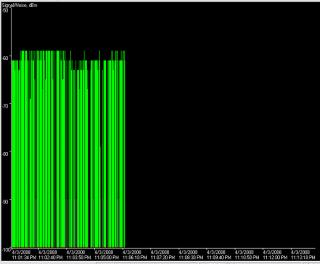
|
|
|
Apr 6 2008, 01:54 AM
Return to original view | Post
#23
|
|
Elite
2,520 posts Joined: Jan 2003 From: Sibu
|
new firmware available 9679 BrainSlayer
download it here: http://www.dd-wrt.com/dd-wrtv2/down.php?pa...379%2FBroadcom/ Added on April 6, 2008, 2:51 amWah the new firmware so good. I flash it into wap54g. Now i can get better snr This post has been edited by tictac: Apr 6 2008, 02:51 AM |
|
|
Apr 7 2008, 02:58 AM
Return to original view | Post
#24
|
|
Elite
2,520 posts Joined: Jan 2003 From: Sibu
|
I post a video guide how to build 14dB omnidirectional antenna. Feel free to check it out. Still uploading another 4 out of 5 part. In native indonesia language
 Sorry http://airfart.blogspot.com/2008/04/how-to...irectional.html Added on April 7, 2008, 11:39 amOk finished upload all 5 clips of the video guide. Feel free to check it out This post has been edited by tictac: Apr 7 2008, 11:39 AM |
|
|
Apr 10 2008, 07:31 PM
Return to original view | Post
#25
|
|
Elite
2,520 posts Joined: Jan 2003 From: Sibu
|
I overclock my LInksys WAP-54G to 250MHz
 Attached thumbnail(s) 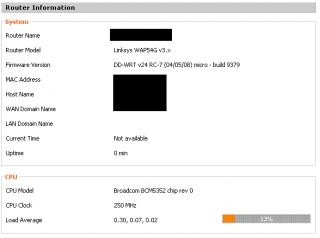
|
|
|
Apr 10 2008, 11:32 PM
Return to original view | Post
#26
|
|
Elite
2,520 posts Joined: Jan 2003 From: Sibu
|
New DD-WRT firmware release by Brainslayer 9392..
|
|
|
|
|
|
Apr 15 2008, 10:32 AM
Return to original view | Post
#27
|
|
Elite
2,520 posts Joined: Jan 2003 From: Sibu
|
QUOTE(uzairi @ Apr 15 2008, 12:16 AM) I always wanted to OC my WRT54GL v1.1 with DD-WRT v24 RC5 on board to 250mhz but not sure should i do it or not. Well you wont know if you dont try... and if you only listen to others warning this and that... you will go no where... Report shows that WRT54GL model can withstand the speed and wouldnt overheat at all running 24/7. What do you think ? |
|
|
Apr 19 2008, 08:14 AM
Return to original view | Post
#28
|
|
Elite
2,520 posts Joined: Jan 2003 From: Sibu
|
so far i test stable. Even able to turn my single port WAP-54G into wired router. I was amazed when it manage to do that. Ruunning on both of my router. Linksys and Buffalo WHR-G54S
|
|
|
Apr 21 2008, 08:47 AM
Return to original view | Post
#29
|
|
Elite
2,520 posts Joined: Jan 2003 From: Sibu
|
QUOTE(Lacus @ Apr 20 2008, 01:39 PM) hmm, try enable upnp? easier to port forward coz it base on application to port forward themself. Btw any idea on how to keep alive a connection? keep dc from bnet in warcraft III Have you try this menu option:Administration -> Keep Alive Enter proxy server there.. set at interval of what time you want it to check the proxy... Good Luck Added on April 21, 2008, 8:51 am QUOTE(capriodimitri @ Apr 20 2008, 10:24 AM) Okie, I just joined the family with WRT150N and BrainSlayer-RC7-9414. I have a question tough, everything working fine include the BT which I put itunder QoS. Now my internet working smoothly with BT running at background. You can also set under this menu:I would like to put a port forwarding to my pc. I click and set apply changes but after tat all I c is New empty row of empty ip and empty port. Is tat working? What should I do? NAT/QOS -> DMZ set enable then enter your pc IP address. Its easier This post has been edited by tictac: Apr 21 2008, 08:51 AM |
|
|
Apr 22 2008, 05:51 PM
Return to original view | Post
#30
|
|
Elite
2,520 posts Joined: Jan 2003 From: Sibu
|
QUOTE(Lacus @ Apr 21 2008, 02:22 PM) hmm, proxy? I don't have a proxy... So wat ip do i put to check? Coz while playing games in bnet i tend to get dc from bnet -.-" tmnet got proxy or not? just put tmnet proxy in that. It will not use proxy for the connection. Juast as watchdog  |
|
|
Apr 23 2008, 02:34 PM
Return to original view | Post
#31
|
|
Elite
2,520 posts Joined: Jan 2003 From: Sibu
|
QUOTE(Lacus @ Apr 22 2008, 07:00 PM) Hmm, or should i just use the ip tm assign to me ok give a try lar... i havent try that yet  . Manage to find another alternative but it's a bit troublesome . Manage to find another alternative but it's a bit troublesome  |
|
|
Apr 24 2008, 12:27 AM
Return to original view | Post
#32
|
|
Elite
2,520 posts Joined: Jan 2003 From: Sibu
|
QUOTE(esoon87 @ Apr 23 2008, 11:08 PM) hai i wanna ask... y i cant connect to wireless? my laptop cant detect at 1st can... but so sad after off it cannot on balik >< i using wrt54gl Probably your laptop wifi kong already. Thats why cannot detect. Or maybe got interferance from neighbour wifi using same channel. Try occupying channel with less interferance. And dont use overlap channel. Only use channel 1 , 6 or 11. |
|
Topic ClosedOptions
|
| Change to: |  0.0442sec 0.0442sec
 0.31 0.31
 7 queries 7 queries
 GZIP Disabled GZIP Disabled
Time is now: 6th December 2025 - 10:52 PM |
 Quote
Quote