Welcome Guest ( Log In | Register )

Bump Topic Topic Closed RSS Feed
126 Pages « < 7 8 9 10 11 > » Bottom

Outline · [ Standard ] · Linear+

 THE DD-WRT V1, For Linksys WRT54G/GL/GS Fans -ONLY-

views
     
danielwoo
post Apr 9 2006, 09:49 PM

Getting Started
**
Junior Member
227 posts

Joined: Jan 2003
QUOTE(prasys @ Apr 9 2006, 09:22 PM)
Just hold it , Just hold the Linksys' Light for a while

It would change color and eventually it will turn off
*
Just hold it???? Did you mean I need to press and hold on that SES button??? Thanks!!!!
aku_ker
post Apr 9 2006, 10:03 PM

Casual
***
Junior Member
438 posts

Joined: Mar 2005


QUOTE(ldragon @ Apr 5 2006, 11:15 AM)
do you guyz know how to configure rflow with mysql, what table we need to create??
TSMX510
post Apr 9 2006, 10:17 PM

Love Me Sin Hate Me Sinner
*******
Senior Member
4,038 posts

Joined: Aug 2005
From: Earth


QUOTE(aku_ker @ Apr 9 2006, 10:03 PM)
do you guyz know how to configure rflow with mysql, what table we need to create??
*
enable them in ur router settings check this thread previous post :-)
prasys
post Apr 9 2006, 10:17 PM

Heros Never Die
Group Icon
VIP
12,925 posts

Joined: Mar 2005
From: Kuala Lumpur
you would need MySQL installed , just get MySQL installed ...You would need v4

daniel : yes , just press and hold it
danielwoo
post Apr 10 2006, 03:43 PM

Getting Started
**
Junior Member
227 posts

Joined: Jan 2003
I got another question, I noticed that my wireless network card require a longer time to acquire network addresses from the linksys router around 10 to 15 sec because i set it to automatically obtain address. I don't have such problem before I flashed to this DD-WRT, I mean when using the original linksys firmware. So, now I manually set the IP address for my network card.

To prasys: I press and hold on that SES button for few seconds and it turn white color but it did not lid off. After i switch off the router and turn it on, the SES light lid on and turn yellow again, swt!!! heheh!!! dunno why rclxub.gif
danielwoo
post Apr 10 2006, 07:12 PM

Getting Started
**
Junior Member
227 posts

Joined: Jan 2003
Bump!!!!!!!!!!!!!!!
prasys
post Apr 10 2006, 09:19 PM

Heros Never Die
Group Icon
VIP
12,925 posts

Joined: Mar 2005
From: Kuala Lumpur
QUOTE(danielwoo @ Apr 10 2006, 03:43 PM)
I got another question, I noticed that my wireless network card require a longer time to acquire network addresses from the linksys router around 10 to 15 sec because i set it to automatically obtain address. I don't have such problem before I flashed to this DD-WRT, I mean when using the original linksys firmware. So, now I manually set the IP address for my network card.

To prasys: I press and hold on that SES button for few seconds and it turn white color but it did not lid off. After i switch off the router and turn it on, the SES light lid on and turn yellow again, swt!!! heheh!!! dunno why rclxub.gif
*
Keep on holding again , it would be


Yellow/Orange ---> (hold) --> White and then it would be off...Just press and hold

You can configure that thing to use a script that tells your Network Load as well , Orange Will be high load , White , Normal and if there is nothing your network is relaxed [aka Internet Connection]. Its pretty cool

ldragon
post Apr 12 2006, 05:58 PM

Regular
******
Senior Member
1,026 posts

Joined: Jan 2003
From: Kuala Lumpur, Malaysia
WRT54GS version 4 (serial number: CGN6)still available at TechDOS & Sri Computer (RM260.00)
If power adapter faulty, techdos give 1 to 1 swap if stock available.
Dannyl
post Apr 13 2006, 12:00 PM

what the fucuk-yimai
*******
Senior Member
6,113 posts

Joined: Jan 2003
From: Pokey Oaks


Okay, just flashed to this firmware from the original Linksys yesterday. First attempt, the browser timed out midway of updating... I had a scare. Then I refreshed and tried again... successful. I have many questions...

1) I have a WRT54G v2.2. A few pages back someone mentioned v2.2 has some wireless problems, may I know what it is?

2) What's this QoS which can supposedly improve BT? Is it in the network properties at Windows? Becos I've seen it there with the TCP/IP settings.

3) What are some good settings to try? So far I've only changed the xMit value to 42mW (someone said it's a good value to try).

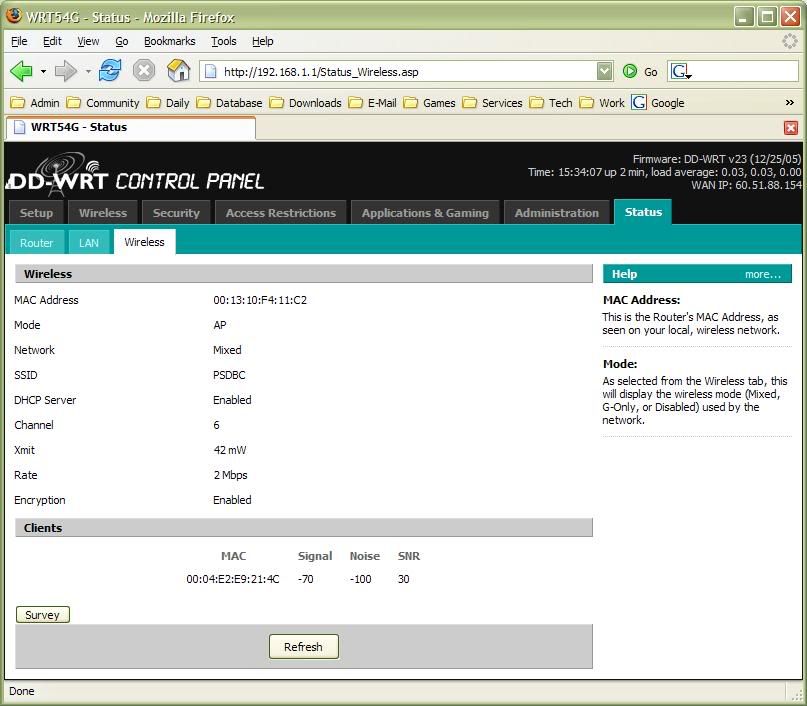
4) From the wireless connection icon in Windows, I see that the speed fluctuates greatly... it changes all the time, 2Mbps, 6Mbps, 48Mbps, 36Mbps, 12Mbps... what happened?

4) In the pic below, how come my PC is not listed as one of the clients? I set the IP manually to 192.168.1.100. DHCP starting IP is from 192.168.1.100.

Thanks for any help.

user posted image

This post has been edited by Dannyl: Apr 13 2006, 12:02 PM
DeLarafi
post Apr 13 2006, 01:25 PM

Ammar Tycoon
******
Senior Member
1,423 posts

Joined: Jan 2003
From: Yasud - Tash Murkon


00:04:E2:E9:21:4C ...whos MAC is it anyway???
Dannyl
post Apr 13 2006, 02:32 PM

what the fucuk-yimai
*******
Senior Member
6,113 posts

Joined: Jan 2003
From: Pokey Oaks


QUOTE(DeLarafi @ Apr 13 2006, 01:25 PM)
00:04:E2:E9:21:4C ...whos MAC is it anyway???
*
Oops, my bad. It's there after all. But at another screen, it's totally not there... hmm...
prasys
post Apr 13 2006, 03:36 PM

Heros Never Die
Group Icon
VIP
12,925 posts

Joined: Mar 2005
From: Kuala Lumpur
QUOTE(Dannyl @ Apr 13 2006, 12:00 PM)
Okay, just flashed to this firmware from the original Linksys yesterday.  First attempt, the browser timed out midway of updating... I had a scare.  Then I refreshed and tried again... successful.  I have many questions...

1)  I have a WRT54G v2.2.  A few pages back someone mentioned v2.2 has some wireless problems, may I know what it is?

2)  What's this QoS which can supposedly improve BT?  Is it in the network properties at Windows?  Becos I've seen it there with the TCP/IP settings.

3)  What are some good settings to try?  So far I've only changed the xMit value to 42mW (someone said it's a good value to try).

4)  From the wireless connection icon in Windows, I see that the speed fluctuates greatly... it changes all the time, 2Mbps, 6Mbps, 48Mbps, 36Mbps, 12Mbps... what happened?

4)  In the pic below, how come my PC is not listed as one of the clients?  I set the IP manually to 192.168.1.100.  DHCP starting IP is from 192.168.1.100.

Thanks for any help.
1. Frequent Disconnections and 'The Slow File Transfer' Problem Syndrome

2. Manage your Traffic. You could run BitTorrent and still able to play online games without 'major' lags. It shapes your traffic. In other words , you can manage your own bandwidth [Lets assume that you have RM 1 and if you dont manage it , you might just spend it , but if you manage it , you could buy some useful stuffs]

3. Well you could boost up to 100mW , there is no problem at all. I suggest you to install proper cooling system [or at least place in a 'cool' envoriment] , so that the router does not overheat


soul2soul
post Apr 14 2006, 01:15 AM

To the end of suffering!
*******
Senior Member
5,640 posts

Joined: Feb 2005
From: Manussa loka


I went to Midvalley AND lowyat plaza/imbi/ sungei wang searching for LInksys WRT54G version 4 hardware.. well dude... not in sale anymore. I did find WRT54GS version 4 hardware sold for RM280 at midvalley IT corner.

After some thoughts, I settled for my 2nd Linksys WRT54G hardware version 5... reason.. dont fix what is not broken. I have the propencity to get into problem with computer stuff (call it bad karma).. so better dont try mess aroudn with the firmware.

anyway thanx for the advice on ddwrt... I wish I had the gut to flash it.. but I guess I wont risk my RM280 for that!
die_257
post Apr 14 2006, 12:14 PM

Getting Started
**
Junior Member
108 posts

Joined: Jan 2005
From: Langkawi


QUOTE(soul2soul @ Apr 14 2006, 01:15 AM)
I went to Midvalley AND lowyat plaza/imbi/ sungei wang searching for LInksys WRT54G version 4 hardware.. well dude... not in sale anymore. I did find WRT54GS version 4 hardware sold for RM280 at midvalley IT corner.

After some thoughts, I settled for my 2nd Linksys WRT54G hardware version 5... reason.. dont fix what is not broken. I have the propencity to get into problem with computer stuff (call it bad karma).. so  better dont try mess aroudn with the firmware.

anyway thanx for the advice on ddwrt... I wish I had the gut to flash it.. but I guess I wont risk my RM280 for that!
*
//Off topic

Friend,

How is your new Linksys v5 router doing? Trouble free? I read around the net and
found that many had an unfortunate experience with the router after some prolong usage.

Here is the link "http://wifinetnews.com/archives/006160.html"

I want to buy one, prefer the previous version coz I want to try the DD-WRT but it
seems that it's hard to get one nowdays n the price is quite expensive compared to v5.

Where can I find the WRT54GL?

This post has been edited by die_257: Apr 14 2006, 12:21 PM
Squallwc
post Apr 14 2006, 01:05 PM

Getting Started
**
Junior Member
76 posts

Joined: Feb 2005


QUOTE(die_257 @ Apr 14 2006, 12:14 PM)
//Off topic

Friend,

How is your new Linksys v5 router doing? Trouble free? I read around the net and
found that many had an unfortunate experience with the router after some prolong usage.

Here is the link "http://wifinetnews.com/archives/006160.html"

I want to buy one, prefer the previous version coz I want to try the DD-WRT but it
seems that it's hard to get one nowdays n the price is quite expensive compared to v5.

Where can I find the WRT54GL?
*
Well, I accidentally bought a WRT54Gv5.... Got disconnect problem, need to reset it once or twice per day.. Then go to forum and found a solution:
Turn off uPnP. Turn off Firewall(Un-tick all things in the firewall page). Change the router IP to 192.168.2.x.

So far no problem. Up and running smoothly. icon_rolleyes.gif

This post has been edited by Squallwc: Apr 14 2006, 01:08 PM
sanosizo
post Apr 14 2006, 01:24 PM

Look at all my stars!!
*******
Senior Member
4,553 posts

Joined: Jan 2003
From: Shah Alam


some guys in ddwrt forum are discussing abt flashing the v5 with linux firmware. some have success but its not official yet. so do not flash ur v5 yet until the gurus say its safe to do so...
btw rite now my 54gsv4 is running on ddwrt2.3. there's a slight problem with the router time. i've change the time setting several times but it never sync with our time. for example, time rite now is 1.20pm (according to my pc) and the router time shows 5.23am. its 8 hours difference. or do i have to switch off the router?
prasys
post Apr 14 2006, 03:14 PM

Heros Never Die
Group Icon
VIP
12,925 posts

Joined: Mar 2005
From: Kuala Lumpur
Its a known issue and you would need to wait for a Fix [that is DD-WRT SP1]
sanosizo
post Apr 14 2006, 03:28 PM

Look at all my stars!!
*******
Senior Member
4,553 posts

Joined: Jan 2003
From: Shah Alam


i see...thanks 4 the info. another prob 4 u hehehe...in the dhcp client table i see no client at all. rite now the router got 5 pcs connected but none of them are displayed in the client table.
prasys
post Apr 14 2006, 03:59 PM

Heros Never Die
Group Icon
VIP
12,925 posts

Joined: Mar 2005
From: Kuala Lumpur
Are you on Static IP ?

Try to change the DHCP Lease time from x minutes to 1440 minutes , that should fix the problem
sanosizo
post Apr 14 2006, 04:20 PM

Look at all my stars!!
*******
Senior Member
4,553 posts

Joined: Jan 2003
From: Shah Alam


nope. all pcs set to dynamic & the lease time is the default value (1440). btw, i read some posts in the ddwrt forum n found out that some of the members are using the latest build of v2.3. i dont know where they get the firmware from....


update: the client table is updated finally. only 2 pcs show up becos their lease time are over. problem solved i guess since i know why it didnt show up b4 this. thanks prasys.

This post has been edited by sanosizo: Apr 14 2006, 04:32 PM

126 Pages « < 7 8 9 10 11 > » Top
Topic ClosedOptions
 

Change to:
| Lo-Fi Version
0.0162sec    0.37    6 queries    GZIP Disabled
Time is now: 8th December 2025 - 04:36 AM