

QUOTE(angah_as @ Nov 27 2012, 04:22 PM)
CWM, but how to flash recovery? My device is not rooted yet

Use nexus7 toolkit. Flash recovery no need root but need unlock bootloader. You can root before or after flashing recoveryGoogle NEXUS 7 Official Thread @V3, Now with Android 4.2.1
|
|
 Nov 27 2012, 04:48 PM Nov 27 2012, 04:48 PM
|
 
Elite
27,801 posts Joined: Jun 2007 From: Johor  
|
QUOTE(angah_as @ Nov 27 2012, 04:22 PM) CWM, but how to flash recovery? My device is not rooted yet Use nexus7 toolkit. Flash recovery no need root but need unlock bootloader. You can root before or after flashing recovery |
|
|
|
|
|
Nov 27 2012, 05:14 PM
|
 
Junior Member
279 posts Joined: Sep 2009 From: raincity 
|
QUOTE(benny888 @ Nov 27 2012, 04:48 PM) Use nexus7 toolkit. Flash recovery no need root but need unlock bootloader. You can root before or after flashing recovery Uncle Benny, how to make backup before unlocking the bootloader? because unlocking the bootloader will wipe data rite?thanks for the explanation  |
|
|
Nov 27 2012, 05:18 PM
|

Senior Member
971 posts Joined: Mar 2007
|
No it will not wipe your data when unlocking bootloader. Just go ahead
This post has been edited by redlyfs: Nov 27 2012, 05:19 PM |
|
|
Nov 27 2012, 05:23 PM
|
|
Junior Member
279 posts Joined: Sep 2009 From: raincity
|
QUOTE(redlyfs @ Nov 27 2012, 05:18 PM) No it will not wipe your data when unlocking bootloader. Just go ahead but it shown over here that unlocking will wipe data  » Click to show Spoiler - click again to hide... « |
|
|
Nov 27 2012, 05:31 PM
|
|
Senior Member
971 posts Joined: Mar 2007
|
My bad. Unlocking bootloader apparently leaves the system partition intact, but wipes user data, including SD card data.
Other than copy pasting data out and to sync your contacts/details/etc online, there's no other way to backup. Nandroid requires cwm which requires unlocked bootloader. Titatinium backup requires root. This post has been edited by redlyfs: Nov 27 2012, 05:33 PM |
|
|
Nov 27 2012, 05:54 PM
|
|
Junior Member
279 posts Joined: Sep 2009 From: raincity
|
So, how did u guys backup before unlocking?
|
|
|
|
|
|
Nov 27 2012, 05:55 PM
|

Senior Member
963 posts Joined: Dec 2007
|
Got my unit from Newegg a few weeks ago. the 32gb one. Loving this device cos it's so smooth and games don't crash or lag (or have not, touch wood) unlike my mom's iPad. The size is just right for most things ie. gaming with both hands, videos, music & surfing. So lightweight too!
My only grievances are: - screen resolution not as sharp as I would expect of a 7" these days. - setting up wallpapers is a pain (have to use an app to crop the wallpapers first). I had to buy a cover cos it got scratched when I put it in my bag.  Bought this standard one, which has the magnetic smart cover feature so that's pretty good. http://www.ebay.com.my/itm/Viridian-Green-...=item43b55a19de. Bought this standard one, which has the magnetic smart cover feature so that's pretty good. http://www.ebay.com.my/itm/Viridian-Green-...=item43b55a19de.And to someone who earlier mentioned bout this device not having physical buttons - YES, I AGREE. Quite a bit of a pain. Matter of getting used to, I guess. Attached thumbnail(s) 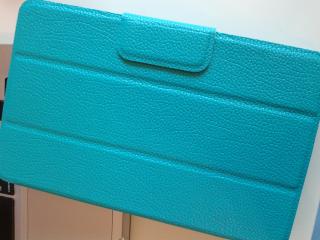
|
|
|
Nov 27 2012, 05:57 PM
|
|
Senior Member
971 posts Joined: Mar 2007
|
QUOTE(baoz @ Nov 27 2012, 05:55 PM) Got my unit from Newegg a few weeks ago. the 32gb one. Loving this device cos it's so smooth and games don't crash or lag (or have not, touch wood) unlike my mom's iPad. The size is just right for most things ie. gaming with both hands, videos, music & surfing. So lightweight too! Hey I bought that for my nexus too! But didnt go through ebay, bought from a fellow LYNMy only grievances are: - screen resolution not as sharp as I would expect of a 7" these days. - setting up wallpapers is a pain (have to use an app to crop the wallpapers first). I had to buy a cover cos it got scratched when I put it in my bag. Bought this standard one, which has the magnetic smart cover feature so that's pretty good. http://www.ebay.com.my/itm/Viridian-Green-...=item43b55a19de.And to someone who earlier mentioned bout this device not having physical buttons - YES, I AGREE. Quite a bit of a pain. Matter of getting used to, I guess. |
|
|
Nov 27 2012, 05:58 PM
|

Senior Member
1,221 posts Joined: Mar 2006
|
For those that purchased from newegg, how long does the delivery takes? Sorry if this has been asked
 |
|
|
Nov 27 2012, 06:02 PM
|

Senior Member
5,362 posts Joined: Jan 2003 From: Johor Bahru
|
wrong thread....
 This post has been edited by Cynox: Nov 27 2012, 06:03 PM |
|
|
Nov 27 2012, 06:14 PM
|
|
Junior Member
279 posts Joined: Sep 2009 From: raincity
|
QUOTE(Kyl3 @ Nov 27 2012, 05:58 PM) For those that purchased from newegg, how long does the delivery takes? Sorry if this has been asked If they got ready stock, u will get it immediately. but if they dont have it, u will have to w8 about 2 weeks-3weeks to ship from US. |
|
|
Nov 27 2012, 06:42 PM
|
|
Senior Member
1,221 posts Joined: Mar 2006
|
QUOTE(angah_as @ Nov 27 2012, 06:14 PM) If they got ready stock, u will get it immediately. but if they dont have it, u will have to w8 about 2 weeks-3weeks to ship from US. Ok thanks, might try my luck on tomorrow |
|
|
Nov 27 2012, 07:02 PM
|

Senior Member
3,114 posts Joined: Dec 2006
|
QUOTE(orenzai @ Nov 24 2012, 07:45 PM) Omg my friends 2 week old 32gb n7 cracked his screen today. Went to Asus Malaysia ask and they said the screen will cost 430 for replacement. But they said I could send it to 3rd party shops to repair and the warranty won't be void. Does anyone know anywhere that can replace the screen at a more reasonable price? QUOTE(orenzai @ Nov 27 2012, 11:38 AM) I tried to create a nandroid backup using wug's toolkit but when i reach the "waiting for the backup to complete and reboot etc" then my n7 is at the twrp page. What do I do? I tried clicking on the backup button on twrp and start backup and it says failed. BUMP for help. Anyone can answer any of these questions please?  |
|
|
|
|
|
Nov 27 2012, 07:05 PM
|
|
Senior Member
5,362 posts Joined: Jan 2003 From: Johor Bahru
|
QUOTE(Kyl3 @ Nov 27 2012, 06:42 PM) Ok thanks, might try my luck on tomorrow was told by them via FB that they do not have ready stock for 32GB wifi at the moment. New stock arriving in 2 weeks time. Only can register for interest in their FB page tomorrow morning from 9am onwards. Added on November 27, 2012, 7:09 pm QUOTE(orenzai @ Nov 27 2012, 07:02 PM) BUMP for help. Anyone can answer any of these questions please? i thought uncle Benny already answered your first question? Send it back to Asus for repair, you can't save much from RM430 from outside. And you do not have black and white that they allow you to go to third party service. What if later they deny saying that? Not worth to take the risk of service it at other than Asus. Based on Samsung charging close to RM600-650 to replace a much smaller S3 and Note II screen, RM430 is not so unreasonable. This post has been edited by Cynox: Nov 27 2012, 07:09 PM |
|
|
Nov 27 2012, 07:14 PM
|

Senior Member
597 posts Joined: Nov 2007
|
QUOTE(baoz @ Nov 27 2012, 05:55 PM) And to someone who earlier mentioned bout this device not having physical buttons - YES, I AGREE. Quite a bit of a pain. Matter of getting used to, I guess. I don't have any button hangover coz I am using Nokia N9 before buying Nexus7... but still wanna double tab the screen to wake it up, habit from N9... by the way, is there any app or tweak to lock the device without using the power button? and how do I do a screen capture (first time Android user here) |
|
|
Nov 27 2012, 07:29 PM
|

Senior Member
1,748 posts Joined: Mar 2010
|
QUOTE(kiasunkiasi @ Nov 27 2012, 07:14 PM) I don't have any button hangover coz I am using Nokia N9 before buying Nexus7... but still wanna double tab the screen to wake it up, habit from N9... Same here. Everytime I switch from my N9 to the old Galaxy Nexus or my current iPhone5, I always end up double-tapping to unlock or swiping up to exit apps. That's what you call a true button-less experience. The Meego team got it so right with the N9, it's a shame Nokia and that idiot Elop killed it off. Hope Jolla brings out some good stuff next year. Really want to see some genuine innovation in this sector. by the way, is there any app or tweak to lock the device without using the power button? and how do I do a screen capture (first time Android user here) As for screen capture, hold down the power + volume down button. Not sure about the lock thing though. If you want similar behaviour to the N9, I know someone once said you could, but I can't remember. This post has been edited by G-17: Nov 27 2012, 07:32 PM |
|
|
Nov 27 2012, 07:55 PM
|

Senior Member
2,345 posts Joined: Jan 2010
|
Seems like there are a few N9 combo Nexus 7 users here. Im one of them.
Don't quite like android phone. But prefer and android tablet over an apple one.haha.Btw, i've rooted my Nexus 7 using the toolkit. Have my data from my previous tablet transferred over through datasync. But will prefer my N7 to remain unrooted. Now here's the question, if i backup my data using the toolkit and unroot my N7, can i still restore the data from there? Thanks. |
|
|
Nov 27 2012, 07:58 PM
|

Senior Member
5,011 posts Joined: Aug 2011
|
Android 4.2.1 coming soon.
This time my nexus is 100% no mod. Fully stock. Hope won't have issues with ota. |
|
|
Nov 27 2012, 08:05 PM
|

Senior Member
4,874 posts Joined: Sep 2011
|
QUOTE(mtxx @ Nov 27 2012, 07:58 PM) Android 4.2.1 coming soon. Waaa this time u are really prepared. Good on you This time my nexus is 100% no mod. Fully stock. Hope won't have issues with ota.  |
|
|
Nov 27 2012, 08:10 PM
|
|
Senior Member
1,748 posts Joined: Mar 2010
|
QUOTE(mtxx @ Nov 27 2012, 07:58 PM) Android 4.2.1 coming soon. Any info on what kind of updates? As far as I can tell, it fixes the December bug and some stuff related to Nexus 4 and 10. Shame they didn't fix the notifications. The current left-right setup on AOSP 4.2 is so stupid!!This time my nexus is 100% no mod. Fully stock. Hope won't have issues with ota. This post has been edited by G-17: Nov 27 2012, 08:10 PM |
|
Topic ClosedOptions
|
| Change to: |  0.0307sec 0.0307sec
 1.02 1.02
 6 queries 6 queries
 GZIP Disabled GZIP Disabled
Time is now: 9th December 2025 - 11:18 PM |
 Quote
Quote
