Welcome Guest ( Log In | Register )

5 Pages < 1 2 3 4 5 >Bottom

Outline · [ Standard ] · Linear+

 Supercharge your 3G experience

views
     
digilife
post Oct 30 2012, 04:05 PM

The MNP guy, its me yeah.
*******
Senior Member
8,025 posts

Joined: Feb 2005
From: Planet Boleland


UMG1831 , default Dailer shows 4G, laugh.gif laugh.gif

Wat a BullBull

Attached Image


Added on October 30, 2012, 4:08 pm
QUOTE(blacktubi @ Oct 30 2012, 04:04 PM)
Why signal so serious  ohmy.gif
*
this area signal damn suck one la............

gonna complain soon, fucuk them kawkaw, put in MCMC name to let them shitt brick tongue.gif

This post has been edited by digilife: Oct 30 2012, 04:08 PM
digilife
post Oct 30 2012, 04:25 PM

The MNP guy, its me yeah.
*******
Senior Member
8,025 posts

Joined: Feb 2005
From: Planet Boleland


TX33 at this hour at this sucky place

user posted image

you guys all dare not show your ST result doh.gif

show la, if low like mine, wat so scare malu doh.gif

user posted image

you guys only wan show >10Mbps ST only whistling.gif whistling.gif
digilife
post Oct 30 2012, 05:23 PM

The MNP guy, its me yeah.
*******
Senior Member
8,025 posts

Joined: Feb 2005
From: Planet Boleland


QUOTE(LcBoy135z @ Oct 30 2012, 05:14 PM)
hmmm.....it suddently happen to me..

...how come only 1 tower got super power?  hmm.gif
*
this morning i have been monitoring my Cell ID, via Direct Plug in .........one minute its a sucky ID which average abt 1~2Mbps, then next minute, it will change to another ID which fly at 5~6Mbps on mt E367 (single channel modem) doh.gif
digilife
post Oct 30 2012, 05:51 PM

The MNP guy, its me yeah.
*******
Senior Member
8,025 posts

Joined: Feb 2005
From: Planet Boleland


QUOTE(LcBoy135z @ Oct 30 2012, 05:45 PM)
u so lucky..my situation right now not even a minute..waiting for hours from 12PM today..

do refresh..do restart laptop...still same cell id...still poor signal..and still worst speed...

signal always changes from wcdma to dc hspa and vice versa  doh.gif  sweat.gif
*
This is called Ding Dong Speed , aka Doremon Speed biggrin.gif

Simple use a MF600 modem, slower speed between 1~3Mbps but super stable .
digilife
post Oct 30 2012, 06:06 PM

The MNP guy, its me yeah.
*******
Senior Member
8,025 posts

Joined: Feb 2005
From: Planet Boleland


QUOTE(chuahcs79 @ Oct 30 2012, 06:03 PM)
that's why i keep my ZTE MF600,

super useful,  thumbup.gif

and due to the 5dBi antenna, signal never jump cell id  thumbup.gif
*
Connect MF600 into your MR3420 = super consistent icon_idea.gif
digilife
post Oct 30 2012, 06:43 PM

The MNP guy, its me yeah.
*******
Senior Member
8,025 posts

Joined: Feb 2005
From: Planet Boleland


QUOTE(chuahcs79 @ Oct 30 2012, 06:09 PM)
i have my ZTE MF600 connnected to TL-MR3420 wan blue port with lan cable all time,

as soon as i feel DING DONG session here, i will insert sim card in ZTE MF600 and continue  thumbup.gif

too bad ZTE MF600 cannot tweak TX power  , or upgrade chipset inside to 7.2Mbps and 5.76Mbps.

otherwise it would be best modem ever for sure  rclxms.gif


Added on October 30, 2012, 6:13 pmcompare ZTE MF600 to HUawei B660,

ZTE MF600 still hands down stable than any other modem,.
*
I heard B660 suck , bad WiFi signal and 3G reception signal too.............

A fren took the Maxis package sold off his B660 and bought my E353, now he happily using it. He sold the B660 for rm150 and i sold my E353 to him for rm150 too biggrin.gif
digilife
post Nov 2 2012, 06:45 PM

The MNP guy, its me yeah.
*******
Senior Member
8,025 posts

Joined: Feb 2005
From: Planet Boleland


QUOTE(sieg_wahrheit @ Nov 2 2012, 06:26 PM)
cry.gif

thanx for the info though.. smile.gif
*
wrong port dude !!

digilife
post Nov 4 2012, 03:12 PM

The MNP guy, its me yeah.
*******
Senior Member
8,025 posts

Joined: Feb 2005
From: Planet Boleland


QUOTE(wkkm007 @ Nov 4 2012, 12:51 PM)
I use Aztech HW550-3G la sad.gif
*
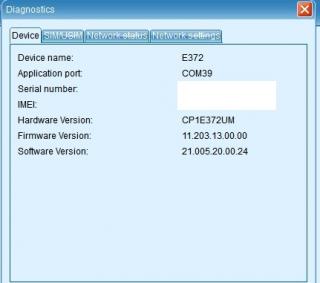
wat FW is your E372, mine also cannot connect with HW550

Attached Image

before the FW upgrade it was okay, i dun believe its the TX33 problem as i can connect easily with my MR3420 V1 and V2.

Any site to DL another FW for E372, i wan try

This post has been edited by digilife: Nov 4 2012, 03:12 PM
digilife
post Nov 4 2012, 03:17 PM

The MNP guy, its me yeah.
*******
Senior Member
8,025 posts

Joined: Feb 2005
From: Planet Boleland


QUOTE(wkkm007 @ Nov 4 2012, 03:13 PM)
any tweak Aztech HW550 3G? hehe brows.gif
*
i believe its the E372 latest FW that did this, before i upgrade it was fine.

just reflash back to a older FW should solve it
digilife
post Nov 4 2012, 03:24 PM

The MNP guy, its me yeah.
*******
Senior Member
8,025 posts

Joined: Feb 2005
From: Planet Boleland


QUOTE(fruitie @ Nov 4 2012, 03:10 PM)
Exactly but can't do much thing... sad.gif
Well, I seldom go back to my hometown, so getting another TP Link there is a waste. I also go to my sister's house quite often...
*
next time u go back PD, bring the MR3420 home, plug in the E372 into MR3420,

Disable WiFi on Mr3420 use LAN only, then connect the LAN cable into Aztech WAN PORT on one side and the other side into HW550 Ethernet Port, meaning u are supplying a WAN connection from MR3420 into HW550

From there u can use WiFi and LAN on your HW550, your connection will be super consistent.

I tried with my MR3420 V1 > MR3420 V2 this morning.........no need OpenWRT too

I am thinking of getting either an Asus or MikroTik for the router #2 to getter better WiFi and Gigabit LAN connection hmm.gif
digilife
post Nov 7 2012, 07:13 AM

The MNP guy, its me yeah.
*******
Senior Member
8,025 posts

Joined: Feb 2005
From: Planet Boleland


QUOTE(blacktubi @ Nov 7 2012, 07:02 AM)
After further diagnostics it is found that there are some issue for the antenna ddr3received sweat.gif

Should works with Maxis E372 as usual
*
QC din test before sending out. Too bad the QC was too busy laugh.gif
digilife
post Nov 14 2012, 07:36 AM

The MNP guy, its me yeah.
*******
Senior Member
8,025 posts

Joined: Feb 2005
From: Planet Boleland


E1762 supercharged to TX = 27

RSSI = 89dBm

user posted image
digilife
post Nov 17 2012, 04:31 PM

The MNP guy, its me yeah.
*******
Senior Member
8,025 posts

Joined: Feb 2005
From: Planet Boleland


QUOTE(hairul @ Nov 17 2012, 03:55 PM)
IF the rental sim card already register online account, then a bit difficult.
Need to know "the secret question" if you cliks "forgot Your Pin"
*
The PIN will only be send to the Principle Sim icon_idea.gif

Its stated verly clearly on the website.
digilife
post Dec 12 2012, 09:09 AM

The MNP guy, its me yeah.
*******
Senior Member
8,025 posts

Joined: Feb 2005
From: Planet Boleland


QUOTE(eehtsitna @ Dec 12 2012, 09:04 AM)
Can someone suggest the most value-for-money modem to try this supercharge mod?

Thanks in advance. biggrin.gif
*
E1762 , rm50
digilife
post Dec 12 2012, 09:10 AM

The MNP guy, its me yeah.
*******
Senior Member
8,025 posts

Joined: Feb 2005
From: Planet Boleland


QUOTE(memoOonsta @ Dec 12 2012, 07:49 AM)
bro...super powerful guide la bro.. flex.gif
update firmware ..signal increase from 57 to 99% bro..crazy stuff

before supercharge : good time - dl 5mbps
                                                ul 2mbps
                                                signal ( 51%) forgot rssi value


after supercharge                  - dl 7.8Mbps
                                              ul 2mbps
                                              signal 91-99%!
  thumbup.gif

firmware upgrade :

user posted image
firmware + qpst :

user posted image

next target..reduce ping  biggrin.gif
*
give him some donation

smile.gif
digilife
post Jan 2 2013, 01:37 PM

The MNP guy, its me yeah.
*******
Senior Member
8,025 posts

Joined: Feb 2005
From: Planet Boleland


QUOTE(khairilyazit @ Jan 2 2013, 12:30 PM)
any recommended mifi modem?

i need to be OTG at times..
*
maxis ?

E5331
digilife
post Jan 6 2013, 07:30 AM

The MNP guy, its me yeah.
*******
Senior Member
8,025 posts

Joined: Feb 2005
From: Planet Boleland


QUOTE(blacktubi @ Jan 5 2013, 11:58 PM)
Huawei E398 default -2XX  flex.gif
*
E372 default is -2xx , but i try -3xx , much better signal

Attached Image

is 15Mbps = 1MBps ?

if not anything wrong with my dashboard ?

its a E372


digilife
post Jan 6 2013, 09:41 AM

The MNP guy, its me yeah.
*******
Senior Member
8,025 posts

Joined: Feb 2005
From: Planet Boleland


QUOTE(fitzhex @ Jan 6 2013, 09:24 AM)
err.. suppose 15Mbps is about 1.8MB/s..  sweat.gif  sweat.gif
*
ya la, dashboard wrongly calculated ?
digilife
post Jan 6 2013, 01:27 PM

The MNP guy, its me yeah.
*******
Senior Member
8,025 posts

Joined: Feb 2005
From: Planet Boleland


QUOTE(rifle_m16 @ Jan 6 2013, 10:43 AM)
Thanks, bro.  nod.gif

I'm gonna kill my E372 anytime with -444 value.  laugh.gif

For the meantime, I don't need LTE because the speed is like graveyard shift and web surfing is F awesome.  rclxms.gif

Signal Strength :-

[attachmentid=3246744]
*
apo modem ni , got show signal percentage ?

QUOTE(azim61 @ Jan 6 2013, 12:57 PM)
guys, what is ur TX value?
the default one or supercharged?

@digilife
what is ur value? -444 too
?

i only have zte mf680, still thinking too try or not
*
trying -450 , Ready To Die mode laugh.gif

anyway, modems are cheap now tongue.gif
digilife
post Jan 6 2013, 01:59 PM

The MNP guy, its me yeah.
*******
Senior Member
8,025 posts

Joined: Feb 2005
From: Planet Boleland


QUOTE(azim61 @ Jan 6 2013, 01:40 PM)
Tried with my zte mf680 pair with mr3420 v1 openwrt (got fan blowing to the router and modem)

TX value = 20
NV_WCDMA_VGA_GAIN_OFFSET_1 = -438 from original -238

really stabalize my speed, now fibre connection feel!
even in peak day also speed like graveyard shift

@digilife
you got money, can la  tongue.gif
*
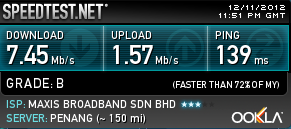
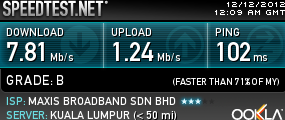
not abt money, i have a few unuse modems around , moreover if one of my modem failed, i will inform you guys to stop........btw, my e1762 have the best result, from RSSI -95dBm , set to -200 ( default is 80 ) gives me RSSI of -65dBm , speed 4Mbps ( 7.2Mbps modem) , shaved off -35dBm , without Antenna...........

Fiber Like

Attached Image

This post has been edited by digilife: Jan 6 2013, 02:08 PM

5 Pages < 1 2 3 4 5 >Top
 

Change to:
| Lo-Fi Version
0.0234sec    0.58    7 queries    GZIP Disabled
Time is now: 10th December 2025 - 12:56 AM