Welcome Guest ( Log In | Register )

Outline · [ Standard ] · Linear+

 Pantech VEGA R3 (IM-A850) Official Thread Ⅴ①, 1.5GHz QuadCore S4 Pro,2GB Ram,13MP,5.3"

views
     
DynamicG
post Dec 11 2012, 11:06 AM

On my way
****
Senior Member
597 posts

Joined: Jun 2011

QUOTE(Angeline @ Dec 11 2012, 09:36 AM)
I just get my r3 yesterday from DynamicG.

why i don't hv sketchpad and dictionary apps?

and my text action apps cannot open

my motion recognition also not so responsive
sometimes can, sometimes cannot

does anyone face this problem?
*
the motion recognition is function from the front camera, you have to wave your hand at the front camera at a bright place condition


Added on December 11, 2012, 11:09 amuser posted image

system reboot

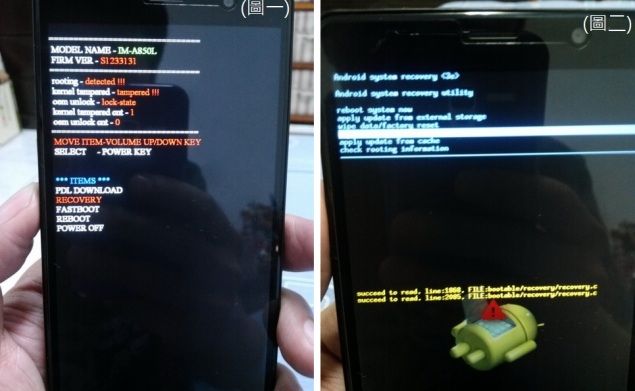
1.shutdown the phone,sametime press the volume updown button and power button, enter factory BOOT LOADER (圖一)
2.enterselect RECOVERY (圖二)after press power button,see the android icon felt on the floor(sametime press the volume updown button and power button)
3.select wipe cache partition ,press power button to excute
4.select wipe data/factory reset, press power button to excute
5.select delete all user data press power button to excute
6.select delete user data (except preloaded app data) press power button to excute
7.select delete all user data & cpoy preloaded app data press power button to excute
8. reboot system now

source from: http://www.mobile01.com/topicdetail.php?f=586&t=3039050&p=1

Hope this can solve your problem

This post has been edited by DynamicG: Dec 11 2012, 11:09 AM
DynamicG
post Dec 11 2012, 01:40 PM

On my way
****
Senior Member
597 posts

Joined: Jun 2011

QUOTE(Angeline @ Dec 11 2012, 01:00 PM)
how to shutdown?
*
press power button to shutdown, you just perform the step 1-5, the link sent to you
DynamicG
post Dec 11 2012, 02:20 PM

On my way
****
Senior Member
597 posts

Joined: Jun 2011

QUOTE(Angeline @ Dec 11 2012, 02:16 PM)
i cannot find vega station
where is it?
*
just follow this link: http://www.mobile01.com/topicdetail.php?f=586&t=3039050&p=1

if you cant read chinese, you hv to translate to english, right click your mouse, you will find the translation.(using google chrome)
DynamicG
post Dec 11 2012, 10:31 PM

On my way
****
Senior Member
597 posts

Joined: Jun 2011

self update using the website given http://dmfile.isky.co.kr/NewSelfUpgrade/index.html? must use internet explorer. do you follow the step in the forum link i give you,
just follow this link: http://www.mobile01.com/topicdetail.php?f=586&t=3039050&p=1


Added on December 11, 2012, 10:33 pm
QUOTE(Angeline @ Dec 11 2012, 05:38 PM)
why cannot self update using the website given http://dmfile.isky.co.kr/NewSelfUpgrade/index.html?

i cannot click the blue button

when i plug the usb cable into my laptop, the driver cannot be install
why?
*
make sure you follow all the setting in step 4 and step 5, to get the blue button


Added on December 11, 2012, 10:34 pmyou also need to instal the vega usb software at step one

This post has been edited by DynamicG: Dec 11 2012, 10:34 PM
DynamicG
post May 29 2013, 09:09 AM

On my way
****
Senior Member
597 posts

Joined: Jun 2011

Hi Mr Binary,

How to extract the binx file? can you sent me the tutorial,thanks


QUOTE(TheMrBinary @ Feb 7 2013, 10:42 PM)
alright problem solved ! Just found the tutorial how to convert the BINX file to flashable ZIP ... just ignore the step to ZIP ... after extract the BINX file just take the recovery.img then use fastboot to flash it biggrin.gif

Thanks dude biggrin.gif
*


Change to:
| Lo-Fi Version
0.0288sec    0.66    7 queries    GZIP Disabled
Time is now: 18th December 2025 - 03:25 AM