Welcome Guest ( Log In | Register )

Outline · [ Standard ] · Linear+

 Showing How To Verify 3G DC-HSPA+ Network, bigdeal, Maxis, Umobile, ZTE, Huawei

views
     
TScoolstore
post Sep 20 2012, 09:21 PM, updated 14y ago

Regular
******
Senior Member
1,524 posts

Joined: Apr 2008
Preface: as earlier promised to some members showing how to check your area got DC-HSPA+ network (telco's say is true or not) or whether your modem is getting at DC-HSPA+ mode now or not, here this thread for you. Also to cater repeated PM question of what DC network is about, what's the big deal of having dual carrier network... so 1 thread for everyone. Very simple info here, no theory, every one can work on it by yourself after reading.

Disclaimer: not act as guru here, just sharing a bit what i know. just 1 simple way among others.


Objective:
=======
1) Help understand DC-HSPA+ network simple what-about
2) HOW TO VERIFY DC-HSPA+ network exist at your area by yourself
3) What big deal of having DC-HSPA+ or not having.


so topics will be presented as below:
==========================

post #2: What DC-HSPA+ is about from end user point of view?
post #3: How can you VERIFY existance of DC-HSPA+ by youself without listening/relying on other info.
post #4: What bid deal of DC-HSPA+? obvious performance gap seen immediately.
post #5: Inteprete your 3G network at your own site - QOS.
post #6: Appendix - line quality (fluctuating signal), LTE
post #7: Extra info: war driving? no, it is site surveying!

This post has been edited by coolstore: Sep 20 2012, 09:27 PM
TScoolstore
post Sep 20 2012, 09:22 PM

Regular
******
Senior Member
1,524 posts

Joined: Apr 2008
post #2: What DC-HSPA+ is about from end user point of view?

For end user like us the most simple understanding way:
~~~~~~~~~~~~~~~~~~~~~~~~~~~~~~~~~~~~~

DC-HSPA+ network is offering DUAL CHANNEL (dual carrier) 3g connection concurrently to u.

Meaning u are getting DOUBLING SPEED by using a DC-HSPA+ 42mbps class modem if DC-HSPA+ network present in your area. If using non DC-HSPA+ modem, then no enjoying doubling speed.

On the other hand, under HSPA+/HSDPA/HSUPA network you are only getting SINGLE CHANNEL (single carrier) 3g connection here. Regardless using whatever class of 3g modem (DC-HSPA+ 42Mbps or non DC modem 28Mbps and below), u still can't get doubling speed.

quite similarly to computer RAM performance: SDRAM vs DDR-SDRAM

DC-HSPA+ is the top 3G network standard now.


local 3G telcos that offering DC-HSPA+ network now are:
~~~~~~~~~~~~~~~~~~~~~~~~~~~~~~~~~~~~~
1) u-mobile (first one)
2) maxis (now got)

celcom was quoted would upgrade to HSPA+ first, then further move into to DC-HSPA+.

digi.... unknown...

This post has been edited by coolstore: Sep 20 2012, 09:29 PM
TScoolstore
post Sep 20 2012, 09:22 PM

Regular
******
Senior Member
1,524 posts

Joined: Apr 2008
post #3: How can you VERIFY existance of DC-HSPA+ by youself without listening/relying on other info.


ok, now we know how significance DC-HSPA+ network on performance impact.

But how do we know if it really exist?

Normally, we rely on these way:
1) Check telco website to see the coverage area. (true or not?)
2) Guessing:
a) some users guess it based on speedtest result: over 10Mbps got DC-HSPA+ network, under 10Mbps no DC (but this has been proven wrong concept, next post you will see this).
b) use MDMA to check qos link speed, and guess.
c) listen to what other people say, may being misleded.

The only 100% confirmation way is to VERIFY IT YOURSELF.
Yes, NOW YOU CAN DO THIS ALONE as long as you got a QUALCOMM chipset DC-HSPA+ 42mbps modem in hand! (nowadays most advanced modem are using Qualcomm chipset)


Your tools checklist:
==============
1) computer with Windows 7 or Windows XP.
2) a DC-HSPA+ 42mbps QUALCOMM chipset usb modem (don't be so silly to use non DC-HSPA modem (28mbps or below) to diagnose).
3) 3G telco simcard
4) install software provided by Qualcomm: QPST and QXDM

* note: i'm not showing the link to download (not allowable here), u just google it and already can find it.


My testing tools:
===========
1) Windows XP SP3
2) [DC-HSPA+ modem] ZTE MF680 & Huawei E372; [HSPA+ Non DC modem] Huawei UMG1831 & E367 (for fool proof test)
3) Umobile prepaid 40 monthly plan, Maxis prepaid 42mbps hotlink plan.
4) QPST version: 2.7.366; QXDM version 3.12.714

Let's begin!


Steps:
====
1) Install QPST first. Next install QXDM.

2) Plug in your DC-HSPA+ modem now. (DO NOT DIAL UP NOW, JUST PLUG IN BEING DETECTED)

3) Go to control panel to bring up the device manager. (u should know how)

View the Ports break-down, to ascertain the modem diagnostic port number.
Attached Image

for ZTE, should pick 'ZTE diagnostic Interface (COM xx).
for Huawei, can choose 'Huawei Mobile Connect - 3G application interface (COM xx)'.

whereby the COM xx indicates the port number to be used in the test later.


4) Next, start using QPST program.

From start menu, QPST > QPST configuration.

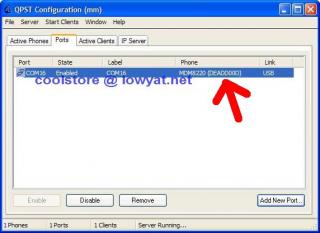
Click the 'Ports' tab, click 'Add New Port'.
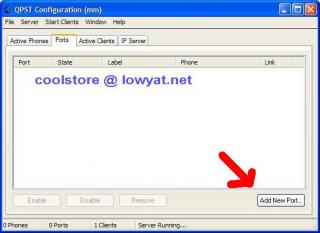
Attached Image

If u don't see the needed port number being shown, uncheck the 'show serial and usb/qc diagnostic port only'.
Select the correct port number. In my case COM 16. Done. It is in use now.
Minimise QPST program to system bar, DON'T CLOSE/EXIT THIS PROGRAM.
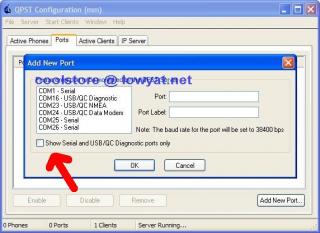
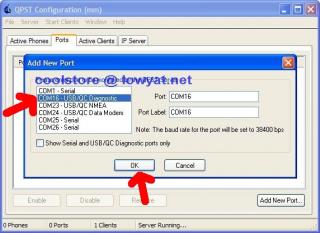
Attached Image
Attached Image
Attached Image


5) Now, start up QXDM program. This is the main diagnostic program with great UI info.

From start menu, QXDM professional > QXDM professional.
Attached Image

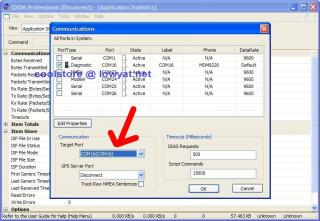
Select Options > Commnunications. Next, move to 'Target Ports' and select the port number that just being entered into the QPST earlier. Click OK.
Attached Image
Attached Image

Back to main page, u would see the communication port has been established successfully with some statistic data shown.
Attached Image


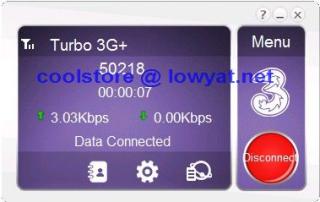
6) Then you can dial up your modem to the 3G network by using any dialup manager u want. Connect to 3G network now!
DO NOT USE VPN, stop them before dialup, need a clean connection!
Attached Image


7) Back to QXDM after connecting to 3G network.

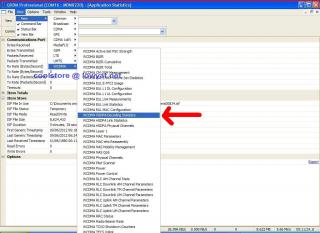
Select: View > New > WCDMA > WCDMA HSDPA Decoding Statistic:
Attached Image
Attached Image

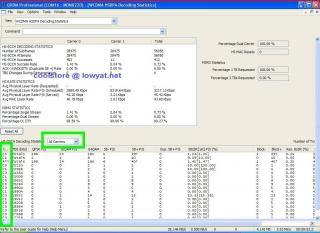
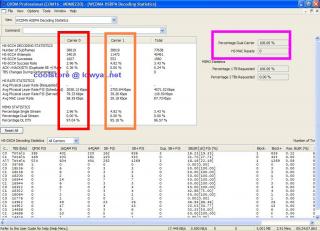
Now can you see the window there showing Carrier 0 and Carrier 1, this is what called dual carrier (dual channel), we will look into this to verify got dual carrier in operation or not.

Now load a webpage/youtube with lots and continuously data, so we can see the real time actual data flow.

See the both Carrier 0 and Carrier 1 running data? and also bottom window showing data come from both carrier line, this means the network is DC-HSPA+ ! YEAH!

At right hand side, you would notice 'Percentage Dual Carrier: 100%'.
Attached Image

take note: Huawei E372 didn't show up data at this testing option, don't know why. Luckily we have a 2nd method to double verify DC-HSPA+ network.


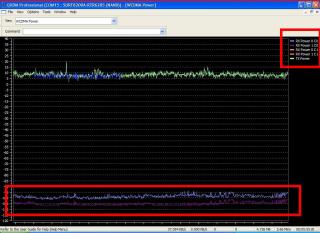
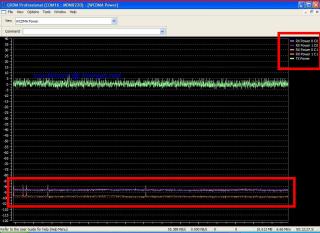
8) Double confirmation: View > New > WCDMA > WCDMA Power.

This option is actually showing the real time 3G signal level (real time monitoring, fluctuating signal level can be seen).
Attached Image

Ok, load a webpage/youtube with lots and continuously data again.

For dual carrier operation, you would notice 4 color horizontal lines at bottom (2 pairs). Carrier 0 (first channel) with blue and purple lines. Carrier 1 (2nd channel) with cyan and orange color lines.

BINGO! THIS IS DUAL CARRIER NETWORK! YEAH!!! (this is UMOBILE being tested)

The green line at top is the transmission power of modem to the base station - modem do communicate back, it not just receive signal.

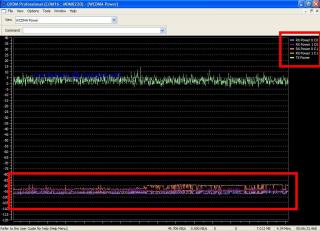
OK, now i turn to MAXIS HOTLINK 42mbps prepaid plan to verify is that really what they claim DC-HSPA+ network?
Attached Image
Attached Image

Yes, it also DC network here !!!


~~~~~~~~~~~~~~~~~~~~~~~~~~~~~~~~~~~~~~~~~~~~~~~~~~~~~~~~~~~~~~~~~~

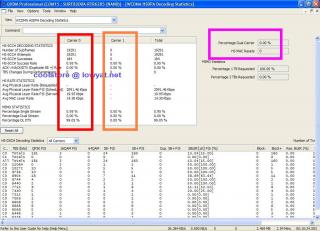
OK, after confirming Umobile and Maxis running at DC-HSPA+ here, now doing a fool proof test by using non DC-HSPA+ 42Mbps modem to see how. Any 28Mbps or below modem are not DC capable, so any model can test. Took Huawei UMG1831 21Mbps as testing tool.

Non DC modem used on umobile:
Attached Image
Attached Image


Non DC modem used on Maxis:
Attached Image
Attached Image


See no dual carrier operation available, this modem run at single channel only.

Double confirm, no dual carrier capability.


Sub-conclusion:
===========

This are the simple steps u can do it alone to verify got DC or no DC network at your place, simple, fast, low cost just need a DC-HSPA+ modem. Way better than u guess or ask ppl around.

This post has been edited by coolstore: Sep 20 2012, 09:59 PM

TScoolstore
post Sep 20 2012, 09:23 PM

Regular
******
Senior Member
1,524 posts

Joined: Apr 2008
post #4: What bid deal of DC-HSPA+? obvious performance gap seen immediately.

OK, after confirming both Umobile and Maxis at my place are DC network.
Now to see the big deal of DC-HSPA+ network with DC modem and non DC modem.

last time:
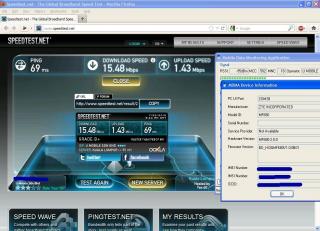
simcard: Umobile, modem: DC-HSPA+ 42mbps ZTE MF680
speedtest: (download) 15.48Mbps (upload) 1.43Mbps
Attached Image

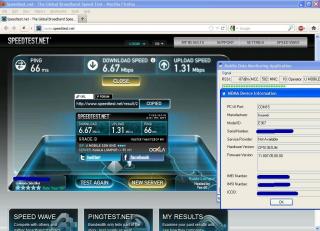
simcard: Umobile, modem: non DC 28Mbps Huawei E367
speedtest: (download) 6.67Mbps (upload) 1.31Mbps
Attached Image

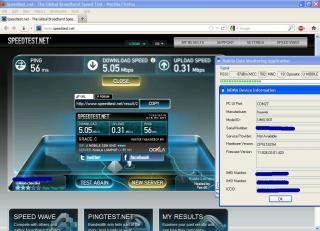
simcard: Umobile, modem: non DC 21Mbps Huawei UMG1831
speedtest: (download) 5.05Mbps (upload) 0.31Mbps
Attached Image


lately:
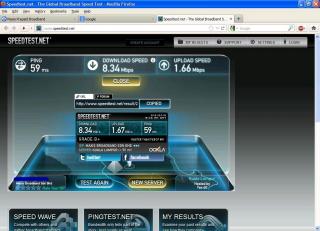
simcard: Maxis, modem: DC-HSPA+ 42mbps ZTE MF680
speedtest: (download) 8.34Mbps (upload) 1.66Mbps
Attached Image

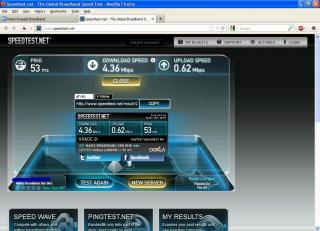
simcard: Umobile, modem: non DC 21Mbps Huawei UMG1831
speedtest: (download) 4.36Mbps (upload) 0.62Mbps
Attached Image


so now u should have understand what big deal of DC-HSPA+ network to us = almost double up the speed by using DC-hspa+ modem.


common misunderstanding heard:
========================
Example 1: I saw others get around 20Mbps only by speedtest, so i guess using 21mbps modem enough here ...
the truth is (that he didn't mention):

a) If that user is using DC-HSPA+ modem under DC+HSPA+ network and showing 20Mbps, means he is actually getting 10Mbps + 10Mbps dual channel. If you use a 21Mbps non DC modem there, u only get around 10Mbps, surprised?

b) If that user is using HSPA+ only modem under DC-HSPA+ network and showing 20Mbps, means he didn't use up the full potential yet. By upgrading to a DC-HSPA+ modem, he will be enjoying 20Mbps + 20Mbps almost full speed already.

c) If that user is using DC-HSPA+ modem under HSPA+ only network and showing 20Mbps, it means the modem is getting single channel now but very good 20Mbps indeed for him. If the telco upgrade the network to DC-HSPA+ one day, then doubling speed forseeable.

* so the point is that we need to collect more info before come up with a conclusion, don't simply guess/influenced.


Example 2: under 10Mbps no DC, over 10Mbps got DC.
the truth: It is not, (see maxis above?) speed wise depends on network performance. We have seen DC of 2Mbps + 2Mbps too.


sub-conclusion:
===========
1) Under DC-HSPA+ network, using a DC-HSPA+ modem (42mbps class) will enjoy full dual channel speed.
2) Under DC-HSPA+ network, using a Non DC-HSPA+ modem (28mbps class or below) only get 1 channel speed. simply too wasting.

i think write till here the main questions already answered.

This post has been edited by coolstore: Sep 23 2012, 09:03 PM
TScoolstore
post Sep 20 2012, 09:23 PM

Regular
******
Senior Member
1,524 posts

Joined: Apr 2008
post #5: Inteprete your 3G network at your own site - QOS.

The questions like 'do our telcos really provide us 42mbps?' , 'what's the max speed we can get here', for this can check newtork QoS value for reference purpose.

Majority users have known to use MDMA to view the network QOS - downlink & uplink, no need to say more, lots of guru out there. But main problem is modem other Huawei hard to get that info, including ZTE, Sierra etc.

ZTE modem no showing either in Umobile or Maxis in my place:
Attached Image
Attached Image

Huawei modem shows this at my place:
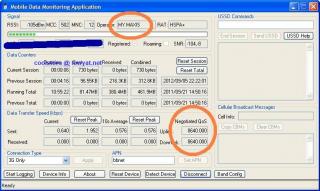
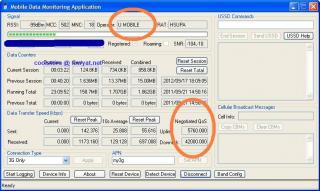
Umobile: Downlink: 42000; Uplink: 5760
Attached Image

Maxis: Downlink: 8640; Uplink: 8640.
Attached Image

OK, do u notice my Maxis Downlink just only 8640? BUT IT GOT DUAL CARRIER CONNECTION IN FACT WITH DOUBLING SPEED! (4Mbps+4Mbps testing result). That's y go verify yourself, rather than believing only certain QOS got DC connection. This is the objective.


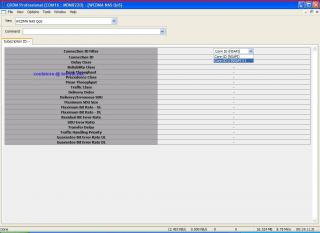
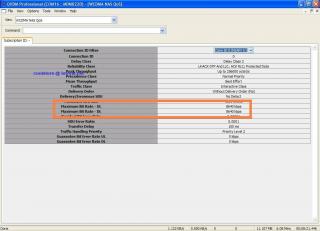
Besides of MDMA, QXDM also allow us to view the qos value, and much details info. And ZTE,Sierra modem also can view it!

View>New>WCDMA>WCDMA NAS QoS
At Connection ID Filter, click to bring down the drop down list and select the device.
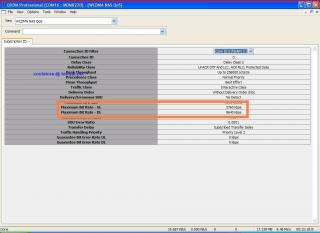
'Maximum Bit Rate - UL' = uplink
'Maximum Bit Rate - DL' = downlink

Attached Image

umobile: QXDM qos
Attached Image

maxis: QXDM qos
Attached Image

* Somehow the MDMA QoS downlink value of umobile is contradict with QXDM downlink value. Wonder if this QXDM version not up to date. Might need to find newer version again later.


Sub-conclusion:
===========
So what level of speed we can get is network dependant. And also depends on these factors:
1) device capability (modem)
2) location (indoor, outdoor, blocking...all that)
3) distance from base station
4) number of simultaneous users.

* If you got a pack of the latest Maxis Hotlink 42Mbps prepaid simpack, these factors are listed 'nicely' at right bottom part. You may call it 'escape terms', but telco mentioned 'UP TO 42Mbps', not 'AT 42Mbps'.
But with DC network availability and DC modem capability, at least u can get doubling speed, this is the point!

This post has been edited by coolstore: Sep 21 2012, 10:23 AM
TScoolstore
post Sep 20 2012, 09:24 PM

Regular
******
Senior Member
1,524 posts

Joined: Apr 2008
post #6: Appendix - line quality (fluctuating signal), LTE
TScoolstore
post Sep 20 2012, 09:24 PM

Regular
******
Senior Member
1,524 posts

Joined: Apr 2008
post #7: Extra info: war driving? no, it is site surveying!


Added on September 20, 2012, 9:25 pmreserved

This post has been edited by coolstore: Sep 20 2012, 09:25 PM
TScoolstore
post Sep 20 2012, 09:25 PM

Regular
******
Senior Member
1,524 posts

Joined: Apr 2008
reserved...
ddr3
post Sep 20 2012, 09:38 PM

HEDGIE :3
******
Senior Member
1,459 posts

Joined: Oct 2009
From: BOLEHLAND


got any pictures bro, thanks in advanced biggrin.gif
blacktubi
post Sep 20 2012, 09:45 PM

-
Group Icon
Elite
8,418 posts

Joined: Jul 2008

Some guide for people who don't wanna mess with tweaks and config or MAC users
Easiest way to determine = Fire Up MDMA, IF QoS 42000 = 100% DC-HSPA+

ALTERNATIVELY
Maxis Broadband http://58.71.131.131/mimsgoogle/gmapform.aspx
U Mobile http://www.u.com.my/broadband/coverage-locations

This post has been edited by blacktubi: Sep 20 2012, 09:46 PM
TScoolstore
post Sep 20 2012, 10:18 PM

Regular
******
Senior Member
1,524 posts

Joined: Apr 2008
QUOTE(ddr3 @ Sep 20 2012, 09:38 PM)
got any pictures bro, thanks in advanced biggrin.gif
*
added. other info later time/day lah, tired.

at least did fulfill my word to describe a bit.

easy to use, but hard to master the software full features.
ddr3
post Sep 20 2012, 10:27 PM

HEDGIE :3
******
Senior Member
1,459 posts

Joined: Oct 2009
From: BOLEHLAND


QUOTE(coolstore @ Sep 20 2012, 10:18 PM)
added. other info later time/day lah, tired.

at least did fulfill my word to describe a bit.

easy to use, but hard to master the software full features.
*
yea, thanks bro notworthy.gif gonna try when i realli free then LOL laugh.gif
lwk523
post Sep 20 2012, 11:35 PM

Premium Q Trader
******
Senior Member
1,040 posts

Joined: Mar 2006


QUOTE(coolstore @ Sep 20 2012, 10:18 PM)
added. other info later time/day lah, tired.

at least did fulfill my word to describe a bit.

easy to use, but hard to master the software full features.
*
Wow, you really did a good job .. impressive notworthy.gif . Anyway, thanks for ur info


chuahcs79
post Sep 21 2012, 12:35 AM

Look at all my stars!!
Group Icon
Elite
6,931 posts

Joined: Apr 2011
From: Bolehland for sure ^_^


very amazing detail thread,..

for ZTE MF680 wise, very easy to know whether u on DC-HSPA+ network,

it need purple LED

most easy way to recognize notworthy.gif

This post has been edited by chuahcs79: Sep 21 2012, 12:43 AM
TScoolstore
post Sep 21 2012, 11:06 AM

Regular
******
Senior Member
1,524 posts

Joined: Apr 2008
since promise is promise, so got to do this thread. hope now they are reading and figure out how actually by themselves. Also easy for me, next time any question i redirect to here, pm explanation is too tiring and not comprehensive.
ddr3
post Sep 21 2012, 11:21 AM

HEDGIE :3
******
Senior Member
1,459 posts

Joined: Oct 2009
From: BOLEHLAND


QUOTE(coolstore @ Sep 21 2012, 11:06 AM)
since promise is promise, so got to do this thread. hope now they are reading and figure out how actually by themselves. Also easy for me, next time any question i redirect to here, pm explanation is too tiring and not comprehensive.
*
a promise to???? hmm.gif customers?
chuahcs79
post Sep 21 2012, 04:04 PM

Look at all my stars!!
Group Icon
Elite
6,931 posts

Joined: Apr 2011
From: Bolehland for sure ^_^


just try all the step above,

strongly not suggested for newbie as if both of the software a bit complicated and can tweak many part,..

did see dual carrier speed transmit just now, that's why my ZTE MF680 is on purple led,

also, IP address is important too, some IP is originally slower than others

This post has been edited by chuahcs79: Sep 21 2012, 04:05 PM
ddr3
post Sep 21 2012, 04:21 PM

HEDGIE :3
******
Senior Member
1,459 posts

Joined: Oct 2009
From: BOLEHLAND


QUOTE(chuahcs79 @ Sep 21 2012, 04:04 PM)
just try all the step above,

strongly not suggested for newbie as if both of the software a bit complicated and can tweak many part,..

did see dual carrier speed transmit just now, that's why my ZTE MF680 is on purple led,

also, IP address is important too, some IP is originally slower than others
*
sifu tried ald ah? rclxms.gif flashed the latest firmware? icon_question.gif
TScoolstore
post Sep 21 2012, 09:39 PM

Regular
******
Senior Member
1,524 posts

Joined: Apr 2008
QUOTE(ddr3 @ Sep 21 2012, 11:21 AM)
a promise to????  hmm.gif customers?
*
yup some did ask.

and present this way help everyone to understand with pictures, no pm back and forward.


Added on September 21, 2012, 9:47 pm
QUOTE(chuahcs79 @ Sep 21 2012, 04:04 PM)
just try all the step above,

strongly not suggested for newbie as if both of the software a bit complicated and can tweak many part,..

did see dual carrier speed transmit just now, that's why my ZTE MF680 is on purple led,

also, IP address is important too, some IP is originally slower than others
*
this is Qualcomm pro diagnostic software, i think actually more used on phone network diagnosting.

without entering own command line (programming) won't change any.

for viewing only free to click any part to view the info. now this already becoming common software in end user computer.

This post has been edited by coolstore: Sep 21 2012, 09:47 PM
ahbi1982
post Sep 23 2012, 04:17 PM

New Member
*
Junior Member
22 posts

Joined: Jan 2011
bro,
after i try View>New>WCDMA>WCDMA NAS QoS
At Connection ID Filter, after click it, it only shows "conn id (nasapi)" and nothing more.
After restart all the process, still the same.

Anything step am i doing wrong? using zte mf680.
TScoolstore
post Sep 23 2012, 08:59 PM

Regular
******
Senior Member
1,524 posts

Joined: Apr 2008
QUOTE(ahbi1982 @ Sep 23 2012, 04:17 PM)
bro,
after i try View>New>WCDMA>WCDMA NAS QoS
At Connection ID Filter, after click it, it only shows "conn id (nasapi)" and nothing more.
After restart all the process, still the same.

Anything step am i doing wrong? using zte mf680.
*
probably u have dial up to the internet too early, that'y qxdm not able to recognise.

only dial up to internet AFTER U succesfully establish the target port in qxdm, no hurry. see details in step 5 and 6.
ahbi1982
post Sep 24 2012, 12:27 PM

New Member
*
Junior Member
22 posts

Joined: Jan 2011
QUOTE(coolstore @ Sep 23 2012, 08:59 PM)
probably u have dial up to the internet too early, that'y qxdm not able to recognise.

only dial up to internet AFTER U succesfully establish the target port in qxdm, no hurry. see details in step 5 and 6.
*
okay, thanks bro..
i found that i forget to connect my network before checking with the QOS..
rootlinux
post Sep 24 2012, 03:02 PM

Enthusiast
*****
Senior Member
898 posts

Joined: Jan 2003
From: ph/sbj/slgr
Geng ah... notworthy.gif notworthy.gif notworthy.gif notworthy.gif notworthy.gif thumbup.gif thumbup.gif thumbup.gif thumbup.gif thumbup.gif

LcBoy135z
post Sep 27 2012, 08:58 PM

Getting Started
**
Junior Member
224 posts

Joined: Mar 2009


stuck at step 5

got this blank

modem e372

Attached Image
chuahcs79
post Sep 27 2012, 09:47 PM

Look at all my stars!!
Group Icon
Elite
6,931 posts

Joined: Apr 2011
From: Bolehland for sure ^_^


QUOTE(LcBoy135z @ Sep 27 2012, 08:58 PM)
stuck at step 5

got this blank

modem e372

Attached Image
*
u miss a step,

go option -> communication -> select the Port of your huawei modem

so it can detect the port notworthy.gif
LcBoy135z
post Sep 27 2012, 10:09 PM

Getting Started
**
Junior Member
224 posts

Joined: Mar 2009


QUOTE(chuahcs79 @ Sep 27 2012, 09:47 PM)
u miss a step,

go option -> communication -> select the Port of your huawei modem

so it can detect the port  notworthy.gif
*
then i got this la...

cannot connect to internet after choose the target port..

Attached Image
aliendarknez
post Sep 27 2012, 10:23 PM

Bus Driver :P
******
Senior Member
1,645 posts

Joined: Apr 2005
From: Puchong

I assume this method cannot use for mifi such as e587?
chuahcs79
post Sep 27 2012, 11:47 PM

Look at all my stars!!
Group Icon
Elite
6,931 posts

Joined: Apr 2011
From: Bolehland for sure ^_^


QUOTE(LcBoy135z @ Sep 27 2012, 10:09 PM)
then i got this la...

cannot connect to internet after choose the target port..

Attached Image
*
run MDMA first

then run QPST

then do QXDM

then baru connect MDMA notworthy.gif
LcBoy135z
post Sep 28 2012, 02:42 AM

Getting Started
**
Junior Member
224 posts

Joined: Mar 2009


QUOTE(chuahcs79 @ Sep 27 2012, 11:47 PM)
run MDMA first

then run QPST

then do QXDM

then baru connect MDMA  notworthy.gif
*
cannot tongue.gif

same error... hmm.gif
chuahcs79
post Sep 28 2012, 03:01 AM

Look at all my stars!!
Group Icon
Elite
6,931 posts

Joined: Apr 2011
From: Bolehland for sure ^_^


QUOTE(LcBoy135z @ Sep 28 2012, 02:42 AM)
cannot  tongue.gif

same error... hmm.gif
*
wether i run QPST, QXDM before or after i run dashboard/MDMA, both also working fine though hmm.gif
have u try your modem dashboard software instead of MDMA ?


This post has been edited by chuahcs79: Sep 28 2012, 03:02 AM
sotong168
post Sep 28 2012, 09:56 AM

in retiring mode
*******
Senior Member
5,291 posts

Joined: Dec 2004
From: I Luv Msia
i think the QXDM QoS is inaccurate coz my actual downtime spd is much higher than the display 8640kbps hmm.gif
LcBoy135z
post Sep 28 2012, 11:03 AM

Getting Started
**
Junior Member
224 posts

Joined: Mar 2009


QUOTE(chuahcs79 @ Sep 28 2012, 03:01 AM)
wether i run QPST, QXDM before or after i run dashboard/MDMA, both also working fine though   hmm.gif
have u try your modem dashboard software instead of MDMA ?
*
modem use E372

as the instruction at the front page, need to open QPST first..then choose port..then open qxdm then connect internet using dashboard mobile partnet/mdma right?

so i try booth mobile partner and mdma...same error..dont know where the mistake now...try reboot and do again also fail la.. doh.gif sweat.gif

This post has been edited by LcBoy135z: Sep 28 2012, 11:03 AM
TScoolstore
post Sep 28 2012, 01:42 PM

Regular
******
Senior Member
1,524 posts

Joined: Apr 2008
you may need to select another huawei port to try out.


This post has been edited by coolstore: Oct 7 2012, 01:14 PM
TScoolstore
post Oct 7 2012, 01:18 PM

Regular
******
Senior Member
1,524 posts

Joined: Apr 2008
add on reminder:

ar, as chuah have said before and i answered before:

for general users who use these Qualcomm specific program just to view options and functions, then free to click and view around.

but if you plan to enter ur own command or tweak the default value of modem, e.g. increasing wireless transmission tx power beyond the modem default value (FCC testing approval value) (overclocking to be easy for u to understand), then:

a) be ready to face a hardware risk that surpassing risk of flashing wrong firmware ya (overclocking the tx power make it looks great at early stage with great signal level, but also speed up the wear and tear process, or may lead to sudden dead at unexpected moment if the modem hardware really cannot sustain it).

b) and confronting different RF (radio frequency) Radiation Emission level (no longer the reported approval safety level in FCC document).

it is same way when happening to overtweak wifi router/wifi adapter.

flashing firmware problem: the worst lead to 'brick' status, but still reversible bcoz no hardware failure.

hardware wireless transmission unit (tx power) malfunction: no wireless activities any more, dump to dustbin.

This post has been edited by coolstore: Oct 7 2012, 01:21 PM
Kojie
post Oct 8 2012, 01:51 PM

New Member
*
Junior Member
23 posts

Joined: May 2009


so basically if i want to test if my place got the dc-hspa+ coverage(even though on maxis website i got the coverage) i need to buy 42mbps modem+maxis 42mbps prepaid plan rm5 just 4 testing only? n i plan to upgrade to maxis unlimited plan btw
SUSaaaeye
post Oct 9 2012, 06:50 AM

Getting Started
**
Junior Member
183 posts

Joined: Aug 2009
QUOTE(Kojie @ Oct 8 2012, 01:51 PM)
so basically if i want to test if my place got the dc-hspa+ coverage(even though on maxis website i got the coverage)  i need to buy 42mbps modem+maxis 42mbps prepaid plan rm5 just 4 testing only? n i plan to upgrade to maxis unlimited plan btw
*
Yup..

by having 42mbps ( dc-hspa+ ) modem, then u can check if ur place cover dc-hspa+ or not and also to check if ur modem dc enable..
miezaidin
post Oct 10 2012, 12:28 AM

Getting Started
**
Junior Member
119 posts

Joined: Nov 2008


anyone here can borrow E372.......perak area....tapah or kampar.....i wanna check of my area is DC-hsdpa.......
hairul
post Oct 12 2012, 12:34 PM

** Learn From The Mistake **
*****
Senior Member
944 posts

Joined: Jan 2003
From: SHAH ALAM


Just want to double confirm, Its U-Mobile using Maxis Tower?
Because in maxis website, didnt stated location of the tower, only u-mobile website show the tower location. I need to point the antena to nearest Maxis tower.
TScoolstore
post Oct 27 2012, 10:43 PM

Regular
******
Senior Member
1,524 posts

Joined: Apr 2008
QUOTE(Kojie @ Oct 8 2012, 01:51 PM)
so basically if i want to test if my place got the dc-hspa+ coverage(even though on maxis website i got the coverage)  i need to buy 42mbps modem+maxis 42mbps prepaid plan rm5 just 4 testing only? n i plan to upgrade to maxis unlimited plan btw
*
yes, just RM5 simpack only.

as receiving feedback from some members that Maxis map is actually 'not accurate', some place actually don't have DC-HSPA+ yet but showing got.


Added on October 27, 2012, 10:45 pm
QUOTE(hairul @ Oct 12 2012, 12:34 PM)
Just want to double confirm, Its U-Mobile using Maxis Tower?
Because in maxis website, didnt stated location of the tower, only u-mobile website show the tower location. I need to point the antena to nearest Maxis tower.
*
they don't share 3g tower facities, roaming now available on both 3g network instead.

maybe when it come to LTE, they may start to share tower.

This post has been edited by coolstore: Oct 27 2012, 10:45 PM
Boy96
post Oct 27 2012, 11:35 PM

That's a tripod.
*******
Senior Member
3,848 posts

Joined: Dec 2009
From: Ampang


All maxis simcard can get DC-HSDPA?

So If I cut maxis simcard and put it in 3rd/4th gen iPad or an iPhone 5, I can get DC-HSPA service?
blacktubi
post Oct 27 2012, 11:45 PM

-
Group Icon
Elite
8,418 posts

Joined: Jul 2008

QUOTE(Boy96 @ Oct 27 2012, 11:35 PM)
All maxis simcard can get DC-HSDPA?

So If I cut maxis simcard and put it in 3rd/4th gen iPad or an iPhone 5, I can get DC-HSPA service?
*
Every Maxis sim card can get DC-HSPA+

But 42000 QoS is unknown
Boy96
post Oct 27 2012, 11:50 PM

That's a tripod.
*******
Senior Member
3,848 posts

Joined: Dec 2009
From: Ampang


QUOTE(blacktubi @ Oct 27 2012, 11:45 PM)
Every Maxis sim card can get DC-HSPA+

But 42000 QoS is unknown
*
Any other phones able to support DC-HSPA+ besides iPhone 5?
blacktubi
post Oct 28 2012, 01:45 AM

-
Group Icon
Elite
8,418 posts

Joined: Jul 2008

QUOTE(Boy96 @ Oct 27 2012, 11:50 PM)
Any other phones able to support DC-HSPA+ besides iPhone 5?
*
Galaxy S III LTE

http://www.gsmarena.com/samsung_i9305_galaxy_s_iii-5001.php

If I am not wrong, it is running same chip as iPhone 5
Boy96
post Oct 28 2012, 01:55 AM

That's a tripod.
*******
Senior Member
3,848 posts

Joined: Dec 2009
From: Ampang


QUOTE(blacktubi @ Oct 28 2012, 01:45 AM)
Galaxy S III LTE

http://www.gsmarena.com/samsung_i9305_galaxy_s_iii-5001.php

If I am not wrong, it is running same chip as iPhone 5
*
Malaysia wont get this...
DigitalKL
post Dec 17 2012, 04:33 PM

Regular
******
Senior Member
1,360 posts

Joined: Jan 2003


guys any idea why my iphone 5 cannot make use of HSPA+ or DC-HSDPA
In SpeedTest Im only getting around 3-4Mbps. Using U-Mobile

I thought can achieve higher than 10Mbps?
sayid1983
post Dec 21 2012, 09:04 PM

New Member
*
Newbie
0 posts

Joined: Nov 2012
ill come back later...
z720
post Jan 2 2013, 01:08 PM

New Member
*
Newbie
7 posts

Joined: May 2012
sharing tower location, but only more info @ KL & Maxis

http://www.cellmapper.net/map.php?MCC=502&MNC=12
wkkm007
post Jun 18 2013, 11:07 AM

Look at all my stars!!
*******
Senior Member
3,123 posts

Joined: Sep 2008
From: OUG - Muhibbah LRT


How to know my Xperia SP are running on DC or single?
IMfae_
post Jun 24 2013, 03:18 AM

Enthusiast
*****
Senior Member
887 posts

Joined: Feb 2013
From: Johor Bahru


QUOTE(Boy96 @ Oct 27 2012, 11:50 PM)
Any other phones able to support DC-HSPA+ besides iPhone 5?
*
What about nexus 4?
DemonKnight
post May 16 2014, 08:06 AM

Getting Started
**
Junior Member
238 posts

Joined: Jun 2008
thanks for ur info

keebl
post Jun 29 2014, 12:28 AM

Casual
***
Junior Member
425 posts

Joined: Oct 2013
did celcom suppoty dc network??
chuahcs79
post Jun 29 2014, 12:32 AM

Look at all my stars!!
Group Icon
Elite
6,931 posts

Joined: Apr 2011
From: Bolehland for sure ^_^


QUOTE(keebl @ Jun 29 2014, 12:28 AM)
did celcom suppoty dc network??
*
yes celcom does in most area,.


keebl
post Jul 1 2014, 07:48 AM

Casual
***
Junior Member
425 posts

Joined: Oct 2013
QUOTE(chuahcs79 @ Jun 29 2014, 12:32 AM)
yes celcom does in most area,.
*
bro where can we seeking for the maps that celcom support in dc since i have a sierra 753s which is dc hspda+ modem but in teluk intan it seem same also i using a e355 huawei 21.6mbps modem download speedtest is 3-6mbps but when using the sierra 753s still same is that mean my place dun support the dc network o my sim card problem using celcom friendz


Change to:
| Lo-Fi Version
0.4102sec    0.27    6 queries    GZIP Disabled
Time is now: 16th December 2025 - 06:52 PM