


 Sep 17 2012, 01:57 PM, updated 14y ago


1. Open SQL Server Configuration Manager
2. Expand SQL Server Network Configuration
3. Open (Double-click) on Protocols
4. If not enabled, change TCP/IP status to enabled (Right-click and select Enable). If already enabled, open TCP/IP (Double-click)
5. On TCP/IP Properties go to the IP Addresses, scroll down to IPAll. Change the value for TCP Dynamic Ports to blank, and the TCP port to the Static Port that is desired (for example 1433)
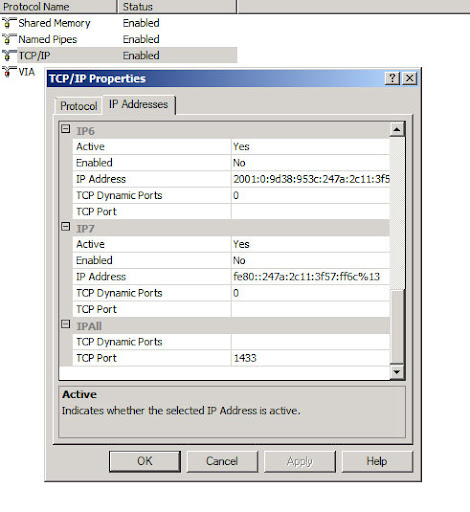
6. Click Apply to make changes, and OK to close the window.
7. Restart the SQL Server Services ( on SQL Server Configuration Manager, right click on SQL Server Services and click restart )
Note: Guide above is applicable to MS SQL Server 2008. Steps may vary depending on the version of MS SQL that you have.
Thanks to Sirius
 Quote
Quote
 0.0141sec
 0.55
0.55
 5 queries
 GZIP Disabled