Welcome Guest ( Log In | Register )

Bump Topic Topic Closed RSS Feed

Outline · [ Standard ] · Linear+

Maxis Maxis 3G/HS 3G Thread V6 (Not WBB), Don't Envy at Our Super Fast Speed! :D

views
     
taaron
post Sep 26 2012, 10:39 PM

New Member
*
Junior Member
49 posts

Joined: Jun 2007


QUOTE(noobandroid @ Sep 26 2012, 08:03 PM)
i still cant find out the max potential speed of my area yet, no money reload for huge data traffic
*
bro, i'm from KK too, will get my connection soon..which area do you live in? What's your fastest speedtest?
taaron
post Oct 26 2012, 02:59 PM

New Member
*
Junior Member
49 posts

Joined: Jun 2007


Anyone can help me buy a brand new MR3420 and flashed it with OpenWRT? I'm willing to pay any reasonable offered price to me biggrin.gif
taaron
post Oct 27 2012, 03:25 AM

New Member
*
Junior Member
49 posts

Joined: Jun 2007


Guys, if TL-WR1043ND vs TL-MR3420, which 1 performance win in terms of internet speed? Need to know so that I can place order, can't wait to buy and get it next week.
taaron
post Oct 27 2012, 12:26 PM

New Member
*
Junior Member
49 posts

Joined: Jun 2007


QUOTE(blacktubi @ Oct 27 2012, 10:01 AM)
Do nit buy 1043ND
The USB port is underpowered
*
Ok.,then i consider MR3420..which version of MR3420 should i go for? V1, V1.3 or V2?


taaron
post Oct 31 2012, 08:06 PM

New Member
*
Junior Member
49 posts

Joined: Jun 2007


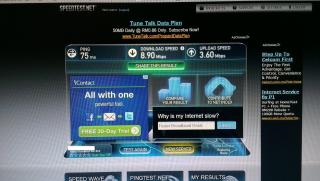
bought supercharged MF680 from blacktubi and here are my best ST results..purple LED light all the way biggrin.gif

Highest DL speed:
user posted image

Highest UL speed:
user posted image

most of the time ST download speed hovering around 7 to 8 Mbps.

Current settings:
Signal power = 26TX
No cooling.
Connected to Enhanced USB port with max 500ma.
Without external antenna.
Using "3" Connect Manager
APN = maxisbb
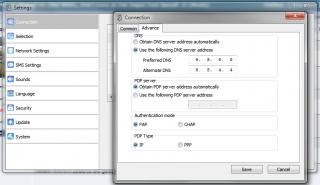
DNS = 8.8.8.8, 4.4.4.4
RSSI in MDMA = -77db

On the other hand, I also have the 3G Yagi antenna (bought from coolstore). The difference is improvement in RSSI by 5db. ST results seems like no change. I wish I have a panel antenna to try out biggrin.gif

By the way, is there anyway that I can check the QoS of the Tower and my simcard? MF680 cannot do that? I have tried checking QXDM, but no info shown under WCDMA Nas QoS cool2.gif
taaron
post Oct 31 2012, 08:29 PM

New Member
*
Junior Member
49 posts

Joined: Jun 2007


QUOTE(shamnh @ Oct 31 2012, 08:12 PM)
welcome taaron join da club, eventhough i'm still not join it. still in refunding process. lol
*
same dealer as mine?

QUOTE(wavezard @ Oct 31 2012, 08:12 PM)
where do you live?
*
KK, Sabah

QUOTE(shamnh @ Oct 31 2012, 08:16 PM)
AFAIK google dns is 8.8.8.8 and 8.8.4.4. never heard dns ip 4.4.4.4
*
i know 4.4.4.4 used to be google's dns server..maybe not now anymore..thx for informing me smile.gif
taaron
post Oct 31 2012, 08:37 PM

New Member
*
Junior Member
49 posts

Joined: Jun 2007


I need some confirmation here..I'm now very new to 3G connection as well as the apps/settings associated with it, previously spent all the time with streamyx 1mbps line laugh.gif

Are my settings below correct?

Attached Image

Attached Image
taaron
post Nov 3 2012, 03:37 AM

New Member
*
Junior Member
49 posts

Joined: Jun 2007


i've received my MR-3420 today and here's my ST (MF680 without Yagi),

user posted image

still cannot get high speed 2x Mbps to 3x Mbps..can i ask Maxis to open up or set the QoS of the base station to 42000? as u guys know, Maxis has rolled out their new data plans in which no matter which package u have applied for, the speed is 42Mbps..is this a good reason for me to tell them to change the QoS? no matter what I did as in direct USB plug in (enhanced port), use Yagi or use MR-3420, I'm still unable to get high DL speeds hmm.gif hmm.gif
taaron
post Nov 3 2012, 11:21 AM

New Member
*
Junior Member
49 posts

Joined: Jun 2007


QUOTE(chuahcs79 @ Nov 3 2012, 08:43 AM)
maxis will either not understand what you say ( with their normal CS ) or will ignore those request  hmm.gif

as QoS is also depends on which base station/ tower u are connected to,

some area QoS is max 42000/8640, and some is 8640/8640,.. and some is 16000/8640  notworthy.gif
*
might still have chances as I have the Cell IDs to tell them, maybe their normal CS staff will forward that message to their technician.

QUOTE(blacktubi @ Nov 3 2012, 10:25 AM)
Try at midnight you will get better performance bro nod.gif

And apply the TX 33 tweak
*
That's the best ST I have obtained during non-peak times (3AM in the morning). If during peak times, most also can get is 7Mpbs.

Regarding the TX33 tweak, if not mistaken the performance dropped, but that was tested (direct USB plugin) before I got the MR-3420. I'll try again later the TX33 with MR-3420.

taaron
post Nov 3 2012, 02:08 PM

New Member
*
Junior Member
49 posts

Joined: Jun 2007


i've just tried TX33 with MR3420..conclusion is i'll still stick to TX26..TX33 doesn't feel right, unstable and low speed


Added on November 3, 2012, 2:10 pm
QUOTE(hykung @ Nov 3 2012, 02:04 PM)
im newbie to maxis broadband....i want to ask about the maxis sme individual

is there any unlimited package 4 tis corporate broadband?

i found 1 agent at tis forum do offer tis special package 68/mnth, but i call maxis 123, he said there is no unlimited pakage. im confusing, anyone cn explain to me pls.

thx in advance.
*
there is no unlimited package by maxis..all plans come with Fair Usage Policy "FUP" and certain plans Maxis not yet enforced the FUP..

This post has been edited by taaron: Nov 3 2012, 02:10 PM
taaron
post Nov 5 2012, 12:27 PM

New Member
*
Junior Member
49 posts

Joined: Jun 2007


QUOTE(chuahcs79 @ Nov 5 2012, 12:08 PM)
you can use QXDM  notworthy.gif
*
Mine no info on QoS in QXDM..I'm using MF680, what's the prob?
taaron
post Nov 5 2012, 10:10 PM

New Member
*
Junior Member
49 posts

Joined: Jun 2007


QUOTE(chuahcs79 @ Nov 5 2012, 09:34 PM)
42Mbps prepaid statement is only advertising gimmick
*
how about the new wireless broadband packages advertised by Maxis? all 42Mbps speed advertised..then for sure they must set all their tower or base station to 42000 QoS? hehe brows.gif

This post has been edited by taaron: Nov 5 2012, 10:11 PM
taaron
post Nov 5 2012, 10:34 PM

New Member
*
Junior Member
49 posts

Joined: Jun 2007


QUOTE(blacktubi @ Nov 5 2012, 10:15 PM)
All those postpaid broadband got uncapped QoS

Unless problem sim card  biggrin.gif
*
but still, if the QoS of the tower remains capped, then those who subscribed to those postpaid broadband will feel cheated.. hmm.gif
taaron
post Nov 5 2012, 10:36 PM

New Member
*
Junior Member
49 posts

Joined: Jun 2007


QUOTE(chuahcs79 @ Nov 5 2012, 10:33 PM)
yes the Sim need to be 42000/8640 QoS

but also one more very important thing,

if u are in very rural Area or non high density area, the QoS will still fall back and depends on that base station / towers you connected to,.

which is if you Sim is 42000/8640 activate, and base station is support 8640/8640 only in that area,

result : your speed QoS is still 8640 /8640

bear in mind those are purely advertising gimmick as not all base station / tower in whole malaysia is all DC-HSPA+ 42Mbps capable

and also remember maxis did put UP TO 42Mbps !!

Dont forget the UP TO
*
I live very near the city..very high density area and only a few minutes away from the middle of city. cannot lah 8640 QoS, at least city needs 42000 QoS sweat.gif
taaron
post Nov 5 2012, 10:38 PM

New Member
*
Junior Member
49 posts

Joined: Jun 2007


QUOTE(blacktubi @ Nov 5 2012, 10:36 PM)
Sometime 42000 tower but get 8640 speed
Sometime 16000 tower but get 42000 speed

It really depends on congestion smile.gif
My Umobile QoS 16000 only but 30mbps anytime easily  biggrin.gif
*
i still not satisfied with my speed..i want at least 20Mbps, now only can get half of it..thinking to get 2nd line and combine the speed brows.gif
taaron
post Nov 5 2012, 10:45 PM

New Member
*
Junior Member
49 posts

Joined: Jun 2007


QUOTE(chuahcs79 @ Nov 5 2012, 10:41 PM)
well good luck on that,

i try that before when Maxis was HSPA era ,..

and if both sim is conencted to same tower,

result : 1 sim is fast while the other sim is snail slow,.

unless you able to log on different tower on both sim  notworthy.gif
*
i don't get it..from your statement, it seems that you're saying that 1 tower can only provide fast speed to 1 simcard, while other people who are connected to the same tower slow speed?
taaron
post Nov 6 2012, 12:11 AM

New Member
*
Junior Member
49 posts

Joined: Jun 2007


Just now reposition my router and antenna..here's my setup hmm.gif

MR3420 v1.3 + MF680 (supercharged TX26)
Attached Image

Yagi 3G Antenna hanging on window, aiming nearest base station approximately 200m away
Attached Image

MF680 connected to Yagi antenna using TS9 converter
Attached Image

Speedtest result with Yagi on
Attached Image

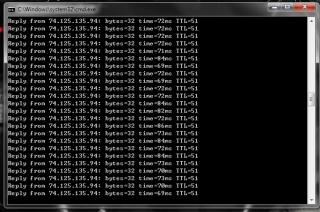
Ping test to Google
Attached Image

Blacktubi, i want to try Panel Antenna! icon_question.gif

just tried some comparison test on 100MB download file, no disconnection/renewal of IP address as I directly remove the TS9 converter for test 2)
1) With Yagi - Time completion 1:43.0
2) Without Yagi - Time completion 1:43.4


This post has been edited by taaron: Nov 6 2012, 12:27 AM
taaron
post Nov 6 2012, 12:55 AM

New Member
*
Junior Member
49 posts

Joined: Jun 2007


QUOTE(chuahcs79 @ Nov 6 2012, 12:41 AM)
Tonight high speed arrive early brows.gif

user posted image

user posted image
*
i admire your speed..my speed no big difference between peak vs non-peak..if non-peak, might only be an extra of 1Mbps+


taaron
post Nov 6 2012, 01:43 AM

New Member
*
Junior Member
49 posts

Joined: Jun 2007


QUOTE(blacktubi @ Nov 6 2012, 01:32 AM)
Your seller didnt teach you how to properly aim using Yagi too doh.gif

PM you tomorrow  laugh.gif

Now using my Mobile
*
lol..i just main agak-agak only the aiming cos i know that direction is the nearest base station..haha..remember PM me how to aim brows.gif ..btw, have you tried your MF680 with Panel / Yagi antenna?
taaron
post Nov 6 2012, 07:42 PM

New Member
*
Junior Member
49 posts

Joined: Jun 2007


just gone back home from work, my speed at this hour without Yagi

user posted image

2 Pages  1 2 >Top
Topic ClosedOptions
 

Change to:
| Lo-Fi Version
0.0546sec    0.36    7 queries    GZIP Disabled
Time is now: 4th December 2025 - 10:03 AM