Outline ·
[ Standard ] ·
Linear+
Maxis Maxis 3G/HS 3G Thread V6 (Not WBB), Don't Envy at Our Super Fast Speed! :D
|
wavezard
|
 Nov 1 2012, 12:48 AM Nov 1 2012, 12:48 AM
|

|
QUOTE(blacktubi @ Nov 1 2012, 12:27 AM) They are using those normal CPU fan or chassis fan. Consume about 5V / 12V @ max 1A which shouldn't contributes a significant amount to your bill Thank you for answering my little noobish question  , can u show me example or link what type you buy? |
|
|
|
|
|
wavezard
|
Nov 1 2012, 11:09 AM
|
|
|
Hey guys, is this good fan? dont know what to choose..... http://forum.lowyat.net/index.php?showtopic=512216&hl=is there any people that can turn this into socket power, i think i have found that person that selling cpu fan and can turn to socket fan, i think in router thread.... |
|
|
|
|
|
wavezard
|
Nov 1 2012, 11:42 AM
|
|
|
QUOTE(ywkwy @ Nov 1 2012, 11:38 AM) dont buy those dc fan and troublesome to "turn to socket power". Buy AC fan directly. The durability and performance of AC fan way beyond the DC fan. I used to have AC to DC adapter to supply for usb fan. Adapter burnt after 1 week 24/7 now using AC fan, use normal 3 pin power plug, operate 24/7 without problem and the air flow is much much better. When I touch my router is cold, touch E372 is little bit warm only. what kind of fan u buy....is there a link? |
|
|
|
|
|
wavezard
|
Nov 1 2012, 01:56 PM
|
|
|
ok, the function of cooling fan is to cool router and modem, if i buy this fan, does i need to buy zte or huawei?
|
|
|
|
|
|
wavezard
|
Nov 4 2012, 09:20 PM
|
|
|
Hey, when i use MDMA beta 10, i cannot change band config, because i cannot see the band config option Attached thumbnail(s)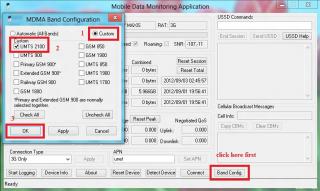
|
|
|
|
|
|
wavezard
|
Nov 4 2012, 11:56 PM
|
|
|
QUOTE(chuahcs79 @ Nov 4 2012, 10:04 PM) MDMA 1.0.0.31 Beta 10 should look like this MDMA 1.0.0.31 Beta 10[attachmentid=3138103] Unless You are using MDMA 1.0.0.31 Beta 9 version, then it wont have Band config hello bro chuah, i guess i download the wrong version....sorry to make trouble.......... |
|
|
|
|
|
wavezard
|
Nov 4 2012, 11:59 PM
|
|
|
Hey somebody, i use MDMA with Huawei E173, and it show my dbm -87 and my QoS is 8640/8640.......using speedtest now with band config and supercharge:
1- Download 1.2mbps+
2- Upload 1mbps+
3- ping 20-40 ms
if i use huawei e372, with the 8640/8640 what is the limit of my speed? if i told at maxis listen can they change the QoS?
|
|
|
|
|
|
wavezard
|
Nov 5 2012, 12:04 AM
|
|
|
QUOTE(chuahcs79 @ Nov 5 2012, 12:01 AM) QoS is area depends, it is have to depends on your area tower/ base station you are connected to, maxis wont do anything on improve your QoS,.. if u want to find out your area Max QoS< u have to use 21Mbps HSPA+ above modem, then under MDMA it will show you the Maximum QoS u can get,.. E173 is HSPA 7.2Mbps modem will confirm come with 8640/8640 I found weird situation (for me) if my ping is high (max 100ms), my download speed will increase to 2.5mbps but upload stable |
|
|
|
|
|
wavezard
|
Nov 5 2012, 08:07 AM
|
|
|
Hey, after supercharge my broadband Huawei E173 with Maxis Postpaid RM98............ BEFORE DOWNLOAD= 0.7MBPS UPLOAD= 0.01MBPS PING= 200MS+ AFTER   The weird is if download increase, the ping will higher, but if the download speed decrease, it will show less ping which mean better See this, the ping is higher, 60ms (usually i always get 30 something which i get slow dl speed)  Thx Blacktubi
Added on November 5, 2012, 9:21 amThis is the latest one using Huawei E173........    This post has been edited by wavezard: Nov 5 2012, 09:58 AM This post has been edited by wavezard: Nov 5 2012, 09:58 AM |
|
|
|
|
|
wavezard
|
Nov 5 2012, 12:08 PM
|
|
|
QUOTE(chuahcs79 @ Nov 5 2012, 11:50 AM) well my adapter is perfectly fine running 24/7 since day 1 i buying, convertor to 3 pin plug and it is working fine  if u dont mind, can u give me the link for you fan? i want to buy fan same with you (follow the pro, learn form the pro), it 3pin plug right.... |
|
|
|
|
|
wavezard
|
Nov 5 2012, 12:13 PM
|
|
|
hello, can somebody help me.......................why when i using MDMA it said
unable to open COMX, mobile data device maybe in use
so i check QPST, and my COMX is disable, when i enable it, it said it been use......somebody can help me
|
|
|
|
|
|
wavezard
|
Nov 5 2012, 12:25 PM
|
|
|
QUOTE(nestlebliss @ Nov 5 2012, 12:21 PM) maybe have program using internet? 
Added on November 5, 2012, 12:22 pmi already have qxdm but how do i check? im noob la bro hahahha no............but the weird is my modem unlocked...is there any thing that i can do to locked my modem again |
|
|
|
|
|
wavezard
|
Nov 5 2012, 12:30 PM
|
|
|
somebody help me, cannot use MDMA
|
|
|
|
|
|
wavezard
|
Nov 5 2012, 12:48 PM
|
|
|
QUOTE(lwk523 @ Nov 5 2012, 12:33 PM) What connection manager that u using now ? you need close the dashboard and use the window dialup 1.  hey, it worked, but the only one thing remain, i cannot enable my port in QPST, it said There was an error enabling COMX. The port may not be working properly or may be busy. (-2147467259) This problem not dangerous right |
|
|
|
|
|
wavezard
|
Nov 5 2012, 01:41 PM
|
|
|
QUOTE(chuahcs79 @ Nov 5 2012, 01:36 PM) close your other dashboard software first before u open MDMA  that is error 623 right ?
Added on November 5, 2012, 1:36 pmwhich part of penang u stay ?
Added on November 5, 2012, 1:38 pmeither u enable the wrong port number or your other software is running and occupied your modem port my broadband working fine, can connected and MDMA work, just do unlocking to my modem.....................maybe because of that  |
|
|
|
|
|
wavezard
|
Nov 5 2012, 08:05 PM
|
|
|
QUOTE(chuahcs79 @ Nov 5 2012, 02:29 PM) if under 8640 / 8640 QoS: if u can try connect UMTS900 band tower, it might be better speed than UMTS2100 Band tower I cannot use the 900band, only use 2100 because when choose the 900, cannot connect to internet using huawei e173 |
|
|
|
|
|
wavezard
|
Nov 5 2012, 08:09 PM
|
|
|
QUOTE(blacktubi @ Nov 5 2012, 08:07 PM) Because your modem don't support 900 probably my modem huawei e173, connected to 8640 QoSA |
|
|
|
|
|
wavezard
|
Nov 5 2012, 08:28 PM
|
|
|
QUOTE(ddr3 @ Nov 5 2012, 08:26 PM) yup, planning to buy Huawei E372 from blacktubi after buying tp link mr3420 and maxis corporate This post has been edited by wavezard: Nov 5 2012, 08:33 PM |
|
|
|
|
|
wavezard
|
Nov 5 2012, 08:34 PM
|
|
|
QUOTE(noobandroid @ Nov 5 2012, 08:32 PM) if you get corporate might as well go e372 hahahaha, mistyped |
|
|
|
|
|
wavezard
|
Nov 5 2012, 10:47 PM
|
|
|
QUOTE(chuahcs79 @ Nov 5 2012, 08:51 PM) if u want speed, go for ZTE MF680 if u want stable, go for E372 huawei set of course want speed, and much cheaper, but it too hot...want to use it with router and maybe i will buy fan after few month using it,,, |
|
|
|
|



 Quote
Quote
 0.0659sec
 0.59
0.59
 7 queries
 GZIP Disabled