Outline ·
[ Standard ] ·
Linear+
Convert Movie for iPad, Windows version
|
TSkuekwee
|
 Aug 17 2012, 12:36 PM, updated 14y ago Aug 17 2012, 12:36 PM, updated 14y ago
|

|
What's the best shareware or freeware that can convert movie to iPad? iPad and iPhone can play same file or need t convert again?
Currently trying this wondershare video converter. Converting my first attempt but it stated there need abobut 1 hour to convert 1 hour movie?
This post has been edited by kuekwee: Aug 17 2012, 12:38 PM
|
|
|
|
|
|
victorian
|
Aug 17 2012, 02:48 PM
|
|
|
Don't bother to convert bro, the process is very tiring and the resolution will be choppy after conversion. If your movie is not that heavy, you can play it smoothly using video player available in AppStore (I'm using GPlayer, able to support MKV, AVI etc with srt subtitle). But if you are planning to play HD MKV or AVI movie using your iPad, you might as well forget it because it will lag.
|
|
|
|
|
|
TSkuekwee
|
Aug 17 2012, 02:56 PM
|
|
|
QUOTE(victorian @ Aug 17 2012, 02:48 PM) Don't bother to convert bro, the process is very tiring and the resolution will be choppy after conversion. If your movie is not that heavy, you can play it smoothly using video player available in AppStore (I'm using GPlayer, able to support MKV, AVI etc with srt subtitle). But if you are planning to play HD MKV or AVI movie using your iPad, you might as well forget it because it will lag. how to copy the file to ipad if not convert? |
|
|
|
|
|
debbierowe
|
Aug 17 2012, 03:49 PM
|
|
|
QUOTE(victorian @ Aug 17 2012, 02:48 PM) Don't bother to convert bro, the process is very tiring and the resolution will be choppy after conversion. If your movie is not that heavy, you can play it smoothly using video player available in AppStore (I'm using GPlayer, able to support MKV, AVI etc with srt subtitle). But if you are planning to play HD MKV or AVI movie using your iPad, you might as well forget it because it will lag. how do u transfer movies/video files into ipad? by sync in itune? |
|
|
|
|
|
victorian
|
Aug 17 2012, 06:39 PM
|
|
|
QUOTE(kuekwee @ Aug 17 2012, 02:56 PM) how to copy the file to ipad if not convert? QUOTE(debbierowe @ Aug 17 2012, 03:49 PM) how do u transfer movies/video files into ipad? by sync in itune? Syncing movie into iPad via a 3rd party app is faster than syncing using iTunes. You can upload a specific movie without syncing your whole library, which takes time. To sync using a 3rd party app, launch iTunes on your PC, on the device column, press "App" tab and scroll down and you will see a list of your app supported to file transfer, press the app you want and you can choose your file to transfer. 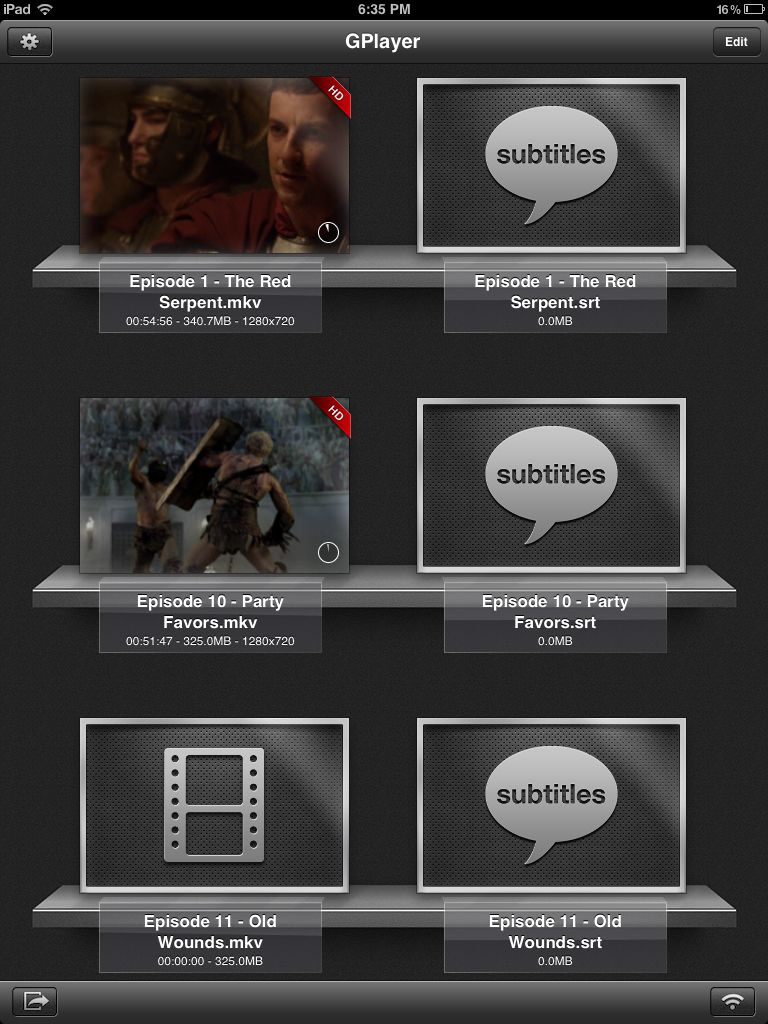 So this is the MKV video I have been watching on my iPad. Gplayer still can manage low resolution MKV video but if it's too heavy, you will notice some choppy part and the audio might be distorted. |
|
|
|
|
|
D.Sync
|
Aug 17 2012, 09:46 PM
|
|
|
You may give GoodPlayer a try. Simple choose the video (avi, mkv, etc.) via iTunes Info tab and play it.
For me I would always choose to convert because I own a lot of HD movie with over 10k bitrate. With a small screen of 9.7' it is pointless to transfer it natively for playback as you won't notice the quality difference.
As for conversion, you can use MediaCoder (freeware) and play with its numerous settings. Things you should adjust is the video bitrate, rate mode and sound. Other than that just leave as default.
|
|
|
|
|
|
acbc
|
Aug 17 2012, 11:39 PM
|
|
|
I used Handbrake to convert all MKV to M4V. Movies playable on both Android and iOS devices.
|
|
|
|
|
|
exquisite_markas
|
Aug 24 2012, 07:42 PM
|
|
|
I am using the video converter utility in YouTube Downloader. It's a freeware. And it works well converting any video format to .mp4. Not bad.
|
|
|
|
|
|
debbierowe
|
Aug 24 2012, 11:21 PM
|
|
|
QUOTE(victorian @ Aug 17 2012, 06:39 PM) Syncing movie into iPad via a 3rd party app is faster than syncing using iTunes. You can upload a specific movie without syncing your whole library, which takes time. To sync using a 3rd party app, launch iTunes on your PC, on the device column, press "App" tab and scroll down and you will see a list of your app supported to file transfer, press the app you want and you can choose your file to transfer. » Click to show Spoiler - click again to hide... « So this is the MKV video I have been watching on my iPad. Gplayer still can manage low resolution MKV video but if it's too heavy, you will notice some choppy part and the audio might be distorted. ah thanks, i found iFunbox  i dont think i'll use itunes anymore... eeeyuck! i am just got RushPlayer+ reading the reviews online, seemed like a good one, hope its really good cos ipad only 1month+old havent even try watching movie on it yet lol |
|
|
|
|
|
carpathia
|
Aug 25 2012, 11:00 AM
|
|
|
so what is the BEST video player for ipad now that works even with full hd mkv files ( over 6gb) ?
|
|
|
|
|
|
ixiel
|
Aug 26 2012, 01:12 AM
|
Getting Started

|
once of the best free movie converter is formatfactory.
|
|
|
|
|
|
darosha
|
Aug 26 2012, 06:28 AM
|
|
|
QUOTE(debbierowe @ Aug 24 2012, 11:21 PM) ah thanks, i found iFunbox i dont think i'll use itunes anymore... eeeyuck! i am just got RushPlayer+ reading the reviews online, seemed like a good one, hope its really good cos ipad only 1month+old havent even try watching movie on it yet lol For movie and music transfer, copy trans manager better than ifunbox, and it doesnt need jailbreaking |
|
|
|
|
|
jackyyong
|
Aug 26 2012, 06:33 AM
|
|
|
Freemake Video Converter. http://www.freemake.com/free_video_converter/Very fast in my experience using. Simple too. Once converted, transfer using iTunes |
|
|
|
|
|
neorage_x
|
Aug 28 2012, 04:53 PM
|
|
|
QUOTE(carpathia @ Aug 25 2012, 11:00 AM) so what is the BEST video player for ipad now that works even with full hd mkv files ( over 6gb) ? I'm currently using AVPlayerHD. Fantastic even for high resolution and big sized movie file. |
|
|
|
|
|
krayz_underground
|
Aug 29 2012, 05:34 PM
|
|
|
QUOTE(acbc @ Aug 17 2012, 11:39 PM) I used Handbrake to convert all MKV to M4V. Movies playable on both Android and iOS devices. How about the speed of conversion? Any quality degrade?  |
|
|
|
|
|
acbc
|
Aug 29 2012, 06:02 PM
|
|
|
QUOTE(krayz_underground @ Aug 29 2012, 05:34 PM) How about the speed of conversion? Any quality degrade? Quality is quite good but why bother with HD quality since u going to watch a few times on a 9.7" screen. Conversion speed is around 6 hours using an old C2D PC running Vista. |
|
|
|
|
|
deric79k
|
Aug 30 2012, 12:46 AM
|
|
|
QUOTE(acbc @ Aug 29 2012, 06:02 PM) Quality is quite good but why bother with HD quality since u going to watch a few times on a 9.7" screen. Conversion speed is around 6 hours using an old C2D PC running Vista. No he also ok, watch only |
|
|
|
|



 Quote
Quote








 0.0272sec
 0.73
0.73
 5 queries
 GZIP Disabled