Welcome Guest ( Log In | Register )

Bump Topic Topic Closed RSS Feed

Outline · [ Standard ] · Linear+

 The SSD Thread V3, The Speed You Need

views
     
pacatU13
post Oct 19 2012, 08:00 AM

Getting Started
**
Junior Member
63 posts

Joined: Jan 2009


hi guys,

just bought intel ssd 330 120G... need help from sifu's..

1st of all sorry if this a noob question.. sweat.gif

i've format & install win 7 in my system.. by i somewhat doesn't satisfied with the speed.. later found out i've installed the wrong installer for my mobo.. doh.gif

so i tried to install new win7.. during installation, i've found there's 2 partition.. 1st is just small partition(lower than 1G) the other is +/-119G.. i can't format the 1st partition.. only the 2nd one...

1. is this normal..??
2. should i delete the 1st partition..?? rclxub.gif

sorry for noob question..

-budak br belajar.. sweat.gif


This post has been edited by pacatU13: Oct 19 2012, 08:03 AM
pacatU13
post Oct 19 2012, 10:20 AM

Getting Started
**
Junior Member
63 posts

Joined: Jan 2009


QUOTE(huzzLEE_82 @ Oct 19 2012, 08:20 AM)
it's normal..windows will create a system reserved partition for windows function properly
it's not recommended to delete the partition..elsewhere u might encounter certain problem in future....
*
thanks bro.. so i'll just format the other partition & install windows normally.. icon_rolleyes.gif
pacatU13
post Oct 29 2012, 02:44 PM

Getting Started
**
Junior Member
63 posts

Joined: Jan 2009


hi guys,

need advice from u all,

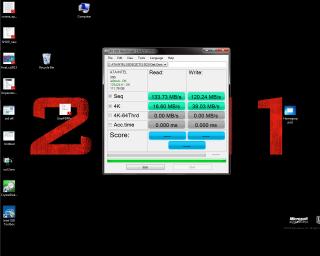
i've done benchmark on my ssd but the result isn't as i expected.. sweat.gif
i'm using intel 330 120G.. please refer screen shots.. in the screen shots also the ssd detail..

Attached Image


pacatU13
post Oct 29 2012, 07:29 PM

Getting Started
**
Junior Member
63 posts

Joined: Jan 2009


QUOTE(soultaker @ Oct 29 2012, 03:53 PM)
Have you update to the latest Intel AHCI driver? what is your sata speed? seem like sata2. also install Intel RST and the provided Intel SSD Optimization software.
*
just update latest driver.. it's alltogether with the same driver 3.1.0... screen shots as below.. slight improvement.. but not as i expected.. tongue.gif

Attached Image

QUOTE(everling @ Oct 29 2012, 03:54 PM)
Please use the ATTO benchmark before following soultaker's advice. The benchmark results there should be similar to the paper specs.
*
u tried running atto benchmark but my pc hang after started it.. sweat.gif
pacatU13
post Oct 30 2012, 12:33 AM

Getting Started
**
Junior Member
63 posts

Joined: Jan 2009


QUOTE(everling @ Oct 29 2012, 08:22 PM)
Strange, ATTO shouldn't cause your Windows to hang.

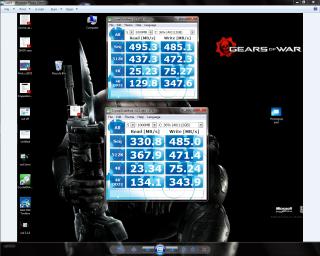
Okay, as an alternative, try using CrystalDiskMark, link on the first post. But before you run the benchmark, click on File > Test Data and choose either "All 0x00 (0 Fill)" or "All 0x01 (1 Fill)". SandForce-based SSDs, like the Intel 330 or 520, does not like random data, which is why the performance seems to be low.
*
tried.. snapshot as below.. stange.. y the reading from as ssd diff..?? is it not reliable..?? hmm.gif

Attached Image


QUOTE(ahhann @ Oct 30 2012, 12:21 AM)
Hi guys, noob in SSD and a 2 hour new user for M4.
Benchmark as below:
[attachmentid=3127175]
which i believe is a normal as per spec of M4.

Problem is, i experience 2 times screen freeze when Diabloing. (In 2 hours times)
Screen freeze for roughly 5 sec then back to normal.

I worry that i have not fine tune the SSD for optimal performance.

What else i need to look for on this mystery issue?
*
almost same as me.. freeze when i do multitasking such as installing game and watch u-tube at the same time...
i'm using HD4670.. is it could be the source..?? rolleyes.gif

Topic ClosedOptions
 

Change to:
| Lo-Fi Version
0.0423sec    0.40    7 queries    GZIP Disabled
Time is now: 7th December 2025 - 06:48 PM