Welcome Guest ( Log In | Register )

Bump Topic Topic Closed RSS Feed

Outline · [ Standard ] · Linear+

 Astro B.yond Episode V (Version 10.0), HD, PVR, IPTV and VOD

views
     
G K Lai
post Jun 18 2013, 08:26 PM

Enthusiast
*****
Senior Member
839 posts

Joined: Aug 2009


Hi all,

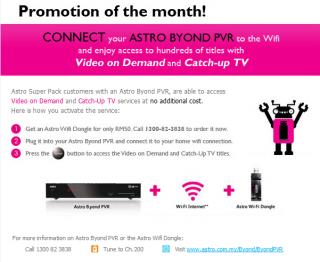
I received this promotional email from Astro today...
Am currently Beyond PVR user and subscribed to Super Pack.

On the Promotion of the month! section, it stated Astro Super Pack customers with an Astro Byond PVR, are able to access
Video on Demand and Catch-Up TV services at no additional cost.
Does that mean I can watch these channels on demand for free? I'm confused... rclxub.gif

EDIT: Another thing, I don't have Unifi in my area, only subscribe to Streamyx 8Mbps package, does this speed sufficient to stream Astro's HD channels?

QUOTE(spikey2506 @ Jun 18 2013, 04:22 PM)
They are not obligated to change your Pace decoder coz the functions are the same. As for the PVR, they will change it coz it comes with wireless function for you to connect to your internet at home to access Astro VOD, so additional function over the Pace PVR. And also, whatever problems we have with Pace units, we might have it again with Sammy if they share the same firmware. Until Astro issues new firmwares for both ordinary and PVR decoders, we will continue to have problems.
If you are determined for them to change your Pace to Sammy, convince them that your unit has problems (stuck, pixelated,sometimes restart) then tell them you want a totally new unit
*
For the highlighted part, do you think it is still a good idea to spend RM50 to purchase their Wi-Fi dongle at this time? Or better off, ask for replacement to Samsung PVR decoder? sweat.gif

This post has been edited by G K Lai: Jun 18 2013, 08:28 PM


Attached thumbnail(s)
Attached Image
G K Lai
post Jun 18 2013, 11:35 PM

Enthusiast
*****
Senior Member
839 posts

Joined: Aug 2009


QUOTE(spikey2506 @ Jun 18 2013, 08:37 PM)
Search your house for an unused Ethernet Cable. Connect the cable from the PVR to your modem. Tada! Free.  biggrin.gif They do not really tell you this coz they want you to spend more money
But I suggest don't bother though. Not that many choices in their lineup. Recommended speed for VOD is 5Mbps. So yours should do fine. Mine is 4Mbps. Kinda slow for VOD.
*
WOW~!!! Thanks for the tips! notworthy.gif icon_rolleyes.gif
Although I can't connect my router with PVR using Ethernet Cable directly, but I do have those "Home Plug", will give a try later! rclxm9.gif
G K Lai
post Jun 19 2013, 02:12 AM

Enthusiast
*****
Senior Member
839 posts

Joined: Aug 2009


QUOTE(spikey2506 @ Jun 18 2013, 11:46 PM)
There are two ethernet ports behind the PVR. The one that you need to connect to is the one near the HDMI port if I am not mistaken. You will know that you connected to the right port if you are able to look through their VOD list.  biggrin.gif
*
Yup! Port 2, tested, it's working, RM50 saved! icon_rolleyes.gif

QUOTE(Anonymous34 @ Jun 19 2013, 12:00 AM)
its port 2!im having it connected already.
*

Many thanks for the guide, it works! thumbup.gif

___________________________________________________________________________

I got a spare and unused TP-Link USB Wi-Fi adapter, will try if it work with the PVR tomorrow. laugh.gif

I do have a few questions would like to seek help/advice...
  • I go to "My Entitlement" section and it listed out 1,307 shows, but I was scrolling through and reached 800+ but still can't see any movie from, like, HBO, Fox Movies or even Celestial (HD or SD). Are these movies at the very end of the list?
  • Is it normal most of the VOD needs to download to watch? I was thought it will stream the video upon pressing the blue (Watch) button? Just tried pick 3-4 from the list but all of them need to download, but not able to watch directly (although it allow to watch after downloaded to certain percentage)
  • Does the new Samsung decoder equipped with Optical digital out?

Thank you all in advance! notworthy.gif
G K Lai
post Jun 20 2013, 10:38 AM

Enthusiast
*****
Senior Member
839 posts

Joined: Aug 2009


QUOTE(enriquelee @ Jun 20 2013, 08:04 AM)
This only work for Samsung decoder?
*
Nope! I'm still using old Pace unit, and the above trick works for me. smile.gif
G K Lai
post Jun 28 2013, 11:55 PM

Enthusiast
*****
Senior Member
839 posts

Joined: Aug 2009


Hi all,

My friend just told me Astro is offering free upgrade from normal B.yond decoder to PVR, is that true?
If it is true, can anyone tell me if I am eligible to take up this offer?
  • Currently subscribed to Super Pack 3
  • Is using PVR in my living room.
  • Got a multi-room subscription in my bedroom which is standard B.yond decoder. <-- This one I would like to upgrade to PVR.
  • The LNB on my dish got 4 output, currently only uses up to 3 lines.

Many thanks in advance! notworthy.gif


G K Lai
post Jun 29 2013, 11:25 AM

Enthusiast
*****
Senior Member
839 posts

Joined: Aug 2009


QUOTE(jamesleetech @ Jun 29 2013, 10:26 AM)
» Click to show Spoiler - click again to hide... «
Wow! Many many thanks @jamesleetech for your informative reply.
Yes, I got your points, and this make me forget about upgrade second B.yond to PVR due to new 2 years contract! shakehead.gif
Yup, @spikey2506 told me earlier that Ethernet cable also work for VOD and I am totally agreed with you that VOD is not interesting at all. Was thought I can watch HBO HD movies or HD documentaries, I was doh.gif when I scroll through the list.
I never see how the Samsung decoder look like, but I am not rushing to switch because I have no interest in Wi-Fi (VOD) at this moment. laugh.gif
Thanks again for your informative reply! icon_rolleyes.gif

G K Lai
post Jun 29 2013, 11:53 PM

Enthusiast
*****
Senior Member
839 posts

Joined: Aug 2009


QUOTE(jamesleetech @ Jun 29 2013, 11:59 AM)
My pleasure. You are welcome.

NEW ADDITION
Almost forgot to mention. I believe the usual upgrade to Byond PVR for existing subscribers is RM 150 (or more) Installation (One-Time) Charges depending on existing subscriber status. So I believe that this "so-called special installation price" of RM 100 is during this "AOD HD Ch. 350" Promo only.

Without this promo, the different "more" installation charges to pay will depend on the "subscriber status".

Not during Promo, what do the subscriber status mean ?

For example (normal charges, not for Promo)...

1) If I did NOT subscribe to any Superpack 1, 2, 3 or 4... to upgrade to Byond PVR, I have to pay RM 10 PER MONTH for "Recording Charges" AND PVR Installation Charges of RM 200 !! Contract is still 2 years period. Note: Even during promo, have to pay for Recording Charges every month.

2) If I am one of the Superpack 1, 2, 3 or 4 subscribers... to upgrade to Byond PVR, I don't have to pay for HD service and Recording Charges per month AND PVR Installation Charges is RM 100 BUT, BUT, BUT I must have already subscribed to Superpack for at least 6 months. If I only subscribed to Superpack less than 6 months, then I have to pay the usual RM 150 installation charges BUT I am actually not sure how much more to pay.

3) If I am NOT a Superpack subscriber, I wish to upgrade to any Superpack 1, 2, 3 or 4 AND Byond PVR, then the usual installation charges will apply. Hehe, I forgot and did not check on this so you have to call As*teruk Support for actual charges. Also the same 2 year contract period.

Hehe, a bit complicated here.


Please correct me if anyone here found any errors I made on the non-promo charges.

cool.gif
*
These conditions are so teruk, especially number 2! laugh.gif

Actually I'm not worrying about their one-time-charges (installation fee), it is the contract that will start over which make me pull handbrake, hahaha.....! laugh.gif

I was thought multi-room promo subject to 12 months contract, last night only I know (read from here) the contract is 24 months... sweat.gif

Thanks again jamesleetech! icon_rolleyes.gif

P/S: how do I "tag" a user name here in LYN?
G K Lai
post Jul 2 2013, 10:36 AM

Enthusiast
*****
Senior Member
839 posts

Joined: Aug 2009


Hi all,

I may be slowpoke, but last few days when I start-up Astro TV Guide mobile app and update/refresh contents, the programme list are blank!

Try uninstall and reinstall from "My Apps" but I can no longer able to login again.

Then try search for the app in Google Play Store, it won't show up (meaning no such app). I can only reinstall it from my installed apps history list.

Is this app discontinued?
G K Lai
post Jul 4 2013, 02:34 PM

Enthusiast
*****
Senior Member
839 posts

Joined: Aug 2009


QUOTE(arslow @ Jul 2 2013, 11:56 AM)
It was like that since April. They took it off the play store, no more in development...
*
QUOTE(munchoong @ Jul 2 2013, 04:54 PM)
Looks to be the case... same with the iOS version, no longer available and can't work anymore sad.gif
*
Thanks arslow and munchoong, now I know this is not my phone's problem laugh.gif

icon_rolleyes.gif
G K Lai
post Jul 8 2013, 01:41 PM

Enthusiast
*****
Senior Member
839 posts

Joined: Aug 2009


Hi all,

Just a quick question:

Since Astro TV Guide mobile apps stopped development, how can we do "Remote Recording" now?
Astro TV Guide website also not working for me, clicked record and confirm, then the indicator just spinning forever.
Also tried Safari browser on iPad, it even reported "There was an error....".

Thanks in advance!
G K Lai
post Jul 19 2013, 03:32 AM

Enthusiast
*****
Senior Member
839 posts

Joined: Aug 2009


QUOTE(pantik @ Jul 15 2013, 10:37 PM)
Yup, remote recording now suck big time. Sigh...
*
Yup~ laugh.gif


QUOTE(chikana @ Jul 18 2013, 03:18 PM)
I heard astro will introduce new apps to replace the existing one
*
Ooo.... that's great! Thanks for the information! thumbup.gif

Topic ClosedOptions
 

Change to:
| Lo-Fi Version
0.0429sec    0.81    7 queries    GZIP Disabled
Time is now: 10th December 2025 - 03:43 PM