


HP Pavillion DV6-6XXX series Owners Lounge V6, >9000 owners. Like a boss.
HP Pavillion DV6-6XXX series Owners Lounge V6, >9000 owners. Like a boss.
|
|
 Sep 1 2012, 05:01 PM Sep 1 2012, 05:01 PM
Return to original view | Post
#1
|
 
Newbie
0 posts Joined: Dec 2011 From: Manila, Philippines  
|
After almost a year, I am happy to report my DV6-6168TX is still going strong. Some scratches on the aluminum cover, but otherwise no problems.
|
|
|
|
|
|
Nov 22 2013, 04:31 PM
Return to original view | Post
#2
|
|
Newbie
0 posts Joined: Dec 2011 From: Manila, Philippines
|
QUOTE(elco-ph @ Sep 1 2012, 05:01 PM) After almost a year, I am happy to report my DV6-6168TX is still going strong. Some scratches on the aluminum cover, but otherwise no problems. After more than two years, my DV6-6168TX is still working well. Even more scratches on the aluminum cover and some on the wrist rest (because of metal watch strap), but otherwise no problems.  I'm using the latest drivers from this page. This laptop is more durable than my previous ASUS and Acer. This post has been edited by elco-ph: Nov 22 2013, 04:33 PM |
|
|
Dec 7 2015, 05:29 PM
Return to original view | Post
#3
|
|
Newbie
0 posts Joined: Dec 2011 From: Manila, Philippines
|
Hi everyone. Been a long while since my last post (December 20, 2011). I use my DV6-6168TX almost every day and it has been a reliable workhorse.
A few days ago, I decided to upgrade to an SSD. Instead of reinstalling Windows, I used a disk cloning tool to copy my old hard drive to the SSD. Now my DV6 is very very fast! Here are some photos: 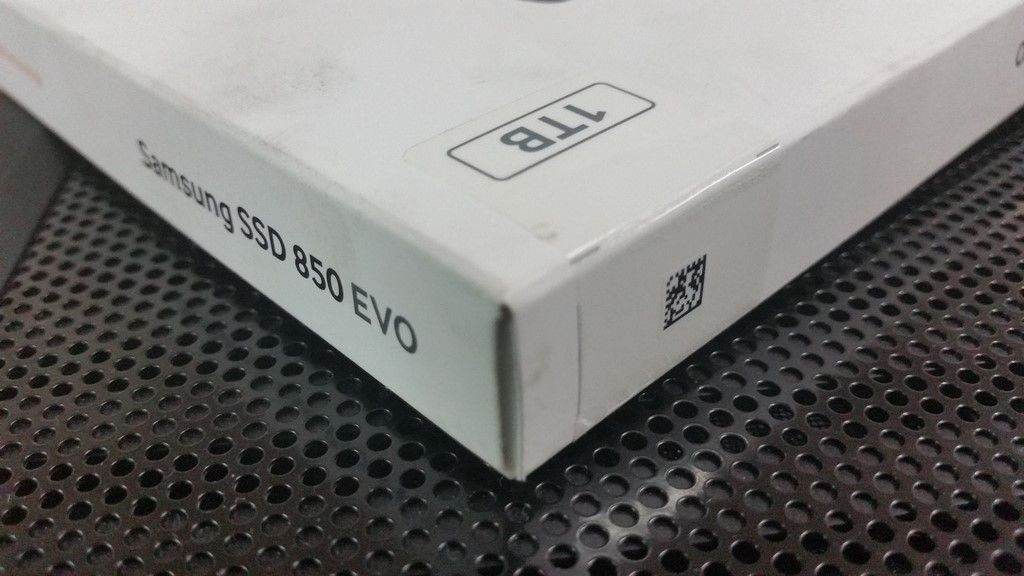    |
|
|
Dec 12 2015, 03:52 PM
Return to original view | Post
#4
|
|
Newbie
0 posts Joined: Dec 2011 From: Manila, Philippines
|
QUOTE(Smurfs @ Dec 9 2015, 07:54 AM) Do you need any special adapter or socket to change to SSD? Plug and play. No adapter needed.Or just simply plug and play? |
|
|
Dec 22 2015, 12:07 PM
Return to original view | Post
#5
|
|
Newbie
0 posts Joined: Dec 2011 From: Manila, Philippines
|
QUOTE(GearX_SaM @ Dec 14 2015, 11:56 PM) Wah 1 TB SSD! Damn rich la haha.I just change mine to kingston savage 240GB too! Yes 1TB SSD. Suddenly like to use my laptop so much. No lag or whatsoever haha. Bought it during early 2011 and still using now!!! I was able to justify the expense because: (1) The laptop is used for work (Sales Department). (2) There are many photos and videos stored that are used daily in Sales activities. (3) The time it would take for the Sales Team to trim the amount of videos to fit a smaller SSD or to transcode them to a smaller format would cost the company 2 days salary for 2 staff. (4) The salary of 2 staff for 2 days is more than the cost of a 1TB SSD. So it was actually a good decision on the part of my boss. Also, the day after it was installed, the Sales Department managed to close a big account. So the 1TB SSD already paid for itself. |
|
|
Dec 22 2015, 12:10 PM
Return to original view | Post
#6
|
|
Newbie
0 posts Joined: Dec 2011 From: Manila, Philippines
|
QUOTE(XxxNightSkyxxX @ Dec 15 2015, 10:42 PM) » Click to show Spoiler - click again to hide... « what software you use to clone? I removed the old 1TB HDD from the laptop and plugged it into my PC. Then I got the new 1TB SSD and also plugged it into my PC. Then I used AOMEI to clone the drives. Simple and fast. No need for Windows to shut down and reboot in a proprietary OS like what Acronis does. Copy speed was around 100MB/second. |
| Change to: |  0.0214sec 0.0214sec
 0.40 0.40
 7 queries 7 queries
 GZIP Disabled GZIP Disabled
Time is now: 12th December 2025 - 11:41 AM |
 Quote
Quote