
Welcome Guest ( Log In | Register )

3 Pages  1 2 3 >Bottom

Outline · [ Standard ] · Linear+

 HP Pavillion DV6-6XXX series Owners Lounge V6, >9000 owners. Like a boss.

views
     
afifman305
post Sep 27 2012, 06:23 AM

Getting Started
**
Junior Member
132 posts

Joined: Feb 2012


Elloooooop bro..

Acid, i hope u can help me to solve this problems that made me dizzy all the time. I'm glad i found this thread.

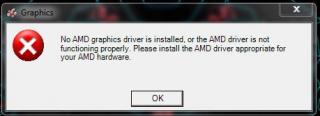
My HP dv6 have prob with ATI HD 6700 graphics card.

It cannot detect the graphic card and everytime i open the ati catalyst center, it says that no hardware detected. I recognized this prob when i play the game, it get lagging. The game is run using Intel graphic card. The intel grapics still can be used.

Just rite now, i cant switchable my graphics card n the ATI graphic card is not detected. I hope bro Acid can help me solve this prob. Maybe it takes time but i hope this prob can be solved.

I hope u can guide me to tune up my dv6 to become like ur dv6 bro.. Before this the graphic card always stop responding n have recovered. That's also the problem. But right now, is the main prob, cant detect my graphic card. huhu..

This is the picture of the pop up.


Attached thumbnail(s)
Attached Image
afifman305
post Sep 28 2012, 12:51 AM

Getting Started
**
Junior Member
132 posts

Joined: Feb 2012


QUOTE(Acid_RuleZz @ Sep 27 2012, 08:38 AM)
Did you update your intel driver thru Window Update before? hmm.gif

How many graphic adapter it show in device manager?
*
I always update using Windows update before.. Right now there are no update that i can download.

In device manager, it still shown 2 graphic cards, Intel n HD 6770.

This is the pic of device manager.


Attached thumbnail(s)
Attached Image
afifman305
post Sep 28 2012, 04:33 AM

Getting Started
**
Junior Member
132 posts

Joined: Feb 2012


QUOTE(Acid_RuleZz @ Sep 28 2012, 12:57 AM)
Try Leshcat 12.9 Sep4 driver. Follow the built in manual.. you gonna need DriverFusion.

Don't update your graphic driver thru Window Update because it will break switchable graphic component.
*
So, rite now, i just need to dwnld the Leshcat 12.9 Sep4 driver n Driver Fusion n then install it??
I give a try. I'll inform u if it succeed or not.

Thanx 4 the information. I wont upgrade through Window update after this smile.gif


Added on September 28, 2012, 6:32 amWhat is the function of Driver Fusion??

I had installed both, Leshcat n Driver Fusion.

All going well. The graphic cards been detected back.

Thanx a lot bro.. U totally ROCK!! smile.gif

Can u teach me how to maximise the performance of dv6 to its limit..

Before this i cant play in direct x11, i dunt know if dv6 can play in direct x11 or not.


This post has been edited by afifman305: Sep 28 2012, 07:05 AM
afifman305
post Sep 28 2012, 02:32 PM

Getting Started
**
Junior Member
132 posts

Joined: Feb 2012


QUOTE(Acid_RuleZz @ Sep 28 2012, 08:03 AM)
User DriverFusion to remove the remaining file of the driver after u uninstall it. It's in the manual. sweat.gif
user posted image

Overclock the GPU and upgrade to SSD. tongue.gif


Added on September 28, 2012, 9:42 amAMD HD6770M support DX11 while Intel HD3000 not. nod.gif
*
Sorry cuz i dont read the manual.. huhu..

How to overclock the GPU safely?? I quite afraid to overclock because overclock always have a side effect after it..

What kind of SSD that the best with dv6?? Is it in my plan to change to SSD.

Thanx a lot bro smile.gif
afifman305
post Sep 29 2012, 12:06 PM

Getting Started
**
Junior Member
132 posts

Joined: Feb 2012


Is it normal for dv6 to suddenly get "hang". My dv6 always have this prob n i need to hard reset it. I afraid this will damage my hard disk.

Do u have any solution for this Acid??

About the noise of the fan, no doubt about it. It sound like heli blade. How to clean the air vent?? I'm quite afraid to do this kind of thing.

Hope u can guide me bro Acid.

Thanx a lot for all ur help smile.gif
afifman305
post Sep 30 2012, 01:37 PM

Getting Started
**
Junior Member
132 posts

Joined: Feb 2012


QUOTE(lee_what2004 @ Sep 29 2012, 12:31 PM)
Maybe try run in command prompt
chkdsk /f C:
to check if got any data corruption...
*
why when i insert in command prompt, it stated like this??

I not too pro in command prompt. Hope lee n acid can guide me.

Thanx bro smile.gif


Attached thumbnail(s)
Attached Image
afifman305
post Sep 30 2012, 03:05 PM

Getting Started
**
Junior Member
132 posts

Joined: Feb 2012


QUOTE(lee_what2004 @ Sep 30 2012, 02:33 PM)
Type cmd on the start menu, right click it, run as admin
then later when you run the command, it will ask you to restart the laptop and scan.
*
It stated like this. I have restart my laptop. Does it will scan by itself or need to do it manually??


Attached thumbnail(s)
Attached Image
afifman305
post Sep 30 2012, 03:47 PM

Getting Started
**
Junior Member
132 posts

Joined: Feb 2012


QUOTE(lee_what2004 @ Sep 30 2012, 03:14 PM)
Auto start scanning nod.gif
*
how i can i know that it had scan or not??
afifman305
post Sep 30 2012, 04:17 PM

Getting Started
**
Junior Member
132 posts

Joined: Feb 2012


QUOTE(Acid_RuleZz @ Sep 30 2012, 03:48 PM)
Ah.. i see. doh.gif
Select Yes and then reboot your system... it will enter command prompt and start scanning.
*
I had done the scan. Does it change anything??

What is the TDR problem?? Can u explain it to me ash..


afifman305
post Sep 30 2012, 04:27 PM

Getting Started
**
Junior Member
132 posts

Joined: Feb 2012


QUOTE(Acid_RuleZz @ Sep 30 2012, 04:23 PM)
After u change back HP_Tools to Primary can u use Recovery? hmm.gif
any bad sector? hmm.gif

it happen when windows can't keep up with the gpu powerplay feature that change the clock from idle to 2d/3d mode. you can try run Leshcat main installer and choose Issue Resolver. Then select Change TDR level.
*
Nope. It dont show anything wrong.

When i had change the TDR level, does it will fix the problems??
afifman305
post Sep 30 2012, 04:42 PM

Getting Started
**
Junior Member
132 posts

Joined: Feb 2012


QUOTE(Acid_RuleZz @ Sep 30 2012, 04:37 PM)
If it still happen to you, boot into safe mode and use Alter AMD driver method.
*
Wokey bro... If the prob happen, i'll let u know..

Thanx for ur guide bro.. If i want to upgrade my dv6, will ask for ur advice.

Ure d best Acid smile.gif
afifman305
post Oct 12 2012, 01:07 AM

Getting Started
**
Junior Member
132 posts

Joined: Feb 2012


Elloooooop bro acid...

We meet again.. I want to ask, do u play fifa 13??
What is the best setting that u use to play it.

I have some lagging issue while playing it. Maybe because i use internet during playing or i downloaded something during playing.

Thanx bro smile.gif


afifman305
post Oct 13 2012, 05:37 PM

Getting Started
**
Junior Member
132 posts

Joined: Feb 2012


My laptop temperature has reached 90+..

What is the best way to make it become normal??
What is the normal temp ??

If i wanna clen the air vent, what is the best way to clean it?

Hope bro Acid can guide me. Thanx bro smile.gif
afifman305
post Oct 14 2012, 05:10 AM

Getting Started
**
Junior Member
132 posts

Joined: Feb 2012


QUOTE(Acid_RuleZz @ Oct 13 2012, 11:00 PM)
90+ on idle? browsing interweb? play bf3?
lol.. YUC is a biatch. don't use it.
*
especially when playing game n after playing game...

if in idle (60-70) and in web browsing, the temp is around 70-90..

But after playing game, the temp totally burn my hand.. haha biggrin.gif

This post has been edited by afifman305: Oct 14 2012, 05:11 AM
afifman305
post Oct 15 2012, 04:26 PM

Getting Started
**
Junior Member
132 posts

Joined: Feb 2012


Howwa about my prob??

Can someone solve it??


afifman305
post Oct 15 2012, 08:19 PM

Getting Started
**
Junior Member
132 posts

Joined: Feb 2012


QUOTE(Acid_RuleZz @ Oct 15 2012, 05:36 PM)
Have you enable CoolSense?

70c on idle is pretty high.. better send to service centre to clean and reapply thermal paste.
*
yup.. i have enabled the cool sense..

I'm right now at Indonesia. Quiet hard to send to service center here.

Is there any other way that i can do to clean it??
afifman305
post Oct 23 2012, 06:58 AM

Getting Started
**
Junior Member
132 posts

Joined: Feb 2012


Bro acid...

Can i clean the air vent using air compressor??

Wanna ask for your opinion cuz i'm here totally hard to send to HP Centre.


afifman305
post Oct 24 2012, 12:12 AM

Getting Started
**
Junior Member
132 posts

Joined: Feb 2012


QUOTE(Acid_RuleZz @ Oct 23 2012, 10:53 PM)
lol. never autoshutdown.. good news i guess. laugh.gif
sry pretty busy today..

yes you can. check the service manual on how to remove the keyboard, that will reveal a portion of the cooling fan(@2:10) for you to blow the compress air out or in.


the laptop in this video is slightly different than ours and please remember to remove your battery before doing it.
*
thanx Acid.. I'll do my best smile.gif


Added on October 24, 2012, 6:21 am
QUOTE(Acid_RuleZz @ Oct 23 2012, 10:53 PM)
lol. never autoshutdown.. good news i guess. laugh.gif
sry pretty busy today..

yes you can. check the service manual on how to remove the keyboard, that will reveal a portion of the cooling fan(@2:10) for you to blow the compress air out or in.


the laptop in this video is slightly different than ours and please remember to remove your battery before doing it.
*

Can i just use air compressor from the outside of air vent rather than remove all parts of my laptop??

I quiet worried to do like the video show.. sweat.gif


This post has been edited by afifman305: Oct 24 2012, 06:21 AM
afifman305
post Oct 24 2012, 06:39 PM

Getting Started
**
Junior Member
132 posts

Joined: Feb 2012


QUOTE(Netto Hikari @ Oct 24 2012, 03:01 PM)
bro, where is yor location? i can help u to do it.
*
I'm right now in Indonesia...

dats make me really hard to clean the air vent.

Can bro teach me how to clean the air vent??

Give me guide for it. Thanx bro smile.gif

afifman305
post Oct 24 2012, 07:52 PM

Getting Started
**
Junior Member
132 posts

Joined: Feb 2012


QUOTE(Acid_RuleZz @ Oct 24 2012, 07:18 PM)
Just remove the keyboard.. to do that you need to remove 1 screw near Wifi adapter and pluck out the keyboard. No need to remove everything. hmm.gif
*


I'll try it.. I hope i dont unscrew the wrong screw.. haha biggrin.gif

Just 1 screw dat cnnct the keyoard??

Dat will be really easy...

Thanx bro acid..


3 Pages  1 2 3 >Top
 

Change to:
| Lo-Fi Version
0.0498sec    0.54    7 queries    GZIP Disabled
Time is now: 12th December 2025 - 05:38 PM