Welcome Guest ( Log In | Register )

Outline · [ Standard ] · Linear+

Unifi UNIFI with TP-Link N750 TL-WDR4300, Any advise on how to setup this router

views
     
TSGabriel_Angel
post Jul 30 2012, 12:17 PM, updated 14y ago

New Member
*
Junior Member
46 posts

Joined: Jan 2007
Broadband provider
ISP/package: VIP5
Location: Puchong
Have you called your ISP's helpline?: yes.

Personal equipment
Modem: Default from Unifi
Router: TP-Link N750 TL-WDR4300
Firewall used: nope

Problem details
First occurence of problem:
Problem frequency:
Problem description: wanted to replace the default unifi router (orange-white box.) Modem dafault, white tower like.

Any one tried to config this router with unifi? My problem is, when i try to setup thru the wizard setup, it keep on showing the WAN setting is wrong.
WAN type only has 3 option;
- dynamic
- static
- pppoe

Choosing 'dynamic', it requires me to insert the MAC address.
Choosing the 'pppoe', needs me to keyin the unifi account.

Both failed.

I have confirmed the unifi account with the call center, nothing wrong.
Internet no issue, as when i plugin the default router back to modem, all is ok.
funfunks
post Jul 30 2012, 10:40 PM

New Member
*
Junior Member
29 posts

Joined: Jun 2005
From: Bandar Sri Damansara


i follow the guide over here and i success use with unifi vip 5

http://stanleytiang.blogspot.com/

user posted image

user posted image
TSGabriel_Angel
post Jul 31 2012, 12:08 AM

New Member
*
Junior Member
46 posts

Joined: Jan 2007
hi funfunks,

thanks for replaying. my unifi modem are not the normal black color box. It was changed by them to a white color tower-like modem. Doesnt the steps still the same?


funfunks
post Jul 31 2012, 12:19 AM

New Member
*
Junior Member
29 posts

Joined: Jun 2005
From: Bandar Sri Damansara


QUOTE(Gabriel_Angel @ Jul 31 2012, 12:08 AM)
hi funfunks,

thanks for replaying. my unifi modem are not the normal black color box. It was changed by them to a white color tower-like modem. Doesnt the steps still the same?
*
i m not sure about that, i using the black modem to mod
buyoq
post Jul 31 2012, 06:01 AM

hat ni sebulan...........
******
Senior Member
1,305 posts

Joined: Jan 2010
From: Jitra >> Putrajaya


does that router support Unifi ?
i meant,support those VLAN tagging and everything
DIR-615 is not like any other ordinary router out there.Eventho it's a crappy router, but the main purpose of it's are to control those VLAN tagging and everything.
so u have to make sure your router supports the function
and also, you cant just simply plug in your BTU & STB RJ-45 cable on any port as each port are assigned with their own VLAN .
TSGabriel_Angel
post Jul 31 2012, 12:56 PM

New Member
*
Junior Member
46 posts

Joined: Jan 2007
hi,

If the WDR4300 is not possible to be use with the ZTE(white tower) modem,

then would be it possible that, i disable the unifi default router (Dir-615) and have the WDR4300 hook up with it. Using the WDR4300 to transmit the wifi?

ZTE modem -> Dir-615 -> WDR4300?

funfunks
post Jul 31 2012, 03:07 PM

New Member
*
Junior Member
29 posts

Joined: Jun 2005
From: Bandar Sri Damansara


maybe u try a look this

http://www.azim.my/unifi/

maybe can help
TSGabriel_Angel
post Jul 31 2012, 03:23 PM

New Member
*
Junior Member
46 posts

Joined: Jan 2007
QUOTE(buyoq @ Jul 31 2012, 06:01 AM)
does that router support Unifi ?
i meant,support those VLAN tagging and everything
DIR-615 is not like any other ordinary router out there.Eventho it's a crappy router, but the main purpose of it's are to control those VLAN tagging and everything.
so u have to make sure your router supports the function
and also, you cant just simply plug in your BTU & STB RJ-45 cable on any port as each port are assigned with their own VLAN .
*
hi,

The box doesnt have any info of this router support unifi.

Anyway, im thinking of other plan to make use of this new router. (bought rm250 cry.gif )

Would it be possible to have the setup as below;

ZTE modem connect to DLINK DIR615 and connect to TL-WDR4300 ?

Im thinking of diable the wifi on the DIR615. And using TL-WDR4300 to transmit the wifi.
Im not sure what needs to be change in the config; both router.


funfunks
post Jul 31 2012, 03:57 PM

New Member
*
Junior Member
29 posts

Joined: Jun 2005
From: Bandar Sri Damansara


if u wanna try

ZTE modem connect to DLINK DIR615 and connect to TL-WDR4300 ?

u plug the lan cable at dir615 lan port and wdr4300 wan port, set wdr4300 using dynamic ip will do, no need extra configure
TSGabriel_Angel
post Jul 31 2012, 04:39 PM

New Member
*
Junior Member
46 posts

Joined: Jan 2007
QUOTE(funfunks @ Jul 31 2012, 03:57 PM)
if u wanna try

ZTE modem connect to DLINK DIR615 and connect to TL-WDR4300 ?

u plug the lan cable at dir615 lan port and wdr4300 wan port, set wdr4300 using dynamic ip will do, no need extra configure
*
hi

No. Im not connecting 2 router to ZTE modem.

Its;

Modem connect to D-link, D-link connect to TP-link.

Single way.

Turn off the wifi on the D-link. Enable wifi on the TP-link.

D-link wont be use for any internet connection except from TP-link.


Added on July 31, 2012, 4:40 pm
QUOTE(funfunks @ Jul 31 2012, 03:57 PM)
if u wanna try

ZTE modem connect to DLINK DIR615 and connect to TL-WDR4300 ?

u plug the lan cable at dir615 lan port and wdr4300 wan port, set wdr4300 using dynamic ip will do, no need extra configure
*
hi
No. Im not connecting 2 router to ZTE modem.

Its;
Modem connect to D-link, D-link connect to TP-link.
Single way.

Turn off the wifi on the D-link. Enable wifi on the TP-link.
D-link wont be use for any internet connection except from TP-link.

This post has been edited by Gabriel_Angel: Jul 31 2012, 04:40 PM
funfunks
post Jul 31 2012, 05:08 PM

New Member
*
Junior Member
29 posts

Joined: Jun 2005
From: Bandar Sri Damansara


i know that,

previously i do like urs mention

terminal (port 1) -> dlink (wan port) and dlink (port 1) -> tplink (wan port)

dlink turn off wifi, but still use as pppoe dialer,
tplink change from pppoe -> dynamic ip

then it will automatic connected to internet once dlink success make the pppoe connection


Added on July 31, 2012, 5:11 pmu can use the guide over here,

http://www.azim.my/unifi/

i success make my company zte unifi terminal to connect using a non-unifi compatible hardware firewall router by the guide in that website just now

This post has been edited by funfunks: Jul 31 2012, 05:12 PM
TSGabriel_Angel
post Jul 31 2012, 05:16 PM

New Member
*
Junior Member
46 posts

Joined: Jan 2007
QUOTE(funfunks @ Jul 31 2012, 05:08 PM)
i know that,

previously i do like urs mention

terminal, port 1 -> dlink, wan port and dlink, port 1 -> tplink, wan port

dlink turn off wifi, but still use as pppoe dialer,
tplink change from pppoe -> dynamic ip

then it will automatic connected to internet once dlink success make the pppoe connection


Added on July 31, 2012, 5:11 pmu can use the guide over here,

http://www.azim.my/unifi/

i success make my company zte unifi terminal to connect using a non-unifi compatible hardware firewall router by the guide in that website just now
*
Is that means it can be work?

just to make it clear;

so its, modem port-1 connect to d-link wan port, d-link port-1 connect to tp-link wan port ?

what kind of ip range that i have to put in dynamic setup for tp-link ?
funfunks
post Aug 1 2012, 12:49 AM

New Member
*
Junior Member
29 posts

Joined: Jun 2005
From: Bandar Sri Damansara


any ip will do except the range use by dlink

eg, dlink use 192.168.1.1 mean that 192.168.1.x range cannot be used.

This post has been edited by funfunks: Aug 1 2012, 12:49 AM
TSGabriel_Angel
post Aug 1 2012, 02:01 PM

New Member
*
Junior Member
46 posts

Joined: Jan 2007
hi,

last night i tried.

Modem - no change
d-link - i untick the dhcp
tp-link - i plug the cable from d-link port1 to tp-link port1.

i start up the tp-link, i can see the wifi name. But when connected, it still no internet.

did i miss out some steps?
rootlinux
post Aug 1 2012, 04:02 PM

Enthusiast
*****
Senior Member
898 posts

Joined: Jan 2003
From: ph/sbj/slgr
Here is my suggestion: -

Modem: Don't change anything
D-Link: Don't change anything except configure your DHCP to lease IP from 192.168.1.21 to 192.168.1.50
TP-Link: Read below.

1. Connect TP-Link Port 1 (remember its not WAN port) to D-Link Port 1.
2. Set your TP-Link LAN IP to 192.168.1.2 with netmask 255.255.255.0 and gateway 192.168.1.1
3. Disable DHCP in TP-Link.
4. Connect to TP-Link Port 2 from your notebook/PC.
5. If step 4 can get IP, you can connect to TP-Link WiFi.

TSGabriel_Angel
post Aug 1 2012, 05:24 PM

New Member
*
Junior Member
46 posts

Joined: Jan 2007
QUOTE(rootlinux @ Aug 1 2012, 04:02 PM)
Here is my suggestion: -

Modem: Don't change anything
D-Link: Don't change anything except configure your DHCP to lease IP from 192.168.1.21 to 192.168.1.50
TP-Link: Read below.

1. Connect TP-Link Port 1 (remember its not WAN port) to D-Link Port 1.
2. Set your TP-Link LAN IP to 192.168.1.2 with netmask 255.255.255.0 and gateway 192.168.1.1
3. Disable DHCP in TP-Link.
4. Connect to TP-Link Port 2 from your notebook/PC.
5. If step 4 can get IP, you can connect to TP-Link WiFi.
*
thanks!

i will try this out tonight. Hope it works! smile.gif
funfunks
post Aug 1 2012, 05:29 PM

New Member
*
Junior Member
29 posts

Joined: Jun 2005
From: Bandar Sri Damansara


QUOTE(Gabriel_Angel @ Aug 1 2012, 02:01 PM)
hi,

last night i tried.

Modem - no change
d-link - i untick the dhcp
tp-link - i plug the cable from d-link port1 to tp-link port1.

i start up the tp-link, i can see the wifi name. But when connected, it still no internet.

did i miss out some steps?
*
if u wan port 1 dlink -> tp-link port 1, the dhcp need turn on at dlink and not tplink or no internet happen
TSGabriel_Angel
post Aug 2 2012, 12:43 PM

New Member
*
Junior Member
46 posts

Joined: Jan 2007
hi rootlinux,

it works. But the wifi signal is not that strong. In there a config in the tp-link that can boost up the wifi signal?
rootlinux
post Aug 2 2012, 01:19 PM

Enthusiast
*****
Senior Member
898 posts

Joined: Jan 2003
From: ph/sbj/slgr
QUOTE(Gabriel_Angel @ Aug 2 2012, 12:43 PM)
hi rootlinux,

it works. But the wifi signal is not that strong. In there a config in the tp-link that can boost up the wifi signal?
*
Cool...it works for you. To boost your wifi signal, try placing the tp-link to a best place or you can purchase higher dBi antenna.

You may download this inSSIDer to verify if there is any wifi channel interference.
TSGabriel_Angel
post Aug 3 2012, 03:43 PM

New Member
*
Junior Member
46 posts

Joined: Jan 2007
bad news.

i have to remove the tp-link. as i notice that the line drop intermittently and not stable. Although the speed is ok but the internet drop.

I change back all the config back to square-1. Now, im having issue of the speed only about 4mb.

haih.
peterkoay
post Dec 5 2012, 08:45 PM

New Member
*
Junior Member
7 posts

Joined: Mar 2006


Official by TP link the customized firmware supports Unifi http://www.tp-link.com.my/Resources/softwa...1_121106_my.zip

kaisam
post Dec 6 2012, 11:13 AM

Getting Started
**
Junior Member
257 posts

Joined: Dec 2007
QUOTE(Gabriel_Angel @ Jul 30 2012, 12:17 PM)
Broadband provider
ISP/package: VIP5
Location: Puchong
Have you called your ISP's helpline?: yes.

Personal equipment
Modem: Default from Unifi
Router: TP-Link N750 TL-WDR4300
Firewall used: nope

Problem details
First occurence of problem:
Problem frequency:
Problem description: wanted to replace the default unifi router (orange-white box.) Modem dafault, white tower like.

Any one tried to config this router with unifi? My problem is, when i try to setup thru the wizard setup, it keep on showing the WAN setting is wrong.
WAN type only has 3 option;
- dynamic
- static
- pppoe

Choosing 'dynamic', it requires me to insert the MAC address.
Choosing the 'pppoe', needs me to keyin the unifi account.

Both failed.

I have confirmed the unifi account with the call center, nothing wrong.
Internet no issue, as when i plugin the default router back to modem, all is ok.
*
New release Firmware now can support Unifi thumbup.gif

Pls refer to ...http://www.tp-link.com.my/support/download/?model=TL-WDR4300&version=V1#tbl_j

Credit to peterkoay

Thank you. biggrin.gif

This post has been edited by kaisam: Dec 6 2012, 11:13 AM
memini
post Feb 20 2013, 10:03 PM

New Member
*
Junior Member
12 posts

Joined: Nov 2007
QUOTE(kaisam @ Dec 6 2012, 11:13 AM)
New release Firmware now can support Unifi  thumbup.gif

Pls refer to ...http://www.tp-link.com.my/support/download/?model=TL-WDR4300&version=V1#tbl_j

Credit to peterkoay

Thank you.  biggrin.gif
*
Hi all,

First Gabriel thanks for opening this thread. Have you managed to get the tplink router to work?

Guys,

I'm now facing the same problem right now.

Modem is the 850 Huawei, and router is l7.

When using tp link router above iptv can use. But not Internet!

Using the wizard to setup - still no Internet.
Using manual setup courtesy klseet still no Internet!
Called tp link tech support seems they are not familiar with Unifi.

Appreciate if any body can help.

A gazillion thanks in advance.
memini
post Feb 20 2013, 10:05 PM

New Member
*
Junior Member
12 posts

Joined: Nov 2007
One more thing, using the latest firmware on the net.

This post has been edited by memini: Feb 20 2013, 10:06 PM
kaisam
post Feb 21 2013, 08:48 PM

Getting Started
**
Junior Member
257 posts

Joined: Dec 2007
QUOTE(memini @ Feb 20 2013, 10:03 PM)
Hi all,

First Gabriel thanks for opening this thread. Have you managed to get the tplink router to work?

Guys,

I'm now facing the same problem right now.

Modem is the 850 Huawei, and router is l7.

When using tp link router above iptv can use. But not Internet!

Using the wizard to setup - still no Internet.
Using manual setup courtesy klseet still no Internet!
Called tp link tech support seems they are not familiar with Unifi.

Appreciate if any body can help.

A gazillion thanks in advance.
*
sorry, i'm not use this model.

Thank you. biggrin.gif
tupaiterbang
post May 21 2013, 09:10 PM

Getting Started
**
Junior Member
126 posts

Joined: Mar 2012


hurm...i'm planning to use this router but from what i see here, still a lot of problem, can i still have iptv if i were to use this router?
firdausbhari
post May 24 2013, 02:21 AM

Look at all my stars!!
*******
Senior Member
2,281 posts

Joined: Feb 2012


hi guys. i just bought tp-link wdr4300 and using the 850 modem as well. i plugged in all the cables etc and setup the router.

stock firmware is 121226. i couldnt connect to the internet. but then i flash it with 121106 .login my unifi id, setup 2.4ghz and 5ghz, wait a few minutes and voila.

iptv and internet works like charm. wifi range and speed increased. im happy with this router.

there's no need for you to flash custom firmware. hope this helps wink.gif
kaisam
post May 26 2013, 06:16 PM

Getting Started
**
Junior Member
257 posts

Joined: Dec 2007
QUOTE(firdausbhari @ May 24 2013, 02:21 AM)
hi guys. i just bought tp-link wdr4300 and using the 850 modem as well. i plugged in all the cables etc and setup the router.

stock firmware is 121226. i couldnt connect to the internet. but then i flash it with 121106 .login my unifi id, setup 2.4ghz and 5ghz, wait a few minutes and voila.

iptv and internet works like charm. wifi range and speed increased. im happy with this router.

there's no need for you to flash custom firmware. hope this helps wink.gif
*
Thank you for ur sharing..... biggrin.gif
firdausbhari
post May 27 2013, 04:38 PM

Look at all my stars!!
*******
Senior Member
2,281 posts

Joined: Feb 2012


either 121126 or 121106 both are working. confirmed by today 27th May 2013 biggrin.gif

the only problem is 5ghz band wifi signal is weak to penetrate walls etc compared to 2.4ghz.

other than that, wdr4300 works perfect
dat_chong
post May 29 2013, 10:54 AM

Getting Started
**
Junior Member
159 posts

Joined: Dec 2009


not working for me... is there anything to do with Clone MAC for Wan?
dat_chong
post May 29 2013, 10:59 AM

Getting Started
**
Junior Member
159 posts

Joined: Dec 2009


QUOTE(firdausbhari @ May 24 2013, 02:21 AM)
hi guys. i just bought tp-link wdr4300 and using the 850 modem as well. i plugged in all the cables etc and setup the router.

stock firmware is 121226. i couldnt connect to the internet. but then i flash it with 121106 .login my unifi id, setup 2.4ghz and 5ghz, wait a few minutes and voila.

iptv and internet works like charm. wifi range and speed increased. im happy with this router.

there's no need for you to flash custom firmware. hope this helps wink.gif
*
where to get firmware 121106 ? thanks b ro
firdausbhari
post May 29 2013, 08:21 PM

Look at all my stars!!
*******
Senior Member
2,281 posts

Joined: Feb 2012


QUOTE(dat_chong @ May 29 2013, 10:59 AM)
where to get firmware 121106 ? thanks b ro
*
here you go bro. but anyways, the latest 121226 firmware works for me now. im using the latest firmware which is 121226,no problems occurred wink.gif http://www.tp-link.com.my/Resources/softwa...1_121106_my.zip
*


This post has been edited by firdausbhari: May 29 2013, 08:21 PM
dat_chong
post May 29 2013, 10:10 PM

Getting Started
**
Junior Member
159 posts

Joined: Dec 2009


QUOTE(firdausbhari @ May 29 2013, 08:21 PM)
here you go bro. but anyways, the latest 121226 firmware works for me now. im using the latest firmware which is 121226,no problems occurred wink.gif http://www.tp-link.com.my/Resources/softwa...1_121106_my.zip
*

*
122226 not working for me, router status shown connected but no data received . can share you setting ?tq
firdausbhari
post May 29 2013, 10:56 PM

Look at all my stars!!
*******
Senior Member
2,281 posts

Joined: Feb 2012


QUOTE(dat_chong @ May 29 2013, 10:10 PM)
122226 not working for me, router status shown connected but no data received . can share you setting ?tq
*
first of all, u need your unifi id and default password. login to the router web management. just click quick setup and choose unifi mode. enter your unifi id and password. next next next next and you are done.
dat_chong
post May 30 2013, 12:21 AM

Getting Started
**
Junior Member
159 posts

Joined: Dec 2009


hi i am not able to run on the latest firmware downloaded from TPlink website. but the one you given to me.. 121106 really work like a cham... thanks bro
firdausbhari
post May 30 2013, 01:13 AM

Look at all my stars!!
*******
Senior Member
2,281 posts

Joined: Feb 2012


QUOTE(dat_chong @ May 30 2013, 12:21 AM)
hi i am not able to run on the latest firmware downloaded from TPlink website. but the one you given to me.. 121106 really work like a cham... thanks bro
*
rclxms.gif
dat_chong
post May 30 2013, 10:09 PM

Getting Started
**
Junior Member
159 posts

Joined: Dec 2009


tq bro
arslow
post May 31 2013, 11:31 AM

Look at all my stars!!
*******
Senior Member
3,544 posts

Joined: Sep 2008


So that means newer firmware doesn't work with unifi anymore? sad.gif
bahathir
post Jun 30 2013, 09:12 AM

Regular
******
Senior Member
1,200 posts

Joined: Jan 2009


Hi,

I bought TP-Link TL-WDR4300 last week, replacing the aging but still nicely working TP-Link TD-W8960N; which being used since Streamyx era. smile.gif

In addition, I am also using 3x TP-Link's 8dB antennas, and TP-Link HomePlug TL-PA211Kit. The Huawei HG850a unit is at upstair's living area, and the HyppTV decoder and Panasonic SmartTV Plasma are at downstair's living hall. The HomePlugs work nicely in my setup.

TM *fiber* HG850 -RJ45- PA211 ++house electrical wiring (3phase)++ PA211 -RJ45- WDR4300

Both 5GHz (11an) and 2.4GHz (11n) are enabled. Smartphone and laptop are using the 5GHz network. BTW, the 5GHz range is limited and the coverage is not as wide as the 2.4GHz. Wish it has more TX power.

I upgraded firmware version to 3.13.32 Build 130612 Rel.83937n, few hours ago.
The latest firmware updates add Maxis HomeFiber support.

http://www.tp-link.com.my/support/download...4300&version=V1

Comments and wishlists.
1) More TX power, for wider coverwage.
2) VPN link feature which is available in TD-W8960N. At least. basic PPTP is enough
3) The LED's blinking indicators are not as 'accurate' as TD-WD8960N
4) SSH administration.
5) Performance wise, seem to be better than TD-W8960N and easier to configure.
6) OpenWRT and DDWRT firmwares are available for the unit, and hope someday I want to try them smile.gif. For now, I am satisfied with the factory's firmware.

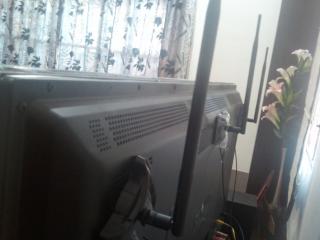
Attached Image
Notice where I put the antennas smile.gif

Thank you.

This post has been edited by bahathir: Jun 30 2013, 11:02 AM
pokemon01234
post Jul 2 2013, 01:53 AM

Zorua the Little Illusionist
******
Senior Member
1,009 posts

Joined: Aug 2012
From: The Legend of the Mysterious Pokémon Island


QUOTE(bahathir @ Jun 30 2013, 09:12 AM)
Hi,

I bought TP-Link TL-WDR4300 last week, replacing the aging but still nicely working TP-Link TD-W8960N; which being used since Streamyx era. smile.gif

In addition, I am also using 3x TP-Link's 8dB antennas, and TP-Link HomePlug TL-PA211Kit. The Huawei HG850a unit is at upstair's living area, and the HyppTV decoder and Panasonic SmartTV Plasma are at downstair's living hall. The HomePlugs work nicely in my setup.

TM *fiber* HG850 -RJ45- PA211 ++house electrical wiring (3phase)++ PA211 -RJ45- WDR4300

Both 5GHz (11an) and 2.4GHz (11n) are enabled. Smartphone and laptop are using the 5GHz network. BTW, the 5GHz range is limited and the coverage is not as wide as the 2.4GHz. Wish it has more TX power.

I upgraded firmware version to 3.13.32 Build 130612 Rel.83937n, few hours ago.
The latest firmware updates add Maxis HomeFiber support.

http://www.tp-link.com.my/support/download...4300&version=V1

Comments and wishlists.
1) More TX power, for wider coverwage.
2) VPN link feature which is available in TD-W8960N. At least. basic PPTP is enough
3) The LED's blinking indicators are not as 'accurate' as TD-WD8960N
4) SSH administration.
5) Performance wise, seem to be better than TD-W8960N and easier to configure.
6) OpenWRT and DDWRT firmwares are available for the unit, and hope someday I want to try them smile.gif. For now, I am satisfied with the factory's firmware.

Attached Image
Notice where I put the antennas smile.gif

Thank you.
*
Hi, can you help me a bit with TL-WDR4300 ? cry.gif
I just got my N750 TL-WDR4300 today and I spent a few hours configuring it up
But I still can't find the Guest Newtork options rclxub.gif

Cause in official Malaysia Tp-Link site wrote:
5. The firmware supports Guest Network and IPv6 function.
bahathir
post Jul 2 2013, 11:21 AM

Regular
******
Senior Member
1,200 posts

Joined: Jan 2009


QUOTE(pokemon01234 @ Jul 2 2013, 01:53 AM)
Hi, can you help me a bit with TL-WDR4300 ? cry.gif
I just got my N750 TL-WDR4300 today and I spent a few hours configuring it up
But I still can't find the Guest Newtork options rclxub.gif

Cause in official Malaysia Tp-Link site wrote:
5. The firmware supports Guest Network and IPv6 function.
*
I am not using "Guest Network' feature, but, I also cannot find the 'Guest Network' feature/page in the setup's page.
Why not try the WPS feature, which is quite easy to use.

Thank you.
urbansaint
post Jul 4 2013, 09:07 PM

Getting Started
**
Junior Member
115 posts

Joined: Jun 2007


QUOTE(pokemon01234 @ Jul 2 2013, 01:53 AM)
Hi, can you help me a bit with TL-WDR4300 ? cry.gif
I just got my N750 TL-WDR4300 today and I spent a few hours configuring it up
But I still can't find the Guest Newtork options rclxub.gif

Cause in official Malaysia Tp-Link site wrote:
5. The firmware supports Guest Network and IPv6 function.
*
HI,

I just bought the N750 TP-Link today and also faced the same thing. I even called UNIFI support thought the problem might come from them. But I've download the latest firmware and upgrade it...Now everything works fine...but the 5GHz signal is quite weak.

http://www.tp-link.com/en/support/download...ersion=V1#tbl_j

Try it out..
arslow
post Jul 7 2013, 01:23 PM

Look at all my stars!!
*******
Senior Member
3,544 posts

Joined: Sep 2008


Amy reason why you guys don't seem to prefer wdr4900?
firdausbhari
post Jul 12 2013, 01:06 PM

Look at all my stars!!
*******
Senior Member
2,281 posts

Joined: Feb 2012


QUOTE(arslow @ Jul 7 2013, 01:23 PM)
Amy reason why you guys don't seem to prefer wdr4900?
*
wdr4900 support unifi meh?
arslow
post Jul 12 2013, 02:37 PM

Look at all my stars!!
*******
Senior Member
3,544 posts

Joined: Sep 2008


QUOTE(firdausbhari @ Jul 12 2013, 01:06 PM)
wdr4900 support unifi meh?
*
if 4300 support, shouldn't 4900 support it too? hmm.gif
firdausbhari
post Jul 14 2013, 03:43 PM

Look at all my stars!!
*******
Senior Member
2,281 posts

Joined: Feb 2012


QUOTE(arslow @ Jul 12 2013, 02:37 PM)
if 4300 support, shouldn't 4900 support it too? hmm.gif
*
really meh? have u tried?

This post has been edited by firdausbhari: Jul 14 2013, 03:50 PM
arslow
post Jul 14 2013, 04:11 PM

Look at all my stars!!
*******
Senior Member
3,544 posts

Joined: Sep 2008


QUOTE(firdausbhari @ Jul 14 2013, 03:43 PM)
really meh? have u tried?
*
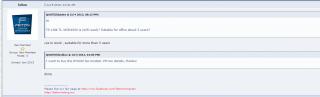
Attached Image

this seller seems to be sure about it hmm.gif
yeah, maybe its not so clear from his answer, but he could have just said no...
firdausbhari
post Jul 14 2013, 08:26 PM

Look at all my stars!!
*******
Senior Member
2,281 posts

Joined: Feb 2012


QUOTE(arslow @ Jul 14 2013, 04:11 PM)
Attached Image

this seller seems to be sure about it hmm.gif
yeah, maybe its not so clear from his answer, but he could have just said no...
*
im not sure bout that but i dont think wdr4900 firmware supports unifi. or does it?
bahathir
post Jul 14 2013, 08:37 PM

Regular
******
Senior Member
1,200 posts

Joined: Jan 2009


TL-WDR4900:

To be safe look at the simulator/emulator

http://www.tp-link.com/resources/simulator...R4900/Index.htm

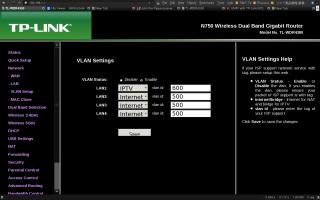
Click at Network.
If it does NOT have VLAN Setup, then, it is CANNOT be used to replace uniifi's DIR615.

Example from my WDR4300.
Attached Image

If you browse TP-LInk Malaysia (www.tp-link.com.my), the is no Unifi mode mentioned.

Thank you.

This post has been edited by bahathir: Jul 14 2013, 08:49 PM
firdausbhari
post Jul 15 2013, 04:56 PM

Look at all my stars!!
*******
Senior Member
2,281 posts

Joined: Feb 2012


QUOTE(bahathir @ Jul 14 2013, 08:37 PM)
TL-WDR4900:

To be safe look at the simulator/emulator

http://www.tp-link.com/resources/simulator...R4900/Index.htm

Click at Network.
If it does NOT  have VLAN Setup, then, it is CANNOT be used to replace uniifi's DIR615.

Example from my WDR4300.
Attached Image

If you browse TP-LInk Malaysia (www.tp-link.com.my), the is no Unifi mode mentioned.

Thank you.
*
yes broooo. thank you. this is what im trying to say haha. its firmware does not support unifi.
sHawTY
post Jul 19 2013, 11:21 PM

Frequent Reporter
********
All Stars
14,908 posts

Joined: Jul 2005

QUOTE(bahathir @ Jun 30 2013, 09:12 AM)
I upgraded firmware version to 3.13.32 Build 130612 Rel.83937n
I'm using the same version of firmware as yours.
Everything is working perfectly.

I've been wondering, how on earth did you stick those antennas to the back of the LCD TV?
Are you using double sided tape? blink.gif
kaisam
post Jul 20 2013, 11:55 AM

Getting Started
**
Junior Member
257 posts

Joined: Dec 2007
can call to Hotline Support to ask.

For Malaysian Users Only(English Service)

Toll Free:
+60 1300 88 875465 (1300 88 TP-LINK)

E-mail:
support.my@tp-link.com

Service Time:
24 hours a day, 7 days a week.

Thank you. biggrin.gif
bahathir
post Jul 20 2013, 02:20 PM

Regular
******
Senior Member
1,200 posts

Joined: Jan 2009


QUOTE(sHawTY @ Jul 19 2013, 11:21 PM)
I'm using the same version of firmware as yours.
Everything is working perfectly.

I've been wondering, how on earth did you stick those antennas to the back of the LCD TV?
Are you using double sided tape? blink.gif
*
Doutble tape ? No. smile.gif

The TP-Link TL-ANT2408C 8dB antenna comes with magnetic base which I able to stick the antenna to the back of the HDTV, which is made from metal. smile.gif

Ref
http://www.tp-link.com/en/products/details...del=TL-ANT2408C
sHawTY
post Jul 20 2013, 06:04 PM

Frequent Reporter
********
All Stars
14,908 posts

Joined: Jul 2005

QUOTE(bahathir @ Jul 20 2013, 02:20 PM)
Doutble tape ? No. smile.gif

The TP-Link TL-ANT2408C 8dB antenna comes with magnetic base which I able to stick the antenna to the back of the HDTV, which is made from metal. smile.gif
Damn, too bad my LCD TV doesn't have metal back. sad.gif
bahathir
post Jul 23 2013, 10:54 AM

Regular
******
Senior Member
1,200 posts

Joined: Jan 2009


QUOTE(sHawTY @ Jul 20 2013, 06:04 PM)
Damn, too bad my LCD TV doesn't have metal back. sad.gif
*
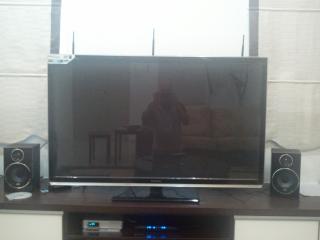
Let's look at behind of the HDTV. smile.gif
Attached Image

But. the 'metal' also can be a problem because it MAY absorb or deflect radio wave. Anyway, I don't have coverageproblem, because,......

I am using the Unifi's D-Link DIR615; which running DD-WRT firmware and run as 'Repeater Bridge' mode; and changed it's TX Power to 200mW, which provides coverage for upper stair. smile.gif

Thank you.

This post has been edited by bahathir: Jul 23 2013, 10:57 AM
gopinath24
post Jul 25 2013, 04:10 PM

New Member
*
Junior Member
35 posts

Joined: Mar 2007
QUOTE(sHawTY @ Jul 19 2013, 11:21 PM)
I'm using the same version of firmware as yours.
Everything is working perfectly.

I've been wondering, how on earth did you stick those antennas to the back of the LCD TV?
Are you using double sided tape? blink.gif
*
Bro i using the TL-WDR4300 router, after i upgrade the new firmware 3.13.32 its doesn't connect to unifi, how did you did it ?? Perviously in wan menu i have radio button to select wither normal or unifi mode, if i use select unifi mode it work normally. But for new firmware i cant select unifi, normal , or maxis as they stated in the website.
sHawTY
post Jul 25 2013, 04:45 PM

Frequent Reporter
********
All Stars
14,908 posts

Joined: Jul 2005

QUOTE(gopinath24 @ Jul 25 2013, 04:10 PM)
Bro i using the TL-WDR4300 router, after i upgrade the new firmware 3.13.32 its doesn't connect to unifi, how did you did it ?? Perviously in wan menu i have radio button to select wither normal or unifi mode, if i use select unifi mode it work normally. But for new firmware i cant select unifi, normal , or maxis as they stated in the website.
3.13.32 which build?
I'm using "3.13.32 Build 130612 Rel.83937n", it works perfectly with UNiFi.

Or you may try the: TL-WDR4300_V1_130613(VLAN)_My from this website: http://www.tp-link.com.my/support/download...ersion=V1#tbl_j
gopinath24
post Jul 25 2013, 04:57 PM

New Member
*
Junior Member
35 posts

Joined: Mar 2007
Thanks shawty, i figure out the issue ready, after i upgrade the firware when i try to restore the setting from my pervious firmware it doesnt work.. i have to reconfigure everything to make it work again. thanks
sHawTY
post Jul 28 2013, 01:37 PM

Frequent Reporter
********
All Stars
14,908 posts

Joined: Jul 2005

Has anyone tried the TL-WDR4300_V1_130617 firmware?
Does it work with UNiFi? hmm.gif
sHawTY
post Jul 29 2013, 05:08 PM

Frequent Reporter
********
All Stars
14,908 posts

Joined: Jul 2005

Edited.

This post has been edited by sHawTY: Oct 20 2013, 02:33 AM
sHawTY
post Jul 29 2013, 09:07 PM

Frequent Reporter
********
All Stars
14,908 posts

Joined: Jul 2005

Edited.

This post has been edited by sHawTY: Oct 20 2013, 02:34 AM
sHawTY
post Jul 30 2013, 02:07 AM

Frequent Reporter
********
All Stars
14,908 posts

Joined: Jul 2005

Edited.

This post has been edited by sHawTY: Oct 20 2013, 02:34 AM
Xefron
post Jul 30 2013, 08:51 AM

Look at all my stars!!
*******
Senior Member
2,507 posts

Joined: Jan 2003


QUOTE(sHawTY @ Jul 29 2013, 05:08 PM)
Starting to regret replacing my ASUS RT-N16 with TP-Link WDR4300.
WDR4300 seems to lock itself after a few days.

WiFi can't connect, even connection through ethernet is also inaccessible.
The only way to fix it is to turn off and turn on the router using the switch at the back.

This is annoying.

I've disabled the 5GHz WiFi to see if it fixes the problem.
Will report back after a day or 2.

PS: Apparently, I'm not the only who has this problem. Several people all over the globe is reporting the same problem. I miss my RT-N16. sad.gif
*
QUOTE(sHawTY @ Jul 29 2013, 09:07 PM)
Disabling 5GHz WiFi didn't fix the problem.
But in fact, it makes thing worse.

Before disabling 5GHz WiFi, the router could work for 24 hours before having any hickups.
After disabling 5GHz WiFi, the lockup happens in less than 4 hours. doh.gif

WTF TP-Link? doh.gif
*
QUOTE(sHawTY @ Jul 30 2013, 02:07 AM)
my TPLink WDR4300 running fine without restarting flex.gif average uptime is 40 days.
jianwei87
post Jul 30 2013, 09:55 AM

Casual
***
Junior Member
481 posts

Joined: Jan 2007
Anyone know how to boost the wireless signal, it terrible wireless signal on this router. I just get 2/3 bar or 1/3 bar of the signal and the router just beside my room only.
sHawTY
post Jul 30 2013, 10:38 AM

Frequent Reporter
********
All Stars
14,908 posts

Joined: Jul 2005

Edited.

This post has been edited by sHawTY: Oct 20 2013, 02:34 AM
jianwei87
post Jul 30 2013, 10:54 AM

Casual
***
Junior Member
481 posts

Joined: Jan 2007
QUOTE(sHawTY @ Jul 30 2013, 10:38 AM)
I'm starting to think me & the rest of the people who has the same problem probably purchased a lemon unit. sad.gif
http://www.wikihow.com/Improve-WiFi-Reception
*
ya compare with using the original router from unifi is better than wdr4300.
sHawTY
post Jul 31 2013, 02:40 AM

Frequent Reporter
********
All Stars
14,908 posts

Joined: Jul 2005

QUOTE(sHawTY @ Jul 28 2013, 01:37 PM)
Has anyone tried the TL-WDR4300_V1_130617 firmware?
Does it work with UNiFi? hmm.gif
Anyone? blink.gif
Xefron
post Jul 31 2013, 08:28 AM

Look at all my stars!!
*******
Senior Member
2,507 posts

Joined: Jan 2003


try 3.13.21 Build 121226 Rel.39036n .its pretty stable.
sHawTY
post Jul 31 2013, 10:33 PM

Frequent Reporter
********
All Stars
14,908 posts

Joined: Jul 2005

Edited.

This post has been edited by sHawTY: Oct 20 2013, 02:35 AM
jasontpe
post Sep 14 2013, 08:38 AM

New Member
*
Newbie
1 posts

Joined: May 2011
cannot use tp-link tether...when they going to update the firmware for malaysia user?
sHawTY
post Oct 20 2013, 02:18 AM

Frequent Reporter
********
All Stars
14,908 posts

Joined: Jul 2005

Edited.

This post has been edited by sHawTY: Oct 20 2013, 02:35 AM
firdausbhari
post Oct 21 2013, 06:07 PM

Look at all my stars!!
*******
Senior Member
2,281 posts

Joined: Feb 2012


anyone upgraded stock antenna to 8dbi antenna?
-VigRouX-
post Oct 28 2013, 12:22 AM

New Member
*
Junior Member
26 posts

Joined: Sep 2010
So the solution is to download the firmware? I bought the TL-WDR4300 as well because the promoter said it supports Unifi (even had the 'Supports Unifi' sticker on the box), but when I finished setting up the router, the wireless network can be detected and connected to, but there is no internet connection.

I spent hours trying to do just anything but then I gave up and switched back to the old router and now I am here, finding solutions.
UbuntuClient
post Oct 30 2013, 10:44 PM

Regular
******
Senior Member
1,417 posts

Joined: Jun 2007
From: /puchong/cyberjaya/klang


Is this router can support IPTV?
sHawTY
post Dec 7 2013, 12:30 AM

Frequent Reporter
********
All Stars
14,908 posts

Joined: Jul 2005

QUOTE(UbuntuClient @ Oct 30 2013, 10:44 PM)
Is this router can support IPTV?
Yes. smile.gif
mroctopus
post Dec 12 2013, 09:58 PM

Getting Started
**
Junior Member
232 posts

Joined: Nov 2005


I bought this router and use for 7 days. It was fine all 7 days, suddenly there is no Internet connection this morning. I check, reset the router, redo the quick startup. The wan indicated it was connected, when i try to ping google.com it took forever. I tried to redo quick setup again, it failed 2nd time to connect to internet. Then, i brought up my old tm given router dir-615, plug in, and it works perfectly.

Guess i got a lemon unit and need a replacement. Anyone facing this problem?
t3chn0m4nc3r
post Mar 2 2014, 02:37 PM

Teh Necron Lord
*******
Senior Member
4,139 posts

Joined: Sep 2006
From: Internet


Hi guys. I'm no networking expert but I would like to share my experience using this router on UniFi. I bought myself a TP-Link TL-WDR4300 just yesterday due to the unavailability of Asus N16. The 1st thing I did upon unpacking was to check out it's menu and all then proceeded to upgrade it's firmware. hmm.gif

This is where I did a mistake as the international firmware is not the same as the local "UniFi supported" version. Upon installing, I lost the option to set the router to "UniFi mode" and also lost the "VLAN ID" assignment option. Noticing this, I re-installed the firmware "TL-WDR4300_V1_130612(VLAN)_My" from HERE. hmm.gif

2nd mistake was during the firmware upgrade, the progress bar was meant to run twice but for some reason, it hung on my Chrome. rclxub.gif Then I restarted my PC and the router together. After that, I keep seeing Time out due to PADO error in the router log. doh.gif I almost assume this as a lemon unit until I did a hard reset (via the button) then restore factory default via browser and then re-install the same firmware stated above all over again. This time, the progress bar ran twice (1 for installing the firmware and another 1 for restarting the router). Upon completion, I ran the quick setup and key in all the necessary details and voila. rclxm9.gif

I got this instead of the PADO error:
CODE
rcvd [PAP AuthAck "Authentication success,Welcome!"
rclxm9.gif
amirudin920927
post Mar 16 2014, 10:17 PM

///-| Kapten | Amirudin |-\\\
******
Senior Member
1,431 posts

Joined: Feb 2009
From: Seremban - Putrajaya


Hello guys, i just bought WDR4300 , have done all the setup n its working but my PING for BF4 jumping from 10ms (with TM router) to 110ms (with WDR4300) . Anyone face the same problem? Any solutions? cry.gif icon_question.gif
chua
post Mar 18 2014, 09:59 PM

Getting Started
**
Junior Member
163 posts

Joined: Dec 2004


Anyone manage to upgrade to WDR4300 (v1.7) on 3.13.32 Build 130612 Rel.83937n to run OpenWRT? I tried to upgrade the firmware but the page doesn't seem to be responding. What am I doing wrong? i followed the steps in http://klseet.com/index.php/tl-wdr4300-v13

Please help
bushyboy105
post Sep 8 2014, 08:49 PM

Happiness is you could spend time with closest one.
****
Senior Member
561 posts

Joined: Feb 2010


anyone could connect to the internet for UNIFI using this TL-WDR4300 router?
K2002
post Nov 6 2014, 12:27 PM

Getting Started
**
Junior Member
61 posts

Joined: Oct 2006


can we have two ISP connect to the same TL-WDR4300.

only have one wan port. is there any way that we can make the lan port untagged with respective vlan to make this work?


wind01
post Feb 28 2015, 12:16 PM

Folding@Malaysia Team
Group Icon
VIP
2,615 posts

Joined: Jan 2003
From: Kuala Lumpur


Can I get the settings for unifi for the international version firmware...I need the gust network settings....local unifi version don't have guest network.

The international firmware...I didn't see vlan tagging...darn...
Xefron
post Mar 3 2015, 04:00 PM

Look at all my stars!!
*******
Senior Member
2,507 posts

Joined: Jan 2003


QUOTE(wind01 @ Feb 28 2015, 12:16 PM)
Can I get the settings for unifi for the international version firmware...I need the gust network settings....local unifi version don't have guest network.

The international firmware...I didn't see vlan tagging...darn...
*
no you can't use UniFi using the international firmware version.but u can try to use ur old modem as bridge to ur 4300.

High-Speed
post Mar 13 2015, 08:14 PM

Getting Started
**
Junior Member
54 posts

Joined: Feb 2015


Nice review, helpful info here! biggrin.gif
gopinath24
post May 2 2015, 07:33 PM

New Member
*
Junior Member
35 posts

Joined: Mar 2007
Anyone tested with TL-WDR4300_V1_150302 ???? I tried but fail..
phoenix69
post Jun 15 2015, 02:04 AM

Regular
******
Senior Member
1,836 posts

Joined: Sep 2007


Anyone using TP-LINK Tether with this TP-Link N750 TL-WDR4300 with UNIFI?

I downloaded the app but its not working.

Searched for firmware update (It requires "TL-WDR4300_V1_140916" or higher)
Found Latest version TL-WDR4300_V1_150518, Published 18/5/2015 but no UNIFI support stated - do not dare use
Go to Download section
Found Latest version TL-WDR4300_V1_130612(VLAN)_My, Published 1/12/2015 with UNIFI support stated - do net meet the (It requires "TL-WDR4300_V1_140916" or higher) - no support for TP-LINKTether

How ah???? rclxub.gif

This post has been edited by phoenix69: Jun 15 2015, 02:20 AM


Change to:
| Lo-Fi Version
0.0648sec    0.36    6 queries    GZIP Disabled
Time is now: 3rd December 2025 - 05:09 AM