QUOTE(Eiraku @ Jul 18 2012, 10:43 PM)
Chrome NEEDS ICS... minimum.
Anyway, market is shit slow again on Shialkom. Time to tunnel.

i have same problem with shialkom..Anyway, market is shit slow again on Shialkom. Time to tunnel.
how to tunnel?
Samsung Galaxy S III I9300 Official Thread V14, Discuss, Learn and Thrive
|
|
 Jul 18 2012, 10:45 PM Jul 18 2012, 10:45 PM
Return to original view | Post
#1
|
 
Junior Member
101 posts Joined: Sep 2008 
|
QUOTE(Eiraku @ Jul 18 2012, 10:43 PM) Chrome NEEDS ICS... minimum. i have same problem with shialkom..Anyway, market is shit slow again on Shialkom. Time to tunnel. how to tunnel? |
|
|
|
|
|
Jul 18 2012, 10:49 PM
Return to original view | Post
#2
|
|
Junior Member
101 posts Joined: Sep 2008
|
QUOTE(Eiraku @ Jul 18 2012, 10:47 PM) Setup VPN. Keep in mind YOU WILL NEED TO SETUP A PASSWORD LOCK FOR YOUR DEVICE TO USE THE BUILT IN VPN CLIENT. can give me a guide? Just Samsung being S.A.F.E I guess. Later I give you the setup. TQ |
|
|
Jul 18 2012, 11:01 PM
Return to original view | Post
#3
|
|
Junior Member
101 posts Joined: Sep 2008
|
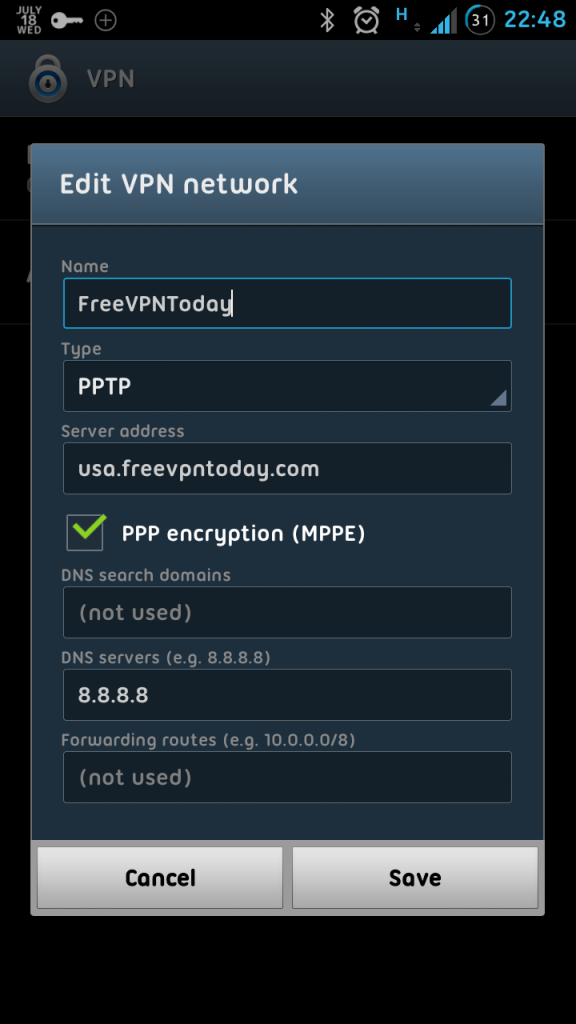
QUOTE(Eiraku @ Jul 18 2012, 10:58 PM) VPN Setup using the built in client (Basic Free PPTP): Thanks..1) Go to Options -> Security. Set up a password lock. Tick "with swipe lock" if you want your water slider lock thingy. 2) Go to Options -> More Options -> VPN. Add a new VPN with these settings: » Click to show Spoiler - click again to hide... « 3) Go here: http://bit.ly/LrLtTP . Slide the slider and click on "Get VPN info". "Account" is your username and "Password" is, well, your password. 4) Go back to Options -> More Options -> VPN, select the VPN you created in STEP 2, enter the Username and Password you got from STEP 3 and CONNECT. 5) Rememember that you need to repeat STEP 3 and 4 EVERY TIME you wanna connect. Otherwise, get a paid VPN. 6) Go to the market and enjoy un-shitted speeds from Shialkom. The end. I have a VPN acc.. can use it? same step? |
|
|
Jul 18 2012, 11:08 PM
Return to original view | Post
#4
|
|
Junior Member
101 posts Joined: Sep 2008
|
QUOTE(Eiraku @ Jul 18 2012, 11:02 PM) Yep. Mod step 2 with your own hostname/server address. err.. yes.. i have openVPN acc..so cant use this way?But if you're using openVPN, the internal client DOES NOT support that. |
|
|
Jul 18 2012, 11:21 PM
Return to original view | Post
#5
|
|
Junior Member
101 posts Joined: Sep 2008
|
QUOTE(Eiraku @ Jul 18 2012, 11:08 PM) Nah. Normal batteries don't "overcharge" either, the internal power regulation circuits prevent that. yup.. success.. TQ bro..But if heat is generated... well, heat is NEVER good for batteries. Nope. I think you'll have to find a 3rd party app for openVPN (PLUS a kernel with tun.ko - it's gonna be hell complicated to explain). Alah, just use the freevpn thingy I linked above. It's mafan a bit but it's free anyway lol. |
|
|
Jul 22 2012, 11:20 PM
Return to original view | Post
#6
|
|
Junior Member
101 posts Joined: Sep 2008
|
QUOTE(arju @ Jul 22 2012, 10:59 PM) bro.. really nice.. how to make it into my phone? |
|
Topic ClosedOptions
|
| Change to: |  0.0423sec 0.0423sec
 0.56 0.56
 7 queries 7 queries
 GZIP Disabled GZIP Disabled
Time is now: 9th December 2025 - 04:30 PM |
 Quote
Quote