Welcome Guest ( Log In | Register )

Outline · [ Standard ] · Linear+

 >>> DIY Notebook Cooler Owner's Club <<<, Cost Effective + Performance

views
     
nerd nation
post Jan 4 2007, 10:46 PM

Trance addict
******
Senior Member
1,440 posts

Joined: Jan 2003
From: Ipoh


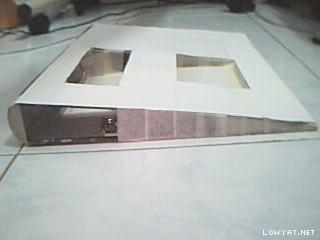
Hi all, this is my DIY laptop cooler. Made using ring file and some masking tape.

3 quater view:
Attached Image

Left profile:
Attached Image

Right profile:
Attached Image

Cooler in action (left):
Attached Image

Cooler in action (right):
Attached Image

How it works:
The fan sucks in cool air from outside. The two cutouts on the cooler pad direct cool air from the fan to the base of the laptop where the cutouts are ideally located just below the CPU and GPU. Cool air takes the heat away from the base as it expel from the laptop. The cooler pad can be custom make to suit the design of your laptop.

The best thing is the cutouts can be custom make to suit the design of your laptop so that they are located directly below the CPU/GPU/HDD.

Unlike conventional laptop cooler, the fan does not suck in dust from your desk as it faces upwards. Even if it does, the placement of the fan means any particles being sucked into the cooler pad would settle on the inside of the cooler instead of the base of your laptop.

Lets check out the performance:
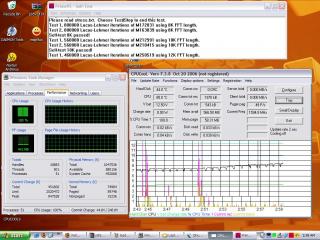
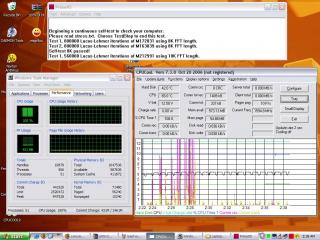
Test is conducted using a Compaq Presario B3800 Centrino P-M 1.6Ghz.
Idle without cooler:
Attached Image

Idle with cooler fan off:
Attached Image

Idle with cooler fan on:
Attached Image

Load without cooler:
Attached Image

Load with cooler fan off:
Attached Image

Load with cooler fan on:
Attached Image

Result:
The cooler brings the idle temperature down as much as 12C! blink.gif
Prime95 was used to test load temperatures. As you can see, the laptop is 20C cooler when the cooler is used!! thumbup.gif

Cost:
Ring file RM2
80mm fan RM3
Masking tape RM1
Total: RM 6 only!! biggrin.gif

This post has been edited by nerd nation: Jan 5 2007, 11:15 AM
nerd nation
post Jan 4 2007, 11:06 PM

Trance addict
******
Senior Member
1,440 posts

Joined: Jan 2003
From: Ipoh


QUOTE(mADmAN @ Jan 5 2007, 12:25 AM)
@nerd nation
judging by the molex on the fan...it seems like ur running ur fan off a PSU... which would make it run at 12v (usually)

but if u connect the fan to the USB port itll be running on only 5v.. have u tried running the fan at 5v? if not.. y not give it a try...kinda curious on how much improvement ull get with 5V

also curious to know the difference in temps between the fan blowing in cool air (which is the current position) and sucking out hot air (the fan reversed). curious to know these 2 setups with 12v and 5v
*
I run the fan off an external HDD power adapter. Yes its 12V. I've tried modding the fan to run off usb at 5v. The result is very disappointing. The fan spins so slow and barely moves adequate air to cool the laptop down.

Regarding the fan orientation, I've tried using the fan to suck air out of the cooler. Compared to blowing the performance is much poorer, which is why i chose to have the fan in blowing position.


Change to:
| Lo-Fi Version
0.0203sec    0.31    7 queries    GZIP Disabled
Time is now: 5th December 2025 - 09:31 PM